1
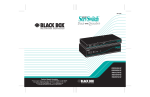
Technically Speaking KV6608SA: top: front view; bottom: rear view KV6616FA: top: front view; bottom: rear view Multi-User ServSwitch products vs. multipoint access ServSwitch products. A multi-user ServSwitch, such as the Matrix ServSwitch, enables two or more users to access different servers at the same time. So, for instance, one user can access “Server A” while another user accesses “Server B.” This is considered a “true two-channel” architecture because two users have independent access to CPUs. It should be pointed out that multiple users cannot access the same server at the same time. A multipoint access ServSwitch, such as the ServSwitch Duo, provides two access points for control stations but requires that both users view the same server at the same time. So, if one user is accessing “Server A” on his screen, the other user is also seeing “Server A” on his screen. If the second user switches to “Server B,“ the first user will also switch to “Server B.” Only one of these users is actually in control. The user in control stays in control until his workstation is inactive for a period of time (selectable). Then the other station can take control. A multipoint access ServSwitch is useful when simultaneous, independent access is not required—just the ability to access CPUs from more than one place. Technically Speaking On-screen menus. When the ServSwitch™ brand of KVM switches was first introduced, there were only two ways to switch: from frontpanel push buttons or by sending command sequences from the keyboard. While this was more convenient than having a separate keyboard, monitor, and mouse for each CPU, the operator still had to remember key combinations and which server was connected to which port—leading to many cryptic, scribbled notes attached to the switch and to the workstation. But with the advent of on-screen menus, an operator can use easy-to-read, pop-up menus to identify and select CPUs. It’s even possible to give each CPU a name that makes sense to you—names like “MIS Server,” “Accounting Server,” and so on. 04/29/2010 #10913 724-746-5500 Tech SPecs Controls — On-screen menus; Keyboard commands; Mouse-click functions: (2) push buttons for user and server selection; (1) DIP switch for firmware upgrade Distance (Maximum) — User ports to any directly attached user station or KVM switch: 16.4 ft. (5 m); Server ports to any directly attached CPU or KVM switch: 35 ft. (10.6 m) using EHN428–EHN429 Video — Resolution (maximum): 1920 x 1440 at 100 Hz; DDC support: 1 and 2 CE Approval — Yes Interface — Keyboard and mouse: USB only; Serial: Subset of TIA-574 (IBM PC DB9) pinout of TIA/EIA RS-232; USB and Sun with appropriate converter cables Connectors — Power: (1) barrel jack; Serial: All: (1) DB9 F serial port for flash upgrade; User ports: (2), each consisting of: (1) HD15 F for monitor, (2) USB Type A F for keyboard and mouse; Server: (8) or (16), each consisting of: (1) HD15 F for video-port attachment, (2) 6-pin mini DIN F for keyboard and mouse Power — External 100–240 VAC, 50–60 Hz, autosensing Size — KV6608SA: 1.75"H (1U) x 17.3"W x 8.7"D (4.4 x 43.9 x 22.1 cm); KV6616FA: 3.5"H (2U) x 17.3"W x 8.7"D (8.9 x 43.9 x 22.1 cm) Item Code ServSwitch Duo USB KVM Switch 2 x 8 KV6608SA 2 x 16 KV6616FA For redundant power, order… ServSwitch 5-V Power Supply PS649-R2 To connect a PC server to your ServSwitch Duo USB, order… Standard KVM Computer Cables 5-ft. (1.5-m) EHN408-0005 10-ft. (3.0-m) EHN408-0010 20-ft. (6.0-m) EHN408-0020 30-ft. (9.1-m) EHN408-0030 50-ft. (15.2-m) EHN408-0050 To connect a USB or Sun server to your ServSwitch Duo USB, order… Flash Computer Cables PS/2 to USB 6-ft. (1.8-m) EHN428-0006 16-ft. (4.8-m) EHN428-0016 32.8-ft. (10.0-m) EHN428-010M PS/2 to Sun 6-ft. (1.8-m) EHN429-0006 16-ft. (4.8-m) EHN429-0016 32.8-ft. (10.0-m) EHN429-010M blackbox.com 3 of 3 BLACK BOX ®