1
Chapter 1: Enhancing Development with Dojo Core
Downloading the Latest Dojo Release
If relying on someone else’s servers for a JS framework isn’t quite your style — even if (or because)
they are as big as AOL — you can download the complete Dojo framework to host your own
way.
Find the latest Dojo release here:
http://dojotoolkit.org/downloads
From that page, you can find a distribution package of everything Dojo — as well as a few other
support tools such as Dojo ShrinkSafe, handy for use later in building your own compressed version
of the bits of Dojo you end up using.
Once you’ve downloaded the distribution archive, you’ll need to unpack it somewhere convenient
on your web server. Make a note of the URL at which you’ve made it available, for use throughout
the rest of this part of the book.
Trying Dojo Under Development
If you’re really feeling adventurous, you can skip the release version and head straight for a cut
of the current code under development. The easiest way to do this is to check out a nightly build,
available here:
http://archive.dojotoolkit.org/nightly/
But, if you’d like to track Dojo development even more closely, you can check out code directly
from the project’s Subversion repository. As of this writing, find details on this repository here:
http://dojotoolkit.org/book/dojo-book-0-9/part-4-meta-dojo/get-code-subversion
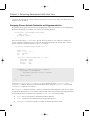
If you have a command-line Subversion client, the following as of this writing will assemble and
check everything out for you from all the subprojects:
svn co http://svn.dojotoolkit.org/src/view/anon/all/trunk dojodev
After this command, you should have a dojodev/ directory organized in the same way as a release
package. The rest of the examples here will refer to this dojodev/ directory in using Dojo locally,
but keep the following in mind: Grabbing a copy of Dojo this close to the bleeding-edge might not
quite be what you want to deal with on a regular basis.
Sampling Dojo
If you grabbed a local copy of Dojo, whether from a release download or checked out from the development repository, you should notice that there are several directories in the root of the package directory,
including the following:
❑
2
dojo/ — Here lives the core of Dojo, including basic JS extensions, dynamic module loading,
DOM and AJAX utilities, and a host of other useful bits.