1
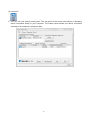
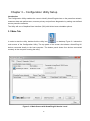
The Main screen provides a list of all powerline devices logically connected to the computer when
the utility is running.The top panel shows all local HomePlug devices connected to the computer’s
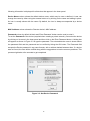
NIC (Network Interface Card). In most cases, only one device will be seen. In situations where there
are more than one local device being connected, such as a USB or an Ethernet adapter, the user
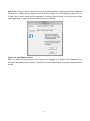
can select the local device by clicking on it and then click the Connect button to its right. The status
area above the button indicates that your PC is connected to that same device. Once connected to
the local device, the utility will automatically scan the power line periodically for any other HomePlug
devices. If no local HomePlug devices are discovered, the status area above the connect button will
indicate with a message ‘NO HOMEPLUG ADAPTERS DETECTED’.
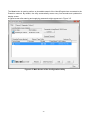
Figure 3-2 illustrates the presence of two local devices connected locally to the computer.
Figure 3-2: Multiple Local Device Connection
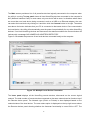
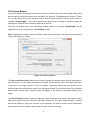
The lower panel displays all the HomePlug remote devices, discovered on the current logical
network. The total number of remote devices connected on the same network can be found on top of
the Remote device panel. The Network type (Public or Private) is also displayed based on the
network status of the local device. The scan status option is displayed on the top right corner above
the Remote devices panel showing whether the Autoscan functionality is turned ON or OFF. The
17