1
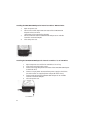
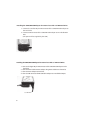
Installing the SATA/IDE-USB Adapter for internal use with 2.5” IDE Hard Drive:
1.
2.
Open computer case.
Connect the smaller 44-pin IDE connector of the SATA/IDE-USB
Adapter to the hard drive.
(The power will be supplied by the USB)
Connect USB connector of SATA/IDE-USB Adapter to an available
internal or external USB port.
Close computer case.
3.
4.
2.5” IDE HDD
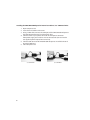
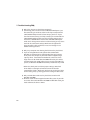
Installing the SATA/IDE-USB Adapter for internal use with 3.5”/5.25“ IDE Drive:
1.
2.
3.
4.
5.
6.
Open computer case and find an available 3.5”/5.25” bay.
Insert drive and mount with screws.
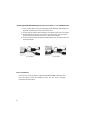
Connect the larger 40-pin IDE connector of the SATA/IDE-USB Adapter
to the hard drive.
Connect a 4-pin power connector from power supply to hard drive.
(Do not need to use supplied power adapter for internal use)
Connect USB connector of SATA/IDE-USB Adapter to an available
internal or external USB port.
Close computer case.
3.5” IDE HDD
4