1
Contents
1Important
2
Safety2
2 Your Mini Hi-Fi System
3
Introduction3
What's in the box
4
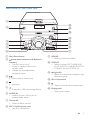
Overview of the main unit
5
Overview of the remote control
6
3Connect
Place the unit
Connect FM antenna
Connect speakers
Connect video options
Connect power
4 Get started
Prepare the remote control
Turn on
Change system menu language
Find the correct viewing channel
Select the correct TV system
Set up EasyLink (HDMI-CEC control)
5Play
Play from disc
Play from USB or recored discs
Control play
Play options
Enjoy karaoke
Play from Bluetooth-enabled devices
6 Listen to the radio
Tune to a radio station
Program radio stations automatically
Program radio stations manually
Select a preset radio station
7
7
8
8
9
10
10
10
11
11
11
11
12
13
13
14
15
15
16
16
7 Adjust volume level and sound
effect
19
19
19
19
Select a preset sound effect
Enhance bass
Apply Nitro boost
8 Other features
USB record
Play from an external device
Listen to an MP3 player
Set the sleep timer
Customize the speakers' light effects
20
20
21
22
22
22
9 Adjust settings
23
General setup
23
Video setup
23
Audio setup
24
Preferences24
10 Product information
26
26
27
27
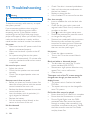
11Troubleshooting
28
12Notice
30
Specifications
Supported disc formats
USB playability information
18
18
18
18
18
EN
1