1
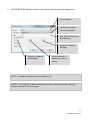
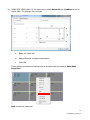
10. USING FOR VIDEO WALLS In the above menu select Select All then Combine to use for
videos walls. This dialogue box will open.
a.
Name the video wall
b.
Adjust the bezel and gap compensation
c.
Select OK
These settings and advanced settings can be accessed later by selecting Video Wall
Properties.
Split cancels the video wall.
15
TC2-MATRIX_manual_en