1
Chapter 1 — About the SF61B Cordless Scanner
Understand the SF61B Behavior
The SF61B uses lights, beeps and vibrations to indicate if a bar code
has been successfully decoded.
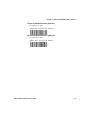
Note: The SF61B has a different behavior (lights, beeps, vibrate alert)
to its predecessor, the SF51. If you prefer to use the beep and LED
mode of the SF51, you can use EasySet to activate the legacy mode
(Operating settings > Beeps / LEDs > Beep and LED mode >
Legacy mode).
Blue Intermec-Ready-to-Work Indicator
Note: The blue Intermec Ready-to-Work light is enabled by default
but you can use EasySet to disable the light or choose another color if
you wish (Operating settings > Beeps / LEDs > Ready-to-Work
LED).
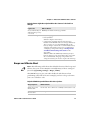
The blue Intermec Ready-to-Work indicator™ LED gives information
about the Bluetooth connection. When a connection has been
established the light is always on (blue) unless the scanner is docked
in a charger (in this case the LED displays a green or red battery
charge indication even though the Bluetooth connection is still
active).
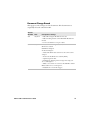
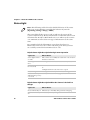
Blue Intermec Ready-to-Work Indicator
Light State
What it Means
Off
A Bluetooth connection has not been established.
Blinking, slow
The scanner is trying to establish a Bluetooth
connection with a Bluetooth host device.
On
A Bluetooth connection is established with a
Bluetooth base station or host computer and the
scanner is ready to scan bar codes and send data.
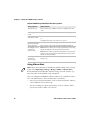
When using your scanner to scan bar codes (blue light on) your
scanner will also flash status information using green or red lights.
See the Status Light information in the next section.
SF61 Cordless Scanner User’s Guide
9