1
SOFTWARE CONFIGURATION
8
8.4 PARAMETER DEFAULT VALUES
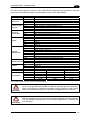
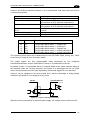
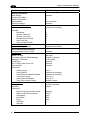
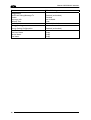
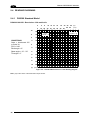
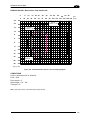
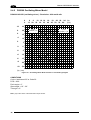
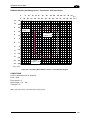
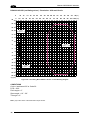
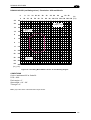
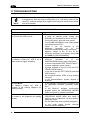
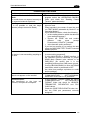
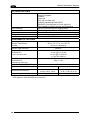
The following table contains the list of the factory default settings for the DS6300.
Genius™ also allows checking the parameter default values by selecting the "Compare
parameters" option available in the Tools menu and comparing the current scanner
configuration to the default one.
Parameter
Code Definition
Code Combination
No read Message
No Read String
Multiple Read Filters
Code Label Settings #1
Code Symbology
Label Length
Min Code Position
Max Code Position
Check Digit
Decoding Safety
Decoding Severity
Match String Rule
Pattern Match String
Match Direction Rule
Code Label Settings #2
Code Symbology
Label Length
Minimum Label Length
Maximum Label Length
Min Code Position
Max Code Position
Check Digit
Decoding Safety
Decoding Severity
Match String Rule
Pattern Match String
Match Direction Rule
Operating Modes
Operating Mode Selection
On Line Options
Start Input Number
Start Input Active Level
Reading Phase Timeout
Verifier
Reading System Layout
Device Assignment
Modify&Backup Lon Slave Configuration
Enable A.S.R.
Default Setting
Single Label
Global No Read Message
<CAN>
Disabled (unchecked)
Interleaved 2 of 5
8
0
255
Disabled (unchecked)
1
3
Match
Empty
Disable
Code 39
Variable
1
60
0
255
Disabled (unchecked)
1
3
Match
Empty
Disable
On Line
On Line 1 Input
1
Active Closed
Disabled (unchecked)
Disabled (unchecked)
Alone
Disabled (unchecked)
Disabled (unchecked)
75