1
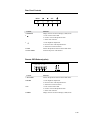
On Screen Display (OSD) Control Options
Control
Contrast
Brightness
V-Position
Description
Increases or decreases contrast.
Increases or decreases brightness.
Moves the screen up or down.
H-Position
Recall Defaults
RGB
Moves the screen left or right.
Returns the monitor to its default settings.
Press or
to select 9300, 6500, 5500, 7500 and USER.
Only when selecting USER can you make adjustments to the
R/G/B content. Press Enter to restore to factory default setting.
Exit
Sharpness
Phase
Exit the menu.
Adjusts the sharpness.
Increases or decreases the snow noise of the image after auto
adjustment is made.
The dot clock is fine-adjusted after auto adjust.
Clock
OSD H-Position
OSD V-Position
OSD Time
Moves the OSD position horizontally on the screen.
Moves the OSD position vertically on the screen.
Determines how long (in seconds) the OSD menu waits before
closing automatically after no action has been performed.
Auto-Adjust
Press Auto to enable this function. The Auto-Adjust will
automatically adjust V-Position, H-Position, Clock and
Clock-Phase.
Select from English, French, German, Spanish, and Japanese.
Indicates the current resolution, H-Frequency and
OSD Language
Information Description
V-Frequency.
2-20