1
Function description:
1. Utility Failure: UPS input mains voltage or frequency out of range
2. Battery Low: UPS Battery voltage level is low
3. General Alarm: UPS fail condition
4. Bypass Status: UPS under Bypass mode
5. Summary Alarm: Any one of AS400 “Utility Failure”, “General Alarm”, ”Bypass”, “Battery Low”,
“Over Load Warning” active will send this signal
6. Battery Testing: Battery Testing is in progress
7. Shutdown Processing: UPS doing shutdown after received shutdown command via
communication port
8. Over Load Warning: UPS load over spec definition over load warning level
4.5. Input Segment Function Configure menu
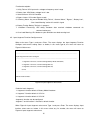
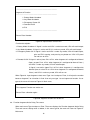
When main menu Type 3 and press Enter. The menu displays the Input Segment Function
Configure and current setting status as below, in this menu type 0, the menu will return to
Figure12. Main menu
! "
#
$%&
'
$%&
()*
%+,)
-./
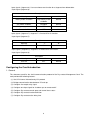
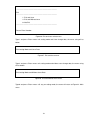
Figure18. Input Segment select menu
Default of each Segment
1. Segment 6 function default is Battery Mode Shutdown
2. Segment 7 function default is UPS On
3. Segment 8 function default is UPS Off
Segment 6 function can be configured.
Segment 7 and 8 function is fixed to its default function.
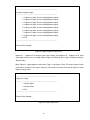
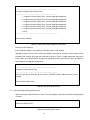
When Figure18. Input Segment select menu Type 1 and press Enter. The menu displays input
function select menu as below, in this menu select any list number, the menu will return to
Figure18. Input Segment select menu
15