1
REFERENCE
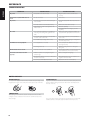
TROUBLESHOOTING
ENGLISH
CONDITION
POSSIBLE CAUSES
POSSIBLE SOLUTIONS
• The power cord is disconnected.
• Plug the power cord into the wall outlet
securely.
The power is on, but the M56 does not
work.
• No disc is inserted.
• Insert a disc.
No picture.
• The TV is not set to receive video input signal
from the M56
• Select the appropriate video input mode on
the TV.
• The video cable is not connected securely.
• Connect the video cable securely.
• Mismatched resolution setting between the
M56 and the TV.
• Check TV capability.
• The connected equipment is not capable of
detecting or decoding audio signal from the
M56.
• Connect the audio output of the M56 to an
equipment with appropriate audio decoders.
• The power of the equipment connected with
the audio cable is turned off.
• Turn on the equipment connected with the
audio cable.
• The AUDIO output settings are incorrect.
• Check audio output settings as configured in
the Audio Setup menu.
• An unplayable disc is inserted.
• Insert a playable disc. (Check the disc type
and regional code.)
• The rating level is set.
• Cancel the rating function or change the
rating level.
BD-Live feature does not work.
• Internet connection is not established.
• Ensure that the M56 is connected to the local
area network and can access the internet.
The remote control does not work
properly.
• M56 front panel is in very bright sunlight or
ambient light.
• Reduce sunlight/room lighting.
• IR transmitter window on remote or IR receiver
window is obstructed.
• Check IR windows and ensure clear line-ofsight from remote to M56.
• The remote control batteries are dead.
• Replace the remote control batteries.
FRANÇAIS
No power.
No sound.
ESPAÑOL
The M56 does not start playback.
• Set the Resolution according to your TV’s
capability.
ITALIANO
DEUTSCH
NEDERLANDS
NOTES ON DISCS
HANDLING DISCS
CLEANING DISCS
Do not touch the playback side of the disc. Hold the disc by the edges so that
fingerprints do not get on the surface. Never stick paper or tape on the disc.
Fingerprints and dust on the disc can cause poor picture quality and sound
distortion. Before playing, clean the disc with a clean cloth. Wipe the disc
from the center out.
SVENSKA
STORING DISCS
After playing, store the disc in its case. Do not expose the disc to direct
sunlight or sources of heat and never leave it in a parked car exposed to
direct sunlight.
РУССКИЙ
28
Do not use strong solvents such as alcohol, benzine, thinner, commercially
available cleaners, or anti-static spray intended for older vinyl records.