1
Intel® MPI Library User’s Guide for Linux* OS
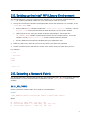
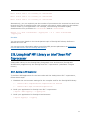
2.9.2. Running an MPI Application
To run an MPI application on the host node and the Intel® Xeon Phi™ coprocessor, do
the following:
1. Ensure that NFS is properly set up between the hosts and the Intel® Xeon Phi™
coprocessor(s). For information on how to set up NFS on the Intel® Xeon Phi™
coprocessor(s), visit the Intel® Xeon Phi™ coprocessor developer community at
http://software.intel.com/en-us/mic-developer.
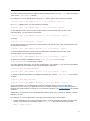
2. Use the I_MPI_MIC_POSTFIX environment variable to append the .mic postfix
extension when running on the Intel® Xeon Phi™ coprocessor.
$ export I_MPI_MIC_POSTFIX=.mic
3. Make sure your ~/mpi_hosts file contains the machine names of your Intel® Xeon®
host processors and the Intel® Xeon Phi™ coprocessor(s). For example:
$ cat ~/mpi_hosts
clusternode1
clusternode1-mic0
4. Launch the executable file from the host.
$ export I_MPI_MIC=on
$ mpirun -n 4 -hostfile ~/mpd.hosts ./myprog
NOTE:
You can also use the -configfile and -machinefile options.
To run the application on Intel® Xeon Phi™ coprocessor only, follow the steps described
above and ensure that mpd.hosts contains only the Intel® Xeon Phi™ coprocessor name.
See Also
You can get more details in the Intel® Xeon Phi™ Coprocessor Support topic of the
Intel® MPI Library Reference Manual for Linux* OS.
You can get more information about using Intel® MPI Library on Intel® Xeon Phi™
coprocessor at How to run Intel® Xeon Phi™ Coprocessor.
14