1
2-Port SATA3 RAID PCIe Card
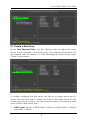
4.1 Create a Disk Array:
Under Free Physical Disks, use the <Space> key to select the hard
drives to be included in the RAID array. The selected hard drive will
be marked with an asterisk (*). After selecting the hard drives, press
<Enter> to proceed.
To further configure the disk array, use the up or down arrow key to
move the selection bar to select an item in the right block of the
screen and press <Enter>. Set the required items in sequence and
press <Enter> after each step:
1.
RAID Level: Select a RAID level. Options include RAID 0 (Stripe)
and RAID 1 (Mirror).
3