1
•
•
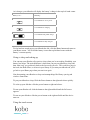
News & Mags — see any newspapers and magazines you have subscribed to.
Previews — see excerpts of new and exciting books.
The other menus include:
•
•
Store — shop the Kobo Store using a wireless Internet connection.
Reading Life — explore your reading habits and achievements.
At the top of the page you’ll see icons that show whether you’re connected to a wireless
network, and how much power your battery has left.
At the bottom of the page you’ll see a few other useful items:
•
•
•
Help — find contact information, and help on important topics
Settings — change the date and time, your personal information, and more.
Sync — tap this icon to update your Kobo library using wireless Internet
connection
You can jump back to your Home page at any time by pressing the Home button.
Reading a book
Opening a book
To open a book, just tap the title or cover.
Turning pages and moving around
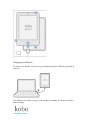
Moving around while reading is easy. To turn pages in a book, just tap the sides of the
page.
If you want to jump forward by more than a page or two, you can:
•
•
Use the navigation bar to change pages or chapters
Use the Table of Contents to browse a list of chapters
Using the navigation bar to move around
To jump around in a book you can use the navigation bar.
1. Tap the middle of your page to see the reading menu.