1
1
12
2
3
4
5
6
13
7
16
14
15
8
POWER SUPPLY
Plug one end of the AC cord into the AC socket on the unit, then plug the other end into the
AC wall outlet.
SLEEP FUNCTION
Press a SLEEP button on the remote in power on mode. Each time SLEEP button is pressed,
the LCD display changes Sleep time in a sequence as follows:
90
80
70
60
50
40
30
20
10
off
The player goes to standby mode in the moment playback or broadcasting reaches the set
Sleep time.
17
18
19
9
20
21
22
23
10
11
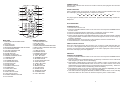
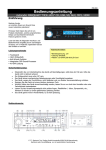
MAIN UNIT
1. PREV/FAST BACKWARD/TUNEBUTTON
2. STOP BUTTON
3. IPOD DOCKING
4. NEXT/FASTFORWARD/TUNE+ BUTTON
5. PLAY/PAUSE BUTTON
6. VOLUME CONTROLLER
7. REMOTE SENSOR
8. STORE BUTTON
9. PRESET UP BUTTON
10. PRESET DOWN BUTTON
11. TONE BUTTON
12. LCD DISPLAY
13. STANDBY BUTTON
14. FUNCTION BUTTON
15. MUTE BUTTON
16. PTY BUTTON
17. SD/MMC CARD SLOT
18. STAND FEET
19. VIDEO OUT JACK
20. FM ANTENNA
21. RIGHT AUX IN JACK
22. LEFT AUX IN JACK
23. POWER ON/OFF BUTTON
24. AC SOCKET
REMOTE CONTROL
1. FUNCTION BUTTON
2. INFO BUTTON
3. SLEEP BUTTON
4. PREV/FASTBACKWARD BUTTON
5. NEXT /FAST FORWARD BUTTON
6. M+ BUTTON
7. TUNE- BUTTON
8. ENTER BUTTON
9. NUMERIC BUTTON
10. STORE BUTTON
11. VOL- BUTTON
12. STANDBY BUTTON
13. MUTE BUTTON
14. PLAY/PAUSE BUTTON
15. STOP BUTTON
16. TUNE+ BUTTON
17. M- BUTTON
18. MENU BUTTON
19. PTY BUTTON
20. RAN BUTTON
21. REP/ST BUTTON
22. TONE BUTTON
23. VOL+ BUTTON
2
iPod OPERATING
PLAYING AN iPod
1. Dock an iPod onto the unit.
2. Press the POWER ON/OFF button on the rear of the unit and press STANDBY button to
turn the unit on.
3. Press the FUNCTION button continuously to toggle the unit to iPod mode.
4. Press PLAY/PAUSE button to play and pause the docked iPod .
5. During normal playback, Press PREV/NEXT button to skip the tracks ahead or backward.
Long press the NEXT or PREV button to search through the current track at a high speed
forward or backward.
6. Press MENU button on the remote to return back the menu the inserted iPod.
7. Use STOP button to cease the iPod playback.
VIDEO OUTPUT FOR iPod
There is a video output jack on the rear of the unit, so that you could make the video output to
a TV set or other appliance with video input jack for enjoying video. To output the video,
connect one end of the video cable(included) to the video output jack of the unit, the other
end to the video input jack of the appliance.
FM RADIO
TUNING THE FM RADIO
1. Press the POWER ON/OFF button on the rear of the unit and press STANDBY button to
turn the unit on.
2. Press and release the FUNCTION button continuously to switch the unit to radio mode (the
radio frequency is shown on the LCD display).
3. Press PREV or NEXT button on the main unit or TUNE+/- button on the remote to tune the
radio. Press and hold PREV/NEXT button on the unit or TUNE-/+ button on the remote to
automatically tune the radio frequency backward and forward respectively . When the tuning
goes to one available station, broadcasting starts immediately.
4. Press REP/ST button on the remote to switch the radio between FM(MONO) and FM(ST).
If the signal is not strong enough, you cannot select FM(ST).
5. If the unit broadcast a program with RDS, the RDS icon will be shown on the LCD display.
Press INFO button on the remote to check the frequency of the current station.
3