1
SAVING FM RADIO STATIONS TO THE UNIT'S MEMORY
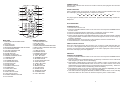
1. After tuning the FM radio to the desired stations, press STORE button until "MEM" is shown
on the LCD display with a flashing number of a memory cell.
2. Press the M+/ M- button on the remote or press PRESET UP/DOWN button on the unit to
select the radio memory cell.
3. Press STORE button again to save the current radio station to the selected memory cell.
4. To recall the preset station frequency, press M+ or M- button on the remote or PRESET
UP/DOWN button on the unit repeatedly.
PTY BUTTON
If you want to tune to a radio station of your favorite type, please set the program type first
before tuning. Press and hold PTY button until a certain program type flashes on the LCD
display.
Select your desired program type by pressing PTY button repeatedly until your desired
program type shows on the screen, then press PREV/NEXT button on the unit or TUNE-/+
button on the remote to start tuning. When a station of the selected program type, the unit will
broadcast it immediately.
PLAYING THE EXTERNAL STORAGE MEDIA DEVICE (SD/MMC CARD)
1. Power on the unit. Insert a SD/MMC card onto the unit, and press FUNCTION button
repeatedly until toggle the unit to card mode.
2. After the unit scan the inserted card, playback will start automatically.
3. Press REP/ST button repeatedly to change the play mode.
4. Press RAN button to play the inserted media device in the random order, press the button
again to exit random play.
5. Press PLAY/PAUSE button to pause playback, press the button again to resume normal
play.
6. During playback, short press NEXT button or PREV button to skip the track forward or
backward.
Long press the NEXT or PREV button to search through the current track at a high speed
forward or backward.
7. Press numeric buttons to select your favorite track directly.
Note: The card reader can only play MP3 files.
TONE SETTING FOR THE UNIT
During playback, press TONE button once, and use VOL+/-button on the remote or VOLUME
CONTROLLER on the unit to adjust the bass. Press TONE button twice repeatedly for
adjusting treble effect by pressing VOL+/- button on the remote or rotate VOLUME
CONTROLLER on the unit as adjust bass effect. After adjusting the treble effect, press the
TONE button again to resume the previous display.
AUX IN
Your player can be used as a power amplifier to playback an audio signal from portable radio,
TV set or MP3 player or whatever provided this appliance is so designed that audio signal may
be produced through a LINE-OUT jack or the like.
Observe the following steps to connect the player to another appliance:
1. Connect the appliance into the player's left & right AUX IN jacks with the supplied LINE OUT
cables.
2. Press STANDBY button to turn the unit on.
3. Press FUNCTION button repeatedly to switch the unit to AUX mode.
4. Power on the appliance and begin play.
At this time you will be able to hear the sound produced from the connected appliance.
IMPORTANT SAFETY INSTRUCTIONS
The apparatus shall not be exposed to dripping or splashing and that no objects filled with
liquids, such as vases, shall be placed on the apparatus.
When the mains plug or an appliance coupler is used as the disconnect device, the disconnect
device shall remain readily operable. To be completely disconnected the power input, the
mains plug of the apparatus or the appliance coupler shall be disconnected from the mains
completely.
No naked flame sources, such as lighted candles, should be placed on the apparatus.
Minimum distances 2.0cm around the apparatus for sufficient ventilation. The ventilation
should not be impeded by covering the ventilation openings with items, such as newspapers,
table-cloths, curtains, etc.
The use of apparatus is in tropical and/or moderate climates.
Attention should be drawn to the environmental aspects of battery disposal.
CAUTION: Danger of explosion if battery is incorrectly replaced. Replace only with the same
or equivalent type.
Battery shall not be exposed to excessive heat such as sunshine, fire or the like.
The marking plate is located at the back of the apparatus.
SPECIFICATIONS
Power source: AC 230V 50Hz
Power consumption: 90W
Remote control: AAA1.5V x 2
Receiving bands: FM 87.5 -108 MHz
Speaker Size: AROUND 3.0 INCH SUB 6.5 INCH
Dimensions: 305(L) x 315(W) x 933(H)mm
Operating Humidity Range:10 % to 75 %
Compatible with SD/MMC CARD
MUTE THE UNIT
During playback, press MUTE button to switch off the audio output. Press the button again to
resume normal play.
If at any time in the future you should need to dispose of this product please note
that: Waste electrical products should not be disposed of with household waste.
Please recycle where facilities exist. Check with your Local Authority or retailer for
recycling advice. (Waste Electrical and Electronic Equipment Directive)
4
5