1
Package Content
1.
2.
3.
4.
5.
6.
7.
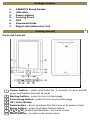
AEBK07FS Ebook Reader
USB cable
Power adapter
Carrying Pouch
QSG
Download Guide
Registration/Warranty Card
Getting Started
1
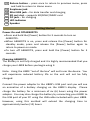
Parts and Controls
1
2
3
4
5
6
7
11
Power button – press and hold for 3 seconds to turn on/off,
press and hold 6 seconds to reset
Next pg button – press to turn to next page
Previous pg button – press to turn to previous page
OK / Enter Button
Zoom button – press to adjust the font size or to zoom in/out
Menu button – press to display Option Menu
8 9 10 Directional buttons – to move cursor
Music button – to enter into music menu