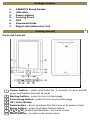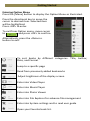
1
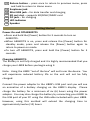
12 Return button – press once to return to previous menu, press and hold to return to Home menu Earphone jack Mini USB jack – for data transfer and charging SD cart slot – supports SD/SDHC/MMC card DC jack – for charging LED indicator 18 Speaker 13 14 15 16 17 Getting Started Power On and Off AEBK07FS Press and hold the [Power] button for 3 seconds to turn on AEBK07FS. When AEBK07FS is on, press and release the [Power] button for standby mode, press and release the [Power] button again to return to power on mode. To turn off AEBK07FS, press and hold the [Power] button for 3 seconds. Charging AEBK07FS The battery is not fully charged and it is highly recommended that you charge your LIBRE before you begin using it. Note: Using the LIBRE “out of the box” will not harm the device. You will experience reduced battery life as the unit will not be fully charged. Connect the power adapter to the LIBRE’s USB port and you will see an animation of a battery charging on the LIBRE’s display. Please charge the battery for a minimum of six (6) hours using the power adapter. You may also charge the battery by connecting your LIBRE to the USB port of your PC using the USB cable included with your LIBRE. However, using this method will extend the charging time to approximately twelve (12) hours.