1
Please check www.sitecom.com for up to date drivers & utilities, manuals and support
7. NetUSB Mode
7.1 Introduction
The Sitecom LN-309 has a totally different technology “NetUSB”, to deal with printers and scanners
(MFPs).
•
For printers, some special kinds of printers, such as GDI printers or host-based printers, can
not work well with traditional print server technology. Users should use the NetUSB mode to
deal with these kinds of printers.
•
For MFPs or scanners, the NetUSB mode is able to support almost all models from all
MFP/scanner vendors.
•
For USB mass storage, such as USB hard drives and flash drives and card readers on some
kinds of MFPs, users can also use the NetUSB mode to access them in single-user mode. By this
way, NTFS file system is supported for read/write.
Note:
The default storage access mode is server mode.
7.2 Connect & Disconnect
“NetUSB” allows you to use USB printers or USB storage devices directly, even when they’re actually
connected to the Sitecom LN-309 USB MFP server.
The “connect” operation is a software operation that simulates an actual USB device plug-in. Therefore,
when you do a “connect” operation in the Control Center, PC can detect a USB device’s plug-in, although
actually you do not plug in any USB device to your PC. Similarly, the “disconnect” operation is a
software operation that simulates the disconnection of the USB device.
Note:
If a USB device is “connected” by a PC, we say that PC has the ownership of the USB device. Only one
PC can get the ownership of a USB device at the same time.
7.3 How to Use
7.3.1 Remote Installation
Before using the NetUSB technology, you must first make sure that your PC can access the Sitecom USB
MFP server via TCP/IP. The simplest way to do this is using “Control Center” to search for the Sitecom
USB MFP server on the network and change its IP address to be the same subnet as your PC. If the MFP
server and your PC are not in the same TCP/IP subnet, Control Center will show the MFP server in
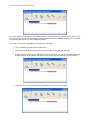
green, as the following figure.