1
RMT-4IR INSTALLATION
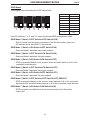
1. Remove battery cover from the back of the RMT-4IR remote.
2. Verify that dip switches 1 & 2 are in the down (OFF) position.
3. Insert the battery, hold the battery so that you can see the positive side facing up. The
side that is not marked must be facing down.
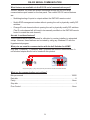
4. Test the RMT-4IR remote by pressing ONLY one button at a time. The indicator light
on the remote will flash once each time you press a button. WARNING: Do not press
multiple buttons simultaneously and do NOT press buttons rapidly. These actions will
cause the remote to reset and steps 1-4 will have to be repeated.
Note: The RMT-4IR ships with two batteries. One battery is required for operation, the
second battery is complimentary.
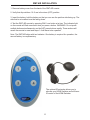
The optional IR extender allows you to
relocate your HDMI Switcher and still have
IR control of the HDMI Switcher
5