1
SETUP
SETUP
1
2
1
2
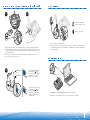
Unplug the handset cord from phone.
3
3
Plug the phone cord that is connected to
the CS50/CS55 base into the handset jack
on the phone.
CAUTION: Your phone may have two similar
jacks. Put the cord only in the jack from
which the handset came.
4
Base - Bottom View
3A
4A
!
9v
4
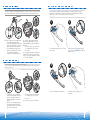
Plug the handset cord into the handset
jack in the base. Push in until it clicks.
Plug the AC charger into the base’s AC
charging jack. Push in firmly.
Complete
Plug the handset cord into the handset
jack in the bottom of the base.
See step 3A for detailed location.
Plug the AC charger into an outlet and into
the base’s AC charging jack.
See step 4A for detailed location.
NOTE: The access to the handset jack is
fairly small. If you have large hands you
may want to ask someone with smaller
fingers to do this step.
6
7