Download Nik Software Complete Collection - Aperture Edition
Transcript
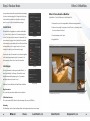
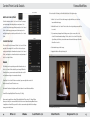
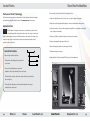
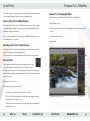
Color Efex Pro 3.0 for Capture NX 2 Selective Application of Filters Nik Software Color Efex Pro 3.0 for Capture NX 2 is the most advanced set of filters for digital photography. Color Efex Pro 3.0 filters are designed to make photographic enhancements not only easier, but better. Now the powerful filters of Color Efex Pro 3.0 are available Selectively Applying Color Efex Pro 3.0 Filters All of the Color Efex Pro 3.0 filters can be applied for Capture NX 2. selectively using the various selection tools found Installation for Capture NX 2 Control Points, the Selection Brush, and the Selection within Capture NX 2. A brief overview of the Selection Gradients can be found below. Windows Macintosh 1. Close all open applications. 1. Close all open applications. 2. Insert the Color Efex Pro 3.0 CD. 2. Insert the Color Efex Pro 3.0 CD. 3. When the auto-run installer appears, 3. Open the CD and double-click the Color click Next to begin installing Color Efex Efex Pro 3.0 Setup file. When the Color Pro 3.0. Efex pro 3.0 installer appears, click Next 4. Next, read the Read Me and accept the License Agreement. 5. When the installer is complete, click the Finish button to close the installer. to begin installation. 4. Next, read the Read Me and accept the License Agreement. Selection Control Point Selection control points utilize U Point® technology to selectively apply the filter effect of the current step. You can use a selection control point to selectively apply any of the Color Efex Pro 3.0 filters. © 2008 David Saffir Selection Brush Tools The selection brush enables you to selectively paint-in or paint-out the filter effect in the current step. You can use the selection brush to achieve an artistic application of the filters. Selection Gradient Tools 5. When the installer is complete, click the Close button to close the installer. The selection gradient tools enable you to gradually blend between applying and removing the filter effect in the current step. There are two selection gradient tools to choose from, the Linear Gradient tool and the Radial Gradient tool. Accessing Color Efex Pro 3.0 inside Capture NX 2 Color Efex Pro 3.0 NEF Update Tool 1. Launch Capture NX 2. The Color Efex Pro 3.0 NEF Update Tool will convert any NEF files with Nik Color Efex Pro 2.0 filters applied into the corresponding Color Efex Pro 3.0 filters with equivalent filter settings. 2. Open the image that you would like to enhance. For more information about updating NEF files with Nik Color Efex Pro 2.0 filters to Color Efex 3. Navigate to the Filter menu. Pro 3.0 filters with the NEF Update Tool, please see the Color Efex Pro 3.0 for Capture NX 2 4. Roll over either the Color Efex Pro 3.0: Stylizing or Color Efex Pro 3.0: Traditional sub-menus User Guide. 5. Select the filter you wish to apply to your image from this list. 20 Dfine 2.0 Viveza Color Efex Pro 3.0 Silver Efex Pro Sharpener Pro 3.0 21