1
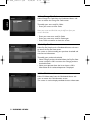
DTR 2010_indice 1.qxd
DTR 2010
15/05/06
11:13
Page 1
DTR 2010_indice 1.qxd
15/05/06
11:13
Page 2
Safety instructions
English
-
-
Your receiver has been manufactured to meet the appropriate safety standards, but the instructions
below must be followed to operate it safely.These instructions must be kept for future reference.
Before connecting the receiver to the mains, check that the mains supply voltage corresponds to
the voltage printed on the rear of the receiver. If the mains voltage is different, consult your dealer.
The receiver does not contain any user-serviceable parts. Do not attempt to open it. All
maintenance work must be carried out by qualified personnel.
If you disconnect the receiver from the mains, make sure to unplug it from the wall socket and not
just from the AC socket at the back of the unit. Children could seriously injure themselves, as the
free end of the cable is still alive.
Unplug the receiver from the mains during lightning storms.
If the power cord becomes damaged, it must be replaced. Always refer to qualified personnel.
To prevent fire or shock hazard, do not expose the receiver to rain or moisture.
The receiver should be placed on a firm surface, and the ventilation openings must not be covered
with items, such as newspapers, table clothes, curtains, etc.
Do not install the receiver near any heat sources such as radiators, stoves or other apparatus that
produce heat. Protect it from direct sunlight.
When installing the receiver, ensure there is a gap of approximately 2 cm around the receiver to
enable air to circulate freely and prevent overheating.
Leave accessible the mains connector at the back of the unit in case emergency shutdown is required.
Do not place any combustible objects on the receiver (candles, etc.).
No objects filled with liquids, such as vases, shall be placed on the unit.The receiver shall not be
exposed to dripping or splashing. Should this happen, disconnect your receiver from the mains and
consult your dealer.
Meaning of symbols
Important information:
Must be read and understood.
Your product has been designed and manufactured with high quality materials and components,
which can be recycled and reused.
When this crossed-out wheeled bin symbol is attached to a product or his packaging, it means
the product is covered by European Directive 2002/96/EC.
Please inform yourself about the local separate collection system for electronic products.
Please act according to your local rules and do not dispose of your old products with your
normal household waste. The correct disposal of your old product will help prevent potential
negative consequences for the environment and human health.
The “Material recyclability symbol” affixed on package cardboard and user manual means these
parts are recyclable.
So do not dispose of them with your normal household waste.
02
The “Material recyclability symbol” affixed on plastic packaging parts means these parts are recyclable.
So do not dispose of them with your normal household waste.
The “Green Dot” affixed on cardboard means PHILIPS pays a financial duty to the “Avoidance
and Recovery of Packaging Waste” organization.
2 SAFETY INSTRUCTIONS
DTR 2010_indice 1.qxd
15/05/06
11:13
Page 3
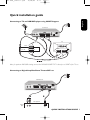
Connecting to TV and VCR/DVD player using SCART Support
to AC outlet
Terrestrial Receiver
RF Cable
TV set
PHILIPS
VCR/DVD
EXT 1
IN FROM ANT
OUT TO ANT
SCART
EXT 2
For optimum configuration
Note: for optimum DVD/VCR viewing, connect the DVD/VCR SCART EXT 1 directly to a SCART of the TV set.
Connecting to Digital Amplifier/Home Theatre/HiFi set
to AC outlet
Terrestrial Receiver
A
B
Audio equipment
AUDIO
Analogue
input
L
R
Digital
input
QUICK INSTALLATION GUIDE 3
English
Quick installation guide
DTR 2010_indice 1.qxd
15/05/06
11:13
Page 4
TABLE OF CONTENTS
English
Safety instructions
2
Meaning of symbols
2
Quick installation guide
3
1
6
Introduction
7
General Viewing Function
17
7.1
Receiver wake up
17
7.2
Channel Information
17
7.3
Channel selection
18
7.3.1
Using <P+/P-> or numeric keys 18
7.3.2
Using the channel list
18
2
Product description
7
2.1
Unpacking the product
7
7.4
Channel Lists
18
2.2
Front panel
8
7.5
Previous Channel Recall
18
2.3
Rear panel
9
7.6
TV or Radio Mode selection
19
7.7
Volume & Audio Control
19
3
Remote control
10
4
Inserting your Smart Card
12
5
Connecting your receiver
12
5.1
Connecting to aerial wall socket
and TV
13
5.2
Connecting to TV and VCR/DVD
player using SCART support
13
5.3
Connecting to your audio
equipment
14
6
First installation
15
6.1
Easy installation
15
6.2
Channel scanning
15
6.3
Scanning failure
16
4 TABLE OF CONTENTS
7.7.1
Volume control and Mute
19
7.7.2
Audio Control
19
7.7.3
Audio language
19
7.7.4
Subtitles language
20
7.8
Recording timers
20
7.8.1
To set a timer from the guide 20
7.8.2
To set or modify a timer
from the Timer menu
20
7.8.3
To delete a running timer while
watching digital TV or listening
to digital radio
21
7.8.4
To delete a running timer
enabled while the receiver
was in standby
21
Viewing Teletext
21
7.8.5
15/05/06
11:13
8
Menu
22
8.1
General information
22
8.1.1
Basics about menu navigation
22
8.1.2
Cancel/Store changes
22
8.2
8.3
Conditional Access
31
8.8.1
Authorization
31
8.8.2
Maturity Rating
31
8.8.3
Change Pin Code
32
Pay Per View
32
Channel Manager
23
8.8.5
CA Information
32
8.3.2
Favourites
24
Parental Control
24
8.4.1
To enable Menu Lock
25
8.4.2
To set the Parental Rate
25
8.4.3
To change your receiver's Pin
Code
25
Timer Manager
Recording timer
26
8.5.2
Reminder
27
8.5.3
Sleep timer
27
System setting
27
8.6.1
Receiver settings
28
8.6.2
Remote Control setting
28
Installation
9
Menu tree
33
10
Troubleshooting
34
11
Technical specifications
36
25
8.5.1
8.7
30
8.8.4
23
8.6
8.8
Software update
22
Channel Pool
8.5
8.7.5
Guide
(Electronic Programme Guide)
8.3.1
8.4
Page 5
29
8.7.1
Add Service
29
8.7.2
Signal Test
30
8.7.3
Product Identifier
30
8.7.4
Factory Default
30
TABLE OF CONTENTS 5
English
DTR 2010_indice 1.qxd
DTR 2010_indice 1.qxd
1
15/05/06
11:13
Page 6
Introduction
English
Thank you for buying this product from Philips and congratulations!
The Philips Digital Terrestrial Receiver DTR 2010 allows you to view a wide variety of free-to-air and
scrambled channels with the best digital picture and sound quality.
With this product you can enjoy advanced functions and features including:
- Digital picture and sound quality
- Wide screen format
- TV SCART and VCR/DVD SCART connector
- Up to 500 presets for TV and Radio channels
- Easy installation and use through the well-tested Euphoria User Interface
- Personal channel list and favourite lists
- Electronic programme Guide
This User Manual covers the installation of your receiver and the necessary steps to use the various
functions, so you can optimally enjoy classic as well as unique features.
Philippe Alcaras
Paris, Mai 2006
6 INTRODUCTION
15/05/06
11:13
Page 7
2
Product description
2.1
Unpacking the product
Unpack the receiver and check to make sure that all of the following items are also included in the
package:
-
1
2
1
1
1
1
1
x Remote Control Unit
x AA batteries
x SCART Cable
x RF Cable
x Power Cord
x User Manual
x Worldwide Warranty booklet
Plastic bags can be dangerous.To avoid suffocation keep the bag away from babies
and children.
PRODUCT DESCRIPTION 7
English
DTR 2010_indice 1.qxd
DTR 2010_indice 1.qxd
2.2
15/05/06
11:13
Page 8
Front panel
English
Q
WE
R
T
1
STANDBY button . . . . . . . . . . . . . . . . . . . . . . . . . . Switch the receiver OFF.
2
Red LED indicator
3
Green LED indicator
4
Remote control receiver window
5
Smart Card slot
.........................
......................
............................
Display receiver status (see status indicator table).
Display receiver status (see status indicator table).
See chapter 4.
Status indicator table
LED
Left-hand LED
(Red)
Right-hand LED
(Green)
Receiver connected to the mains or in
Standby
ON
OFF
Watching TV or listening to the Radio
OFF
ON
Fast blinking
Depending on
current mode
ON
ON
Timer active in Standby
Slow blinking
OFF
Software download
Depending on
current mode
Fast blinking
Mode
Pressing a remote control key
Timer active
8 PRODUCT DESCRIPTION
DTR 2010_indice 1.qxd
11:13
Page 9
Rear panel
English
2.3
15/05/06
Q
W
E
R
T
Y
U
I
1
AERIAL IN (*)
2
RF OUT (*)
3
VCR (*)
4
SERIAL (*) . . . . . . . . . . . . . . . . . . . . . . . . . . . . . . . RS232 socket used for serial data transfer to a PC or
another receiver.
5
TV (*)
6
L/R AUDIO OUT (*)
7
DIGITAL OPTICAL OUT (*)
8
230V~50Hz 15W max (**) . . . . . . . . . . . Socket used to connect the power cord.
.........................
.............................
.................................
...................................
.................
........
RF input used to connect the coaxial cable from the cable
wall socket.
Refer to chapter 5 for recommended connection diagrams.
RF output used to connect your receiver to a VCR/TV set
to watch analogue channels only, or to connect another
receiver.
SCART (1) socket used to connect your video recorder or
DVD player/recorder.
SCART (1) socket used to connect to your TV set or a
video projector.
Left/Right outputs used to connect your HiFi /Audio
receiver system.
Digital output used to connect your HiFi /Audio receiver
system.
Note: the label showing the type and serial number is underneath the receiver.
(1) SCART is also called Euroconnector or Peritel.
* Safety Extra Low Voltage
** Hazardous Voltage
PRODUCT DESCRIPTION 9
DTR 2010_indice 1.qxd
3
15/05/06
11:13
Page 10
Remote control
English
0-9 number keys
- In TV/radio mode: select
channels
- In menu: directly select a
menu item or set a setting
- In standby: wake up the
receiver
INFO
Switch between normal viewing,
Channel Banner, and Channel
Banner with Extended Info
EXIT
Return to normal viewing
VOLUME
+/Increases/Decreases the volume
level
MUTE
Mute/Demute the sound on
your TV or receiver
RED, GREEN,
YELLOW, BLUE
Contextual keys
TV/STB
Toggle between watching digital
TV via your receiver and standard
analogue TV via your TV set
1-11
Open the Audio Languages
screen to momentarily change
the soundtrack and audio mode
MENU
Opens/Closes the Menu
REC
Open/Close the Timer screen
10 REMOTE CONTROL
Standby
Switch your receiver into the
standby mode
EPG
Opens/Closes the Programme
Guide
BACK
- In TV/radio mode: return to
the previously tuned channel
- In menu mode: return to the
previous screen
CURSOR t/y
- Switch the Channel Banner in
the browsing mode
- Scroll up/down in a menu or
channel list
CURSOR u/ i
In Channel Banner: switch
between the current and next
programme
OK
Confirm your choice
P+ / P- In TV/radio mode: tune the
next/previous channel within
the current channel list
- In standby: wake up the
receiver
OPT
In TV/radio mode:
enable/disable teletext display
/
Teletext page scrolling
SUBTITLE
Open the Subtitles Language
screen to momentarily change
subtitles language
FAV
Open/Close the current
channel list
RADIO
In TV/radio mode: toggle
between TV and Radio
15/05/06
11:13
Page 11
English
DTR 2010_indice 1.qxd
Do not dispose of the batteries with
your household waste.
The Philips batteries supplied with your receiver’s remote do not contain heavy metals such as
Mercury, Lead or Cadmium. Nevertheless, in many countries, exhausted batteries may not be
disposed of with your household waste.
Please enquire about the local regulations regarding the disposal of used batteries.
REMOTE CONTROL 11
DTR 2010_indice 1.qxd
4
15/05/06
11:13
Page 12
Inserting your Smart Card
English
To be able to receive scrambled digital terrestrial channels specific to an operator, you need a smart
card from that operator.Your operator may update it from time to time.
Insert the smart card with the chip facing down.
Push the smart card into the slot as far as it will go.The end of the card will be visible outside the slot.
New and updated information may be downloaded onto the smart card from time to time.
5
Connecting your receiver
There are several ways you can connect and incorporate your digital receiver into your existing
video / audio equipment set up.
Warning!
Before starting to connect:
- Unplug all equipment (TV set as well as VCR and / or DVD if required) from the mains.
- Do not connect your digital receiver to mains supply now.
- Check your current wiring: you may not need to modify your existing Audio / Video set up
connections if they already match the connection diagrams below.
- Depending on your exiting set up, choose the best suited connection method for incorporating
your digital receiver into your existing Audio / Video set up. Please read chapters 5.2 and 5.3.
Note: when adding new equipment, be sure to refer to the related installation instructions of the manual.
- Your receiver, as any electronic equipment, consumes power. In order to reduce power
consumption, please switch your receiver to standby whenever you are not using it.
- For maximum energy saving we recommend you to switch off the receiver by unplugging it
from the mains if you are not using it for a long time.
12 INSERTING YOUR SMART CARD
DTR 2010_indice 1.qxd
11:13
Page 13
Connecting to aerial wall socket and TV
English
5.1
15/05/06
Aerial Wall socket
DTR 2010 DIGITAL TERRESTRIAL RECEIVER
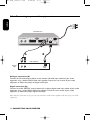
5.2
Connecting to TV and VCR/DVD player using SCART support
to AC outlet
Terrestrial Receiver
RF Cable
TV set
PHILIPS
VCR/DVD
IN FROM ANT
EXT 1
OUT TO ANT
EXT 2
SCART
For optimum configuration
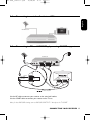
Use the RF cable to connect your receiver to the aerial wall socket.
Use the SCART cable to connect your receiver to the TV set.
Note: for best DVD/VCR viewing, connect DVD/VCR SCART EXT 1 directly to the TV SCART.
CONNECTING YOUR RECEIVER 13
DTR 2010_indice 1.qxd
5.3
15/05/06
11:13
Page 14
Connecting to your audio equipment
English
to AC outlet
Terrestrial Receiver
A
B
Audio equipment
AUDIO
Analogue
input
L
R
Digital
input
Analogue connection (A)
Connect the L/R audio output sockets to the relevant L/R audio input sockets of your audio
equipment using a double CINCH cable (not supplied). Consult the user manual of your audio
equipment to choose the proper analogue audio inputs.
Digital connection (B)
Connect the audio “DIGITAL” output socket to the relevant digital audio input socket of your audio
equipment using a single CINCH cable (not supplied). Consult the user manual of your audio
equipment to choose the proper digital audio input.
Note: with this connection set up you can only control the audio volume up/down and mute from your audio
equipment.
14 CONNECTING YOUR RECEIVER
DTR 2010_indice 1.qxd
6
15/05/06
11:13
Page 15
First installation
6.1
English
For fast and successful start-up, check that your receiver is
connected to the wall socket,TV set and other equipment
according to the diagrams in chapter 5.
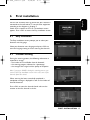
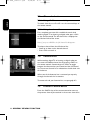
Switch on the receiver and TV set.The welcome screen
appears. Press <OK> to access the Easy installation screen.
Easy installation
The Easy installation screen prompts you to select your
favourite menu language.
Select your favourite menu language and press <OK> to
store the language setting and start scanning for channels.
6.2
Channel scanning
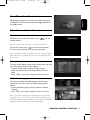
During the scanning process, the following information is
reported on screen:
- the number of TV and Radio channels detected,
- the scanning progress, indicated as a percentage,
- the strength of the signal and the quality of reception.
Note: if you press <BACK> during the scanning process, you
return to the Easy installation screen. In this case, none of the
channels found are stored.
When scanning has been successfully completed, a
completion message is displayed as well as the number of
channels detected.
Press <OK> to store the channels found and tune the
receiver to the first channel in the list.
FIRST INSTALLATION 15
DTR 2010_indice 1.qxd
15/05/06
11:13
6.3
Page 16
Scanning failure
English
In case of channel scanning failure, a failure message is
displayed.
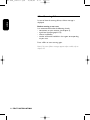
Before starting a new scan
It is recommended to do the following checks:
- connections to your receiver (see chapter 5),
- signal level (see paragraph 8.7.2),
- antenna installation,
- number of channels available in the region corresponding
to your area.
Press <OK> to start scanning again.
Note: if the same failure message appears after a while, refer to
chapter 10.
16 FIRST INSTALLATION
DTR 2010_indice 1.qxd
11:13
Page 17
General Viewing Function
English
7
15/05/06
This section describes the basic functions available while
watching digital TV or listening to digital Radio. For general
menu navigation information, see Basics about menu
navigation.
7.1
Receiver wake up
Your receiver is in standby.To wake it up, press any of the
following on the remote control:
- numerical keys,
- <P->/<P+>,
- <OK>.
Note: be careful the Standby button can only be used to
switch the receiver off.
7.2
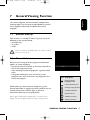
Channel Information
Every time you change channels, programme information
appears on screen, displaying:
- the channel name and number in the current channel list,
- the current programme name,
- icons indicating the channel properties, e.g. channel lock
status,
- a bargraph indicating the start time of the current
programme, the start time of the next programme, and
the current progress.
icon description
alternate audio
language/format
current favourite list
While watching a channel, you can display the current
channel information at anytime by pressing <INFO> on the
remote control. Press <INFO> again to get more
information about the current programme.
Note: channel information is displayed for 3 seconds as per
default. This can be adjusted from the System Setting screen.
maturity rating locked
scrambled channel
locked channel
subtitles presence
teletext presence
GENERAL VIEWING FUNCTION 17
DTR 2010_indice 1.qxd
15/05/06
11:13
Page 18
English
7.3
Channel selection
7.3.1
Using <P+/P-> or numeric keys
To switch channels, use <P+>/<P-> or the numerical keys of
the remote control.
7.3.2
Using the channel list
For a complete overview of the available channels while
watching digital TV or listening to digital radio, press <OK>
on the remote control.The full channel list is displayed on
the left-hand side of the screen.
Note: if you press <BACK>, the full channel list disappears.
To select a channel from the full channel list:
- Scroll up or down to the desired channel.
- Press <OK> to watch it.
7.4
Channel Lists
While watching digital TV or listening to digital radio, you
can access all available channel lists by pressing <FAV> on
the remote control. Successively press <FAV> to toggle
between the favourite lists you created and the full channel
list.The current channel list is indicated on the left-hand side
of the banner.
When one of the favourite lists is activated, you zap only
through the channels this list contains.
To create and edit your favourite lists, see paragraph 8.3.
7.5
Previous Channel Recall
Press the <BACK> key of the remote control to move to
the previous channel you watched in the current channel list.
18 GENERAL VIEWING FUNCTION
DTR 2010_indice 1.qxd
11:13
Page 19
TV or Radio Mode selection
While watching digital TV or listening to digital radio, press
<TV/RADIO> on the remote control to toggle between TV
and Radio modes.
7.7
Volume & Audio Control
7.7.1
Volume control and Mute
To decrease or increase the volume, use <
remote control.
> on the
Note: the volume level can also be controlled from your TV.
To mute the sound, press <
> on the remote control
To resume normal sound, press this key once again.
Note: a change of volume is signalled on-screen using a bar graph,
while audio mute is signalled with an icon in the top right corner
of the screen.
7.7.2
Audio Control
To access audio settings, select System Setting from the main
menu.The System Setting screen appears.
- Scroll to Audio Output. Default setting is Stereo.
- Select the desired value (Left, Right, Mono, Stereo or
AC3).
- Press <OK> to save your changes and exit the screen.
7.7.3
Audio language
To select your preferred audio language, select System
Setting from the main menu.The System Setting screen
appears.
- Scroll to Audio Language, and then select the desired
language.
- Press <OK> to save your changes and exit the screen.
Note: if you want to change the audio language for a particular
programme, press <I-II> on the remote control to directly access
the audio language options available for this programme. Available
languages depend on the audio content transmitted.
GENERAL VIEWING FUNCTION 19
English
7.6
15/05/06
DTR 2010_indice 1.qxd
15/05/06
11:13
7.7.4
Page 20
Subtitles language
English
To select your preferred Subtitles language, select System
Setting from the main menu.The System Setting screen
appears.
- Scroll to Subtitle Language, and then select the desired
language.
- Press <OK> to save your changes and exit the screen.
Note: if you want to change the Subtitle language for a particular
programme, press < > on the remote control to directly access
the Subtitles language options available for this programme.
Available languages depend on the content transmitted.
7.8
Recording timers
Recording timers are used for VCR or DVD recordings.
7.8.1
To set a timer from the guide
- Select Guide from the main menu to access the Electronic
Programme Guide.
- Move to the desired programme using the arrow keys.
- Press the <Red> colour key to set a recording timer on
the selected programme. Alternatively, press the <Green>
colour key to set a reminder on the programme.
- Enter your PIN code if necessary, and then set the timer
type as appropriate. By default, other settings correspond
to the selected programme.
7.8.2
To set or modify a timer from the Timer
menu
- Select the Record Timer item from the Timer sub-menu
or press the <TIMER> key of the remote control to
access the Recorder screen.
- Select an available Timer Number or select the timer you
want to modify.
- Set the values of the recording parameters using the
arrow or numerical keys as appropriate (for more details,
refer to paragraph 8.5.1).
- Press <OK> to confirm.
Note: an existing recording timer can be disabled from the
Recorder screen by selecting Disable as Timer Type.
20 GENERAL VIEWING FUNCTION
DTR 2010_indice 1.qxd
11:13
Page 21
To delete a running timer while watching
digital TV or listening to digital radio
A timer is running and you are watching the programme you
are recording. Recording is signalled by two front LEDs, the
right-hand one lit in red and the left-hand one lit in green.
To delete the running timer:
- Press the key sequence “TIMER, 0”.The red light then
switches off and you can change channels.
7.8.4
To delete a running timer enabled while
the receiver was in standby
A timer is running that was enabled while your receiver was
in standby. Recording is signalled by the right-hand red LED,
which is blinking slowly.
- Press the key sequence “TIMER, 0” to delete the running
timer.The red light then switches off and you can change
channels.
Note: when a recording timer is active, you cannot change digital
channels, but you can switch to analogue TV using the <TV/STB>
key and zap through analogue channels.
7.8.5
Viewing Teletext
Using the integrated teletext decoder.
- Press <OPT>.
- Select a page using number keys, then follow the
instructions appearing on screen.
- Press <OPT> to exit.
GENERAL VIEWING FUNCTION 21
English
7.8.3
15/05/06
DTR 2010_indice 1.qxd
8
15/05/06
11:13
Page 22
Menu
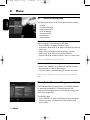
8.1
General information
English
The Menu gives access to all the functions of your receiver:
o Guide
o Channel Manager
o Parental Control
o Timer Manager
o System Setting
o Installation
o Information
8.1.1
Basics about menu navigation
While watching TV or listening to the radio:
- Press <MENU> to display the Menu screen.
- Press t or y to scroll up or down and select the desired
menu item.
- Press <OK> to display the corresponding sub-items.
- Press t or y to move to the desired sub-item.
- Press the u or i button to select a value in a menu item.
Note: press <BACK> to go back one step.
8.1.2
Cancel/Store changes
- Either press <BACK> to go back one step.You may then
be prompted to confirm your changes.
- Or press <OK> to validate changes and exit the screen.
Note: to open a locked menu item, you need to enter your Pin
Code.
8.2
Guide (Electronic Programme Guide)
The TV/Radio Electronic Programme Guide (EPG) provides
an overview of available TV and Radio channels, and
programmes the broadcasters have scheduled, starting with
the current programme.
To view EPG data:
- Press <GUIDE> on your remote control when watching a
channel, or select the Guide item from the Menu and
press <OK>.
22 MENU
DTR 2010_indice 1.qxd
15/05/06
11:13
Page 23
English
- Highlight the name of the programme for which you want
more detailed information.
- Press the <INFO> key of the remote control once to get
extended information (programme description) and once
again to close it.
- Press <OK> to view the corresponding channel.
Note: a “No information yet” message is displayed if the selected
channel does not provide EPG data. It may take a few seconds
before data can be displayed.
To set a recording timer from the Guide:
- Press the <Red> colour key once to set a recording timer
for the programme currently highlighted.
To set a reminder from the Guide:
- Press the <Green> colour key to set a reminder for the
programme currently highlighted.
If you want to check the previous or next information of the
channel, please press u or i on the remote control.
8.3
Channel Manager
The Channel Manager function is used to:
- lock channels (Channel POOL)
- create and edit your favourite lists.
Note: switch from TV channel lists to Radio channel lists by
pressing <TV/RADIO>. Radio Channel Manager has the same
operation as TV channel Manager.
To access the Channel sub-menu, select Channel Manager
from the main menu.
8.3.1
Channel Pool
Select Channel POOL to access the Channel Pool screen.
This screen is used to lock channels.
To lock channels:
- Scroll to the channel you want to lock.
- Lock the channel by pressing <OK>.The selected channel
is marked with this
selection.
icon. Press <OK> again to cancel
MENU 23
DTR 2010_indice 1.qxd
15/05/06
11:13
Page 24
Note: the first time you press <OK>, you are prompted to enter
your Pin Code.
English
- Press <BACK> to exit the screen.
- When prompted, confirm your changes by pressing <OK>.
Note: you can only use this function once you have set up your Pin
Code from the Parental Control screen.
8.3.2
Favourites
Select Favourites from the Channel sub-menu to access the
screen used to create and edit up to three TV and three
Radio channel lists according to your personal preferences.
To create a favourite list:
- Individually select the desired channels from the list by
scrolling to the corresponding channel and pressing
<OK>. Press <OK> again to cancel selection
- Alternatively, use the red colour key to select all channels
or green colour key to deselect all channels.
Note: selected channels are marked with a tick.
To create additional favourite lists:
- Press <FAV> to select the next favourite list (up to
Favourite 3).
- Then proceed as indicated above.
- Press <BACK> to exit the screen.
- When prompted, confirm your changes by pressing <OK>.
When you activate one of the favourite lists by pressing
<FAV> while watching digital TV or listening to digital radio,
the receiver only zaps through your favourite channels.
Press <FAV> to again toggle between your favourite lists and
the full channel list.
8.4
Parental Control
Parental Control is used to:
- block access to your receiver and its Menu;
- provide maturity rating data transmitted with the
programme, indicating whether it is suitable for the age of
your children;
24 MENU
DTR 2010_indice 1.qxd
15/05/06
11:13
Page 25
- enable channel lock using a Pin Code in order to prevent
children from watching these channels;
8.4.1
English
You must enter your 4-digit Pin Code to access the
various settings.
To enable Menu Lock
To lock access to every sub-menu of your receiver, set Menu
Lock to ON.
8.4.2
To set the Parental Rate
Select the desired Parental Rate: from 3 to 18, or None.
8.4.3
To change your receiver's Pin Code
The receiver's Pin Code default value is 1111.
To change your Pin Code:
- Scroll down to New Pin Code and enter your new Pin Code.
- Scroll down to Confirm Pin Code and enter your new Pin
Code again.
Note: once you have changed your Pin Code, keep it secret to
prevent others from using it. If you forget or lose your Pin Code,
please refer to the Troubleshooting chapter.
Press <OK> to confirm your changes and exit the screen.
8.5
Timer Manager
The Timer Manager is used to set:
- recording timers for the programmes you want to record
using your VCR or DVD recorder,
- reminders for programmes you want to see in the near
future,
- sleep timers.
To be able to record a digital channel using a VCR
or DVD recorder, you must set both your recorder
and receiver:
- You must set a timer on your receiver.
- You must also enable recording on the VCR or DVD
recorder (refer to the VCR or DVD recorder user manual).
MENU 25
DTR 2010_indice 1.qxd
15/05/06
11:13
8.5.1
Page 26
Recording timer
English
Select the Record Timer item from the Timer sub-menu or
press the <TIMER> key of the remote control to access the
Recorder screen.
To activate a recording timer:
- Select values for the following:
• Timer number: used to identify the timer. Select the
number corresponding to the timer you want to use.
• Channel Name: select the channel on which the
programme you want to record is broadcast using the
u or i key.
Note: alternatively, press <OK> when the highlight is on Channel
Name to display the list of available channels. Then scroll to the
desired channel and press <OK> to select it.
• Timer Type: select Daily to record once every day,
Weekly to record once every week, Monthly to record
once every month, or One time for a single recording
at the selected time. Select Disable to cancel the timer.
- Depending on the timer type, proceed with the following:
• Month: select 1 for January, 2 for February, etc. using
the u or i key for a single recording.
• Date: select a date using the u or i key for single and
monthly recordings.
• Start time: select a start time using the u or i key to
modify the default time in steps of 10 minutes or
numerical keys.
• End Time: select a end time using the u or i key to
modify the default time in steps of 10 minutes or
numerical keys.
- Press <OK> to confirm.
Note: when a recording timer is active, you cannot change digital
channels, but you can switch to analogue TV using the <TV/STB>
key and zap through analogue channels.
26 MENU
DTR 2010_indice 1.qxd
8.5.2
15/05/06
11:13
Page 27
Reminder
English
When you set a reminder for a particular programme, the
receiver sends a warning at the start of that programme and
switches automatically to the right channel if you accept the
reminder message.
Select the Reminder item from the Timer sub-menu to
access the Reminder screen.
To activate a reminder:
- Set the values of the reminder parameters using the arrow
keys or numerical keys as indicated in the above paragraph.
- Press <OK> to confirm.
Note: an existing reminder can be disabled by selecting Disable as
Timer Type in the Reminder screen. When a timer is already active
(recording in progress), press <TIMER> then <0> to cancel this
timer.
8.5.3
Sleep timer
You can set a sleep timer to automatically switch your
receiver to Standby mode after a given time lapse.
Select the Sleep item from the Timer sub-menu to access
the Sleep screen.
To activate a sleep timer:
- Select the time lapse after which the receiver should go to
Standby (up to 4:59) using the u or i key to decrease or
increase the time lapse steps of 10 minutes or using the
numerical keys of the remote control.
- Press <OK> to confirm.
To disable a sleep timer:
- Select Disable instead of a time lapse for this timer.
- Press <OK> to confirm.
8.6
System setting
Select System Setting from the main menu to access
the System Setting screen.
This screen is used to modify the general settings of your
receiver and your remote control setting.
Note: access to this menu can be protected by Pin Code.
MENU 27
DTR 2010_indice 1.qxd
15/05/06
11:13
8.6.1
Page 28
Receiver settings
English
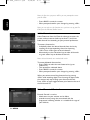
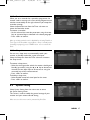
- Select appropriate values for the following:
• Menu Language: Swedish (default value), Finnish, English
• Audio Language: Swedish (default value), Finnish, English
• Subtitle Language: Swedish (default value), Finnish,
English, or OFF
• Screen Format: 4:3 or 16:9
• TV Video Output: RGB or CVBS
• VCR Video Output: CVBS or Y/C
• Audio Output: Stereo (default value), Left, Right, Mono,
or AC3.
• Banner Timeout: banner display duration, from 1 to
5 seconds
• Transparency: OSD transparency, from 0% to 70%
- Press <OK> to store the settings.
Note: your TV settings will be overwritten by the receiver settings.
8.6.2
Remote Control setting
If you have a Philips TV set equipped with a universal remote
control which in 'STB' mode is able to perform certain
actions like channel up/down, the current setting of your
receiver offers you the possibility to do so.
However, if you have other items of equipment in your home
and the Philips remote control of your receiver interferes
with them, it is recommended to change the setting of both
your receiver and remote control.
To change the setting of your receiver:
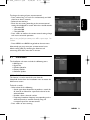
- Press y to scroll down to RCU ID.
- Change the value from 39 to 40 or 38 using the u or i
key, and then press <OK> to validate the remote control
setting change on the receiver.A pop-up message appears,
prompting you to refer to the user manual instructions to
change the setting of your remote control
- Press <OK> to proceed. Another pop-up message
appears, indicating that you must now change the setting
of your remote control.
28 MENU
DTR 2010_indice 1.qxd
15/05/06
11:13
Page 29
English
To change the setting of your remote control:
- Press number keys <1> and <3> simultaneously and hold
them for at least 5 seconds.
- Release these two keys.
- Enter the new setting according to the remote control
setting value displayed on screen within the next 60 seconds:
• 1 for code 039
• 3 for code 040
• 5 for code 038.
- Press <OK> to confirm the remote control setting change
and return to normal operation.
Note: in case you find you cannot press <OK>, repeat steps 1 to
3 above.
- Press <MENU> or <BACK> to go back to the main menu.
Alternatively you may reset your remote control to its
default setting (039) by removing the batteries and
reinserting them after more than 3 minutes.
8.7
Installation
The Installation sub-menu includes the following items:
o Add Service
o Signal Test
o Product Identifier
o Factory Default
o Software Update.
8.7.1
Add Service
This feature is used to search for new channels.
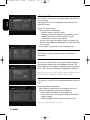
Select Add Service from the Installation menu to access the
Add Service screen.
To launch a search:
- Select values for the following:
• Search type: select Automatic to perform a search for
all channels or Manual for a particular channel to be
selected below.
• Number: select a channel number.
• Frequency: broadcast frequency corresponding to the
selected channel or entered manually using the
numerical keys of the remote control.
- Press <OK> to start scanning.
MENU 29
DTR 2010_indice 1.qxd
15/05/06
11:13
8.7.2
Page 30
Signal Test
English
This feature is used to test the signal strength and quality for
a given channel.
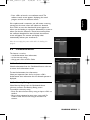
Select Signal Test from the Installation menu to access the
Signal Test screen.
To test the signal strength:
- Select values for the following:
• Number: select a channel number.
• Frequency: broadcast frequency corresponding to the
selected channel or entered manually using the
numerical keys of the remote control.
As you enter values, the signal strength and quality, and
Bit Error Rate (BER) are displayed on the right-hand side
of the screen.
- Press <BACK> to go back to the Installation menu.
8.7.3
Product Identifier
This feature is used to provide hardware and software
information.
8.7.4
Factory Default
To reset your receiver back to the factory default condition,
select Factory Default from the Installation sub-menu.The
Factory Default screen appears, displaying a warning message.
Press <OK> to confirm (selection is highlighted in yellow).
Note: if you reset your receiver to factory default settings, you lose
all your personal settings which were previously stored.
8.7.5
Software update
This feature is used to set the software download mode and
type.
To manage software downloads:
- Select Software update from the Installation sub-menu.
- Select the appropriate values for the following:
• Select mode: Auto Mode or User Mode. It is
recommended to set the update mode to Auto Mode
(default setting).
• Download Type: Software, Software+Data or Data
Note: data is for example a preset list.
30 MENU
DTR 2010_indice 1.qxd
15/05/06
11:13
Page 31
English
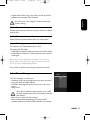
- Press <OK> to launch a new software search.The
software search screen appears, displaying the search
progress and the new software version.
If the update mode is automatic, you will receive a warning
message on the screen when new software is detected.
Press <OK> to start the download. A screen appears to
inform you the loading is in progress, followed by a screen to
inform you that the software is stored into memory. After
the automatic download has been finished, the welcome
screen will appear.The receiver will display video
automatically without your interference.
Note: do not unplug the power cable while the loading is in
progress.
8.8
Conditional Access
This feature is used to:
- view Authorization class information;
- set the maturity rating;
- change your smart card Pin Code.
8.8.1
Authorization
Select Authorization from the Conditional Access sub-menu
to access the Authorization screen.
To view Authorization class information:
Select your operator from the list and press <OK>.
Authorization class information for the selected operator is
displayed.
8.8.2
Maturity Rating
Select Maturity Rating from the Conditional Access
sub-menu to access the Maturity Rating screen.
To modify the maturity rating:
- Enter the desired new maturity rating and press <OK> to
confirm.
- You are then prompted to enter your smart card Pin
Code in order for the new rating to be taken into
account.
RUNNING HEADS 31
DTR 2010_indice 1.qxd
15/05/06
11:14
8.8.3
Page 32
Change Pin Code
English
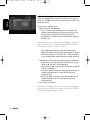
Select Change Pin Code from the Conditional Access submenu to access the Change Pin Code screen.
To modify your smart card Pin Code:
- Enter your smart card Pin Code.
Note: your smart card Pin Code may be different from your
receiver Pin Code.
- Enter your new smart card Pin Code.
- Enter your new smart card Pin Code again.
- Press <OK> to confirm and exit the screen.
8.8.4
Pay Per View
Select Pay Per View from the Conditional Access sub-menu
to access the Pay Per View screen.
This screen is used to modify your purchase threshold and
view Service Information.
To modify your purchase threshold:
- Select Change purchase threshold from the Pay Per View
screen and press <OK> to access the Change purchase
threshold screen.
- Select your operator from the list and press <OK>.
Information for the selected operator is displayed.
8.8.5
CA Information
Select CA Information from the Conditional Access submenu to access the CA Information screen.
This screen is used to display conditional access information.
32 RUNNING HEADS
DTR 2010_indice 1.qxd
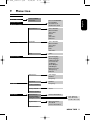
9
15/05/06
11:14
Page 33
Menu tree
Guide
Channel POOL
Favourites
Parental control
(Pin Code required)
Timer Manager
Menu lock ON/OFF
Parental Rate
New Pin Code
Confirm Pin Code
Record Timer
Timer Number
Channel Name
Timer Type
Month
Date
Start Time
End Time
Reminder
Timer Number
Channel Name
Timer Type
Month
Date
Start Time
Sleep
Time
System Setting
English
Channel Manager
Menu Language
Audio Language
Subtitle language
Screen Format
TV Output
Audio Output
VCR Output
Banner Timeout
Transparency
RCU ID
Add Service
Search Type
Number
Frequency
Signal Test
Number
Frequency
Installation
Product Identifier
Factory default
Yes/no
Software Update
Information
Authorization
Maturity Rating
Change Pin Code
Service Information
Pay Per View
Change Purchase
Threshold
Service Information
New Maturity
New Pin Code
Confirm Pin Code
CA Information
MENU TREE 33
DTR 2010_indice 1.qxd
15/05/06
11:14
Page 34
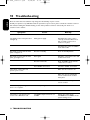
10 Troubleshooting
English
Please be aware that new software may change the functionality of your receiver.
Should you experience any difficulties with the operation of your receiver, please consult the relevant section of
this manual, including this Troubleshooting section. If the problem cannot be solved, call your dealer or a
customer service adviser.
Symptom
The display on the front panel does
not light up.
Cause
Faulty power supply
Remedy
Check that the power cord is
correctly connected. Disconnect
this cord and reconnect it to
ensure it is in place.
Check that the power is available
at the wall socket.
No sound or picture but the front
panel red light is on.
Receiver in Standby
Press the Standby button.
No sound or picture but the front
panel green light is on.
Poor signal
Check the connections at the wall
socket and receiver.
Receiver in TV mode
Press <TV/STB> on the remote
control once or twice.
Poor SCART connections
Check the SCART connections
The remote control does not
operate your receiver.
Make sure the receiver is on.
Make sure you are pointing the
remote control at the receiver
front panel.
Check the batteries in your
remote control.
On-screen display working but
there is no reception.
Poor reception/signal
Check the installation.
Intermittent reception.
Faulty connections
Check all connections and cable.
The picture is not sharp and onscreen text is difficult to read.
TV SCART output format not set
to RGB
Change the setting of the
TV SCART item to RGB from the
System Setting screen.
34 TROUBLESHOOTING
15/05/06
Symptom
11:14
Page 35
Cause
Remedy
TV SCART not connected to the
RGB-capable SCART socket of
your TV set.
Refer to your TV User Manual.
Inappropriate TV SCART
Use the SCART cable supplied
with your receiver.
You cannot find all the channels
you think should be available.
The signal to your aerial may be
weak.
Try retuning your receiver,
following the relevant steps in
chapter 6. If you are still missing
channels, call your local dealer.
The picture on some channels
seems to have been stretched or
squashed.
The broadcast is probably in wide
screen and the receiver settings
may not be correct.
Check the receiver “TV format”
option setting, following the
information in chapter 7.6.2. If you
have a wide screen TV, you may
also need to check the settings on
your TV.
Even if you use the numerical keys,
you cannot access a particular
channel.
The parental lock has been
activated on this channel and a
message asks for your parental
code.
Enter your parental code to access
the channel or remove it as a
locked channel.
You set a timer but did not record
what you wanted.
The recorder was set incorrectly.
Make sure that your recorder is
set for the same time as your
digital receiver.
The order of the channels has
changed.
They have been re-arranged.
Refer to paragraph 8.3.1 to change
the order again.
You have forgotten or lost your Pin
Code.
You must reset it from the Parental
Control screen.To access the
Parental Control screen, use the
following 4-digit code: 3141.
Keep this code secret to prevent
others from using it.
For detailed information on
Parental Control, refer to
paragraph 8.4.3.
Note: if you have tried all of the actions suggested above and could not solve the problem, please contact
your dealer or service provider.
TROUBLESHOOTING 35
English
DTR 2010_indice 1.qxd
DTR 2010_indice 1.qxd
15/05/06
11:14
Page 36
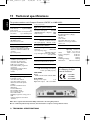
11 Technical specifications
English
This product conforms with European Directives 95/47/EC and 2002/21/EC.
Video decoding
- Low power mode
- MPEG-2 DVB compliant up to MP@ML
up to 15 Mbit/sec
- Video bit rate:
4:3
- Video format:
(letter box if source is in 16:9) and 16:9
- Resolution:
up to 720x576 pixels
Application system resources
Audio decoding
Terrestrial antenna interface
- MPEG layer I / II
- All MPEG bit rates
- Mono and stereo mode
- RF input:
Ease of Installation
Reception-Demodulation
- Menu-controlled installation and
operation using On-Screen Display
- Automatic channels installation via
scanning
- Up to 500 presets
- Demodulation type: COFDM 2K/ 8K
- Network:
MFN / SFN
- Input frequency range:
VHF III & UHF IV/V
- Loop-through frequency range (MHz):
47 - 862 MHz
Ease of Use
- Channel list editing for personalized
installation (delete, add, move)
- 3 favourite TV channel lists
- 3 favourite Radio channel lists
- Fully remote controlled
- Now & Next ESG / programme
monitoring
- Automatic recording via Timer
programming in ESG
- 2 LEDs
Operation/Features
- Full range RF loop-through
- TV & Radio modes
- 3 Fav list forTV channels
- 3 Fav list for Radio channels
- Automatic channel list update
- Subtitles
- Parental lock with Pin Code
- Child timer
- 8 events VCR timers
- Record Failure alarm
- Record header message
- Now & Next ESG
- Highlight programme coming soon in
ESG
- Software upgrade via over-the-air
download
-
Processor:
ST
Processor clock speed:
81 MHz
SDRAM-CPU/Video - Graphics: 8 MB
Flash memory:
2 MB
IEC 169 - 2 female connector
- RF output (bypass): IEC 169 - 2 male
Conditional Access
- One Smart Card Reader
- Viaccess Conditional Access System
Serial interface:
RS 232
Accessories
- Remote control
Type RC19336002/01 (“Zappa”)
- SCART cable
- RF cable
- User manual
- Worldwide Guarantee booklet
- Batteries: 2 x 1.5 V type AA/ R06
- Mains cord
Miscellaneous
- Temperature range (°C):
Operating: +5 to 40 °C
Storage: -10 to +70 °C
- Mains:
230 V ~ +/-10% - 50 Hz
- Power consumption:
15 W max
- Standby:
10 W max
- Weight:
0.980 kg
- Including packaging:
1.780 kg
- Dimensions:
365 x 230 x 62 mm
ConnectionsTV SCART
Output: CVBS, controlled audio L / R,
RGB, Slow blanking, Fast blanking,
S-Video (for LCD projector)
VCR SCART
Output:
CVBS, controlled audio L/R,Y/C, RGB
Audio CINCH
Analogue audio output:
L/R
Digital audio output: AC-3 over SPDIF
The product complies with
the following European
council Directives:
- 73/23/EEC
- 93/68/EEC
- 89/336/EEC
AC-3 ® is a registered trademark of Dolby Laboratories Licensing Corporation.
Due to continued product improvements, this information is subject to change without notice.
36 TECHNICAL SPECIFICATIONS