1
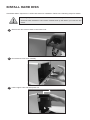
INSTALL HARD DISK
8
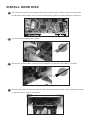
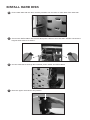
Fix the hard disks with the 5mm screws provided. Use 2 screws on each side of the hard disk.
9
Connect the SATA cables and the hard disk power cables to the hard disks. Please note that the
longest SATA cable is for HDD 1.
10
Use the cable ties to arrange the hard disk power cables and SATA cables.
11
Place the upper case back to the position.