1
Chapter 1: Introduction
Table of Contents
Chapter I: Introduction..............................................................................1-4
1.1 Overview..................................................................................................... 1-4
1.2 IPMI Version 2.0......................................................................................... 1-5
1.3 Product Features....................................................................................... 1-5
1.4 Checklist.................................................................................................... 1-5
1.5 An Important Note to the User................................................................. 1-5
1.6 Contacting Supermicro............................................................................. 1-6
Chapter 2: Technical Specifications and Hardware Installation........... 2-1
2.1 The Configuration of the AOC-SIMSO/SIMSO+ & the AOC-USB2RJ45.... .......................................................................................................................... 2-1
2.2 AOC-SIMSO/SIMSO+ Connector and Jumper Locations ..................... 2-2
2.2.1 Front Components on the AOC-SIMSO(+)............................................... 2-2
2.2.3 Connector Descriptions and Pin Definitions............................................. 2-3
2.2.4 LED Descriptions and Pin Definitions...................................................... 2-4
2.2.5 Rear Components on the AOC-SIMSO(+)............................................... 2-5
2.2.2 The Dedicated LAN LED on the AOC-USB2RJ45................................... 2-2
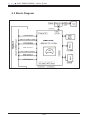
2.3 Block Diagram........................................................................................... 2-6
2.4 Installing the AOC-SIMSO(+).................................................................... 2-7
2.4.1 Safety Guidelines..................................................................................... 2-7
2.4.2 SIMSO Slot Locations.............................................................................. 2-8
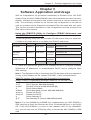
Chapter 3: Software Application and Usage........................................... 3-1
3.1 Home Page................................................................................................. 3-3
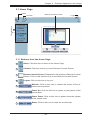
3.2 Functions Listed On the Home Page...................................................... 3-5
3.2.1 Remote Control........................................................................................ 3-5
3.2.2 Virtual Media............................................................................................. 3-7
3.2.3 System Health.........................................................................................3-11
3.2.4 User Management.................................................................................. 3-17
3.2.5 KVM Settings.......................................................................................... 3-21
3.2.6 Device Settings....................................................................................... 3-25
3.2.7 Maintenance........................................................................................... 3-38
3.3 Remote Console Main Page................................................................... 3-42
3.3.1 Remote Console Options....................................................................... 3-43
Chapter 4: Frequently Asked Questions................................................. 4-1
1-3