1
■
“Installing System Management Tools” on page 15
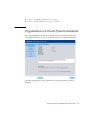
Oracle System Assistant
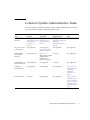
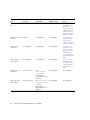
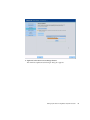
Oracle System Assistant allows you to get the latest software and firmware updates,
update firmware, configure hardware, and install supported operating systems.
Oracle System Assistant is a management tool that integrates Oracle’s system
management products and related software.
It is highly recommended that you use Oracle System Assistant to update your
system to the latest software release before you use the system. You can get the latest
available system BIOS, Oracle ILOM, firmware, and drivers from Oracle by
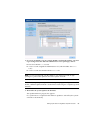
performing the Get Updates task in Oracle System Assistant. For instructions on how
to use the Get Updates task, see “Get Platform Software Release Updates” on
page 45. An Internet connection is required.
You also can download the latest firmware and software updates from My Oracle
Support at http://support.oracle.com. For information about downloading
firmware and software from My Oracle Support, see “Getting Server Firmware and
Software” on page 197.
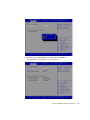
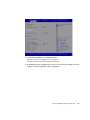
You can start Oracle System Assistant from the BIOS or from Oracle ILOM. Oracle
System Assistant then displays a graphical user interface application from which you
can access features and complete tasks with or without an operating system installed
on the server. After the operating system is running on the server, the tools, drivers,
and documentation appear as files on a typical storage device, allowing you to use
Oracle System Assistant as resource media.
With Oracle System Assistant, you can:
4
■
Get the latest available system BIOS, Oracle ILOM, firmware, and drivers from
Oracle (an Internet connection is required).
■
Update system BIOS, Oracle ILOM, and Oracle-certified device drivers for
optional accessory cards and other system hardware.
■
Configure RAID 0 or RAID 1 for servers that contain a supported disk controller.
■
Configure the Oracle ILOM service processor, including modifying identification
information; configuring network settings (IPv4 and IPv6) and DNS; adding,
deleting, or modifying users; and setting the service processor clock.
■
Install supported operating systems with the latest drivers and supported tools.
■
Display system overview and hardware inventory information.
■
Set the keyboard language.
■
Access the Oracle System Assistant (Linux) shell terminal window allowing use of
the runtime environment.
Sun Server X3-2 Administration Guide • April 2014