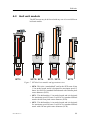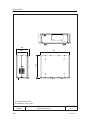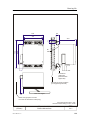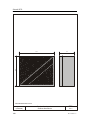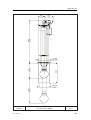
1
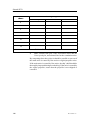
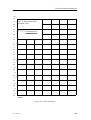
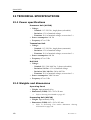
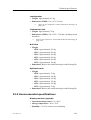
Installation manual
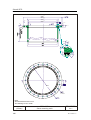
Simrad SP70
Long range fishery sonar
www.simrad.com
ALWAY S
AT
THE
FOR EFR ONT
OF
TECHNOLOG Y
Simrad SP70
Low frequency long range fishery sonar
Installation manual
WARNING
The sonar must never be powered up when the ship is
in dry dock. The transducer will be damaged if it
transmits in open air. To prevent inadvertent use of the
sonar, set switch S102 at the rear side of the Sonar
Processor Unit to Off whenever the vessel is in dry dock.
851--164336 / Rev.C
Note
Simrad AS makes every effort to ensure that the information contained within this
document is correct. However, our equipment is continuously being improved and
updated, so we cannot assume liability for any errors which may occur.
Warning
The equipment to which this manual applies must only be used for the purpose for which
it was designed. Improper use or maintenance may cause damage to the equipment or
injury to personnel. The user must be familiar with the contents of the appropriate manuals
before attempting to operate or work on the equipment.
Simrad AS disclaims any responsibility for damage or injury caused by improper
installation, use or maintenance of the equipment.
Copyright
E 2003 Simrad AS
ISBN 82-8066-010-0
The information contained within this document remains the sole property of Simrad AS.
No part of this document may be copied or reproduced in any form or by any means, and
the information contained within is not to be communicated to a third party, without the
prior written consent of Simrad AS.
Simrad AS
Strandpromenaden 50
Box 111
N-3191 Horten
Telephone:
Facsimile:
+47 33 03 40 00
+47 33 04 29 87
ALWAYS AT T HE F O REFRO N T O F TE CHN O LO GY
Installation manual
Sections
This document is the Installation manual for the Simrad SP70. sonar system. It provides
the information and technical specifications necessary to install the various system
components.
1
Introduction (Page 1)
2
Installation planning (Page 22)
3
Installation of the Sonar Trunk (Page 28)
4
Installation of the Hull Unit (Page 32)
5
Installation of the Transceiver Unit (Page 41)
6
Installation of Wheelhouse Units (Page 45)
7
Cable layout (Page 51)
8
Connecting Auxiliary equipment (Page 70)
9
Start-up procedures (Page 82)
10
Testing the auxiliary equipment (Page 125)
11
Final testing and measurements (Page 138)
12
Technical specifications (Page 150)
13
Drawing file (Page 171)
14
Installation remarks and signature (Page 203)
851-164336 / C
I
Simrad SP70
Remarks
References
Further information about the SP70 system may be found in the following manuals:
• SP70 Operator manual
The reader
This Installation manual is intended for the design and installation engineers at the shipyard
performing the installation. The information is supplied as the basis for the shipyard’s own
installation drawings applicable to the vessel. On completion of the installation, this
manual must be kept on the vessel for reference purposes during system maintenance.
II
851-164336 / C
Installation manual
Table of contents
1
INTRODUCTION . . . . . . . . . . . . . . . . . . . . . . . . . . . . . . . . . . . . . . . . .
1.1 Purpose and description . . . . . . . . . . . . . . . . . . . . . . . . . . . . . . . . . . . .
Introduction . . . . . . . . . . . . . . . . . . . . . . . . . . . . . . . . . . . . . . . . . . . . .
Installation procedures . . . . . . . . . . . . . . . . . . . . . . . . . . . . . . . . . . . .
1.2
1.3
Scope of supply . . . . . . . . . . . . . . . . . . . . . . . . . . . . . . . . . . . . . . . . . . .
1.7
1.8
2
3
3
3
Options . . . . . . . . . . . . . . . . . . . . . . . . . . . . . . . . . . . . . . . . . . . . . . . .
3
Peripheral equipment . . . . . . . . . . . . . . . . . . . . . . . . . . . . . . . . . . . . . .
Supply conditions . . . . . . . . . . . . . . . . . . . . . . . . . . . . . . . . . . . . . . . . .
Purpose . . . . . . . . . . . . . . . . . . . . . . . . . . . . . . . . . . . . . . . . . . . . . . . .
Equipment responsibility . . . . . . . . . . . . . . . . . . . . . . . . . . . . . . . . . .
Receipt, unpacking and storage . . . . . . . . . . . . . . . . . . . . . . . . . . . . . .
1.5
1.6
1
1
Main units . . . . . . . . . . . . . . . . . . . . . . . . . . . . . . . . . . . . . . . . . . . . . .
General . . . . . . . . . . . . . . . . . . . . . . . . . . . . . . . . . . . . . . . . . . . . . . . .
Required inputs . . . . . . . . . . . . . . . . . . . . . . . . . . . . . . . . . . . . . . . . . .
Additional inputs . . . . . . . . . . . . . . . . . . . . . . . . . . . . . . . . . . . . . . . . .
1.4
1
1
General safety rules . . . . . . . . . . . . . . . . . . . . . . . . . . . . . . . . . . . . . . . .
Installation requirements . . . . . . . . . . . . . . . . . . . . . . . . . . . . . . . . . . . .
6
6
6
8
8
8
8
9
10
Responsibility and approval . . . . . . . . . . . . . . . . . . . . . . . . . . . . . . . .
Supply power . . . . . . . . . . . . . . . . . . . . . . . . . . . . . . . . . . . . . . . . . . .
Environmental requirements . . . . . . . . . . . . . . . . . . . . . . . . . . . . . . . .
Compass deviation . . . . . . . . . . . . . . . . . . . . . . . . . . . . . . . . . . . . . . .
Noise sources . . . . . . . . . . . . . . . . . . . . . . . . . . . . . . . . . . . . . . . . . . .
10
10
10
10
11
Dry docking . . . . . . . . . . . . . . . . . . . . . . . . . . . . . . . . . . . . . . . . . . . . .
11
Wiring . . . . . . . . . . . . . . . . . . . . . . . . . . . . . . . . . . . . . . . . . . . . . . . . .
11
Equipment handling . . . . . . . . . . . . . . . . . . . . . . . . . . . . . . . . . . . . . . .
12
Introduction . . . . . . . . . . . . . . . . . . . . . . . . . . . . . . . . . . . . . . . . . . . . .
12
Transportation . . . . . . . . . . . . . . . . . . . . . . . . . . . . . . . . . . . . . . . . . . .
12
Initial preservation . . . . . . . . . . . . . . . . . . . . . . . . . . . . . . . . . . . . . . .
Inspection and unpacking . . . . . . . . . . . . . . . . . . . . . . . . . . . . . . . . . .
13
15
Storage . . . . . . . . . . . . . . . . . . . . . . . . . . . . . . . . . . . . . . . . . . . . . . . . .
17
Pre-installation storage . . . . . . . . . . . . . . . . . . . . . . . . . . . . . . . . . . . .
17
After use storage . . . . . . . . . . . . . . . . . . . . . . . . . . . . . . . . . . . . . . . . .
17
Re-packing . . . . . . . . . . . . . . . . . . . . . . . . . . . . . . . . . . . . . . . . . . . . .
ESD precautions . . . . . . . . . . . . . . . . . . . . . . . . . . . . . . . . . . . . . . . . .
Temperature protection . . . . . . . . . . . . . . . . . . . . . . . . . . . . . . . . . . . .
19
20
21
INSTALLATION PLANNING . . . . . . . . . . . . . . . . . . . . . . . . . . . . .
22
851-164336 / C
III
Simrad SP70
2.1
2.2
General . . . . . . . . . . . . . . . . . . . . . . . . . . . . . . . . . . . . . . . . . . . . . . . . .
Location of the Hull Unit . . . . . . . . . . . . . . . . . . . . . . . . . . . . . . . . . . .
Fore and aft . . . . . . . . . . . . . . . . . . . . . . . . . . . . . . . . . . . . . . . . . . . . .
Athwartships . . . . . . . . . . . . . . . . . . . . . . . . . . . . . . . . . . . . . . . . . . . .
Important considerations . . . . . . . . . . . . . . . . . . . . . . . . . . . . . . . . . . .
2.3
Sonar room requirements . . . . . . . . . . . . . . . . . . . . . . . . . . . . . . . . . . .
Size . . . . . . . . . . . . . . . . . . . . . . . . . . . . . . . . . . . . . . . . . . . . . . . . . . .
Access hatches . . . . . . . . . . . . . . . . . . . . . . . . . . . . . . . . . . . . . . . . . . .
Lifting . . . . . . . . . . . . . . . . . . . . . . . . . . . . . . . . . . . . . . . . . . . . . . . . .
Heating . . . . . . . . . . . . . . . . . . . . . . . . . . . . . . . . . . . . . . . . . . . . . . . .
Insulation . . . . . . . . . . . . . . . . . . . . . . . . . . . . . . . . . . . . . . . . . . . . . . .
Ventilation . . . . . . . . . . . . . . . . . . . . . . . . . . . . . . . . . . . . . . . . . . . . . .
Conduit . . . . . . . . . . . . . . . . . . . . . . . . . . . . . . . . . . . . . . . . . . . . . . . .
Air vent pipe . . . . . . . . . . . . . . . . . . . . . . . . . . . . . . . . . . . . . . . . . . . .
Bilge pump . . . . . . . . . . . . . . . . . . . . . . . . . . . . . . . . . . . . . . . . . . . . .
Lighting . . . . . . . . . . . . . . . . . . . . . . . . . . . . . . . . . . . . . . . . . . . . . . . .
Dry docking . . . . . . . . . . . . . . . . . . . . . . . . . . . . . . . . . . . . . . . . . . . . .
Decking . . . . . . . . . . . . . . . . . . . . . . . . . . . . . . . . . . . . . . . . . . . . . . . .
3
SONAR TRUNK . . . . . . . . . . . . . . . . . . . . . . . . . . . . . . . . . . . . . . . . . . .
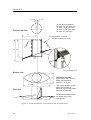
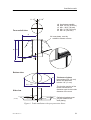
3.1 Mounting of the trunk . . . . . . . . . . . . . . . . . . . . . . . . . . . . . . . . . . . . . .
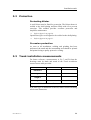
3.2 Protection . . . . . . . . . . . . . . . . . . . . . . . . . . . . . . . . . . . . . . . . . . . . . . .
Protecting blister . . . . . . . . . . . . . . . . . . . . . . . . . . . . . . . . . . . . . . . . .
Corrosion protection . . . . . . . . . . . . . . . . . . . . . . . . . . . . . . . . . . . . . .
3.3
22
23
23
23
23
25
25
25
25
25
25
25
26
26
26
26
26
26
28
28
29
29
29
Trunk installation measurements . . . . . . . . . . . . . . . . . . . . . . . . . . . . .
29
4
HULL UNIT . . . . . . . . . . . . . . . . . . . . . . . . . . . . . . . . . . . . . . . . . . . . . . .
4.1 Introduction . . . . . . . . . . . . . . . . . . . . . . . . . . . . . . . . . . . . . . . . . . . . . .
4.2 Hull unit models . . . . . . . . . . . . . . . . . . . . . . . . . . . . . . . . . . . . . . . . . .
4.3 Unpacking . . . . . . . . . . . . . . . . . . . . . . . . . . . . . . . . . . . . . . . . . . . . . . .
4.4 Mounting . . . . . . . . . . . . . . . . . . . . . . . . . . . . . . . . . . . . . . . . . . . . . . . .
4.5 Bleeding air . . . . . . . . . . . . . . . . . . . . . . . . . . . . . . . . . . . . . . . . . . . . . .
4.6 Mechanical support . . . . . . . . . . . . . . . . . . . . . . . . . . . . . . . . . . . . . . . .
4.7 Transducer alignment . . . . . . . . . . . . . . . . . . . . . . . . . . . . . . . . . . . . . .
4.8 Installation check--list . . . . . . . . . . . . . . . . . . . . . . . . . . . . . . . . . . . . . .
32
32
33
35
36
37
38
39
40
5
TRANSCEIVER UNIT . . . . . . . . . . . . . . . . . . . . . . . . . . . . . . . . . . . . .
41
Introduction . . . . . . . . . . . . . . . . . . . . . . . . . . . . . . . . . . . . . . . . . . . . .
Procedure . . . . . . . . . . . . . . . . . . . . . . . . . . . . . . . . . . . . . . . . . . . . . . .
41
41
6
IV
WHEELHOUSE UNITS . . . . . . . . . . . . . . . . . . . . . . . . . . . . . . . . . . . .
6.1 Location . . . . . . . . . . . . . . . . . . . . . . . . . . . . . . . . . . . . . . . . . . . . . . . .
45
45
851-164336 / C
Installation manual
Units . . . . . . . . . . . . . . . . . . . . . . . . . . . . . . . . . . . . . . . . . . . . . . . . . .
Installation requirements . . . . . . . . . . . . . . . . . . . . . . . . . . . . . . . . . . .
Display unit . . . . . . . . . . . . . . . . . . . . . . . . . . . . . . . . . . . . . . . . . . . . .
Operating Panel . . . . . . . . . . . . . . . . . . . . . . . . . . . . . . . . . . . . . . . . . .
Processor Unit . . . . . . . . . . . . . . . . . . . . . . . . . . . . . . . . . . . . . . . . . . .
Loudspeaker . . . . . . . . . . . . . . . . . . . . . . . . . . . . . . . . . . . . . . . . . . . .
6.2
6.3
6.4
7
Mounting the display unit . . . . . . . . . . . . . . . . . . . . . . . . . . . . . . . . . . .
Mounting the Operating Panel . . . . . . . . . . . . . . . . . . . . . . . . . . . . . . .
Mounting the Processor Unit . . . . . . . . . . . . . . . . . . . . . . . . . . . . . . . .
48
49
50
CABLE LAYOUT . . . . . . . . . . . . . . . . . . . . . . . . . . . . . . . . . . . . . . . . . .
7.1 Introduction . . . . . . . . . . . . . . . . . . . . . . . . . . . . . . . . . . . . . . . . . . . . . .
7.2 System cabling . . . . . . . . . . . . . . . . . . . . . . . . . . . . . . . . . . . . . . . . . . .
51
51
52
Cable layout . . . . . . . . . . . . . . . . . . . . . . . . . . . . . . . . . . . . . . . . . . . .
System and shipyard cables . . . . . . . . . . . . . . . . . . . . . . . . . . . . . . . .
7.3
Cable specifications . . . . . . . . . . . . . . . . . . . . . . . . . . . . . . . . . . . . . . .
Basic configuration . . . . . . . . . . . . . . . . . . . . . . . . . . . . . . . . . . . . . . .
Processing Unit connections . . . . . . . . . . . . . . . . . . . . . . . . . . . . . . . .
7.4
Wheelhouse cabling . . . . . . . . . . . . . . . . . . . . . . . . . . . . . . . . . . . . . . .
Introduction . . . . . . . . . . . . . . . . . . . . . . . . . . . . . . . . . . . . . . . . . . . . .
Data cable to the Transceiver Unit (No.15) . . . . . . . . . . . . . . . . . . . .
AC Power to the display unit (No.1) . . . . . . . . . . . . . . . . . . . . . . . . .
Display cable (No.2) . . . . . . . . . . . . . . . . . . . . . . . . . . . . . . . . . . . . . .
Operating panel (No.3) . . . . . . . . . . . . . . . . . . . . . . . . . . . . . . . . . . . .
Operating panel (USB) (No.4) . . . . . . . . . . . . . . . . . . . . . . . . . . . . . .
AC power to Processor Unit (No.5) . . . . . . . . . . . . . . . . . . . . . . . . . .
Loudspeaker (No.6) . . . . . . . . . . . . . . . . . . . . . . . . . . . . . . . . . . . . . . .
Internal connections (No.7 - Loop A) . . . . . . . . . . . . . . . . . . . . . . . . .
Internal connections (No.8 - Loop B) . . . . . . . . . . . . . . . . . . . . . . . . .
Interface cables to peripheral units . . . . . . . . . . . . . . . . . . . . . . . . . . .
7.5
Sonar room cabling . . . . . . . . . . . . . . . . . . . . . . . . . . . . . . . . . . . . . . . .
Introduction . . . . . . . . . . . . . . . . . . . . . . . . . . . . . . . . . . . . . . . . . . . . .
Motor control (No.17) . . . . . . . . . . . . . . . . . . . . . . . . . . . . . . . . . . . . .
Data cable to the Processor Unit (No.15) . . . . . . . . . . . . . . . . . . . . . .
AC power for hoist/lower motor (No. 19) . . . . . . . . . . . . . . . . . . . . .
AC power to the Transceiver Unit (No.18) . . . . . . . . . . . . . . . . . . . . .
Transducer cable (No.16) . . . . . . . . . . . . . . . . . . . . . . . . . . . . . . . . . .
7.6
8
45
46
46
46
46
47
52
52
54
54
55
56
56
57
57
57
58
58
59
60
60
60
60
61
61
61
63
64
65
66
Basic cabling requirements . . . . . . . . . . . . . . . . . . . . . . . . . . . . . . . . . .
67
PERIPHERAL EQUIPMENT . . . . . . . . . . . . . . . . . . . . . . . . . . . . . . .
8.1 General . . . . . . . . . . . . . . . . . . . . . . . . . . . . . . . . . . . . . . . . . . . . . . . . .
70
70
851-164336 / C
V
Simrad SP70
8.2
8.3
8.4
8.5
8.6
8.7
8.8
8.9
8.10
9
Introduction . . . . . . . . . . . . . . . . . . . . . . . . . . . . . . . . . . . . . . . . . . . . .
Required inputs . . . . . . . . . . . . . . . . . . . . . . . . . . . . . . . . . . . . . . . . . .
70
70
Additional inputs . . . . . . . . . . . . . . . . . . . . . . . . . . . . . . . . . . . . . . . . .
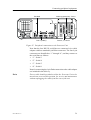
Physical connections to the Processor Unit . . . . . . . . . . . . . . . . . . . .
70
70
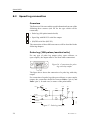
Speed log connection . . . . . . . . . . . . . . . . . . . . . . . . . . . . . . . . . . . . . .
Overview . . . . . . . . . . . . . . . . . . . . . . . . . . . . . . . . . . . . . . . . . . . . . . .
Pulse log (200 pulses/nautical mile) . . . . . . . . . . . . . . . . . . . . . . . . . .
72
72
Speed log with RS-232 output . . . . . . . . . . . . . . . . . . . . . . . . . . . . . .
Speed data from (D)GPS (RS-232) . . . . . . . . . . . . . . . . . . . . . . . . . . .
73
73
Course gyro connection . . . . . . . . . . . . . . . . . . . . . . . . . . . . . . . . . . . .
74
Overview . . . . . . . . . . . . . . . . . . . . . . . . . . . . . . . . . . . . . . . . . . . . . . .
Course gyro with RS-232 serial line output . . . . . . . . . . . . . . . . . . . .
74
74
Course gyro with 3-phase synchro or stepper output . . . . . . . . . . . . .
74
(D)GPS connection . . . . . . . . . . . . . . . . . . . . . . . . . . . . . . . . . . . . . . . .
Echo sounder connection . . . . . . . . . . . . . . . . . . . . . . . . . . . . . . . . . . .
Trawl system connection . . . . . . . . . . . . . . . . . . . . . . . . . . . . . . . . . . . .
Purse seine system connection . . . . . . . . . . . . . . . . . . . . . . . . . . . . . . .
Current meter . . . . . . . . . . . . . . . . . . . . . . . . . . . . . . . . . . . . . . . . . . . .
Radio buoys . . . . . . . . . . . . . . . . . . . . . . . . . . . . . . . . . . . . . . . . . . . . . .
Trackball / mouse connection . . . . . . . . . . . . . . . . . . . . . . . . . . . . . . . .
75
76
77
78
79
80
81
START-UP PROCEDURES . . . . . . . . . . . . . . . . . . . . . . . . . . . . . . . .
9.1 Introduction . . . . . . . . . . . . . . . . . . . . . . . . . . . . . . . . . . . . . . . . . . . . . .
9.2 Check--list before start--up commences . . . . . . . . . . . . . . . . . . . . . . . . .
9.3 Starting up the stand--by power supply . . . . . . . . . . . . . . . . . . . . . . . . .
9.4 Starting up the Hull Unit . . . . . . . . . . . . . . . . . . . . . . . . . . . . . . . . . . . .
82
82
83
84
86
9.5
9.6
9.7
Introduction . . . . . . . . . . . . . . . . . . . . . . . . . . . . . . . . . . . . . . . . . . . . .
Functional check . . . . . . . . . . . . . . . . . . . . . . . . . . . . . . . . . . . . . . . . .
Apply 3-phase AC power . . . . . . . . . . . . . . . . . . . . . . . . . . . . . . . . . .
86
86
89
Re-wire for 230 Vac 3-phase . . . . . . . . . . . . . . . . . . . . . . . . . . . . . . . .
89
Functional check with power . . . . . . . . . . . . . . . . . . . . . . . . . . . . . . .
90
Adjusting the middle--position switch . . . . . . . . . . . . . . . . . . . . . . . . .
Starting up the Wheelhouse Units . . . . . . . . . . . . . . . . . . . . . . . . . . . . .
92
94
Introduction . . . . . . . . . . . . . . . . . . . . . . . . . . . . . . . . . . . . . . . . . . . . .
Start up . . . . . . . . . . . . . . . . . . . . . . . . . . . . . . . . . . . . . . . . . . . . . . . .
94
94
Display set-up . . . . . . . . . . . . . . . . . . . . . . . . . . . . . . . . . . . . . . . . . . .
95
Checking the Operating Panel . . . . . . . . . . . . . . . . . . . . . . . . . . . . . . .
Introduction . . . . . . . . . . . . . . . . . . . . . . . . . . . . . . . . . . . . . . . . . . . . .
Functional test . . . . . . . . . . . . . . . . . . . . . . . . . . . . . . . . . . . . . . . . . . .
VI
72
96
96
96
851-164336 / C
Installation manual
Power off . . . . . . . . . . . . . . . . . . . . . . . . . . . . . . . . . . . . . . . . . . . . . . .
9.8
Checking the hoisting/lower system . . . . . . . . . . . . . . . . . . . . . . . . . . .
Introduction . . . . . . . . . . . . . . . . . . . . . . . . . . . . . . . . . . . . . . . . . . . . .
Preparations . . . . . . . . . . . . . . . . . . . . . . . . . . . . . . . . . . . . . . . . . . . . .
Checking the bridge functions . . . . . . . . . . . . . . . . . . . . . . . . . . . . . .
Checking the sonar room functions . . . . . . . . . . . . . . . . . . . . . . . . . .
9.9 Starting up the Transceiver Unit . . . . . . . . . . . . . . . . . . . . . . . . . . . . . .
9.10 Self--noise test . . . . . . . . . . . . . . . . . . . . . . . . . . . . . . . . . . . . . . . . . . . .
9.11 System start--up . . . . . . . . . . . . . . . . . . . . . . . . . . . . . . . . . . . . . . . . . . .
Introduction . . . . . . . . . . . . . . . . . . . . . . . . . . . . . . . . . . . . . . . . . . . . .
Preparations . . . . . . . . . . . . . . . . . . . . . . . . . . . . . . . . . . . . . . . . . . . . .
Starting up the transmitter . . . . . . . . . . . . . . . . . . . . . . . . . . . . . . . . . .
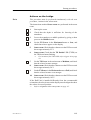
Actions on the bridge . . . . . . . . . . . . . . . . . . . . . . . . . . . . . . . . . . . . .
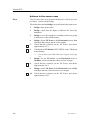
Actions in the sonar room . . . . . . . . . . . . . . . . . . . . . . . . . . . . . . . . . .
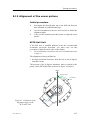
9.12 Alignment of the sonar picture . . . . . . . . . . . . . . . . . . . . . . . . . . . . . . .
Initial procedure . . . . . . . . . . . . . . . . . . . . . . . . . . . . . . . . . . . . . . . . .
SP70 Hull Unit . . . . . . . . . . . . . . . . . . . . . . . . . . . . . . . . . . . . . . . . . .
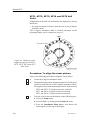
SP71, SP72, SP73, SP74 and SP75 Hull Units . . . . . . . . . . . . . . . . .
Procedure: To align the sonar picture . . . . . . . . . . . . . . . . . . . . . . . . .
9.13 Adjusting the stabilisation sensor offset . . . . . . . . . . . . . . . . . . . . . . . .
Initial procedure . . . . . . . . . . . . . . . . . . . . . . . . . . . . . . . . . . . . . . . . .
SP70 Hull Unit . . . . . . . . . . . . . . . . . . . . . . . . . . . . . . . . . . . . . . . . . .
SP71, SP72, SP73, SP74 and SP75 Hull Units . . . . . . . . . . . . . . . . .
Procedure: To enter the stabilisation offset angle . . . . . . . . . . . . . . . .
9.14 Setting own ship parameters . . . . . . . . . . . . . . . . . . . . . . . . . . . . . . . . .
Ship dimensions . . . . . . . . . . . . . . . . . . . . . . . . . . . . . . . . . . . . . . . . .
Instrument position offsets . . . . . . . . . . . . . . . . . . . . . . . . . . . . . . . . .
100
101
101
101
102
106
107
109
110
110
110
110
113
116
117
117
117
118
118
120
120
120
121
122
123
123
123
10 TESTING THE PERIPHERAL EQUIPMENT . . . . . . . . . . . . . . . 125
10.1 Introduction . . . . . . . . . . . . . . . . . . . . . . . . . . . . . . . . . . . . . . . . . . . . . . 125
10.2 General . . . . . . . . . . . . . . . . . . . . . . . . . . . . . . . . . . . . . . . . . . . . . . . . . 126
Default interface settings . . . . . . . . . . . . . . . . . . . . . . . . . . . . . . . . . . .
Changing the interface settings . . . . . . . . . . . . . . . . . . . . . . . . . . . . . .
Serial line inspection . . . . . . . . . . . . . . . . . . . . . . . . . . . . . . . . . . . . . .
10.3 Speed log . . . . . . . . . . . . . . . . . . . . . . . . . . . . . . . . . . . . . . . . . . . . . . . .
Introduction . . . . . . . . . . . . . . . . . . . . . . . . . . . . . . . . . . . . . . . . . . . . .
Pulse log (200 pulses per nautical mile) . . . . . . . . . . . . . . . . . . . . . . .
Speed log with RS-232 serial line . . . . . . . . . . . . . . . . . . . . . . . . . . . .
Speed data from (D)GPS . . . . . . . . . . . . . . . . . . . . . . . . . . . . . . . . . . .
10.4 Course gyro . . . . . . . . . . . . . . . . . . . . . . . . . . . . . . . . . . . . . . . . . . . . . .
851-164336 / C
126
126
127
129
129
129
129
130
131
VII
Simrad SP70
10.5
10.6
10.7
10.8
10.9
Introduction . . . . . . . . . . . . . . . . . . . . . . . . . . . . . . . . . . . . . . . . . . . . .
Course gyro . . . . . . . . . . . . . . . . . . . . . . . . . . . . . . . . . . . . . . . . . . . . .
131
131
Heading data from (D)GPS . . . . . . . . . . . . . . . . . . . . . . . . . . . . . . . . .
131
(D)GPS . . . . . . . . . . . . . . . . . . . . . . . . . . . . . . . . . . . . . . . . . . . . . . . . .
Echo sounder . . . . . . . . . . . . . . . . . . . . . . . . . . . . . . . . . . . . . . . . . . . . .
Trawl system . . . . . . . . . . . . . . . . . . . . . . . . . . . . . . . . . . . . . . . . . . . . .
Purse seine system . . . . . . . . . . . . . . . . . . . . . . . . . . . . . . . . . . . . . . . .
Radio buoy system . . . . . . . . . . . . . . . . . . . . . . . . . . . . . . . . . . . . . . . .
133
134
135
136
137
11 FINAL TESTS AND MEASUREMENTS . . . . . . . . . . . . . . . . . . . . 138
11.1 Introduction . . . . . . . . . . . . . . . . . . . . . . . . . . . . . . . . . . . . . . . . . . . . . . 138
11.2 Source level (SL) measurements . . . . . . . . . . . . . . . . . . . . . . . . . . . . . 139
Preparations . . . . . . . . . . . . . . . . . . . . . . . . . . . . . . . . . . . . . . . . . . . . .
Preparing the operational mode . . . . . . . . . . . . . . . . . . . . . . . . . . . . .
Test procedure . . . . . . . . . . . . . . . . . . . . . . . . . . . . . . . . . . . . . . . . . . .
Measurement termination . . . . . . . . . . . . . . . . . . . . . . . . . . . . . . . . . .
11.3 Receiving voltage response (VR) . . . . . . . . . . . . . . . . . . . . . . . . . . . . .
Preparations . . . . . . . . . . . . . . . . . . . . . . . . . . . . . . . . . . . . . . . . . . . . .
Procedure . . . . . . . . . . . . . . . . . . . . . . . . . . . . . . . . . . . . . . . . . . . . . . .
Measurement termination . . . . . . . . . . . . . . . . . . . . . . . . . . . . . . . . . .
11.4 Noise/speed curve . . . . . . . . . . . . . . . . . . . . . . . . . . . . . . . . . . . . . . . . .
Preparations . . . . . . . . . . . . . . . . . . . . . . . . . . . . . . . . . . . . . . . . . . . . .
Procedure . . . . . . . . . . . . . . . . . . . . . . . . . . . . . . . . . . . . . . . . . . . . . . .
Problems with flow noise . . . . . . . . . . . . . . . . . . . . . . . . . . . . . . . . . .
139
139
139
142
143
143
143
145
146
146
146
147
12 TECHNICAL SPECIFICATIONS . . . . . . . . . . . . . . . . . . . . . . . . . . 150
12.1 Power specifications . . . . . . . . . . . . . . . . . . . . . . . . . . . . . . . . . . . . . . . 150
12.2 Weights and dimensions . . . . . . . . . . . . . . . . . . . . . . . . . . . . . . . . . . . . 150
12.3 Environmental specifications . . . . . . . . . . . . . . . . . . . . . . . . . . . . . . . . 151
12.4 Telegram formats . . . . . . . . . . . . . . . . . . . . . . . . . . . . . . . . . . . . . . . . . 153
VIII
Introduction . . . . . . . . . . . . . . . . . . . . . . . . . . . . . . . . . . . . . . . . . . . . .
NMEA 0183 . . . . . . . . . . . . . . . . . . . . . . . . . . . . . . . . . . . . . . . . . . . .
Gyro . . . . . . . . . . . . . . . . . . . . . . . . . . . . . . . . . . . . . . . . . . . . . . . . . . .
153
154
155
Speed log . . . . . . . . . . . . . . . . . . . . . . . . . . . . . . . . . . . . . . . . . . . . . . .
156
Time . . . . . . . . . . . . . . . . . . . . . . . . . . . . . . . . . . . . . . . . . . . . . . . . . .
Trawl systems . . . . . . . . . . . . . . . . . . . . . . . . . . . . . . . . . . . . . . . . . . .
Global Positioning System (GPS) . . . . . . . . . . . . . . . . . . . . . . . . . . . .
Echo sounder . . . . . . . . . . . . . . . . . . . . . . . . . . . . . . . . . . . . . . . . . . . .
157
158
164
166
Sea current sensor . . . . . . . . . . . . . . . . . . . . . . . . . . . . . . . . . . . . . . . .
168
Wind sensor . . . . . . . . . . . . . . . . . . . . . . . . . . . . . . . . . . . . . . . . . . . . .
169
851-164336 / C
Installation manual
13 DRAWING FILE . . . . . . . . . . . . . . . . . . . . . . . . . . . . . . . . . . . . . . . . . . 171
13.1 Overview . . . . . . . . . . . . . . . . . . . . . . . . . . . . . . . . . . . . . . . . . . . . . . . . 171
13.2 Cable details . . . . . . . . . . . . . . . . . . . . . . . . . . . . . . . . . . . . . . . . . . . . . 172
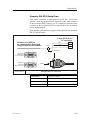
Generic RS-232 Serial line . . . . . . . . . . . . . . . . . . . . . . . . . . . . . . . . .
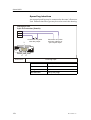
Speed log interface . . . . . . . . . . . . . . . . . . . . . . . . . . . . . . . . . . . . . . .
173
174
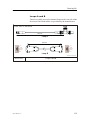
Loops A and B . . . . . . . . . . . . . . . . . . . . . . . . . . . . . . . . . . . . . . . . . .
175
NMEA Serial line for PI30 . . . . . . . . . . . . . . . . . . . . . . . . . . . . . . . . .
Loudspeaker . . . . . . . . . . . . . . . . . . . . . . . . . . . . . . . . . . . . . . . . . . . .
176
177
Processor Unit to Transceiver Unit . . . . . . . . . . . . . . . . . . . . . . . . . . .
178
Transceiver Unit to Motor Control Unit . . . . . . . . . . . . . . . . . . . . . . .
179
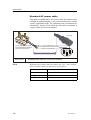
Standard AC power cable . . . . . . . . . . . . . . . . . . . . . . . . . . . . . . . . . .
180
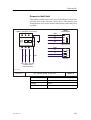
Power to Hull Unit . . . . . . . . . . . . . . . . . . . . . . . . . . . . . . . . . . . . . . .
181
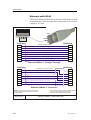
Ethernet with RJ45 . . . . . . . . . . . . . . . . . . . . . . . . . . . . . . . . . . . . . . .
Standard VGA cable . . . . . . . . . . . . . . . . . . . . . . . . . . . . . . . . . . . . . .
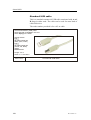
Standard USB cable . . . . . . . . . . . . . . . . . . . . . . . . . . . . . . . . . . . . . .
182
183
184
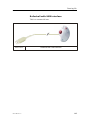
Rollerball with USB interface . . . . . . . . . . . . . . . . . . . . . . . . . . . . . . .
185
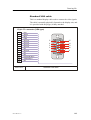
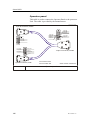
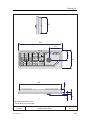
Operator panel . . . . . . . . . . . . . . . . . . . . . . . . . . . . . . . . . . . . . . . . . . .
186
14 INSTALLATION REMARKS . . . . . . . . . . . . . . . . . . . . . . . . . . . . . . . 203
851-164336 / C
IX
Simrad SP70
Document revisions
Rev
Date
Written by
Checked by
Approved by
A
20.12.00
LEA
SØJ
SØJ
B
10.09.01
LEA
SØJ
SØJ
C
21.05.03
RBr
SØJ
SØJ
D
E
F
G
(The original signatures are recorded in the company’s logistic database.)
Rev.A
First edition.
Rev.B
Only minor corrections.
Rev.C
Partly reorganised. Test of radio bouys introduced. Additional hull
units added.
To assist us in making improvements to the product and to this manual, we would welcome
comments and constructive criticism. Please send all such - in writing or by Email - to:
Simrad AS
Documentation Department
P.O.Box 111
N--3191 Horten
Norway
or Email:
[email protected]
X
851--164336 / C
Introduction
1 INTRODUCTION
1.1
Purpose and description
Introduction
The purpose of this manual is to provide the information and basic
drawings required for installation of the Simrad SP70 sonar
system.
These instructions must be followed carefully to ensure optimal
sonar performance. As a guide, installation procedures are
presented in the order they are to be performed. Successful
completion of each procedure is to be confirmed by checking-off
the corresponding box.
After installation, this document should be stored on board the
vessel for later reference when updating or servicing the
equipment.
Note
The installer is responsible for the equipment during the
installation. The guarantee is only valid when the installation is
made in accordance with this manual.
Installation procedures
Installation procedures for the standard Simrad SP70 sonar system
can be grouped under the following main categories:
851-164336 / C
→
Installation planning, page 22.
→
Installation trunk, page 28.
→
Hull Unit, page 32.
→
Transceiver Unit, page 41.
→
Wheelhouse Units, page 45.
→
Cabling, page 51.
→
Peripheral equipment, page 70.
→
Start-up procedures, page 82.
→
Testing the peripheral equipment, page 125.
→
Final tests and measurements, page 138.
1
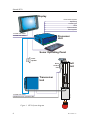
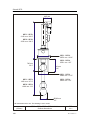
Simrad SP70
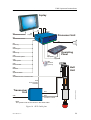
Display
Purse seine system
Speed log
Course gyro
GPS
Echo sounder
Trawl system
115/230 Vac mains
115/230 Vac mains
Processor
Unit
Sonar Operating Panel
Loudspeaker
Hoist
Control
Unit
Hull
Unit
115/230 Vac mains
230/380/440 Vac 3-phase mains
(CD6484)
Transceiver
Unit
Figure 1 SP70 System diagram
2
851-164336 / C
Introduction
1.2
Scope of supply
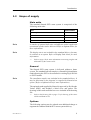
Main units
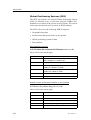
The standard Simrad SP70 sonar system is comprised of the
following main units:
Unit
Order number
Operating Panel
SH8--203593
Sonar Processor Unit
SP7--203985
Transceiver Unit
SP7--203997
SP70 Hull Unit (standard)
SP2--113108
Note
A number of optional hull units with different stroke lengths and
operational speeds can be delivered. Refer to Options below for
more information.
Note
The display unit is not included in the standard delivery, but may
be ordered as an option. Refer to Display Unit below for more
information.
→
Refer to page 150 for more information concerning weights and
dimensions of the various units.
General
The Simrad SP70 sonar system is delivered without a dome
system. The standard hull unit employs a Simrad SQ4 installation
trunk allowing the SP70 to be mounted in existing SQ4, SR 240
or SP270 trunks.
Note
The installation trunk is not included in the standard delivery. It
may be fabricated by the shipyard, or supplied by Simrad as an
option. (Refer to Options below for more information.)
The optional trunk supplied by Simrad is approved by Det Norske
Veritas (DNV) and includes a blind cover and gasket. The
drawings of the trunk and blind cover are included in the drawing
file.
→
Refer to the Drawing file on page 171 for drawing of the sonar
trunks and blind covers.
Options
The following options may be ordered at an additional charge to
augment the standard Simrad SP70 sonar system delivery.
851-164336 / C
3
Simrad SP70
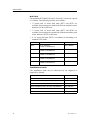
Hull Unit
The standard SP70 Hull Unit can be lowered 1.2 meters at a speed
of 15 knots. The following options are available:
• 1.2 meter and 1.6 meter hull units (SP71 and SP72) are
available for mounting on a trunk with 20 bolts and pitch centre
diameter (PCD) of 620 mm.
• 1.2 meter and 1.6 meter hull units (SP73 and SP74) are
available for mounting on a trunk with 24 bolts and with a pitch
centre diameter (PCD) of 680 mm.
• A 1.0 meter hull unit (SP75) is available for mounting on a
standard SP70 trunk.
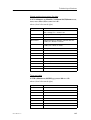
Hull Unit
Specifications
Order number
SP71
1.2 m / 25 knots
20 bolts / PCD 620 mm
SP7--205674
SP72
1.6 m / 20 knots
20 bolts / PCD 620 mm
SP7--204880
SP73
1.2 m / 25 knots
24 bolts / PCD 680 mm
SP7--205501
SP74
1.6 m / 20 knots
24 bolts / PCD 680 mm
SP7--205502
SP75
1.0 m / 15 knots
16 bolts / PCD 540 mm
SP7--206239
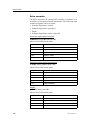
Installation trunk
The installation trunk may be fabricated by the shipyard or
supplied by Simrad:
4
Unit
Order number
SP70 Installation trunk, 16 bolts, PCD 540 mm
SQ4--042508
SP71 Installation trunk, 20 bolts, PCD 620 mm
SP7--205824
SP72 Installation trunk, 20 bolts, PCD 620 mm
SP7--205824
SP73 Installation trunk, 24 bolts, PCD 680 mm
SP7--207517
SP74 Installation trunk, 24 bolts, PCD 680 mm
SP7--207517
SP75 Installation trunk, 16 bolts, PCD 540 mm
SQ4--042508
851-164336 / C
Introduction
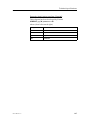
Display unit
The SP70 sonar requires a VGA colour display with a resolution
of at least 1280 x 1024 pixels. An 18 or 20-inch LCD may be
ordered from Simrad. An optional mounting kit must be ordered
for desktop installations.
Unit
Order number
LCD 181 (18--inch LCD monitor)
ES6--201067
LCD 201 (20--inch LCD monitor)
ES6--201580
Desktop mounting kit for LCD 181
ES6--201074
Desktop mounting kit for LCD 201
ES6--201046
Gyro interface
If the course gyro data is not available on a standard NMEA 0183
serial line, a gyro interface box is required.
Unit
Order number
LR40 Gyro interface unit
298--078535
90 degrees tilt
The optional tilt also opens all 180 degrees vertical mode
presentations.
Unit
Order number
90 degrees tilt
KIT--203995
Frequency
The system can be configured to operate on triple or multiple
frequencies. This feature is especially helpful in suppressing
interference from other sonars.
Unit
Order number
Triple frequencies
KIT--203993
Multiple frequencies
KIT--203994
Interface for scientific applications
This Ethernet interface include outputs of sonar beam data, sonar
settings and processed target data.
851-164336 / C
Unit
Order number
Scientific interface
KIT--203477
5
Simrad SP70
1.3
Peripheral equipment
Required inputs
The Simrad SP70 sonar system requires input from both a speed
log and a course gyro. Inaccurate data from either of these
instruments will result in an incorrect indication of vessel and
target movement.
Speed log
The speed log parameters are:
• Pulse log: 200 pulses / nm.
• Serial line, standard NMEA 0183, RS-232
→
Also refer to (D)GPS below.
Course gyro
The course gyro parameters are:
• Serial line, standard NMEA 0183, RS-232
An optional gyro interface box for converting the following
synchro and stepping gyro signals can be ordered from Simrad:
• 3-phase synchro signal, 20 to 150 V L-L, 50/60/400 Hz, gear
ration 1:360 or 1:180
• 3-phase stepper signal, 20 to 150 V L-L, gear ration 1:360 or
1:180
→
Refer to page 5 for the Simrad order number.
Additional inputs
In addition to the pulse log input described above, the SP70 sonar
provides a total of four RS-232 serial lines. Since one is used to
interface the course gyro, the remaining three serial lines may be
used for:
• Differential Global Positioning System - (D)GPS
• Echo sounder
• Purse seine system
• Trawl system
• Radio buoy system
Differential Global Positioning System - (D)GPS
A (D)GPS may be interfaced with the Simrad SP70 sonar to
establish the vessel’s position and provide cursor and marker
latitude and longitude.
6
851-164336 / C
Introduction
Note that in addition to navigational data, the (D)GPS may also be
used for the input of speed log information. Most (D)GPS are
equipped to present course information, but this data is generally
too inconsistent to provide a stable sonar presentation.
The (D)GPS parameters are:
• GPS data: RS-232 Serial line, standard NMEA 0183.
Echo sounder
To provide depth information on the catch control page of the
sonar’s display, echo sounders may be connected:
• RS-232 Serial line, standard NMEA 0183
Purse seine system
To provide purse seine depth information on the sonar’s display,
the following Simrad purse seine system may be connected:
• Simrad PI30 Purse seine system (RS-232)
Trawl system
To provide trawl information on the sonar’s display, one of the
following Simrad trawl systems may be connected:
• Simrad FS903 Trawl sonar system (RS-232)
• Simrad FS3300 Trawl sonar system (RS-232)
• Simrad ITI Integrated Trawl Instrumentation system (RS-232)
Current meter system
A current meter system may be connected to the sonar to display
the direction and speed of the sea currents on various depths. The
following current system can be connected:
• Kaijo DCG-200
The current meter system is interfaced by means of an RS-232
serial line.
Radio buoy system
A GPS based radio buoy system may be connected to the sonar to
show the position and buoy data on the display. The following
buoy systems can be connected:
• SERPE
• Ariane
• Ryokusei
All are interfaced by means of an RS-232 serial line.
851-164336 / C
7
Simrad SP70
1.4
Supply conditions
Purpose
The following supply conditions are applicable to standard Simrad
SP70 deliveries and associated optional equipment.
Equipment responsibility
The shipyard performing the installation and/or dealer becomes
fully responsible for the equipment upon receipt unless otherwise
stated in the contract.
The duration of responsibility includes:
• The period of time the equipment is stored locally before
installation.
• During the entire installation process.
• While commissioning the equipment.
• The period of time between commissioning and the final
acceptance of the equipment by the end user (normally the
owner of the vessel which the equipment has been installed).
The Simrad SP70 system guarantee period (as specified in the
contract) begins when the acceptance documents have been signed
unless other arrangements have been made in the contract.
Receipt, unpacking and storage
Upon accepting shipment of the equipment, the shipyard and/or
the dealer should ensure that the delivery is complete and inspect
each shipping container for evidence of physical damage. If this
inspection reveals any indication of crushing, dropping,
immersion in water or any other form of damage, the recipient
should request that a representative from the company used to
transport the equipment be present during unpacking.
All equipment should be inspected for physical damage, i.e.
broken controls and indicators, dents, scratches etc. during
unpacking.
If any damage to the equipment is discovered, the recipient should
notify both the transportation company and Simrad so that Simrad
can arrange for replacement or repair of the damaged equipment.
Once unpacked, the equipment must be stored in a controlled
environment with an atmosphere free of corrosive agents,
excessive humidity or temperature extremes. The equipment must
be covered to protect it from dust and other forms of contamination
when stored.
→
8
Refer to page 151 for more information concerning environmental
tolerances.
851-164336 / C
Introduction
1.5
General safety rules
The system operates on 115 and/or 230 / 380 / 440 Vac, 50/60 Hz.
WARNING
This voltage can be lethal.
The following safety precautions must be followed at all times
during installation and maintenance work:
• Always switch off all power before installation or maintenance.
Use the main circuit breaker, and label the breaker with a
warning sign that informs others that maintenance or
installation work is being carried out on the system.
• Read and understand the first aid instructions for electric shock.
• For safety reasons during troubleshooting on the equipment
with power ON, two persons should always be present.
• Whenever maintenance is carried out, it is essential that a first
aid kit is available, and that the maintenance personnel are
familiar with the first aid instructions for electrical shock.
• The various parts of the system are heavy. Make sure that the
appropriate tools and certified lifting equipment are available,
and that the personnel are trained in installation and
maintenance work.
851-164336 / C
9
Simrad SP70
1.6
Installation requirements
Responsibility and approval
The Simrad SP70’s Hull Unit sleeve has been approved by Det
Norske Veritas (DNV) Classification society.
Individual Hull Unit installations must be approved on a
case-by-case basis with regard to the vessel’s national registry and
corresponding maritime authority. The shipowner and shipyard
performing the installation are responsible for obtaining
installation approval.
Supply power
The supply voltage to the equipment is to be kept within ±15% of
the installation’s nominal voltage. Maximum transient voltage
variations on the main switchboard’s bus-bars are not to exceed
-15% to +20% of the nominal voltage (except under fault
conditions).
Simrad strongly recommends that the SP70 sonar be powered
using an Uninterruptible Power Supply (UPS). The UPS should
have the capacity to independently maintain power to the sonar for
a minimum of 10 minutes. This ensures that the system can be
switched off in a controlled manner in the event of a power failure.
Environmental requirements
Vibrations
If the equipment is expected to be exposed to excessive vibration
for extended periods, special dampening precautions must be
taken.
Temperature and humidity
All equipment, unless otherwise specified, must be protected from
temperature extremes and excessive humidity.
→
Refer to page 151 for more information.
Compass deviation
Once the installation is complete, the vessel must be swung with
the sonar in both the operative and inoperative modes. The
shipowner and captain are responsible for updating the deviation
table accordingly with regard to the vessel’s national registry and
corresponding maritime authority.
10
851-164336 / C
Introduction
Noise sources
The vessel’s hull, rudder(s) and propeller(s) should be thoroughly
inspected in dry dock prior to installation. Roughness below the
water-line deformities in the shell plating and protruding obstacles
can create underwater noise. These sources of turbulence must be
smoothed or removed as best as possible. It is especially important
that the propeller(s) is not pitted or damaged.
Dry docking
Make sure that ample clearance under the sonar trunk and/or
protection blister is provided when dry docking the vessel. Avoid
locating supporting blocks or structures in the vicinity of this
equipment.
Note
The location of the sonar trunk and/or protection blister must be
noted on the vessel’s docking plan for future reference.
Wiring
The cable from the wheelhouse to the sonar room must be
supported and protected along its entire length using conduits
and/or cable trays. Note that the cable must not be installed in the
vicinity of high-power supplies and cables, antenna cables or other
possible sources of interferences.
851-164336 / C
11
Simrad SP70
1.7
Equipment handling
Introduction
This chapter describes how to transport, pack and unpack, clean,
preserve and store electronic, electro-mechanical and mechanical
units supplied by Simrad AS.
The units may be supplied as spare parts, or as parts of a delivery.
Transportation
General specifications
Unless otherwise stated in the accompanying documentation,
electronic, electro-mechanical and mechanical units supplied by
Simrad can be transported using all methods approved for delicate
equipment; e.g. by road, rail, air or sea. The units are to be
transported in accordance with general or specific instructions for
the appropriate unit(s), using pallets, transport cases, or carton
boxes as appropriate.
Note
Special local restrictions concerning air transportation may be
applied to units containing certain types of batteries. The units
should be checked and the regulations investigated by the
packer/shipper before the unit is dispatched.
Local transportation
All local transportation must be carried out according to the same
specifications as for the initial delivery. In general, all units must
be handled with care. The carton or case containing the equipment
must be kept dry at all times, and must be sheltered from the
weather. It must not be subjected to shocks, excessive vibration or
other rough handling.
The carton or case will normally be marked with text or symbols
indicating which way up it is to be placed. Follow any instructions
given and ensure the case is always placed with its “top”
uppermost.
The carton or case must not be used for any purpose for which it
was not intended (e.g. step, table, etc.), and in the absence of other
information, no other cartons or cases must be stacked on top of it.
Lifting
A heavy crate will normally be marked with its weight, and the
weights of other cartons or crates will normally be entered on the
packing list.
• Always check the weight of a crate before attempting to lift it.
• Always use lifting apparatus that is certified for the load.
12
851-164336 / C
Introduction
Heavy units may be equipped with lifting lugs for transportation
by crane within the workshop or installation area. Before a crane
is used, check:
• The applicable weight certificate for the crane.
• The security of the lifting lugs.
Ensure that all available lifting lugs are used. Ensure the unit
remains under control during the operation to avoid damage to the
unit, equipment or personnel.
Heavy units may be transported using a fork-lift truck. Special
attention must then be paid to the position of the unit’s centre of
gravity. The units must be properly secured to the truck.
Initial preservation
Introduction
When a system, a unit or a spare part has been delivered to the
customer, it may be subject to long-time storage prior to
installation and use. During this storage period, certain
specifications must be met.
The equipment must be preserved and stored in such a way that it
does not constitute any danger to health, environment or personal
injury.
Specific specifications are presented below.
→
For further information about storage, refer to page 17.
→
For further information about re-packing, refer to page 19.
→
For further information about temperature protection, refer to
page 21.
Original packing crate
851-164336 / C
1
The equipment must be stored in its original transportation
crate.
2
Ensure that the units are clearly separated in the shelves and
that each unit is easily identifiable.
3
The crate must not be used for any purpose for which it was
not intended (eg. work platform etc.).
4
The crates must not be placed on top of each other, unless
specific markings permit this.
5
The crates must not be placed directly on a dirt floor.
6
Do not open the crate for inspection unless special
circumstances permit so.
13
Simrad SP70
7
→
- “Special circumstances” may be suspected damage to the
crate and its content, or inspections by civil authorities.
- If any units are damaged, prepare an inspection report
stating the condition of the unit and actions taken.
Describe the damage and collect photographic evidence
if possible. Re-preserve the equipment.
- If the units are not damaged, check the humidity
absorbing material. If required, dry or replace the bags,
then repack the unit(s) according to the packing
instructions.
If the crate has been opened, make sure that is it closed and
sealed after the inspection.
- Use the original packing material as far as possible.
Refer to the information on page 19.
Ambient temperature and humidity
1
Note
The storage room/area must be dry, with a non condensing
atmosphere. It must be free from corrosive agents.
2
The storage area’s mean temperature must not be lower than
-30°C, and not warmer than +70°C.
- If other limitations apply, the crates will be marked
accordingly.
Transducers must not be stored in temperatures below -20°C.
3
4
The crate must not be exposed to moisture from fluid
leakages.
The crate must not be exposed to direct sunlight or excessive
warmth from heaters.
Shock and vibration
1
The crate must not be subjected to excessive shock and
vibration.
- Normal vibrations from vehicle, vessel or other
transportation movements are permitted.
ESD precautions
→
Refer to the information on page 20.
Batteries
If the unit contains normal batteries, these may have been
disconnected/isolated before the unit was packed. These must only
be reconnected before the installation starts. Units containing
batteries are marked.
Caution
14
Units containing lithium or alkaline batteries must be handled
separately and with care. Such units are marked accordingly. Do
not attempt to recharge such batteries, open them or dispose of
them by incineration. Refer to the applicable product data sheets.
851-164336 / C
Introduction
Inspection and unpacking
Inspection
An inspection must be carried out immediately after the unit(s)
have arrived at their destination.
• Check all wooden or cardboard boxes, plastic bags and pallets
for physical damage. Look for signs of dropping, immersion in
water or other mishandling.
• If damage is detected externally, you will have to open the
packaging to check the contents.
- Request a representative of the carrier to be present while the
carton is opened, so any transportation damage can be
identified.
• If any units are damaged, prepare an inspection report stating
the condition of the unit and actions taken. Describe the damage
and collect photographic evidence if possible. Send the
inspection report to Simrad as soon as possible.
• If the units are not damaged, check the humidity absorbing
material. If required, dry or replace the bags, then repack the
unit(s) according to the packing instructions.
General unpacking procedure
Normal precautions for the handling, transportation and storage of
fragile electronic equipment must be undertaken.
Note
If the unit is not to be prepared for immediate use, you may consider
storing it unopened in its original packing material. However, it
may be useful to open the case to check its contents for damage and
retrieve any accompanying documentation.
• Check the carton before opening it to ensure it shows no signs
of dropping, immersion in water or other mishandling.
- If the carton shows signs of such damage, refer to the
paragraph covering Inspection on receipt.
• Place the carton on a stable work bench or on the floor with the
top of the carton uppermost.
• In the absence of other instructions, always open the top of the
carton first. The contents will normally have been lowered into
the carton from above, so this will usually be the easiest route
to follow.
- Care must be used when opening the carton to ensure the
contents are not damaged.
Caution
851-164336 / C
Do not use a knife to open cardboard cartons - the contents may
lie close to the surface, and may be damaged by the blade.
15
Simrad SP70
• If the carton has been closed using staples, remove the staples
from the carton as you open it. This will reduce the possibilities
of scratch injury to yourself and damage to the contents.
• If a wooden crate has been closed using screws, always remove
them using a screw-driver. Do not attempt to prise the lid off
with a crow-bar or similar.
• Once the carton is open, carefully remove all loose packing and
insulation material. Check for manuals and other documents
that may have been added to the carton during packing, and put
these to one side. Check also for special tools, door keys etc.
Electronic and electro-mechanical units
Caution
Beware of the dangers of Electro-Static Discharge (ESD) both to
yourself and to the equipment, when handling electronic units
and components. Refer to the precautions starting on page 20.
Electronic and electro-mechanical units will normally be wrapped
in a clear plastic bag. Lift the unit, in its bag, out of the carton and
place it in a stable position on the floor/work bench.
Note
Cables must never be used as carrying handles or lifting points.
Inspect the unit for damage before opening the plastic bag.
Note
Do not break the seal to open a circuit board package before the
board is to be used. If the board package is returned to the
manufacturers with the seal broken, the contents will be assumed
to have been used and the customer will be billed accordingly.
Assuming all is well, open the bag and remove the unit.
Open the unit and check inside. Remove any packing and desiccant
material that may be inside.
Mechanical units
Mechanical units may be heavy. Using a suitably certified lifting
apparatus, lift the unit out of the crate and place it in a stable
position on the floor/work bench.
Note
Cables must never be used as carrying handles or lifting points.
Inspect the unit for damage and remove any packing material that
may be inside the unit.
Transducers
Transducers may be supplied mounted to a hull unit (if any), or
packed separately. Crates are normally identified by the order
number and the serial number.
16
851-164336 / C
Introduction
The transducer face must be protected by a rigid, padded cover
(e.g. a wooden box lined with foam rubber) all the time it is
exposed to the risk of physical damage.
Note
Once the units are unpacked, great care must be taken to ensure
that transducers and cabling are not exposed to any mechanical
stress.
Re-packing
If the unit is not to be installed immediately, re-pack it in its original
packing material to prevent damage in the intervening period.
→
1.8
Refer to the information on page 19.
Storage
Pre-installation storage
The equipment should be stored in its original transportation crate
until ready for installation. The crate must not be used for any
purpose for which it was not intended (eg. work platform etc.).
Once unpacked, the equipment must be kept in a dry, non
condensing atmosphere, free from corrosive agents and isolated
from sources of vibration.
Note
Do not break the seal to open a circuit board package before the
board is to be used. If the board package is returned to the
manufacturers with the seal broken, the contents will be assumed
to have been used and the customer will be billed accordingly.
The unit must be installed in its intended operating position as soon
as possible after unpacking.
If the unit contains normal batteries, these may have been
disconnected/isolated before the unit was packed. These must then
be reconnected during the installation procedure. Units containing
batteries are marked.
Caution
Units containing lithium or alkaline batteries must be handled
separately and with care. Such units are marked accordingly. Do
not attempt to recharge such batteries, open them or dispose of
them by incineration. Refer to the applicable product data sheets.
After use storage
Introduction
If a unit is removed from its operating location and placed into
storage, it must be properly cleaned and prepared before packing.
851-164336 / C
17
Simrad SP70
Cleaning cabinets
If the unit may have been exposed to salt atmosphere while it was
in use, it must be thoroughly cleaned both internally and externally
to prevent corrosion.
• Wipe the cabinet externally using a damp cloth and a little
detergent. Do not use excessive amounts of water as the unit
may not be water tight. On completion, dry the unit thoroughly.
• All surfaces must be inspected for signs of corrosion, eg.
flaking/bubbling paint, stains etc. Damaged or suspect areas
must be cleaned, prepared and preserved using the correct
preservation mediums for the unit. The mediums to be used will
usually be defined in the units’ maintenance manual.
• Open the unit, and using a vacuum cleaner, remove all dust etc.
from the unit. Great care must be taken to ensure the circuit
boards and modules are not damaged in the process.
Mechanical units
If the mechanical unit may have been exposed to a salt atmosphere
while it was in use, it must be thoroughly cleaned both internally
and externally to prevent corrosion.
• If the construction materials and type of unit permits, wash the
unit using a high-pressure hose and copious amounts of fresh
water.
Examples:
- The lower parts of hull units (outside the hull)
- Subsea units
• Ensure that all traces of mud and marine growth are removed.
Use a wooden or plastic scraper to remove persistent growth,
barnacles etc. On completion, dry the unit thoroughly.
Caution
Do not use a high pressure hose in the vicinity of cables or
transducers. Do not use sharp or metal tools on a transducer
face.
• If the materials or type of unit prevents the use of a
high-pressure hose, wipe the unit using a cloth dampened with
water containing a little detergent.
Example:
- The upper parts of hull units (inside the hull)
- Hydraulic systems
• Do not use excessive amounts of water as some components on
the unit may not be water tight. Wipe off the detergent with a
damp cloth, then dry the unit thoroughly.
18
851-164336 / C
Introduction
• All surfaces must be inspected for signs of corrosion, eg.
flaking/bubbling paint, stains etc. Damaged or suspect areas
must be cleaned, prepared and preserved using the correct
preservation mediums. The mediums to be used will normally
be defined in the unit’s maintenance manual.
Cables
Wipe clean all exposed cables, and check for damage. If a cable
shows signs of wear or ageing, contact Simrad for advice.
Internal batteries
If the unit contains batteries, these may discharge slowly during
storage. If the unit is to be stored for an extended period, disconnect
or remove all internal batteries.
A suitable piece of insulating material can be placed between the
battery and the electrical contacts to prevent electrical discharge.
The battery can then remain in the unit, reducing the risk of it being
misplaced during the storage period.
Caution
Units containing lithium or alkaline batteries must be handled
separately and with care. Such units are marked accordingly. Do
not attempt to recharge such batteries, open them or dispose of
them by incineration. Refer to the applicable product data sheets.
Dehumidifier
Place a suitably sized bag of desiccant material (silica gel or
similar) into the unit to keep the electronic components as dry as
possible.
Coatings
Spray the unit externally with a corrosion inhibitor (e.g. a light oil)
before packing.
Re-packing
The unit should be stored and transported in its original packing
material and/or crate. In the event that this material is not available,
proceed as follows:
• Small units must be protected from damp by being placed
within a plastic bag at least 0.15 mm thick. An appropriate
quantity of desiccant material should be placed inside this bag,
and the bag sealed. The sealed unit must then be placed in an
appropriate carton or crate, and supported in the container by
appropriate shock-absorbing insulation (polystyrene foam
chips etc.).
851-164336 / C
19
Simrad SP70
• Large units must be placed in a suitable cardboard box or
wooden crate. The unit must be protected against physical
damage by means of shock-absorbing insulation mats. The box
must be clearly marked with its contents, and must be stored in
a dry and dust-free area.
• Ensure that the resulting unit is weather proof as required by the
current and expected environment.
ESD precautions
Electrostatic Discharge (ESD)
Electro-Static Discharge (ESD) is the transfer of an electrostatic
charge between two bodies at different electrostatic potentials,
caused either by direct contact or induction by an electrostatic
field.
The passing of a charge through an electronic device can cause
localised overheating, and it can also “puncture” insulating layers
within the structure of the device. This may deposit a conductive
residue of the vaporised metal on the device, and thus create a short
circuit. This may result in a catastrophic failure, or degraded
performance of the device.
ESD Protection during transport and storage
Sensitive electronic equipment must be transported and stored in
protective packing bags, boxes and cabinets. The equipment must
NOT be transported or stored close to strong electrostatic,
electro-magnetic or radioactive fields.
Unpacking and servicing ESD sensitive equipment
If it is necessary to open and touch the electronics inside the
boxes/cabinets, then the following precautions MUST be taken:
• The working area must be covered by an approved
conductive service mat that has a resistance of between 50kΩ
and 2 MΩ, and is connected directly to a reliable earth point
via its earthing cord.
• The service personnel involved must wear a wrist-band in
direct contact with the skin, connected to the service mat.
• Printed circuit boards and other components should be placed
on the conductive service mat during installation,
maintenance etc.
20
851-164336 / C
Introduction
Caution
If, for any reason, it is necessary to move the circuit board or
components from the conductive service mat, they must be
placed in an approved anti-static transportation container (e.g.
static shielding bag) before transportation.
• During installation and servicing, all electrical equipment
(soldering irons, test equipment etc.) must be earthed.
Temperature protection
If the unit must be protected against extremes of temperature, the
carton/crate must be lined on all walls, base and lid with 5 cm thick
polyurethane or polystyrene foam.
These units will be identified as delicate in the applicable
documentation.
The package must then be clearly marked:
Must not be transported or stored in temperatures
below -5 degrees Celsius.
Other units can normally be stored in temperatures between -30°C
and +70°C, though refer to the system’s Technical Specifications
document for details.
Transducers must not be stored in temperatures below -20°C.
851-164336 / C
21
Simrad SP70
2 INSTALLATION PLANNING
Note
2.1
For installation in a previously installed trunk system, first read
the information about sonar room requirements. Then, for a
previously installed trunk system, proceed to the Hull Unit
installation description.
→
Sonar room requirements are described on page 25.
→
Installation of the hull unit is described on page 32.
General
This chapter provides the marine engineers responsible the
information necessary to plan and install the sonar’s Hull Unit
according to Simrad’s requirements.
Correct installation of the sonar transducer is vital to the system’s
performance. Several variables must be taken into consideration,
the most important of which is the vessel’s construction. This
guide is for use in selecting the best location for the transducer and
includes a brief description of areas to be avoided.
Note
Note that installation drawings must be supplied by the shipyard.
The installation must be approved by the vessel’s national registry
and corresponding maritime authority and/or classification
society. The shipowner and shipyard performing the installation
are responsible for obtaining and paying for installation approval.
Simrad offers free advice for installation planning. Proposed
arrangements may be sent for commentary or suggestions supplied
by Simrad. The following drawings should be submitted should
assistance be requested:
• General arrangement
• Body plan and drawings of relevant bottom tanks and
coffer-dams
• Lines plan
22
851-164336 / C
Installation planning
2.2
Location of the Hull Unit
Fore and aft
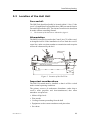
The Hull Unit should preferably be located within 1/10 to 1/3 the
vessel’s Length Between Perpendiculars (LBP) measured from its
Forward Perpendicular (FP). Deviations from this rule should not
be made without consulting Simrad.
→
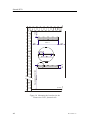
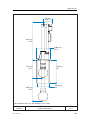
The location of the hull unit is indicated in figure 2.
Athwartships
The Hull Unit may be located on the Centre Line (CL) of the vessel,
or alongside its keel. If the installation is off-set from the vessel’s
centre line, make sure that transducer transmission and reception
will not be obstructed by the keel.
Welding marks
for docking
90°
Waterline at normal trim
(CD1881)
1/3 to 1/10
LBP
LBP
Figure 2 Location of the Hull Unit
Important considerations
The Hull Unit trunk must be installed so that it will be vertical
under normal operating conditions.
The primary sources of underwater disturbance (other than a
vessel’s main propeller and bow/sternthruster) that affect
transducer reception are:
• Main or bilge keels
• Zinc anodes
• Cooling elements protruding from the hull
• Equipment such as sonar transducers and pitot tubes
• Sea chests
851-164336 / C
23
Simrad SP70
• Overboard discharges
• Dents in the hull
All appendages to the hull, indentations and pipe in/outlets are
potential sources of underwater noise. They may act as resonant
cavities amplifying noise at certain frequencies, create cavitation
or turbulence. Transducers should not be located in the vicinity of
such objects and especially not immediately aft of them.
24
851-164336 / C
Installation planning
2.3
Sonar room requirements
Size
The sonar room must be dimensioned to house both the Hull and
the Transceiver Unit. This is due to the limited length of the
flexible hose protected cabling (approximately 3.5 m) connecting
the two.
A well designed sonar room reduces the risk of corrosion and
simplifies maintenance increasing system reliability. The sonar
room should not be unnecessarily obstructed by girders, pipes etc.
which might cause installation problems or impede maintenance.
→
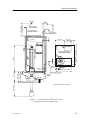
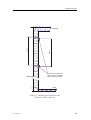
Refer to figure 3 on page 27 for an example of a sonar room
arrangement.
Access hatches
The sonar room must be accessible under all conditions at sea or
at a berth. All doors or hatches should be designed so that the
equipment can be removed without being disassembled.
Lifting
An attachment point, rated at a minimum of two tons, for
supporting a lifting device should be located above the Hull Unit.
This permanently installed fixture will facilitate Trunk and Hull
Unit mounting and also may be used for service of the equipment
in the future.
Heating
The sonar room should be equipped with heater, dimensioned to
maintain the equipment within its environmental tolerances (at
least 1000 W), installed close to the deck. Heating is also an
effective method for reducing humidity.
→
Refer to page 151 for more information concerning environmental
tolerances.
Insulation
Bulkheads must be insulated and provided with an interior wall to
the deck. The insulation should be the minimum equivalent of 50
mm of rock-wool. In addition, piping passing through the space
prone to condensation must be insulated.
Ventilation
The sonar room should be connected to the vessel’s ventilation
system. If this is not possible, two 3-inch vents must be provided
from the sonar room to the main deck.
851-164336 / C
25
Simrad SP70
In the sonar room, the air inlet should be located in close to the deck
and the outlet as high as possible. A funnel shaped drip-collector
should be mounted below the vent pipes to divert moisture to the
bilge.
On the main deck, the best ventilation is provided when the outlet
pipe is at least four meters higher than the inlet pipe. To keep out
sea water, rain and spray, the ventilation pipes should be fitted with
goosenecks of the equivalent.
Conduit
If the cable between the wheelhouse and the sonar room passes
through hatches or areas where it may be damaged, it should be run
through a conduit (two inch conduit is recommended).
Air vent pipe
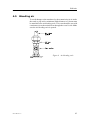
An air vent conduit with a minimum of 10 mm internal diameter
must be attached to the air bleeding cock on the Hull Unit. The pipe
should be laid with with continuous rise to free air on deck or
through the ship’s side.
Note
Through-hull modifications are subject to approval by the vessel’s
national registry and corresponding maritime authority. The
shipowner and shipyard are responsible for obtaining installation
approval.
Bilge pump
The sonar room should be connected to the vessel’s bilge pump
system. If this is not possible, a separate bilge pump for the sonar
room must be installed.
Lighting
The sonar room should be equipped with suitable lighting to
simplify the installation and aid future maintenance.
Dry docking
Make sure that ample space is provided between the vessel and dry
dock for system installation. To facilitate future dry docking, mark
the position of the installed trunk as indicated.
→
Refer to figure 2 on page 23.
Decking
Once the installation has been completed, the sonar room should
be suitably decked without restricting access to the equipment.
26
851-164336 / C
Min. 4000
Load capacity:
Min. 2 tonnes
Air bleeding pipe
Min. Di.=10mm
Air vent pipes
Dia. min.50
25
Min. 3000
(+ lifting device)
Installation planning
Min. 500
Lighting
Min. 150
520
Min. 1300
Transceiver
unit
Min. 350
Min. 585
2080
Transducer cable
Total length: 4 meters
Hatch
Heater
1000 (Recommended)
Min. 810
Max. 990
757
Removable supports
Pipes
10mm
Dia. 508
(CD3411)
Max. 1200
All dimensions are in millimeters
Figure 3 An example of a SP70 sonar room
arrangement as seen from the bow.
851-164336 / C
27
Simrad SP70
3 SONAR TRUNK
3.1
Mounting of the trunk
The location of the sonar trunk must be carefully selected.
→
Note
Refer to the Installation planning information on page 22.
Note the orientation of the centre line of the trunk with regard to
the mounting bolts. Remove the gasket on the top flange during
welding.
∝
∝±1°
Parallel to
centre line
(CD1883)
Figure 4 Orientation of the SP70 sonar trunk
The height from the top of the trunk flange, to the underside of the
protection blister, must be as shown in the referenced figures.
→
Refer to figures 5 and 6 on pages 30 and 31.
The top flange must be parallel to the construction water-line in
both the fore-and-aft and athwartships directions.
The installation trunk must be welded to a doubling plate which
should be at least 1.5 times as thick as the surrounding shell plating.
The doubling plate’s final dimensions are to be governed by the
approved installation drawings supplied by the shipyard. The trunk
must also be stiffened by welding knee-plates to it and the doubling
plate in both the fore-and-aft and athwartships directions.
28
851-164336 / C
Installation trunk
3.2
Protection
Protecting blister
A steel blister must be fitted for protection. The blister shown is
welded to the shell plating and then filled with oil to prevent
corrosion. This method provides excellent protection and
simplifies maintenance.
→
Refer to figure 5 on page 30.
Open blister types are designed to be welded to the shell plating.
→
Refer to figure 6 on page 31.
Corrosion protection
As soon as all installation, welding and grinding has been
performed, the trunk and the surrounding area should be primed
and painted using a quality protective coating.
3.3
Trunk installation measurements
For future reference, measurements A, B, C and D from the
drawings must be made and noted in the Trunk installation
measurements table provided.
Millimetres
Inches
Distance A
Height B
Height C
Height D
Table 1 Trunk installation measurements
If an other type of installation is chosen, make a sketch including
all relevant dimensions.
851-164336 / C
29
Simrad SP70
11 1/4O
11 1/4O
A:
B:
C:
D:
E:
Fore-and-aft view
As short as possible
Max. 35 7/8" (910 mm)
Min. 1 9/16" (40 mm)
Min. 31 7/8" (810 mm)
Min. 22" (560 mm)
A
C
D
B
3-4 knee-plates, must be
welded to frames or floors
Plug for filling of oil
E
Bottom view
2.5-3xE
Side view
(CD1890)
Thickness of plates
Knee-plates: 3/8" (10 mm)
Blister and deflection
bracket: 1/4" (6 mm)
The circular opening of the
blister should have a
diameter equal to the inside
diameter of the trunk.
Deflection-brackets should
be welded only to the
shell-plating.
Figure 5 Trunk installation with extension and oil-filled blister.
30
851-164336 / C
Installation trunk
11 1/4O
11 1/4O
A:
B:
C:
D:
E:
Fore-and-aft view
As short as possible
Max. 35 7/8" (910 mm)
Min. 1 9/16" (40 mm)
Min. 31 7/8" (810 mm)
Min. 22" (560 mm)
A
C
D
B
3-4 knee-plates, must be
welded to frames or floors
E
Bottom view
2.5 - 3xE
Side view
(CD1884)
Thickness of plates
Knee-plates: 3/8" (10 mm)
Blister and deflection
bracket: 1/4" (6 mm)
The circular opening of the
blister should have a
diameter equal to the inside
diameter of the trunk.
Deflection-brackets must
only be welded to the
shell-plating.
Figure 6 Trunk installation with open protection blister.
851-164336 / C
31
Simrad SP70
4 HULL UNIT
4.1
Introduction
The hull unit is a crucial part of the sonar system. Due to its
physical size and weight, and the fact that the trunk penetrates the
vessel hull, it is very important that the hull unit is installed and
secured properly.
This chapter describes the physical installation of the hull unit. The
following information is provided.
32
→
Overview of hull unit models, page 33.
→
Unpacking, page 35.
→
Mounting, page 36.
→
Bleeding air, page 37
→
Mechanical support, page 38.
→
Transducer alignment, page 32.
→
Installation check-list, page 40.
851-164336 / C
Hull unit
4.2
Hull unit models
(CD6949)
The SP70 sonar may be delivered with any one of several different
hull unit models.
SP70
SP72 / SP74
SP71 / SP73
SP75
Figure 7 SP70 hull unit models and approximate sizes
• SP70 - This is the “standard hull” unit for the SP70 sonar. It has
1.2 m stroke length, and it is designed for maximum speed 15
knots. It will fit on a standard Simrad trunk with 540 mm pitch
centre diameter (PCD).
• SP71 - This hull unit has 1.2 m stroke length, and it is designed
for maximum speed 25 knots. It will fit on a standard Simrad
trunk with 620 mm pitch centre diameter (PCD).
• SP72 - This hull unit has 1.6 m stroke length, and it is designed
for maximum speed 20 knots. It will fit on a standard Simrad
trunk with 620 mm pitch centre diameter (PCD).
851-164336 / C
33
Simrad SP70
• SP73 - This hull unit has 1.2 m stroke length, and it is designed
for maximum speed 25 knots. It will fit on a standard Simrad
trunk with 680 mm pitch centre diameter.
• SP74 - This hull unit has 1.6 m stroke length, and it is designed
for maximum speed 20 knots. It will fit on a standard Simrad
trunk with 680 mm pitch centre diameter.
• SP75 - This hull unit has 1.0 m stroke length, and it is designed
for maximum speed 15 knots. It will fit on a standard Simrad
trunk with 540 mm pitch centre diameter (PCD).
34
→
Refer to the illustration on page 33 for a visual comparison.
→
Refer to the Drawing file on page 171 for detailed outline
drawings of the hull units and the mounting trunks.
851-164336 / C
Hull unit
4.3
Unpacking
WARNING
Do not remove the transducer protection from
the transducer until just before the Hull Unit is
to be lowered into the trunk.
The transducer is specially protected to prevent damage during
transport and installation of the Hull Unit, and should remain
attached while it is being manoeuvred into the sonar room.
When unpacking the Hull Unit, first remove the top cover of the
wooden box, then pull out the nails marked with Indian ink. Fasten
the lifting device to the two lifting eye bolts on top of the gantry
and lift the Hull Unit (with transducer protection in place) carefully
out of the transportation box.
851-164336 / C
35
Simrad SP70
4.4
Mounting
The Hull Unit should normally be oriented with the
hoisting/lowering motor pointing aft.
BOW
Figure 8 Recommended
orientation of the Hull
Unit
(CD1905)
If this orientation makes the motor control unit attached to the Hull
Unit difficult to access, the Hull Unit may be oriented in the most
suitable position.
Note
The motor control unit should never be disconnected from the
Hull Unit.
Observe the following procedure. To ensure correct operation, tick
off every item when the action has been carried out.
36
1
Use a tackle to lower the Hull Unit (with the transducer
protection in place) into the sonar room.
2
Remove the blind cover from the trunk and check that the
gasket is not damaged.
3
Store the blind cover in the sonar room for possible future
use.
4
Remove the transducer protection and lower the Hull Unit
carefully onto the trunk.
5
Tighten the flange nuts with a torque of approximately 6
kpm.
6
Keep the transducer cable and connector dry, and handle
them with great care to prevent mechanical damage.
851-164336 / C
Hull unit
4.5
Bleeding air
To avoid damage to the transducer by the transmission in air inside
the trunk, a pipe with a minimum inside diameter of 10 mm must
be attached to the air bleeding cock. This vent should be run with
continuous rise to the main deck or through the vessel’s side. Make
sure the air bleeding cock is opened.
Figure 9 Air bleeding cock
851-164336 / C
37
Simrad SP70
4.6
Mechanical support
To ensure the safety of the sonar system and the vessel, it is very
important that the mechanical support of the hull unit gantry is
satisfactory.
To prevent unwanted vortex induced vibration, the Hull Unit must
be secured to the bulkhead. Use the two pre-drilled holes on the
gantry to mount support brackets in the fore-and-aft and sideways
direction. It must be possible to remove the support brackets if
maintenance is required.
38
851-164336 / C
Hull unit
4.7
Transducer alignment
Note that the transducer should not be mechanically aligned even
though the Hull Unit is oriented differently than shown.
Transducer alignment will be later performed in the Processor Unit
by rotating the echo presentation in the Processor Unit.
851-164336 / C
39
Simrad SP70
4.8
Installation check-list
Refer to section Sonar room requirements when you fill in the
following check list.
INSTALLATION CHECK--LIST
YES
NO
Are the access hatches satisfactory?
Is the heating satisfactory?
Is the insulation satisfactory?
Is the ventilation satisfactory?
Is the air vent pipe satisfactory?
Is a bilge pump installed?
Is the lighting satisfactory?
Is the sonar room suitably decked?
Is the mechanical support of the hull unit satisfactory?
Table 2 Hull unit installation check list
If the answer to any of these questions is NO, note the deficiencies
in the Installation remarks and signature.
→
40
Installation remarks and signatures are found on page 203.
851-164336 / C
Transceiver unit
5 TRANSCEIVER UNIT
Introduction
Note
The Transceiver Unit must be mounted as a complete unit, i.e. the
door should not be opened until the unit is securely fastened to the
bulkhead.
Before mounting the Transceiver Unit, observe that the distance
between the Hull Unit and the Transceiver Unit is restricted by the
flexible transducer cable joining the two. Remember to take into
consideration the slack necessary to lower the transducer.
Caution
Do not fasten the transducer cable to the Transceiver Unit until
described later in the start-up procedure.
Free bulkhead space is required to mount the Transceiver Unit
cabinet.
→
Refer to figure 11 on page 43.
Procedure
Observe the following procedure. To ensure correct operation, tick
off every item when the action has been carried out.
→
851-164336 / C
Drawing references, see pages 42, 43 and 44.
1
Remove the two mounting brackets which are fastened to the
shock absorbers on the Transceiver Unit.
- Use the Allen key found in the plastic bag fastened to the
upper shock absorber.
2
Weld the mounting brackets securely to the bulkhead.
3
Use a chain fall or similar device to lift the Transceiver Unit
into position and bolt it to the mounting brackets.
- Note that eight bolts are provided in the plastic bag
fastened to the upper shock absorber.
4
Connect the grounding cable from the Transceiver Unit to
the mounting bracket.
41
150
Min.
Simrad SP70
470 ±10
150
Min.
150
Min.
App. 40
Recommended 1100-1200
Min. 300
Min. 75
App. 70
(CD1988A)
Figure 10 Mounting the brackets for the
Transceiver Unit - forward view
42
851-164336 / C
Transceiver unit
680 ±2
680 ±5
Overhead
(CD1988b)
Bulkhead
Angle bars with threaded
holes for shock absorbers.
Bars supplied by Simrad.
Deck
Figure 11 Mounting the brackets for the
Transceiver Unit - side view
851-164336 / C
43
(CD3110A)
Simrad SP70
Figure 12 Mounting the Transceiver Unit
44
851-164336 / C
Wheelhouse units
6 WHEELHOUSE UNITS
6.1
Location
Units
The wheelhouse units include:
• Colour display
• Processor Unit
• Operating Panel
• Loudspeaker
On board routines should be thoroughly discussed with the captain
when selecting the locations for the Operating Panel and display
Display
unit
115/230 Vac mains
2.5 m
Operating
Panel
3.0 m
4.5 m
115/230 Vac mains
Processor Unit
2.5 m
(CD5674A)
100 m
5.0 m
Loudspeaker
To the Transceiver Unit
Figure 13 Maximum cable distances between wheelhouse units.
851-164336 / C
45
Simrad SP70
Installation requirements
Installation of the wheelhouse units must be performed by
qualified and trained personnel with regard to:
• The safe navigation of the vessel.
• The “Compass safe distance” for each individual unit.
→
Refer to the respective unit for allowable distances.
• Ergonomically correct operating and viewing heights.
• Maximum allowable cable distances between the various units.
→
The cable lengths are defined in figure 13.
• The installation areas are dry, well ventilated and free of
excessive dust and vibration.
• Easy access to the cable connections on the back of the
equipment is provided.
• Enough extra cable is allowed to facilitate maintenance and
service by not having to disconnect the cables.
Display unit
The display unit should be located so that it is best protected from
glare which reduces readability. It may be:
• Panel mounted
• Desktop mounted
• Bulkhead mounted
• Overhead mounted
Refer to the display unit’s instruction manual for the compass safe
distance.
Operating Panel
An ergonomiclly correct Operating Panel helps to reduce operator
fatigue. It should be mounted in a nearly horizontal position to
facilitate trackball operation, and within easy viewing range of the
display unit.
The compass safe distance must be allowed for when planning the
unit’s location:
• Standard compass 0.05 m.
• Steering compass 0.05 m.
Processor Unit
The Sonar Processor Unit (APC10) should be installed inside a
console, in a cabinet or on a desk. Make sure that adequate
ventilation is available to avoid overheating, and that shock
absorbers are mounted if necessary.
46
851-164336 / C
Wheelhouse units
The compass safe distance must be allowed for when planning the
unit’s location:
• Standard compass 0.9 m.
• Steering Compass 0.7 m.
Loudspeaker
Choosing a location and installation of the loudspeaker should be
done with regard to utility.
The compass safe distance must be allowed for when planning the
unit’s location:
• Standard compass: TBD m.
• Steering Compass: TBD m.
851-164336 / C
47
Simrad SP70
6.2
Mounting the display unit
Different display units are available as optional equipment. For
installation and operation of the chosen display unit, refer to the
manual supplied with the unit.
→
Refer to page 5 for more information about the displays available
from Simrad.
Observe the following procedure. To ensure correct operation, tick
off every item when the action has been carried out.
1
48
Mount the display as described in its respective manual.
851-164336 / C
Wheelhouse units
6.3
Mounting the Operating Panel
Observe the following procedure. To ensure correct operation, tick
off every item when the action has been carried out.
1
Mount the Operating Panel in an almost horizontal position
to facilitate operation of the trackball.
- The necessary mounting hardware (four screws and four
nut plates) are supplied in the standard delivery.
2
Drill and cut the panel opening as shown in the figure.
3
Mount the unit using the supplied hardware.
(CD5654)
372
152
ø7x4
.9
401
Figure 14 Operating panel cut-out
851-164336 / C
49
Simrad SP70
6.4
Mounting the Processor Unit
The Processor Unit should be mounted on the deck or shelf inside
a console, cabinet or desk. It should be located close to the display
unit and the Operating Panel.
→
Refer to figure 13 for more information on maximum cable
distances.
Provide enough space for easy access to the cabling at the rear of
the unit and operation of the controls inside the unit’s front door.
Mounting rails are included in the delivery.
315.3
(CD5673A)
ø6.5
297.5
Rubber foot inside rail
(36.7)
)
.5
33
4
(
Figure 15 Mounting the Sonar Processor Unit.
Observe the following procedure. To ensure correct operation, tick
off every item when the action has been carried out.
Note
1
Disassemble the base rails from the Sonar Processor Unit by
removing the two front base rail screws.
2
Attach the base rails as shown in the figure.
Note that the four rubber bushings should be mounted on top of the
base rails to provide vibration and shock absorption between the
base rails and the rails mounted on the Processor Unit.
3
50
Reattach the Sonar Processor Unit to the base rails by
hooking it onto the rails at the rear, pressing it down and
securing it with the two front base rail screws.
851-164336 / C
Cable layout and connections
7 CABLE LAYOUT
7.1
Introduction
This chapter describes the installation requirements for SP70
system wiring. These instructions must be used together with the
applicable cable plan.
Note
All electronic installations and corresponding wiring must be in
accordance with the vessel’s national registry and corresponding
maritime authority and /or classification society.
If no such guide-lines exist, Simrad AS recommends that Det
Norske Veritas (DNV) Report No. 80-P008 «Guide-lines for
Installation and Proposal for Test of Equipment» be used as a
guide.
The following information is provided:
→
System cabling, page 52.
→
SP70 Cable plan, page 53.
→
SP70 Cable specifications, page 54.
→
Wheelhouse cabling, page 56.
→
Sonar room cabling, page 61.
More information concerning cabling is found in the appendix:
→
851-164336 / C
General cable requirements, page 67.
51
Simrad SP70
7.2
System cabling
Cable layout
Cables are identified according to individual cable numbers and
drawing numbers listed on the cable plan and in the cable overview
table.
→
The cable plan is shown on page 53.
→
The cable specifications are provided on page 54.
Cable information includes:
• Required specifications
• Equipment they are connected to
• Corresponding terminations
System and shipyard cables
Cables fall into two categories:
• Cables supplied by Simrad with the standard SP70 system
delivery. These cables are marked on the cable plan with a
double ring around the cable number.
• Cables provided by the shipyard performing the installation or
the shipowner. These cables are marked on the cable plan with
a single ring around the cable number.
System cables
Most system cables in the standard delivery are supplied by
Simrad. Cables to be provided by the installation shipyard are
specified in the cable specifications.
Shipyard cables
The cable specifications provided are the minimum acceptable.
Detailed cable information is provided for the:
• Connections at each end (including reference to the
corrosponding: system unit, terminal board identification and
plug/socket to be used).
• Number of cores
• Recommended type
• Minimum specifications
Simrad accepts no responsibility for damage to the system or
reduced operational performance caused by improper wiring.
52
851-164336 / C
Cable layout and connections
Display
C7
Loop A
C1
115/230 VAC Power
C8
Loop B
C2
Display
Processor Unit
C5
115/230 VAC Power
C6
Loudspeaker
C9
Pulse log
C10
Course gyro
C11
GPS / Log
C12
Purse seine system
C3
Op.panel C4
Op.panel
C13
Trawl system
Operating
Panel
C23
Trackball
(optional)
C14
Echo sounder
Hull
Unit
C20
Ethernet
C21
Synchronisation
C19
230/380/440 VAC 3-Phase Power
Transceiver
Unit
C18
115/230 VAC Power
C17
Hull unit control
C16
Transducer cables
(CD5720B / GIF / WMF)
C15
Control signals
and data
Note:
The system units are not shown in the same scale!
Figure 16 SP70 Cable plan
851-164336 / C
53
Simrad SP70
7.3
Cable specifications
Basic configuration
The cables identified in the basic cable plan are listed here. Each
cable is identfied with a cable number and a type number.
ID
Specifications
Used / From / To
SBM
C1---SP70
Page 180
AC power to display
Yes
C2---SP70
Page 183
VGA display
Yes
C3---SP70
Page 184
Operator panel (USB)
Yes
C4---SP70
Page 186
Operator panel
Yes
C5---SP70
Page 180
AC power to Processor Unit
Yes
C6---SP70
Page 177
Loudspeaker
Yes
C7---SP70
Page 175 / Note 3
Loop A
Yes
C8---SP70
Page 175 / Note 3
Loop B
Yes
C9---SP70
Page 174
Pulse log
C10---SP70
Page 173 / Note 1
Serial line 3: Normally Course gyro
C11---SP70
Page 173 / Note 1
Serial line 4: Normally GPS / Log
C12---SP70
Page 173
Serial line 1: Normally Purse seine system
C13---SP70
Page 173 / Note 1
Serial line 5: Normally Trawl system
C14---SP70
Page 173 / Note 1
Serial line 6: Normally Echo sounder
C15---SP70
Page 178
Control signals and data to Transceiver Unit
C16---SP70
N/A
Transducer cables
Yes
C17---SP70
Page 179
Hull Unit control
Yes
C18---SP70
Page 180
AC power to Transceiver Unit
Yes
C19---SP70
Page 181
AC power to Hull Unit
Yes
C20---SP70
Page 182 / Note 2
Ethernet
C21---SP70
NYA
Synchronisation
C22---SP70
Not used
C23---SP70
Page 185 / Note 2
USB Trackball (Optional)
Note 1 - Serial lines 3, 4, 5 and 6 are all connected to the same
connector on the rear side of the Processor Unit. The connection
is made by means of a commercial adaptor providing four identical
9-pin male D-connectors.
Serial line 2 is used by Loop B.
Note 2 - This is an optional item.
Note 3 - Loops A and B are two local loops made on the rear side
of the Processor Unit. Both cables are provided by the
manufacturer.
54
851-164336 / C
Cable layout and connections
Processing Unit connections
Refer to the illustration below for a view of the connections made
on the Processing Unit.
AC Power
Trackball
Display
Transceiver Unit Operating
panel
Serial 3-6 Pulse log
(CD6195B)
230
Voltage On/off
selector
Operating
panel
Loop A
Operating
Panel
Loop B
Loudspeaker
Figure 17 Processing Unit connectors
Note that the printer and the extra trackball are both optional items.
851-164336 / C
55
Simrad SP70
7.4
Wheelhouse cabling
Introduction
All Processor Unit wiring is connected to the rear side of the unit
using the terminals specified. Cable numbers and drawing
numbers used to identify the cables in the figure and following
procedures are identical to those used in both the cable plan and
cable specification table.
5
2
10-11-12-13-14
9
15
3
(CD6195)
230
S101 S102
4
3
8
7
6
Figure 18 Cable connections to the Processor Unit
The cables connected to the Processor Unit are:
No
Use
No
Use
2
VGA cable to display unit
9
Pulse log
3
Operating Panel
10
Course gyro
4
Operating panel (USB)
11
GPS/Log
5
AC power to Processing Unit
12
Purse seine system
6
Loudspeaker
13
Trawl system
7
Internal connections (Loop A)
14
Echo sounder
8
Internal connections (Loop B)
15
Data cable to Transceiver unit
Note
56
Excess cable should provided to allow the Processor Unit to be
moved into an accessible position for service and maintenance
without unplugging the cables from the back of the unit.
851-164336 / C
Cable layout and connections
Data cable to the Transceiver Unit (No.15)
This is a data cable from the Processor Unit in the wheelhouse to
the Transceiver Unit in the sonar room. The cable is included in the
standard delivery with a length of 100 meters, and it has a
pre-connected plug in the wheelhouse end.
Note
→
Refer to page 178 for detailed cable information.
1
Run the 100 m data cable no.15 from the wheelhouse to the
sonar room.
- Note that the pre-connected plug will be connected to the
Processor Unit in the wheelhouse at a later stage.
The data cable from the wheelhouse to the sonar room must be
supported and protected along its entire length using conduit
and/or cable trays. The cable must not be installed in close
proximity to high-power cables antenna cables or other possible
sources of interference.
This cable must not be spliced. If it is not long enough, or if an
accident occurs with it, contact your local dealer or Simrad for
advice.
2
Do not connect the plug to the Processor Unit.
→
The installation of this cable into the Transceiver Unit is
described on page 63.
AC Power to the display unit (No.1)
This is a standard mains supply cable. It is included in the delivery
with the optional Simrad display units. The mains voltage for the
Simrad LCD monitors is 115 or 230 Vac, and they will
automatically sense the current supply voltage. For other type of
displays, refer to the applicable documentation.
→
Refer to page 180 for more detailed cable information.
Observe the following procedure for the connection of the mains
supply to the display unit.
1
Connect the mains supply cable between the mains
connector at the rear side of the display unit and a normal
mains outlet.
If the delivered cable connector does not fit, replace it with a
suitable connector.
Display cable (No.2)
This is a standard commercial VGA display cable. It is included in
the delivery with the optional Simrad LCD unit. Each end of the
VGA cable is pre-connected to identical standard 3-row 15-pin
Delta connector. The cable length is 3 meters.
851-164336 / C
57
Simrad SP70
Observe the following procedure for the connection of the VGA
cable.
1
Connect the display cable between the VGA connector at the
rear side of the display unit and the VGA connector at the
rear side of the Processor Unit.
→
Refer to the illustration on page 56.
Operating panel (No.3)
This is a special power cable. It connects between the Operating
Panel and the Processor Unit. The cable is included in the standard
delivery, and the cable length is 4.5 meters. The cable has a 15-pin
Delta connector in the Operating Panel end, and two 9-pin Delta
connectors in the Processor Unit end.
→
Figure 19 on page 58 shows the connections to the Operating
Panel.
→
Figure 20 on page 59 shows how the Operating Panel cables
connect to the rear side of the Processor Unit.
Figure 19 Connections to
the rear side of the
Operating Panel
USB-A
USB-B
4
(CD5718)
3
Observe the following procedure for the connection of the panel
cable.
1
Connect the 15-pin Delta connector to the Operating Panel.
2
Connect the 9-pin male Delta connector to the rear side of the
Processor Unit.
3
Connect the 9-pin female Delta connector to the COM1 port
on the rear side of the Processor Unit.
Operating panel (USB) (No.4)
This is a standard USB data cable. It connects between the
Operating Panel and the Processor Unit. The cable is included in
the standard delivery, and the cable length is 4,5 meters. The cable
has a quadratic USB connector in the Operating Panel end, and
rectangular USB connector in the Processor Unit end.
58
851-164336 / C
Cable layout and connections
Operating panel
(15-pin D-connector)
230
(CD6195C)
Operating panel
(USB)
Figure 20 Operating Panel connections to the rear side of the
Processing Unit
→
Figure 19 on page 58 shows the connection to the Operating
Panel.
Observe the following procedure for the connection of the USB
data cable.
1
Connect the quadratic USB connector to the Operating
Panel.
2
Connect the rectangular USB connector to the lowest USB
connector on the rear side of the Processor Unit.
AC power to Processor Unit (No.5)
This is a standard mains supply cable which is included in the
delivery with the APC10 Processor Unit. The mains voltage for the
Processor Unit can be 115 Vac or 230 Vac.
→
Caution
Refer to page 180 for more detailed cable information.
Ensure that the switch S101 at the rear of the Processor Unit is
set to the mains voltage available before you plug in the mains
supply cable.
→
Refer to the illustration on page 56
Observe the following procedure for the connection of the mains
power.
851-164336 / C
1
Check that the voltage selection switch S101 at the rear of the
Processor Unit is selected to the actual mains voltage.
2
Connect the mains supply cable between the mains
connector at the rear of the Processor Unit and a normal
mains outlet.
59
Simrad SP70
If the delivered cable connector does not fit, replace with a suitable
connector.
Loudspeaker (No.6)
This is a special cable for connections between the Loudspeaker
and the Processor Unit. The cable is included in the standard
delivery, and is pre-connected to the loudspeaker. The cable length
is 5 meters.
Observe the following procedure.
1
Mount the loudspeaker in an adequate position.
2
Connect the 9-pin Delta connector to the rear side of the
Processor Unit.
→
Refer to the illustration on page 56
Internal connections (No.7 - Loop A)
This is a special coax cable for internal connections on the
Processor Unit. The cable is included in the standard delivery, and
has a pre-connected mini BNC connector in one end, and a BNC
T-termination in the other end. The cable length is 0,15 meter.
→
Refer to the illustration on page 56
Observe the following procedure to connect the cable.
1
Connect the interconnection cable between the two sockets
at the rear of the Processor Unit.
Internal connections (No.8 - Loop B)
This is the serial line cable. It is included in the standard delivery
and has a pre-connected 9-pin Delta connector in each end. The
cable length is 0,4 meters. Observe the following procedure for
connecting the cable.
1
Connect the loop cable between the circuit board and the
COM2 port on the Processor Unit.
→
Refer to the illustration on page 56
Interface cables to peripheral units
For connection of the peripheral equipment, refer to the section
Connecting peripheral equipment.
→
60
Refer to page 70.
851-164336 / C
Cable layout and connections
7.5
Sonar room cabling
Introduction
All sonar room cabling must be performed as specified. The cable
numbers used to identify the cables in the figures and following
procedures are identical to those used in the cable plan and cable
overview table.
17
15
18
Figure 21
Transceiver Unit cable
connections
Note
(CD5700A / GIF)
Live Neutral
Ground
Due to the flexible shock mounting, all cables connected to the
Transceiver Unit must have appropriate slack to allow for
approximately 10 cm cabinet movement in all directions.
Motor control (No.17)
This cable is connected between the Transceiver Unit and the
Motor Control Unit mounted on the Hull Unit. Use the surplus of
cable no.15, or an equivalent type of cable.
→
Refer to page 179 for more information.
Observe the following procedure. To ensure correct operation, tick
off every item when the action has been carried out.
1
Use the cable gland on the left-hand side of the Transceiver
Unit.
→
2
Terminate the cable shielding.
→
851-164336 / C
The bottom of the Transceiver Unit is shown in figure 21.
Cable shielding is shown in figure 22.
61
Simrad SP70
Figure 22 Termination of
cable shielding
(CD3117)
Cable
main
screen
3
Terminate the seven cable pairs onto terminal block E201 in
the Transceiver Unit.
- For the insulation of the shielding of each of the cable
pairs, use part of the supplied cable sleeve.
→
4
Run the cable from the Transceiver Unit to the Motor
Control Unit mounted on the gantry.
5
Use the cable gland on the right-hand side in the Motor
Control Unit, and terminate the cable shielding in the cable
gland.
→
The cable shielding is described in figure 22 on page 62.
→
The interior of the Motor Control Unit is shown in figure
23.
6
Create a small cable slack inside the Motor Control Unit as
indicated in the figure.
7
Make the E301 connections in the Motor Control Unit
according to the cable connection drawing.
- Note that the shielding of each cable pair shall not be
connected in the Motor Control Unit.
→
62
Refer to the cable connection drawing on page 179 for
termination details for E201.
Refer to the cable connection drawing on page 179.
851-164336 / C
Cable layout and connections
Figure 23 Connections to
the Motor Control Unit
HOIST
REMOTE
STOP
LOWER
S302
S 302
Hand
crank
(S303)
HAND CRANK
S 303
S301
E301
Cable
strip
(CD5821 / GIF)
19
17
Data cable to the Processor Unit (No.15)
This is the control and data cable from the Processor Unit in the
wheelhouse to the Transceiver Unit in the sonar room. The cable
is included in the standard delivery, with a length of 100 meters,
and has a pre-connected plug in the wheelhouse end.
Note
851-164336 / C
Cable no.17 from the Transceiver Unit to the Motor Control Unit
must be connected before cable no.15. This is necessary because
cable no.17 is connected to the bottom row of terminal E201.
63
Simrad SP70
Use the following procedure for connecting the cable no.15 to the
Transceiver Unit. To ensure correct operation, tick of every item
when the action has been carried out.
1
Use the cable gland on the right-hand side in the Transceiver
Unit as shown in the figure.
→
2
Terminate the cable’s shielding in the cable gland.
→
3
The cable glands at the bottom of the Transceiver Unit are
shown on figure 21 on page 61.
The cable shielding is shown in figure 22 on page 62.
Refer to the cable connection drawing for termination of the
8 cable pairs with shielding to the termination strip E201.
- For insulation of the shielding of each cable pairs, use part
of the enclosed cable sleeve.
→
Refer to the cable information on page 178.
AC power for hoist/lower motor (No. 19)
This cable is used for the 3-phase mains supply for the hoisting and
lowering motor on the Hull Unit. The cable’s specifications are
shown in the referenced cable drawing. The connections are made
to the Motor Control Unit.
→
Refer to the detailed cable drawing on page 181.
Observe the following procedure:
1
Set the hoisting/lowering switch S302 in the Motor Control
Unit to the Stop position.
2
Release the motor overload switch S301 in the Motor
Control Unit by pressing the red button labelled 0.
3
Use the cable gland shown on the left-hand side of the figure
and terminate the cable shielding in the cable gland.
→
Caution
Note that the cables 17 and 19 must be separated inside the Motor
Control Unit. These cables must not be tied together.
4
Connect the 3-phase mains power cable directly to motor
overload switch S301 according to the cable connection
drawing.
- The grounding wire should be attached to the ground
terminal beside the motor overload switch.
→
64
Refer to figure 23 on page 63 and figure 22 on page 62.
Refer to the detailed cable drawing on page 181.
5
Run the 3-phase mains power cable no. 19 from the Motor
Control Unit to the ship’s mains fuse board.
6
Disconnect the fuses and connect the 3-phase main cable to
the ship’s mains fuse board.
851-164336 / C
Cable layout and connections
AC power to the Transceiver Unit (No.18)
This cable is included in the delivery. It is used for the mains supply
to the Transceiver Unit. The mains power can be 115 or 230 Vac.
Observe the following procedure for the connection of the mains
power.
1
Pull out the mains power input connector P201 on the
Transceiver Unit’s power supply.
Refer to figure 24 on page 65 for location of the power supply and
the connector.
(CD3118 WMF/GIF)
→
Figure 24 Power units in
the Transceiver Unit
POWER SUPPLY 290-112750
+8V
ANALOG
AREF
POWER
-8V
SUPPLY
+5VA
-5VA
+5V
+12V
SWITCHED
-12V
POWER
+24V
SUPPLY
HV-POWER UNIT 290-112751
50
L204
100
0
15
0
F203
L203
GND
HIGH
MIDDLE
SERVICE
LOW
OFF
f (SW)
S202
NORMAL
S202
L207
ON/OFF
RELAY
F206
+24V
REF
24V
STAND
BY
L206
L202
F201
8A
F202
8A
F204
8A
SLOW
BLOW
F205
8A
SLOW
BLOW
P201
L205
L201
MAINS INPUT
115/230V AC
CAUTION
DO NOT PULL OUT THIS UNIT
BEFORE THE METER SHOWS
ZERO ( 0 ) VOLTAGE
S201
S201
230V AC
S203
2
851-164336 / C
P201
S203
230V AC
FOR CONTINUED PROTECTION
AGAINST RISK OF FIRE
REPLACE ONLY WITH SAME
TYPE AND RATING OF FUSE.
Set the mains voltage selector switch S201 on the Power
Supply and S203 on the HV Power Unit to correspond to the
correct mains voltage (115 Vac or 230 Vac).
65
Simrad SP70
3
Set the service switch S202 on the Power Supply to the Off
(middle) position.
4
Connect the mains power cable to a normal mains outlet in
the sonar room.
- If the delivered cable connector does not fit use an
adaptor, or replace with a suitable plug.
→
For connection of the mains cable, refer to figure 21 on page 61.
Transducer cable (No.16)
The transducer cables are physically connected to the top of the
transducer shaft.
Caution
66
Do not mount the flexible transducer cable to the Transceiver
Unit.
851-164336 / C
Cable layout and connections
7.6
Basic cabling requirements
Cable trays
All permanently installed cables associated with the system must
be supported and protected along their entire lengths using
conduits and/or cable trays. The only exception to this rule is over
the final short distance (max. 0.5 metre) as the cables run into the
cabinets/units to which they are connected. These short
unsupported lengths are to allow the cabinets to move on their
shock mounts, and to allow maintenance and replacements.
• Wherever possible, cable trays must be straight, accessible and
placed so as to avoid possible contamination by condensation
and dripping liquids (oil, etc.). They must be installed remote
from sources of heat, and must be protected against physical
damage. Suitable shields must be provided where cables are
installed in the vicinity of heat sources.
• Unless it is absolutely unavoidable, cables should not be
installed across the vessel’s expansion joints. If the situation is
unavoidable, a loop of cable having a length proportional to the
possible expansion of the joint must be provided. The minimum
internal radius of the loop must be at least twelve times the
external diameter of the cable.
• Where a service requires duplicate supply lines, the cables must
follow separate paths through the vessel whenever possible.
• Signal cables must not be installed in the same cable tray or
conduit as high-power cables.
• Cables containing insulation materials with different
maximum-rated conductor temperatures should not be bunched
together (that is, in a common clip, gland, conduit or duct).
When this is impractical, the cables must be carefully bunched
such that the maximum temperature expected in any cable in the
bunch is within the specifications of the lowest-rated cable.
• Cables with protective coverings which may damage other
cables should not be bunched together with other cables.
• Cables having a copper sheath or braiding must be installed in
such a way that galvanic corrosion by contact with other metals
is prevented.
• To allow for future expansion of the system, all cables should
be allocated spare conductor pairs. Also, space within the vessel
should be set aside for the installation of extra cables.
851-164336 / C
67
Simrad SP70
Radio Frequency interference
All cables that are to be permanently installed within 9 m (30 ft)
of any source of Radio Frequency (RF) interference such as a
transmitter aerial system or radio cabin, must, unless shielded by
a metal deck or bulkhead, be adequately screened by sheathing,
braiding or other suitable material. In such a situation flexible
cables should be screened wherever possible.
It is important that cables, other than those supplying services to
the equipment installed in a radio room, are not installed through
a radio room. Cables which must pass through a radio room must
be screened by a continuous metal conduit or trunking which must
be bonded to the screening of the radio room at its points of entry
and exit.
Physical protection
Cables exposed to the risk of physical damage must be enclosed in
a steel conduit or protected by a metal casing unless the cable’s
covering (e.g. armour or sheath) is sufficient to protect it from the
damage risk.
Cables exposed to an exceptional risk of mechanical damage (for
example in holds, storage-spaces and cargo-spaces) must be
protected by a suitable casing or conduit, even when armoured, if
the cable covering does not guarantee sufficient protection for the
cables.
Metallic materials used for the physical protection of cables must
be suitably protected against corrosion.
Grounding
All metallic cable coverings (armour, lead sheath etc.) must be
electrically connected to the vessel’s hull at both ends except in the
case of final sub-circuits where they should be connected at the
supply end only.
Grounding connections should be made using a conductor which
has a cross-sectional area related to the current rating of the cable,
or with a metal clamp which grips the metallic covering of the
cable and is bonded to the hull of the vessel. These cable coverings
may also be grounded by means of glands specially intended for
this purpose and designed to ensure a good earth connection. The
glands used must be firmly attached to, and in good electrical
contact with, a metal structure grounded in accordance with these
recommendations.
Electrical continuity must be ensured along the entire length of all
cable coverings, particularly at joints and tappings. In no case
should the lead-sheathing of cables be used as the only means of
grounding cables or units.
68
851-164336 / C
Cable layout and connections
Metallic casings, pipes and conduits must be grounded, and when
fitted with joints these must be mechanically and electrically
grounded.
Cable connections
All cable connections are shown on the applicable cable plan and
interconnection diagrams.
Where the cable plan shows cable connections outside an
equipment box outline, the connections are to be made to a plug or
socket which suits the plug or socket on that particular item of
equipment.
Where two cables are connected in series via a junction box or
terminal block, the screens of both cables must be connected
together but not grounded.
Cable terminations
Care must be taken to ensure that the correct terminations are used
for all cable conductors, especially those that are to be connected
to terminal blocks. In this case, crimped sleeve-terminations must
be fitted to prevent the conductor core from fraying and making a
bad connection with the terminal block. It is also of the utmost
importance that where crimped terminations are used, the correct
size of crimp and crimping tool are used. In addition, each cable
conductor must have a minimum of 15 cm slack (service loop) left
before its termination is fitted.
Cable identification
Cable identification codes corresponding to the cable number
shown in the cable plan must be attached to each of the external
cables. These identification codes should be positioned on the
cable in such a way that they are readily visible after all panels have
been fitted. In addition, each cable conductor should be marked
with the terminal board number or socket to which it is connected.
851-164336 / C
69
Simrad SP70
8 PERIPHERAL EQUIPMENT
8.1
General
Introduction
It is not necessary to make the connection of the peripheral
equipment before the start-up procedure is finished, and this
equipment may therefore be connected later.
However, do not connect the plugs for the auxiliary equipment to
the Processor Unit before mentioned in a later chapter.
Required inputs
The SP70 sonar system requires input from both a speed log and
a course gyro. Inaccurate data from either of these instruments
will result in an incorrect indication of vessel and target
movements.
→
Speed log connection is described on page 72.
→
Course gyro connection is described on page 74.
Additional inputs
The following peripheral sensors may be connected to the SP70
Processor Unit:
→
(D)GPS - connections are described on page 75.
→
Echo sounder - connections are described on page 76.
→
Trawl System - connections are described on page 77.
→
Purse seine system - connections are described on page 78.
→
Current meter system - connections are described on page 79.
→
Radio buoy system - connections are described on page 80.
→
Trackball and mouse - connections are described on page 81.
Physical connections to the Processor Unit
The figure shows the position for the different auxiliary
connections at the rear side of the Processor Unit.
Port 3, Port 4, Port 5 and Port 6 are all RS-232 serial line
connections. These may be used to any of the auxiliary inputs.
Which input is used for which peripheral is defined in the
installation menu when the peripheral equipment is set up and
tested.
70
851-164336 / C
Connecting peripheral equipment
Trackball
Pulse log (200 p/nm) - Port 2
(CD5830A)
Port 1 (COM1)
Ports 3, 4, 5 and 6
Figure 25 Peripheral connections to the Processor Unit
Note that the four RS-232 serial lines are connected via a cable
adapter with four standard 9-pin Delta connectors. The four 9-pin
connectors are identified as “1” through “4”, and they connect to
the serial lines as follows:
• “1” - Serial 3
• “2” - Serial 4
• “3” - Serial 5
• “4” - Serial 6
Nuts for connecting the 9-pin Delta connection to the cable adapter
are included in the delivery.
Note
851-164336 / C
Excess cable should provided to allow the Processor Unit to be
moved into an accessible position for service and maintenance
without unplugging the cables from the rear of the unit.
71
Simrad SP70
8.2
Speed log connection
Overview
The Processor Unit can read the speed information from one of the
following three sources (tick off for the type which will be
connected):
• Pulse log (200 pulses/nautical mile)
• Speed log with RS-232 serial line output
• (D)GPS serial line (RS-232)
The connection of these different sources will be described in the
following chapters.
Pulse log (200 pulses/nautical mile)
For any type of pulse log output (relay, open collector, or
opto-coupler), the output must be free from other connections.
1
2
6
3
7
4
8
5
9
FEMALE
Figure 26 Connections for pulse
log with relay output
(CD1873)
The figure above shows the connection of a pulse log with relay
output.
For connection of a pulse log with open collector, or opto-coupler
output, the connection should be between Pulse+ (pin 6) and
Pulse- (pin 3). In such case, be aware of the polarization.
R62
+12V
3
6
D11
BAV99
R53
100k
10k
R55
1k
4
100k
R60
100k
IN-
3
2
U15
5
TP2
IN+
LM339
TP1
12
PULSEREF
(CD5825)
9
R61
R59
PULSEPULSE+
+5V
+12V
10k
Figure 27 Pulse log interface
72
851-164336 / C
Connecting peripheral equipment
Speed log with RS-232 output
The Processor Unit can read the speed log data from a RS-232
serial line with a standard NMEA 0183 telegram format. The
telegram can contain both the speed and the course data.
Refer to the cable connection drawing for termination of the serial
line data in the 9 pin Delta connector.
→
Refer to cable drawing on page 173.
For connection to the speed log, refer to the applicable log
documentation.
Speed data from (D)GPS (RS-232)
The (D)GPS output data will normally contain the speed log
information. In such case, this serial line can be used for both the
position and speed data.
→
851-164336 / C
(D)GPS connection is described on page 75.
73
Simrad SP70
8.3
Course gyro connection
Overview
The SP70 Processor Unit can read the course information from an
RS-232 serial line. In case where only a 3-phase synchro or stepper
signal is available, an optional gyro interface unit must be used for
converting these signals to RS-232 serial line format.
→
More information about the gyro interface unit can be found on
page 6.
Course gyro with RS-232 serial line output
The course data on the RS-232 serial line must be on a standard
NMEA 0183 telegram format. The telegram can contain both the
speed and the course data.
→
Refer to the telegram format description on page 155.
Refer to the cable connection drawing for termination of the serial
line data in the 9 pin Delta connector.
→
Refer to the cable drawing on page 173.
For connection to the course gyro, refer to the applicable gyro
documentation.
Course gyro with 3-phase synchro or
stepper output
If only a 3-phase synchro or stepper signal is available, an optional
gyro interface unit must be used to convert these signals to RS-232
serial line format. An LR40 Digital Gyro Repeater may be used for
interfacing the following signals:
• 3-phase synchro signal, 20-115V L-L, 50/60/400 Hz, gear ratio
1:360 or 1:180
• 3-phase stepper signal, 20-115V L-L, gear ratio 1:360 or 1:180
The LR40 Digital Gyro Repeater can be delivered from Simrad on
part number 298-078535.
→
For connection to the LR40 Digital Gyro Repeater, refer to the
LR40 Instruction Manual.
Refer to the cable connection drawing for termination of the serial
line data in the 9 pin Delta connector.
→
74
Refer to the cable drawing on page 173.
851-164336 / C
Connecting peripheral equipment
8.4
(D)GPS connection
A (D)GPS may be connected to the SP70 Processor Unit to
indicate the latitude and longitude position of the vessel, cursor,
markers and targets. In addition to the navigational data, the
(D)GPS may also be used for the input of the speed log
information. Most (D)GPS systems are equipped to present the
course information, but this data is generally too inconsistent to
provide a stable sonar presentation.
The Processor Unit can read the (D)GPS data from an RS-232
serial line with a standard NMEA 0183 telegram format.
Refer to the cable connection drawing for termination of the serial
line data in the 9 pin Delta connector.
→
Refer to the cable drawing on page 173.
For connection to the (D)GPS log, refer to the applicable (D)GPS
documentation.
851-164336 / C
75
Simrad SP70
8.5
Echo sounder connection
To provide depth information on the sonar, an echo sounder with
standard NMEA 0183 output format (RS-232 serial line) may be
connected. Most Simrad echo sounders have the depth output
available on an RS-232 serial line.
Refer to the cable connection drawing for termination of the serial
line data in the 9 pin Delta connector.
→
Refer to the cable drawing on page 173.
For connection to the echo sounder, refer to the applicable echo
sounder documentation.
76
851-164336 / C
Connecting peripheral equipment
8.6
Trawl system connection
The SP70 Processor Unit can read the trawl data from a Simrad FS
Trawl sonar or ITI (Integrated Trawl Instrumentation) system. The
communication is achieved using a RS-232 serial line.
When connecting the FS Trawl sonar to the SP70 Processor Unit,
the trawl depth will automatically be shown in accordance with the
surface, targets and bottom in the vertical modes on the sonar.
When the ITI trawl system is connected to the SP70 Processor
Unit, the information exchanged between the ITI and sonar is:
ITI to sonar:
• Trawl position relative to vessel
• Depth of trawl below surface
• Trawl headrope to footrope distance
• Trawl door spread
• Trawl filling
• Water temperature at trawl
Sonar to ITI:
• Position of target or marker
Refer to the cable connection drawing for termination of the serial
line data in the 9 pin Delta connector.
→
Refer to the cable drawing on page 173.
For connection to the trawl system, refer to the RS-232 output in
the applicable trawl system documentation.
851-164336 / C
77
Simrad SP70
8.7
Purse seine system connection
To provide purse seine depth information on the sonar’s display,
Simrad PI30 Purse seine system may be connected.
Refer to the cable connection drawing for termination details.
→
78
Refer to the cable drawing on page 176.
851-164336 / C
Connecting peripheral equipment
8.8
Current meter
The SP70 Processor Unit can read the data from the following
current meter systems:
• Kaijo DCG-200
The interface is based on an RS-232 serial line. Refer to the cable
connection drawing for termination of the serial line data in the
9-pin delta connector.
→
Refer to the cable drawing on page 173.
For connection to the current meter system, refer to the RS-232
output in the applicable current meter documentation.
851-164336 / C
79
Simrad SP70
8.9
Radio buoys
The SP70 Processor Unit can read the data from one of the
following GPS based radio buoy systems:
• SERPE
• Ariane
• Ryokusei
All these systems are interfaced by means of an RS-232 serial line.
Refer to the cable connection drawing for termination of the serial
line data in the 9-pin Delta connector.
→
Refer to the cable drawing on page 173.
For connection to the radio buoy system, refer to the RS-232 output
in the applicable radio buoy system documentation.
80
851-164336 / C
Connecting peripheral equipment
8.10 Trackball / mouse connection
In addition to the standard operating panel, an extra trackball or
mouse with USB interface may be connected to the SP70 Processor
Unit. In such case, all sonar operation may be controlled from this
device.
→
851-164336 / C
Refer to figure 25 on page 71 for connection to the USB port.
81
Simrad SP70
9 START-UP PROCEDURES
9.1
Introduction
The procedures in this chapter shall be carried out once all the
hardware units have been installed, and the cabling is finished.
When you perform the procedures, make sure that you only
perform those tasks described, and in the given order. Also, check
off every item in the procedure as you carry on.
The following procedures shall be performed:
82
→
Checklist before start-up commences, page 83.
→
Staring the stand-by power supply, page 84.
→
Staring up the Hull Unit, page 86.
→
Adjusting the middle position switch, page 92.
→
Starting the wheelhouse units, page 94.
→
Checking the Operator Panel, page 96.
→
Checking the hoisting and lowering system, page 101.
→
Starting up the Transceiver Unit, page 107.
→
Self-noise test, page 109.
→
System start-up, page 110.
→
Alignment of the sonar picture, page 117.
→
Alignment of the stabilization offset, page 120.
→
Defining own ship parameters, page 123.
851-164336 / C
Startup procedures
9.2
Check-list before start-up commences
Before you commence with the start-up procedure, check the
following items. To ensure correct operation, tick off every item
when the action has been carried out.
Processor Unit
1
Check that the connector on cable 15 from the Transceiver
Unit is disconnected from the Processor Unit in the
wheelhouse.
→
Refer to figure 18 on page 56.
Transceiver Unit
2
Check that the ship’s mains fuses to the Transceiver Unit are
disconnected.
3
Check that the mains input connector P201 on the power
supply in the Transceiver Unit is disconnected.
→
4
Refer to figure 28 on page 84.
Check that the transducer plug is not connected to the
left-hand side of the Transceiver Unit.
Hull Unit
5
851-164336 / C
Check that the ship’s mains fuses to the Hull Unit are
disconnected.
83
Simrad SP70
9.3
Starting up the stand-by power supply
In order to start up the sonar units, the +24 Vdc stand-by power
supply in the Transceiver Unit must be started first.
Figure 28 The Transceiver Unit
power system
Observe the following procedure to start up the stand-by power
supply. To ensure correct operation, tick off every item when the
action has been carried out.
1
Check that the mains input connector P201 on the front of
the power supply in the Transceiver Unit is disconnected.
→
84
Refer to figure 28.
2
Check that the switch S202 on the front of the power supply
is set in the Off (middle) position.
3
Insert the mains fuses for the Transceiver Unit on the ship’s
mains fuse box.
851-164336 / C
Startup procedures
4
Measure the mains voltage supplied to the Transceiver Unit.
- Write down the measured voltage here:
Supply voltage (Vac):
5
Check that the voltage selector switches, S201 on the power
supply and S203 on the HV power unit, correspond to the
measured voltage (115 Vac or 230 Vac position).
6
Reinsert the mains input connector P201 on the front of the
power supply.
7
Check that lamps L201 and L202 on the front of the power
supply illuminate.
8
Check that the small LED (Light Emitting Diode) for the
+24 Vdc stand-by power on the Transceiver Interface Board
(TIB) illuminates.
- Refer to the indicator on the front of the power supply.
The +24 Vdc stand-by power is now supplied both to the Hull Unit
and to the connector for the Processor Unit.
851-164336 / C
85
Simrad SP70
9.4
Starting up the Hull Unit
Introduction
Observe the following procedure to start up the Hull Unit. To
ensure correct performance, tick off every item when the action has
been carried out.
WARNING
Before starting up the sonar equipment on a
recently launched vessel, make sure the depth
under the keel is sufficient for the transducer to
be lowered safely.
When starting up the equipment on board a
vessel in dry dock, check first under the vessel
and inside the sonar room. Personnel, tools and
other potential obstructions must be kept clear
of the transducer and related lowering and
hoisting machinery to avoid personal injury or
damage to the equipment.
Functional check
Before you start the functional check, make sure that the mains
fuses for the hull unit has been disconnected in the fuse box. This
check will only require the +24 Vdc standby power from the
Transceiver Unit.
1
Use a spanner to open the door on the Motor Control Unit.
- The unit is mounted on the Hull Unit.
2
Press the red button marked 0 on the motor overload switch
S301 in the Motor Control Unit.
→
86
Refer to figure 29 on page 87.
3
Check that the hoisting/lowering switch S302 in the Motor
Control Unit is set in the Stop position.
4
Locate the hand crank in the Motor Control Unit, and mount
the crank onto the shaft.
5
Locate the brake release screw on the motor (not on SP75!),
and use an 4 mm Allen key to tighten up the screw until the
motor brake is mechanically released (approximately 2 - 3
turns clock- wise).
6
Turn the hand crank counter-clockwise to lower the
transducer manually approximately 10 cm (4”).
851-164336 / C
Startup procedures
HOIST
REMOTE
STOP
LOWER
S302
Hand
crank
S 302
HAND CRANK
S303
S 303
K301
K302
S301
K301
(CD3125 / WMF / GIF)
K302
Figure 29 The
Motor Control Unit
851-164336 / C
7
Loosen the brake release screw to engage the motor brake.
Check with the hand crank to ensure that the motor brake is
engaged.
→
Refer to figure 30 on page 88.
8
Remove the hand crank from the shaft, but do not place it
back into the Motor Control Unit!
9
Set the hoisting/lowering switch S302 to Hoist position, and
check that the hoisting contactor K301 is activated when
pressing the hand crank safety switch S303.
10
Set the hoisting/lowering switch S302 to the Lower position
and check that the lowering contactor K302 is activated
when pressing the hand crank safety switch S303.
11
Set the hoisting/lowering switch S302 to the Stop position.
87
Simrad SP70
Hand crank
(No te th e groo v e in th e s h aft for
the fa s ten in g s c rew)
Hand crank
Brake
release
screw
Motor
Control
Unit
Brake
release
screw
(not on S
Upper
limit switch
S304
Motor
Control
Unit
Lower
limit switch
S305
SP71 / 72 / 73 / 74 / 75
(CD3421B)
SP70
Note that the
gantries are not
drawn in scale.
Figure 30 Hand crank
88
851-164336 / C
Startup procedures
12
Place the hand crank back into its storage position in the
Motor Control Unit.
13
Activate the hoisting contactor K301 by setting the
hoisting/lowering switch S302 to Hoist position, and check
if the contactor is deactivated when pressing the upper limit
switch S304 upwards.
14
Activate the lowering contactor K302 by setting the
hoisting/lowering switch S302 to Lower position, and check
if the contactor is deactivated when pressing the lower limit
switch S305 downwards.
15
Set the hoisting/lowering switch S302 to Stop position.
Apply 3-phase AC power
You will now apply 3-phase mains power to the hull unit.
1
Reinsert the 3-phase mains fuses for the hull unit in the ship’s
fusebox.
2
Measure the three-phase voltage on the terminals of the
motor overload switch S301 in the motor control unit.
- Write down the measured voltage here:
Supply voltage (Vac):
WARNING
The mains voltage is lethal. Observe the safety
precautions described in the general safety
rules.
→
Refer to page 9.
Re-wire for 230 Vac 3-phase
The hoist/lower motor is normally pre-wired for 380 / 440 Vac
three-phase. If the measured three-phase voltage is 230 Vac, the
motor must be rewired.
1
Remove the 3-phase mains fuses for the hull unit in the ship’s
fusebox.
2
Remove the cover for the mains connection to the motor.
→
851-164336 / C
Refer to figure 31 on page 90.
3
Rearrange the motor connections so that they correspond to
the measured voltage.
4
Adjust the release current on the motor overload switch S301
according to the three-phase voltage:
89
Simrad SP70
230 Vac
380 / 440 Vac
Figure 31 Mains connection to the motor
5
Hull Unit
230 Vac
380 / 440 Vac
SP70
3.4 A
2.4 A
SP71, SP72, SP73, SP74
10 A
6.5 A
SP75
5.5 A
4A
Reinsert the 3-phase mains fuses for the hull unit in the ship’s
fusebox.
Functional check with power
The hull unit is now all powered up, and the final functional test
can take place.
1
Remove the hand crank from its storage position.
2
Set the motor overload switch S301 to normal position by
pressing the black button marked ”1”.
3
Set the hoisting/lowering switch S302 to Lower.
4
Check the training direction of the hoisting/lowering motor
by briefly pressing the hand crank safety switch S303.
5
If the transducer shaft was hoisted, perform the following
procedure:
a Disconnect the ship’s 3-phase mains fuses
b Change two of the connections to the terminals on the
motor overload switch S301.
90
851-164336 / C
Startup procedures
c Reinsert the 3-phase mains fuses in the ship’s fusebox.
Note
851-164336 / C
6
Set the hoisting/lowering switch S302 to Stop.
7
Put the the hand crank back to its storage position in the
Motor Control Unit.
8
Check if there is sufficient space under the keel to lower the
transducer.
9
Make sure that the flexible transducer cable is in such a
position that the transducer can be lowered without
stretching or hard-bending the cable.
Watch this carefully during the next steps in this procedure!
10
Set the hoisting/lowering switch S302 to the Lower position
to completely lower of the transducer.
- Lowering will be stopped automatically when the top of
the transducer shaft makes contact with the lower limit
switch S305.
11
Set the hoisting/lowering switch to the Hoist position to
completely hoist the transducer.
- Hoisting will be stopped automatically when the top of
the transducer makes contact with the upper limit switch
S304.
12
Repeat the hoisting/lowering operation to find the best
position for a permanent fastening of the flexible transducer
cable.
13
Set the hoisting/lowering switch to Stop.
91
Simrad SP70
9.5
Note
Adjusting the middle-position switch
Only the SP70 hull unit is equipped with this switch.
Normally, when the transducer is selected to be the middle position
on the Operating Panel, only one half of the transducer’s face
should be outside the sonar trunk.
The middle position switch, which is magnetic, must be adjusted
with regard to to the trunk’s length. Observe the following
procedure:
1
Hoist the hull unit to its maximum upper position.
2
Measure the distance X between the bottom of the transducer
face and the top of the trunk.
→
Refer to figure 32 for a visual description of the X measurement.
3
Write the measured distance here: X =
4
If it is not possible to measure the distance X, it can be
calculated using the total trunk height D.
- Use the table below to perform the calculation.
mm.
Total trunk height D =
-- Distance flange/transducer bottom =
mm
760 mm
= Distance X
92
mm
5
Use the hoisting/lowering switch in the Motor Control Unit
to position the transducer in the calculated correct position
X + 425 mm.
→
Refer to figure 32.
6
Loosen the bracket for the middle position switch.
7
Align the switch relative to the magnet as shown on the
figure. If needed, spare cable is coiled behind the bracket.
8
Fasten the bracket and check that the distance between the
magnet and the switch is approximately five to eight
millimetres.
9
Check the passing of the middle position switch by using the
hoisting/lowering switch.
10
Use the hoisting/lowering switch to hoist the Hull Unit to its
maximum upper position.
11
Release the motor overload switch S301 by pressing the red
button marked 0. This is to prevent unwanted lowering of the
transducer.
851-164336 / C
X + 425 mm
Startup procedures
(CD3422)
Magnet
X
760 mm
D
Middle position switch
851-164336 / C
Figure 32 Adjusting the middle
position switch
93
Simrad SP70
9.6
Starting up the Wheelhouse Units
Introduction
If the mains switch S102 at the rear of the SP70 Processor Unit
have been switched off, the initial start of the sonar must be made
by pressing the start switch S103. This switch is located behind the
small front door on the front panel of the Processor Unit.
The mains switch S102 (on the rear side) should normally be left
on, but should be switched to Off to prevent inadvertent use of the
sonar when in dry dock etc.
Start up
Observe the following procedure for starting up the sonar.
1
Locate the mains switch S102 at the rear of the Processor
unit, and switch it to its On position.
→
The physical location of switch S102 is shown in figure 33.
SIMRAD
S102
(CD5880 / GIF)
Figure 33 Location of the mains switch S102.
94
2
Press the Power button on the display unit.
- Check that the text Sync... appears on the display. after
approximately 10 seconds.
3
Locate the start switch S103 behind the front door on the
front panel of the Processor Unit, and press the switch for
approximately two seconds.
→
The physical location of switch S103 is shown in figure 34.
4
Check that the green LED beside the Power button on the
Sonar Operating Panel starts blinking.
- The sonar is now loading up the sonar programme, and
after approximately two minutes, the sonar menu will be
displayed.
851-164336 / C
Startup procedures
S103
PWR
HD
APC 10
(CD5881 / GIF)
Figure 34 Location of the start switch S103.
Display set-up
Observe the following procedure to set up the display and retrieve
simulated sonar echoes.
1
Refer to the instruction manual for the display unit, and
adjust the picture size so the grey picture frame is shown in
the outmost part of the display frame.
2
Use the trackball and the Select button on the Operating
Panel, and observe this procedure to obtain a simulated echo
on the screen.
a Move the cursor to the Setup tab on the right-hand side
of the main menu, and press the Select button.
- The Setup menu will be displayed.
b Move the cursor to the Test... button in the Setup menu,
and press Select.
- The System test menu will now appear in the menu
field.
c Move the cursor to the Installation Menu button and
press Select.
- The Installation menu will now appear on the top of
the screen.
d Move the cursor to Simulation and press the Select
button. Select Modes and then Auto.
3
851-164336 / C
Check that simulated echoes are displayed on the screen after
a few seconds.
- If not, check that the tilt angle in the upper left-hand
corner is set to 0 degrees.
95
Simrad SP70
9.7
Checking the Operating Panel
Introduction
The simulated echoes makes it possible to test out most of the
operational functions without starting up the Transceiver Unit.
→
2
1
The layout of the Operating Panel is shown in figure 35
3
6
5
4
SIMRAD
MAIN SW.
MODE
SYMBOL
POWER
Mode
1
Up
Mode
2
Middle
Mode
3
Down
Mode
4
TILT
GAIN
RANGE
Gain
H-
Gain
H+
Range
H-
Range
H+
Gain
V-
Gain
V+
Range
V-
Range
V+
Zoom
Position
Track
Manual
Off
Centre
Target
Track
Auto
Search
VARIOUS
Manual
Auto
Record
CURSOR
Menu
Select
View
Object
TRAIN
SONAR OPERATING PANEL
(CD5377A / WMF / GIF)
7
9
8
Figure 35 The Operating Panel
Functional test
Observe the following procedure to check a selection of the
operational functions.
Markers
1
Check the Target Marker.
a Use the trackball on the Operating Panel, and move the
cursor to the echo area.
b Press the Target Marker button (field 2, top button).
c Check that a numbered triangle appears in the position of
the cursor.
2
Check the Ship Marker.
a Press the Ship Marker button (field 2, second button).
b Check if a square symbol appears at the ship’s symbol.
96
851-164336 / C
Startup procedures
SYMBOL
Target marker
Own ship marker
3
Circle marker
Gear symbol
(CD5347)
Figure 36 The Symbol
field with the three
markers and the Gear
symbol
Remove Target Marker and Ship Marker.
a Use the trackball to move the cursor to the Objects tab on
the right-hand side of the menu.
b Press the Select button.
c Press the Delete All button.
d Check that both the Target Marker and the Ship Marker
disappear.
4
Check the Circle Marker.
a Press the Circle Marker button (field 2, third button).
b Check if a circle appears centred around the cursor.
c Press the button once more, and check that the circle
marker disappears.
5
Check the Seine circle.
a Press the Gear button (field 2, bottom button).
b Check that a Seine circle appears next to the ship symbol.
c Press again to bring up the Ship Marker at the ship
symbol.
d Press a third time to remove the Seine circle.
Modes
6
Press the four Mode buttons (field 3) and check that different
display modes are selected.
Horizontal gain and range
7
Check the Horizontal gain readouts.
a Select Mode 2 (270/Vertical).
851-164336 / C
97
Simrad SP70
b Press the Horizontal tab to bring up this menu.
c Press the Gain H- and Gain H+ buttons repeatedly (field
4 on the Operating Panel).
d Check that the Gain readout in the menu and on the top
of the tilt indicator changes from 0 to 50.
8
Check the Horizontal range readout.
a Press the Range H- and Range H+ buttons repeatedly
(field 5 on the Operating Panel)
b Check that the Range readout in the menu and on the top
of the tilt indicator changes accordingly.
Vertical gain and range
9
Check the Vertical gain readout.
a Press the Vertical tab to bring up this menu.
b Press the Gain V- and Gain V+ buttons repeatedly (field
4 on the Operating Panel).
c Check that the Gain readout in vertical the menu can be
changed from 0 to 50.
10
Check the Vertical range readout.
a Press the Range V- and Range V+ buttons repeatedly.
b Check that the Range readout in the Vertical menu
changes corresponding the horizontal ranges.
Full screen
11
Check the Full screen function.
a Press the Menu button (field 6, left button)
b Check that the menu disappears for a Full Screen echo
presentation.
c Press the button once again to recall the menu.
View menu
12
Check the View menu.
a Move the cursor to any position inside the echo area.
b Press the View button (field 6).
c Check that the View menu appears. (Note that this menu
must be regarded as an object menu, and it appears next
to the cursor in the echo field.)
d Press the Select button again to remove the menu.
98
851-164336 / C
Startup procedures
Object menu
13
Check the Object menu.
a Move the cursor to a new position inside the echo area.
b Press the Object button (field 6).
c Check that an Object menu appears. (Note thas this menu
appears next to the cursor in the echo field.)
d Press the Select button again to remove the menu.
Manual and automatic tilt
14
Check the Tilt readout.
a Select the Horizontal menu.
b Press the Tilt Up/Down buttons (field 7) repeatedly.
c Check that the tilt readout in the menu corresponds with
the Tilt indicator shown in the top left corner of the
display.
d Press the Auto button.
e Check that the tilt limits appear on the Tilt indicator.
f Press Manual to stop the automatic tilt program.
Zoom view
15
Check the Zoom function.
a Select Mode 1 (Bow Up).
b Move the cursor to an echo, and press the Zoom button
(field 8).
c Check that the echo is zoomed up.
d Press the Zoom button again.
e Check that the echo is brought back to its normal size.
Off centre
16
Check the Off centre function.
a Move the cursor to any position inside the echo area.
b Press the Off Centre button (field 8).
c Check that the ship’s symbol changes its position to
where the cursor is.
d Select Mode 2 and then Mode 1 to move the ship symbol
back to the screen centre.
Training
17
851-164336 / C
Check the Training function.
a Press the left and right Manual train buttons repeatedly
(field 9, right two buttons).
99
Simrad SP70
18
19
20
21
b Check that the white audio line on the screen trains
correspondingly.
c Try both directions.
Check the Position Track function.
a Move the cursor to any position on the screen.
b Press the Position Track button (field 9).
c Check that a circle appears at the cursor, and that the audio
line moves to the circle.
Check the Target Track function.
a Move the cursor to an echo.
b Press the Target Track button (field 9).
c Check that a violet circle appears at the cursor, and that
the audio line moves to the circle.
Check the Manual train function.
a Press the Manual training button (field 9).
b Check that the violet circle disappears.
Check the Auto search function.
a Press the Auto Search button (field 9).
b Check that the audio line starts a search within the
displayed sector limits.
c Press the Manual button to stop the search.
Operating Panel backlight
22
Check the Operating Panel backlight.
a Select the Display menu.
b Press the left and right hand side of the Panel Backlight
menu button.
c Check that the Operating Panel backlight can be
decreased and increased.
Power off
Observe the following procedure to switch off the sonar for the
remaining tests.
1
Select the Horizontal menu.
2
Set the TX Power button to Off.
3
Press the Power button on the Operating Panel for
approximately three seconds to switch off the sonar.
Check that the green LED next to the button extinguish, and
that the sonar picture changes for the power off sequence.
4
100
851-164336 / C
Startup procedures
9.8
Checking the hoisting/lower system
Introduction
The following set of procedures requires two persons. One person
must be stationed on the bridge to operate the sonar, while one must
stay in the sonar room to make sure the hoisting/lowering system
works properly.
Proper communication exists between the two locations is useful.
Note
Should any problems arise during the operation, the person in the
sonar room must press the red button marked 0 on the motor
overload switch S301 in the Motor Control Unit.
→
Refer to figure 29 on page 87.
The following two procedures must be performed simultanously
by the person on the bridge and the person in the sonar room.
• Checking the bridge functions shall be performed on the bridge
• Checking the sonar room functions shall be performed in the
sonar room.
To simplify the test, remove the applicable pages from this manual.
Preparations
Prior to the two main test procedures, observe the following
preparations.
1
Connect cable no.15 from the Transceiver Unit to the
Processor Unit.
→
851-164336 / C
The cable is shown on figure 18 on page 56.
101
Simrad SP70
Checking the bridge functions
Note
This procedure must be performed simultanously with the next
procedure; Checking the sonar room functions.
The instructions marked Sonar room: are performed in the sonar
room.
1
Check that the depth under the keel is sufficient to safely
lower the transducer.
2
Start the sonar.
a Press the Power button on the Sonar Operating Panel for
approximately two seconds.
b Check that the green LED next to the Power button starts
blinking.
c Observe that the sonar picture is displayed after
approximately two minutes.
d Check that the green LED next to the Up button
illuminates.
e Check that the upper button in the Status menu shows
Transducer: UP.
f If communication exists, notify the sonar room to
perform the next step.
3
Sonar room: Press the black button marked 1 on the motor
overload switch S301 in the Motor Control Unit.
4
Sonar room: Set the hoist / lower switch S302 in the Motor
Control Unit to Remote.
5
Lower the transducer to its middle position.
a Press the Middle button in the Main Sw field on the
Operating Panel to lower the transducer to its middle
position.
b Check that the LED next to the Middle button starts to
flash, and that the audible signal indicates transducer
movement.
c When middle position has been reached, check that the
LED next to the Middle button illuminates continuously,
that the audible signal stops, and that the upper button in
the Status menu shows Transducer: MIDDLE.
6
Lower the transducer to its lower position.
a Press the Down button to lower the transducer to the
lower position.
b Check that the LED next to the Down button starts to
flash, and that the audible signal indicates transducer
movement.
102
851-164336 / C
Startup procedures
c When lower position has been reached, check that the
LED next to the Down button illuminates continuously,
that the audible signal stops, and that the upper button in
the Status menu shows Transducer: DOWN.
7
Hoist the transducer to its middle position.
a Press the Middle button to hoist the transducer to the
middle position.
b Check that the LED next to the Middle button starts to
flash, and that the audible signal indicates transducer
movement.
c When middle position has been reached, check that the
LED next to the Middle button illuminates continuously,
that the audible signal stops, and that the upper button in
the Status menu shows Transducer: MIDDLE.
8
Hoist the transducer to its upper position.
a Press the Up button to hoist the transducer to the upper
position.
b Check that the LED next to the Up button starts to flash,
and that the audible signal indicates transducer
movement.
c When upper position has been reached, check that the
LED next to the Up button illuminates continuously, that
the audible signal stops, and that the upper button in the
Status menu shows Transducer: UP.
9
Lower the transducer to its lower position.
a Press the Down button to lower the transducer to the
lower position.
b Check that the LED next to the Down button starts to
flash, and that the audible signal indicates transducer
movement.
c When lower position has been reached, check that the
LED next to the Down button illuminates continuously,
that the audible signal stops, and that the upper button in
the Status menu shows Transducer: DOWN.
10
Hoist the transducer to its upper position.
a Press the Up button to hoist the transducer to the upper
position.
b Check that the LED next to the Up button starts to flash,
and that the audible signal indicates transducer
movement.
851-164336 / C
103
Simrad SP70
c When upper position has been reached, check that the
LED next to the Up button illuminates continuously, that
the audible signal stops, and that the upper button in the
Status menu shows Transducer: UP.
d Notify the sonar room to perform the next step.
11
Sonar room: Set the hoisting/lowering switch S302 in the
Motor Control unit to the Stop position.
12
Switch off the sonar.
a Press the Power button on the Operating Panel for
approximately three seconds.
b Check if the green LED next to the button extinguish, and
that the sonar picture is changed to present the power off
sequence.
c Notify the sonar room that the test is finished.
104
851-164336 / C
Startup procedures
Blank page
This page is intentionally left blank. It allows you to remove the next test procedure from
the manual, and bring it down to the sonar room during the procedure.
851-164336 / C
105
Simrad SP70
Checking the sonar room functions
Note
This procedure must be performed simultanously with the
procedure and checklist in the previous chapter; Checking the
bridge functions.
The instructions marked Bridge: are performed on the bridge.
Note that these procedures are more detailed that what is presented
here.
1
Check that the depth under the keel is sufficient to safely
lower the transducer.
2
Bridge: Start the sonar.
3
Press the black button marked 1 on the motor overload
switch S301 in the Motor Control Unit.
4
Set the hoist / lower switch S302 in the Motor Control Unit
to Remote.
a Notify the bridge to perform the next step.
5
Bridge: Lower the transducer to its middle position.
6
Bridge: Lower the transducer to is lower position.
7
Bridge: Hoist the transducer to its middle position.
8
Bridge: Hoist the transducer to its upper position.
9
Bridge: Lower the transducer to is lower position.
10
Bridge: Hoist the transducer to its upper position.
11
Set the hoisting/lowering switch S302 in the Motor Control
unit to the Stop position.
a Notify the bridge to perform the next step.
12
106
Bridge: Switch off the sonar.
851-164336 / C
Startup procedures
9.9
Starting up the Transceiver Unit
Observe this test procedure to power up the Transceiver Unit for
the first time.
Remove the fuses F204 and F205 from the HV Power unit’s
front panel.
Lamp
L204
+8V
ANALOG
AREF
POWER
-8V
SUPPLY
+5VA
-5VA
+5V
+12V
SWITCHED
-12V
POWER
+24V
SUPPLY
HV-POWER UNIT 290-112751
50
L204
100
0
0
15
Lamp
L203
POWER SUPPLY 290-112750
(CD3118C / GIF)
1
F203
L203
GND
HIGH
MIDDLE
SERVICE
Service
switch
S202
LOW
OFF
f (SW)
S202
NORMAL
L207
ON/OFF
RELAY
F206
Lamp
L202
+24V
REF
24V
STAND
BY
L206
L202
F201
8A
F202
8A
F204
8A
SLOW
BLOW
Fuses
F204
F205
F205
8A
SLOW
BLOW
Lamp
L201
L205
L201
MAINS INPUT
115/230V AC
Lamp
L205
CAUTION
DO NOT PULL OUT THIS UNIT
BEFORE THE METER SHOWS
ZERO ( 0 ) VOLTAGE
Figure 37 The lamps,
fuses and service switch on
the power supplies
P201
S203
230V AC
FOR CONTINUED PROTECTION
AGAINST RISK OF FIRE
REPLACE ONLY WITH SAME
TYPE AND RATING OF FUSE.
2
Set the service switch S202 on the power supply to Service
position to start up the Transceiver Unit.
3
Check that the fans start, and that the lamps L201, L202,
L203 and L204 on the power supply are lit.
4
Check that only lamp L205 on the HV power unit is lit.
5
Check that the following small LEDs on the Transceiver
Interface Board (TIB) illuminate (refer to the indication on
the front of the power supply):
- +8 V, -8 V, +5VA, -5 AV, +5 V, +12 V, +24 V and +24 V
stand-by.
Switch off the Transceiver Unit by setting the service switch
S202 on the power supply to the Normal position.
6
851-164336 / C
S201
230V AC
107
Simrad SP70
108
7
Start up the sonar in the wheelhouse by pressing the Power
button on the Operating Panel for approximately two
seconds.
8
Check that the Transceiver Unit starts up after approximately
two minutes, and the two LEDs marked COM on the top of
the SPB-31 circuit board starts to flash.
→
The COM and TXEN. LEDs are shown on figure 38 on page 111.
9
Switch off the Sonar Control Unit, and check that the
Transceiver Unit is switched off as well.
851-164336 / C
Startup procedures
9.10 Self-noise test
This test procedure will allow you to check the system’s self-noise.
Observe the following procedure to prepare for the self-noise test.
1
Start up the sonar.
2
Select the following parameters in the menu system to
execute a self-noise test of the sonar installation.
a Select the Setup menu.
b Locate the Test... button, and press it to bring up the
System Test menu.
c Press the Test Config button to access the Test Config
submenu in the lower part of the menu field.
d Select Noise & VR to select the Noise test menu settings.
- After the preparations described above has been carried
out, the echo level for the selected audio beam will be
displayed in the Echo Level button in the System Test
menu.
3
If noise is shown on the display, turn the white audio line
with one of the two manual training buttons to the noisy area
on the display.
- The buttons in question are the two buttons on the
right-hand side of the Train field on the Operator Panel.
4
Read off the echo level (from the menu button).
- Write down the measured echo level here. You should
expect the value to be 43 dB ±3 dB
Echo level (dB):
5
851-164336 / C
Switch off the sonar.
109
Simrad SP70
9.11 System start-up
Introduction
To do the final tests, the vessel must be in the sea. This is because
the transducer always must be in water before you start
transmitting.
WARNING
If the sonar system starts transmitting while
the transducer array is in open air, this may
lead to serious damage to the transducer and
the transmitters.
Preparations
In order to prepare the system start-up, carry out the following
operations in the Transceiver Unit and the motor control unit.
1
2
Connect and fasten the transducer plug to the left-hand side
of the Transceiver Unit.
- Use the screws and washers applied for the protecting
cover.
Reinsert the uses F204 and F205 on the HV power unit.
→
3
The fuses are shown on figure 37 on page 107.
Set the hoisting/lowering switch S302 in the Motor Control
Unit to Remote position.
Starting up the transmitter
The following set of procedures requires two persons. One person
must be stationed on the bridge to operate the sonar, while one must
stay in the sonar room to make sure the Transceiver Unit works
properly.
Make sure that proper communication exists between the two
locations.
Note
Should problems occur in the sonar room, the person in the sonar
room must set the service switch S202 to Off.
The following two procedures must be performed simultanously
by the person on the bridge and the person in the sonar room.
• Actions on the Sonar Control Unit shall be performed on the
bridge
• Actions on the Transceiver Unit shall be performed in the sonar
room.
To simplify the test, remove the applicable pages from this manual.
110
851-164336 / C
Startup procedures
Figure 38 Location of the
COM and TXEN LEDs
851-164336 / C
111
Startup procedures
Actions on the bridge
Note
This procedure must be performed simultanously with the next
procedure; Actions in the sonar room.
The instructions marked Sonar room: are performed in the sonar
room.
1
Start up the sonar.
2
Check that the depth is sufficient for lowering of the
transducer.
3
Lower the transducer to middle position by giving a short
press on the Middle button.
4
Set the TX Power in the Horizontal menu to Low, and
check that echoes appear on the display.
5
Sonar room: Check that the voltmeter on the HV Power unit
shows approximately 25 V.
6
Sonar room: Check that the TX Enable LED (TXEN) on
the TIB board starts flashing.
→
For location of the TXEN LED, refer to figure 38 on page
111.
7
Set the TX Power in the main menu to Medium, and check
that the echoes become stronger.
8
Sonar room: Check that the voltmeter on the HV Power unit
shows approximately 50 V.
9
Set the TX Power in the Horizontal menu to Full, and check
that the echoes become even stronger.
10
Sonar room: Check that the voltmeter on the HV Power unit
shows approximately 105 V.
If the Hull Unit is installed differently from the recommended
orientation, the echo picture on the display must be aligned to show
the echoes in correct position.
→
851-164336 / C
Refer to Alignment of the sonar picture on page 117.
113
Startup procedures
Blank page
This page is intentionally left blank. It allows you to remove the next test procedure from
the manual, and bring it down to the sonar room during the procedure.
851-164336 / C
115
Simrad SP70
Actions in the sonar room
Note
This procedure must be performed simultanously with the previous
procedure; Actions on the bridge.
The instructions marked Bridge: are performed in the sonar room.
1
Bridge: Start up the sonar.
2
Bridge: Check that the depth is sufficient for lower the
transducer
3
Bridge: Lower the transducer to middle position by giving
a short press on the middle button.
4
Bridge: Set the TX Power in the Horizontal menu to Low
and check that echoes appear on the display.
5
Check that the voltmeter on the HV Power unit shows
approximately 25 V.
6
Check that the TX Enable LED (TXEN) on the TIB board
starts flashing.
→
116
For location of the TXEN LED, refer to figure 38 on page
111.
7
Bridge: Set the TX Power in the Horizontal menu to
Medium, and check that the echoes become stronger.
8
Check that the voltmeter on the HV Power unit shows
approximately 50 V.
9
Bridge: Set the TX Power in the Horizontal menu to Full,
and check that the echoes become even stronger.
10
Check that the voltmeter on the HV Power unit shows
approximately 105 V.
851-164336 / C
Startup procedures
9.12 Alignment of the sonar picture
Initial procedure
1
Investigate the identification tag on the hull unit that you
have installed to established the type.
2
Use the information in the two next sections to define the
alignment angle.
3
Carry out the common procedure below to align the sonar
picture.
SP70 Hull Unit
If the hull unit is installed different from the recommended
orientation previously described, you must carry out this
procedure to align the sonar echo on the display.
→
The recommended orientation is shown in section Hull Unit. Refer
to page 32.
The alignment is always defined as:
• the angle measured clockwise from the bow to the 0 degrees
transducer mark.
The position of the 0 degrees transducer mark is related to the
gantry on the SP70 Hull Unit as shown in figure 39 (below).
Bow
Alignment angle
o
0 transducer
mark
Figure 39 Definition of the
alignment angle on the
SP70 Hull Unit
851-164336 / C
(CD6376)
117
Simrad SP70
SP71, SP72, SP73, SP74 and SP75 Hull
Units
Independent of the hull unit orientation, the alignment is always
defined as:
• the angle measured clockwise from the bow to the 0 degrees
transducer mark.
The 0 degrees transducer mark is located outermost on the
mounting flange, and it is marked as a red “0”.
BOW
0O transducer mark
Figure 40 Definition of the
alignment angle on the SP71,
SP72, SP73, SP74 and SP75
Hull Units
(CD6347)
Alignment angle
Procedure: To align the sonar picture
Observe the following procedure to align the sonar picture.
1
Locate the 0 degrees transducer mark.
2
Estimate the approximate alignment angle (0 to 360 degrees)
clockwise from the bow to the 0 degrees transducer mark.
3
The angle between each mounting bolt can be used as an aid;
- SP70 and SP75: 22.5 degrees between each bolt
- SP71 and SP72: 18 degrees between each bolt
- SP73 and SP74: 15 degrees between each bolt
Turn the echo picture on the display in the following way:
a Select the Setup menu.
b Press the Test... to bring up the System test menu.
c Press the Installation Menu button, and observe the
menu appears on the top of the display.
118
851-164336 / C
Startup procedures
d Select Installation on the Installation menu, and then
Alignment.
e Observe the Sonar transceiver configuration menu
appear at the bottom of the menu field.
f Press the Alignment button.
g Enter the estimated alignment angle.
4
Check that the echo picture on the display is correct in
relation to the ambient situation.
- If not, make a fine adjustment of the alignment.
In order to make a correct alignment, a particular target such as a
buoy is required. When the alignment is correct, write the angle
here.
Alignment correction (degrees):
851-164336 / C
119
Simrad SP70
9.13 Adjusting the stabilisation sensor offset
Initial procedure
1
Investigate the identification tag on the hull unit that you
have installed to established the type.
2
Use the information in the two next sections to define the
alignment angle.
3
Carry out the common procedure below to align the sonar
picture.
SP70 Hull Unit
On the standard SP70 hull unit, the offset of the stabilisation sensor
is always 0 degrees. Use the procedure below to check that the
selected offset angle is 0 degrees.
120
851-164336 / C
Startup procedures
SP71, SP72, SP73, SP74 and SP75 Hull
Units
Independent of the hull unit orientation, the offset of the
stabilization sensor is always defined as:
• the angle measured clockwise from the 0 degrees transducer
mark to the 0 degrees reference for the stabilization sensor.
The 0 degrees transducer mark is located outermost on the
mounting flange. The 0 degrees reference for the stabilization
sensor is always related to the gantry, as indicated in the figure
below.
BOW
Offset angle
O
0 stabilisation
sensor
O
0 transducer
mark
(CD6348)
Figure 41 Offset
angle definition
Observe the following procedure to estimate the offset of the
stabilization sensor.
851-164336 / C
1
Locate the 0 degrees transducer mark.
2
Estimate the approximate offset angle (0 to 360 degrees)
clockwise from the bow to the 0 degrees transducer mark.
- The angle between each mounting bolt can be used as an
aid;
- SP71 and SP72: 18 degrees between each bolt.
- SP73 and SP74: 15 degrees between each bolt.
- SP75: 22.5 degrees between each bolt.
121
Simrad SP70
3
Record the estimated offset angle.
Stabilization offset (degrees):
Procedure: To enter the stabilisation
offset angle
Observe the following procedure to enter the offset stabilization
angle as a parameter into the sonar system.
122
1
Select the Setup menu
2
Press the Test... to bring up the System test menu.
3
Press the Installation Menu button, and observe the menu
appears on the top of the display.
4
Select Installation on the Installation menu, and then
Alignment.
5
Observe the Sonar transceiver configuration menu appear
at the bottom of the menu field.
6
Press the Offset button.
7
Enter the estimated offset angle.
851-164336 / C
Startup procedures
9.14 Setting own ship parameters
Ship dimensions
To get the correct size of the vessel symbol on the display, the
length and width have to be adjusted in the following way:
1
Select the Setup menu.
2
Press the Test... button to bring up the System test menu.
3
Press the Installation Menu button, and observe the menu
appear on the top of the display.
4
Select Own Ship on the Installation menu, and then Ship
Dimensions.
5
Observe the Ship Dimensions menu appear in the bottom of
the menu field.
6
Press the Ship Length button, and enter the appropriate
value.
7
Press the Ship Witdh button, and enter the appropriate
value.
8
Press Close to finish.
When a new display mode is selected, the vessel symbol will
change to the selected size.
Instrument position offsets
In order to get correct references of the instruments, the position
of the sonar transducer and the GPS antenna must be set relative
to the origo definition.
→
Refer to figure 42 on page 124.
The origo is initially positioned at the ship’s stern. This is
necessary to get the Own ship and Seine markers positioned on the
ship’s track line, which is generated from the ship’s stern
Observe the following procedure for transducer and GPS antenna
positioning.
1
2
3
851-164336 / C
Ensure that the Installation menu is visible at the top of the
sonar display.
- If not, refer to the first procedure in this chapter.
Select Own Ship on the Installation menu, then Instrument
Position Offsets, and finally Transducer.
Observe the Instrument Offset Positions menu appear at
the bottom of the menu field.
123
Simrad SP70
(CD6748)
+X
Figure 42 Origo
definition
Origo
-Y
+Y
-X
4
Press the X Position button and enter the correct value.
5
Press the Y Position button and enter the correct value.
6
Press Close to finish.
7
Select Own Ship on the Installation menu, then Instrument
Position Offsets, and finally GPS.
8
Observe the Instrument Offset Positions menu appear at
the bottom of the menu field.
9
Press the X Position button and enter the correct value.
10
Press the Y Position button and enter the correct value.
11
Press Close to finish.
When a new display mode is selected, the instruments will change
to the chosen positions.
124
851-164336 / C
Testing the peripheral equipment
10 TESTING THE PERIPHERAL EQUIPMENT
10.1 Introduction
The physical connections of the peripehral sensors has been
previously described. This chapter describes how the sonar system
shall be set up to accept the signals from the sensors.
The following information is provided.
→
General information, page 126.
→
Speed log, page 129.
→
Course gyro, page 131.
→
(D)GPS, page 133.
→
Echo sounder, page 134.
→
Trawl system, page 135.
→
Purse seine system, page 136.
→
Radio buoy system, page 137.
The physical connections of the peripherals are described in the
chapter Peripheral equipment.
→
851-164336 / C
Refer to page 70.
125
Simrad SP70
10.2 General
Default interface settings
The sensor settings are all preset to these recommended
connections.
Sensor
Trawl system
Echo sounder
Purse seine system
Position system
Speed log
Heading
Hull unit
Stabilization
Weather
Type
ITI
FS
NMEA
PI30
GPS
SpeedLog
Gyro
Port
6
6
5
6
4
2
3
Baudrate
4800
4800
4800
4800
4800
9600
4800
Talker
None
None
None
None
None
SS
None
4800
None
Wind
Changing the interface settings
To change any of the interface settings, observe the following
procedure.
126
1
Select the Setup menu.
2
Press the Test... button to open the System Test menu.
3
Press the Installation Menu button.
4
Observe the Installation menu appear on the top of the
display.
5
Select I/O Setup on the Installation menu, and then
Sensors.
6
Observe a submenu listing all the available sensors.
7
Move the cursor down on the submenu, but do not press the
Select button on the Operating Panel.
8
Observe that each sensor has a new submenu listing the
default choices or None. The chosen setting is marked.
9
Select None if you wish to disable the sensor input.
10
Select any of the other settings if you wish to define the
sensor interface parameters.
11
Observe the Sensor Config submenu appear at the bottom
of the menu field.
12
Make the appropriate settings for the sensor.
851-164336 / C
Testing the peripheral equipment
13
Press Close to finish.
If you enter a wrong value and the sensor interface does not work,
you can change the parameters settings as many times as you wish.
All settings are automatically saved when the sonar system is
switched off.
Serial line inspection
The Processor Unit contains an Object Inspector, where it is
possible to read the data of the connected serial line. This is a
valuable tool to check if the connections to the serial line are
working, and for checking the telegram format of the received
data.
Use the following procedure for viewing of the Object Inspector:
1
Select the Setup menu.
2
Presse Test... button to open the System test menu.
3
Press the Message Bar button, and observe the Message Bar
submenu appears ath the bottom of the menu field.
4
Select Always on in the submenu.
- Observe the appearance of a small horizontal bar at the
bottom of the display. On the right hand side of the bar,
a few buttons display the number of warnings, errors and
alarms that are given.
Figure 43 The
Messaage Bar submenu
ate the bottom of the
menu field
851-164336 / C
5
Double-click on the message bar line.with the Object button
on the Operator Panel, or with right mouse button.
6
Observe the Object Inspector appears.
127
Simrad SP70
Figure 44 The Object Inspector
7
Select SensorIOControl on the list by pressing on the + sign
in front of the title, and then HWPortManager in the same
way.
8
Observe the list of communication ports.
9
Press the + sign in front of the actual serial port.
10
Press the COM symbol under the serial port.
The Object Inspector will display the transmit and receive data
currently handled by the selected communication port.
If you select Always on top, you can make changes in the menu
without removing the Object Inspector dialogue box.
128
851-164336 / C
Testing the peripheral equipment
10.3 Speed log
Introduction
The speed log can come from three different sensor types. Tick off
for the type which will be connected.
• Pulse log (200 pulses/nm)
• Speed log (RS-232 serial line)
• (D)GPS
Refer to the selected speed log source in the following text.
Pulse log (200 pulses per nautical mile)
The pulse log input has a dedicated 9-pin Delta connector at the
rear side of the Processor Unit.
→
Refer to figure 25 on page 71.
Observe the following procedure to test the pulse log input:
1
Access the I/O Setup menu.
→
A procedure for this is located on page 126.
2
Select Sensors in the I/O Setup menu, then Speed and
finally Speed Log.
3
Check that the settings in the Sensor Config menu
correspond to the sensor settings table.
→
This table is located on page 126.
4
Press Close to exit the Sensor Config menu.
5
Check that the speed readout in the Status menu corresponds
to the vessel’s speed log.
The pulse log connection and interface circuit is located on the
Sonar Interface Board (SIB) in the Procesor Unit.
→
Refer to the Pulse log interface in figure 27 on page 72.
An oscilloscope can be connected to the test point TP2 to check if
the pulse log signal is present through the comparator U15 (TP1
is GND). If not, try to adjust the potentiometer R62. In case of
noise problems, R62 can be adjusted for noise limitation.
Speed log with RS-232 serial line
Note
This speed log input can not use the Port 2 connection, but must
use one of the remaining serial ports.
Observe the following procedure to test the speed log input:
851-164336 / C
129
Simrad SP70
1
Access the I/O Setup menu.
→
A procedure for this is located on page 126.
2
Select Sensors in the I/O Setup menu, then Speed and
finally Speed Log.
3
Observe the Sensor Config submenu appears at the bottom
of the menu field.
4
Change the settings in the Sensor Config submenu to suit
your requirements for the serial line.
- Remember to set correct baud rate, and set Talker to
None.
5
Press Close to exit the Sensor Config menu.
6
Check that the speed readout in the Status menu corresponds
to the vessel’s speed log.
Speed data from (D)GPS
If the GPS is used for the speed data input, wait with this test until
the GPS position data are tested.
Observe the following procedure to test the GPS speed input:
1
Access the I/O Setup menu.
→
130
A procedure for this is located on page 126.
2
Select Sensors in the I/O Setup menu, then Speed and
finally Speed Log.
3
Observe the Sensor Config submenu appears at the bottom
of the menu field.
4
Change the settings in the Sensor Config submenu to suit
your requirements for the serial line.
- Remember to set correct baud rate, and set Talker to GP.
5
Press Close to exit the Sensor Config menu.
6
Check that the speed readout in the Status menu corresponds
to the GPS speed.
851-164336 / C
Testing the peripheral equipment
10.4 Course gyro
Introduction
The heading can come from two different sensor types. Tick off for
the type which will be connected.
• Course gyro
• (D)GPS
Note that the heading information from a GPS is generally too
inconsistent to provide a stable sonar presentation.
Refer to the selected heading source in the following text.
Course gyro
The Processor Unit can read the heading information from a
RS-232 serial line. If only a 3-phase synchro or stepper signal is
available, an optional gyro interface unit must be used for
converting these signals to RS-232 serial line format.
→
Refer to the information on page 6.
Observe the following procedure to test the course gyro input:
Observe the following procedure to test the speed log input:
1
Access the I/O Setup menu.
→
A procedure for this is located on page 126.
2
Select Sensors in the I/O Setup menu, then Heading and
finally Gyro.
3
Observe the Sensor Config submenu appears at the bottom
of the menu field.
4
Change the settings in the Sensor Config submenu to suit
your requirements for the serial line.
5
Press Close to exit the Sensor Config menu.
6
Check that the heading readout in the Status menu
corresponds to the vessel’s course gyro.
Heading data from (D)GPS
If the GPS is used for the course gyro input, wait with this test until
the GPS position data are tested.
Use the following procedure for testing the GPS input:
1
Access the I/O Setup menu.
→
851-164336 / C
A procedure for this is located on page 126.
131
Simrad SP70
132
2
Select Sensors in the I/O Setup menu, then Heading and
finally Gyro.
3
Observe the Sensor Config submenu appears at the bottom
of the menu field.
4
Change the settings in the Sensor Config submenu to suit
your requirements for the serial line.
5
Press Close to exit the Sensor Config menu.
6
Check that the heading readout in the Status menu
corresponds to the GPS heading.
851-164336 / C
Testing the peripheral equipment
10.5 (D)GPS
Observe the following procedure to test the GPS input:
1
Access the I/O Setup menu.
→
851-164336 / C
A procedure for this is located on page 126.
2
Select Sensors in the I/O Setup menu, then Pos.System,
and finally GPS.
3
Observe the Sensor Config submenu appears at the bottom
of the menu field.
4
Check that the settings in the Sensor Config submenu
corresponds to your requirements for the serial line.
5
Press Close to exit the Sensor Config menu.
6
Check that the Lat/Long readout in the Status menu
corresponds to the GPS readout.
133
Simrad SP70
10.6 Echo sounder
The SP70 Processor Unit can read the depth information from an
echo sounder on standard NMEA 0183 RS-232 serial line format.
Observe the following procedure to test the echo sounder interface.
1
Access the I/O Setup menu.
→
134
A procedure for this is located on page 126.
2
Select Sensors in the I/O Setup menu, then Echo sounder,
and finally EchoNmea
3
Observe the Sensor Config submenu appears at the bottom
of the menu field.
4
Check that the settings in the Sensor Config submenu
correspond to your requirements for the serial line.
5
Press Close to exit the Sensor Config menu.
6
Select Bow up/Vertical mode.
7
Check that the depth readout in the Catch Data page
corresponds to the depth readout on the echo sounder.
851-164336 / C
Testing the peripheral equipment
10.7 Trawl system
Observe the following procedure to test the trawl system interface.
1
Access the I/O Setup menu.
→
A procedure for this is located on page 126.
2
Select Sensors in the I/O Setup menu, then Trawl System,
and finally ITI or FS3300.
- Select ITI or FS3300 depending on the system you have
installed on your vessel.
3
Observe the Sensor Config submenu appears at the bottom
of the menu field.
4
Check that the settings in the Sensor Config submenu
correspond to your requirements for the serial line.
5
Press Close to exit the Sensor Config menu.
6
Check the trawl readouts as follows:
a Select the Setup menu.
b Press the Gear button to access the Gear submenu at the
bottom of the menu field.
c Select either of the Bottom Trawl or Pelagic Trawl
settings.
d Press the Edit button to access the Trawl Configuration
submenu
e Check that the different readouts in the submenu
corresponds to those from the connected trawl system.
851-164336 / C
135
Simrad SP70
10.8 Purse seine system
Observe the following procedure to test the purse seine interface.
1
Access the I/O Setup menu.
→
A procedure for this is located on page 126.
2
Select Sensors in the I/O Setup menu, then Seine System,
and finally ITI or PI30.
- Select ITI or PI30 depending on the system you have
installed on your vessel.
3
Observe the Sensor Config submenu appears at the bottom
of the menu field.
4
Check that the settings in the Sensor Config submenu
correspond to your requirements for the serial line.
5
Press Close to exit the Sensor Config menu.
6
Check the purse seine system readouts as follows:
a Select the Setup menu.
b Press the Gear button to access the Gear submenu at the
bottom of the menu field.
c Select either of the Purse settings.
d Press the Edit button to access the Net Configuration
submenu
e Check that the different readouts in the submenu
corresponds to those from the connected purse seine
system.
136
851-164336 / C
Testing the peripheral equipment
10.9 Radio buoy system
Observe the following procedure to test the radio buoy system
interface.
1
Access the I/O Setup menu.
→
851-164336 / C
A procedure for this is located on page 126.
2
Select Sensors in the I/O Setup menu, then BuoySystem,
and finally Buoy NMEA.
3
Observe the Sensor Config submenu appears at the bottom
of the menu field.
4
Check that the settings in the Sensor Config submenu
correspond to your requirements for the serial line.
5
Press Close to exit the Sensor Config menu.
6
Select the Objects menu, and check that the Buoy readout
(F) is shown.
7
Select one of the buoys in the Objects menu, and verify that
the buoy data is shown in the dialogue below the menu.
137
Simrad SP70
11 FINAL TESTS AND MEASUREMENTS
11.1 Introduction
In order to verify that the sonar works properly, the following
measurements and tests must be carried out:
→
Source Level (SL) measurements, page 139.
→
Receiving voltage response (VR), page 143.
→
Noise/speed curve, page 146.
To make these tests and measurements, an oscilloscope, a signal
generator and a test hydrophone must be available.
138
851-164336 / C
Final tests and measurements
11.2 Source level (SL) measurements
Preparations
The procedure calls for a test hydrophone. Prior to use, fill in the
technical specifications and the appropriate environmental
specifications for the hydrophone to be used. Use the table
provided.
→
Refer to table 3
Hydrophone data
Value
Unit
Example
Serial number
Serial No.
1823860
Date of calibration*
month/year
10/96
Calibrated at temperature
°C
18°
Sensitivity as transmitter S
dB//1µPa/V
119.2
Sensitivity as receiver M
dB//1V/µPa
--208.9
M extension cable (0.7/10m)
dB//1V/µPa
0.7
M total = M + M extension
dB//1V/µPa
--209.6
Table 3 Test hydrophone data
Finally, you need to hook up the test equipement.
→
Refer to figure 45 for the necessary test schematics.
Preparing the operational mode
For measurement of the source level in omni mode, use the
following menu settings.
1
Select the Setup menu.
2
Press the Test... button to access up the System Text menu.
3
Press the Test Config button.
4
Observe the Test Config submenu appear in the bottom part
of the menu field.
5
Select Source Level.
This command sequence has now automatically set up all the sonar
parameters required to do the source level measurements.
Test procedure
Observe the following procedure to make the source level
measurements.
1
Connect the hydrophone and TX Enable pulse to the
oscilloscope as shown in the test schematics.
2
Ensure that the distance between the transducer and the
hydrophone is between 5 and 10 meters.
851-164336 / C
139
Simrad SP70
Transceiver Unit
E201
46 49
TX
enable
Oscilloscope
External trigger
Vertical input
Transducer
Hydrophone
5 to 10 meters
(CD5873)
0.5 ms
t (ms)
Up-p
TX enable
Figure 45 Source Level (SL) measurements
3
Use a weight to keep the hydrophone in a stable vertical
position.
4
Lower the hydrophone and adjust the tilt on the sonar to get
maximum voltage on the oscilloscope at a tilt angle of 0
degrees.
5
Measure the time delay from the negative going TX Enable
pulse to the transmitter pulse on the oscilloscope.
6
Enter the result into the Measurements results table.
→
7
Read the peak-to-peak value of the transmitter pulse U(p-p).
8
Enter the results into the Measurements results table.
→
140
The Measurement results table is shown as table 4 on page
141.
The Measurement results table is shown as table 4 on page
141.
851-164336 / C
Final tests and measurements
9
Access the Horizontal menu.
10
Push the Ping Sector button, and observe the Ping Sector
submenu appear at the bottom of the menu field.
11
Select Sector.
12
Read the oscilloscope measurements, and use the manual
training controls on the Operating Panel to obtain maximum
possible hydrophone voltage.
13
Enter the bearing angle, tilt angle, depth and water
temperature into the Measurements results table below.
→
14
Refer to table 4.
Make the requisite calculations in the Measurements results
table.
→
15
The Measurement results table is shown as table 4.
Enter the 20 log r and U Hydr. values from the
Measurements results table into the Source Level (SL) table.
→
The Source Level (SL) table is shown as table 5.
Measurements/calculations
Value
Unit
Example
Measured time delay (t)
msec
5
Distance from hydrophone to transducer
r = 1.5xt
meter
7.5
20 log r
dB
17.5
volt
0.8
volt
0.28
dB//1V
--11.0
volt
1.6
volt
0.57
U Hydr = 20 log U(RMS)
dB//1V
--4.9
Bearing (° Stb/Port)
°
--36
Tilt angle
°
0
Depth below keel
meter
3
Water temperature
°C
18
Hydrophone voltage U(p--p)
in Omni
U(RMS) = U(p--p)/2/√2
U Hydr = 20 log U(RMS)
Hydrophone voltage U(p--p)
in 11 degrees
U(RMS) = U(p--p)/2/√2
General information
Table 4 Measurements results
851-164336 / C
141
Simrad SP70
SL = U Hydr -- M + 20 log r
OMNI
11°
U Hydrophone
dB//1V
--11.0
M total
dB//1V/µPa
--209.6
20 log r
dB
17.5
SL OMNI
dB//µPa
216.1
U Hydrophone
dB//1V
--4.9
M total
dB//1V/µPa
--209.6
20 log r
dB
17.5
SL 11°
dB//µPa
222.2
Table 5 Source level (SL) for Onmi and 11 degrees
16
Fill in the M total from the Test hydrophone data table into
the Source Level (SL) table.
→
17
The Test Hydrophone Data table is shown as table 3 on
page 139.
Perform the SL calculations as detailed in the table, and
compare the result with the specifications for the sonar.
- SL Omni: 216 ± 2 dB//µPa
- SL 11 degrees: 222 ± 2 dB//µPa
Measurement termination
The Source Level measurements have now been completed.
Note
142
DO NOT remove the hydrophone from the position used for the
source level measurements. This known position should also be
used for the receiving voltage response (VR) measurements in the
next chapter.
851-164336 / C
Final tests and measurements
11.3 Receiving voltage response (VR)
Preparations
In order to measure the receiving voltage response, use the test
hydrophone in the same position as for the previous source level
measurements.
Use the following menu settings on the sonar.
1
Select the Setup menu.
2
Push the Test... button to access the System Test menu.
3
Push the Test Config button, and observe the Test Config
submenu appear at the bottom of the menu field.
4
Select Noise & VR to select the menu settings for the
receiving voltage response.
All the required sonar parameters for the voltage response
measurements have now been set automatically.
Procedure
Observe the following procedure to measure the receiving voltage
response. Note that the procedure calls for an oscilloscope and a
test oscillator.
1
Check that the bearing and tilt angle values are the same as
for the source level measurements.
→
2
Observe the Echo Level readout in the System test menu.
- This is the echo level which - without a signal oscillator
connected - is the noise level for the selected bearing. The
current value is shown on the Echo level button.
3
Enter the Echo level value into the cell for Noise level in the
Measurement and calculation results table.
→
851-164336 / C
Refer to table 4 on page 141.
Refer to table 6.
4
Connect a signal oscillator to the hydrophone.
5
Adjust the oscillator frequency to 26.0 kHz.
6
Connect the oscilloscope channel to measure the output
voltage to the hydrophone.
7
Adjust the oscillator voltage until the Echo level readout is
0.0 dB.
143
Simrad SP70
8
Enter the measured hydrophone voltage U(p-p) into the
Measurement and calculation results table, and calculate the
U Hydr voltage in the same table.
→
Refer to table 6.
Measurements/calculations
Value
Noise level
Hydrophone voltage
Unit
Example
dB
--25.2
U(p--p)
volt
0.8
U(RMS) = U(p--p)/2√2
volt
0.28
dB//1V
--10.9
U Hydr = 20 log U(RMS)
Table 6 Measurement and calculation results
9
Make the requisite calculations in the Measurement and
calculation results table, and enter the result into the
Receiving voltage response (VR) table.
→
10
Retrieve the Hydrophone sensitivity as transmitter S from
the Test hydrophone data table.
→
11
12
The Test hydrophone data table is shown as table 3 on page
139 (Source level measurements).
Enter the data into the Receiving voltage response (VR)
table.
Retrieve the 20 log r value from the Measurements results
table.
→
13
The Receiving voltage response (VR) table is shown as
table 7.
The Measurements results table is shown as table 4 on page
141 (Source level measurements).
Enter the data into the Receiving voltage response (VR)
table.
VR = ÷(S + U Hydr ÷ 20 log r)
Data
Value
S = S Hydrophone
U Hydrophone
20 log r
VR (Voltage Response)
Unit
Example
dB//µPa/V
119.2
dB//1V
--10.9
dB
17.5
dB//1V/µPa
--90.8
Table 7 Receiving voltage response (VR)
14
Calculate the voltage response with the formula given in
Receiving voltage response (VR) table.
Expected receiving voltage response is approximately:
• VR = -90 ±3 dB//1V/µPa
144
851-164336 / C
Final tests and measurements
Measurement termination
The voltage response measurements have now been completed.
Remember to restore all menu settings to normal operational
standard.
851-164336 / C
145
Simrad SP70
11.4 Noise/speed curve
Preparations
In order to make a noise/speed curve for the ship, make the
following settings in the SP70 menu.
1
Select the Setup menu.
2
Push the Test... button to access the System Test menu.
3
Push the Test Config button, and observe the Test Config
submenu appear at the bottom of the menu field.
4
Select Noise & VR to select the menu settings for the
receiving voltage response.
5
Push Close.
6
Observe that the Echo level button in the System test menu
provides a readout of the current value measured by the
sonar.
Procedure
Observe the following procedure to make the noise/speed curve.
1
Start with 0 knots with the engine running.
2
Use the two Train buttons (arrows) on the Operator panel to
turn the audio line to the different bearings shown in the
Noise measurements table.
→
146
Refer to table 8.
3
For every new bearing, wait at least 10 seconds before you
make a readout of the new echo level.
4
Enter the results into the table.
5
Increase the speed to 2 knots.
6
Repeat the readouts for the six different bearings.
7
Repeat the procedure with the different speeds and bearings
shown in the table.
851-164336 / C
Final tests and measurements
Speed
(Knots)
Bearing
--120°
--60°
0°
+60°
+120°
+180°
0
2
4
6
8
10
12
14
Table 8 Noise measurements
8
When the measurements are finished, make a plot of the
noise for 0 degrees bearing into the Noise speed plot.
- The noise level at full speed should preferably not exceed
the 0 dB line.
→
Refer to the plot provided on page 149.
This noise/speed curve can give a picture of the ship’s best search
speed.
Problems with flow noise
In case of very high ship noise levels, the RCG function will
automatically regulate the receiver gain down. This lower gain will
then cause a reduction in the receiving range.
To find out if this high noise level is caused by flow noise from the
vessel’s hull or by the engine/propeller, perform the following test.
1
851-164336 / C
Enter the noise level for 0 degrees bearing from the Noise
measurements table into the column for Stable speed in the
Noise verification table.
→
The Noise measurement table is given as table 8 on page
147.
→
The Noise verification table is given as table 9 .
2
From 0 knots, give full engine thrust, and make a readout of
the noise level for Acceleration when the vessel reaches
each of the listed speeds. Enter the readouts into the table.
3
From full speed, reduce the engine thrust for minimum
speed, and make similar readouts for Retardation.
147
Simrad SP70
Bearing 0 degrees
Speed
(Knots)
Stable speed
Acceleration
Retardation
0
2
4
6
8
10
12
14
Table 9 Noise verification
4
Make a dashed line plot of the acceleration noise into the
Noise/speed plot, and a dotted line for the retardation noise.
By comparing these three plots it should be possible to sort out if
the main noise is caused by flow noise or engine/propeller noise.
If the main noise is caused by flow noise, the ship’s hull should be
thoroughly inspected during next docking. If the noise is caused by
the engine propeller, ensure that the propeller is not chipped or
corroded.
148
851-164336 / C
Final tests and measurements
+10
dB
+8
NOISE/SPEED CURVE
FOR 0° BEARING WITH
dB
MAXIMUM GAIN
+6
dB
+4
dB
_________STABLE SPEED
---------ACCELERATION
........RETARDATION
RETARDATION
+2
dB
0
dB
-2
dB
-4
dB
-6
dB
-8
dB
-10
dB
-12
dB
-14
dB
-16
dB
-18
dB
-20
dB
0
KNOTS
2
4
6
8
10
12
Figure 46 Noise speed plot
851-164336 / C
149
Simrad SP70
12 TECHNICAL SPECIFICATIONS
12.1 Power specifications
Processor Unit (APC10)
• Voltage:
- Nominal: 115 / 230 Vac, single phase (selectable)
- Deviation: 15 % of nominal voltage
- Transient: 20 % of nominal voltage, recover time 3 s
• Power consumption: 100 VA
• Frequency: 47 to 63 Hz
Transceiver Unit
• Voltage:
- Nominal: 115 / 230 Vac, single phase (automatic)
- Deviation: 15 % of nominal voltage
- Transient: 20 % of nominal voltage, recover time 3 s
• Power consumption: 600 VA
• Frequency: 47 to 63 Hz
Hull Unit
• Voltage:
- Nominal: 230 / 380 / 440 Vac, 3-phase (selectable)
- Deviation, 230 Vac: 15 % of nominal voltage
- Deviation, 380 / 440 Vac: 340 to 485 Vac
- Transient: 20 % of nominal voltage, recover time 3 s
• Power consumption: 3000 VA max
• Frequency: 47 to 63 Hz
12.2 Weights and dimensions
Operating Panel
• Weight: Approximately 4 kg
• Dimensions (WDH): 385 x 165 x 58 mm
→
Refer to drawing 834-204688 on page 187.
Processing Unit (APC10)
• Weight: Approximately 20 kg
• Dimensions (WDH): 445 x 365 x 185 mm
→
150
Refer to Processing Unit outline dimensions drawing
834-204252 on page 188.
851-164336 / C
Technical specifications
Loudspeaker
• Weight: Approximately 0.5 kg
• Dimensions (WDH): 110 x 47 x 110 mm
Refer to the lodspeaker outline dimensions drawing on
page 190.
→
Transceiver Unit
• Weight: Approximately 75 kg
• Dimensions (WDH): 520 x 505 x 750 mm (including shock
absorbers)
→
Refer to the Transceiver Unit outline dimensions drawing on
page 189.
Hull Unit
• Weight:
- SP70: Approximately 530 kg
- SP71: Approximately 850 kg
- SP72: Approximately 900 kg
- SP73: Approximately 850 kg
- SP74: Approximately 900 kg
- SP75: Approximately 500 kg
• Dimensions: Refer to the outline drawings in the Drawing file.
Optional trunk
• Weight:
- SP70: Approximately 70 kg
- SP71: Approximately 300 kg
- SP72: Approximately 300 kg
- SP73: Approximately 350 kg
- SP74: Approximately 350 kg
- SP75: Approximately 70 kg
• Dimensions: Refer to the outline drawings in the Drawing file.
12.3 Environmental specifications
Display monitor (typical)
• Operational temperature: 0 to +40°C
• Storage temperature: -40 to +70°C
• Humidity: 5 to 95% relative non-condensing
851-164336 / C
151
Simrad SP70
Processor Unit (APC10)
• Operational temperature: 0 to +40°C
• Storage temperature: -40 to +70°C
• Humidity: 5 to 95% relative non-condensing
Transceiver Unit
• Operational temperature: 0 to +40°C
• Storage temperature: -40 to +70°C
• Humidity: 5 to 95% relative non-condensing
Hull Unit
• Operational temperature: 0 to +40°C
• Storage temperature: -40 to +70°C
• Humidity: 5 to 95% relative non-condensing
152
851-164336 / C
Technical specifications
12.4 Telegram formats
Introduction
The SP70 can send and receive information from several different
peripherals. All transmissions take place as telegrams with data
sentences, where each telegram has a defined format and length.
All interfaces to and from the SP70 will be described in detail in
this chapter.
The table below provides an overview of the different telegrams
received from the peripherals.
Gyro
Speed log
GPS
ITI
FS 900
$??HDM
$??VBW
$??GLL
@IITPT
$??DBS
$??HDT
$??VTG
$??GGA
@IITPC
$??VTG
$IIGLL
$??ZDA
$IIDBS
@IIMTW
@IIHFB
@IIHB2
@IITDS
@IITS2
@IITFI
@IITTS
Echo sounder
FS 3300
Time
Wind
Sea current
$??DBT
$??DBS
$??ZDA
$??MWD
$??YWP
$SDDBS
$??MWV
$??DBT
$??VWR
Table 10 Overview of input telegrams
The only telegrams to be sent to external sensors and peripherals
from the SP70, are to the ITI system.
ITI
$??TTM
@SSTPP
Table 11 Overview of output telegrams
851-164336 / C
153
Simrad SP70
NMEA 0183
The NMEA 0183 Standard is the most common protocol used for
receiving and transmitting sensor data. The following approved
sentence structure are used for all NMEA data:
$aaccc,c—c*hh<CR><LF>
For some telegrams received from other Simrad equipment, the $
character is replaced by the @ character.
According to the NMEA standard, the checksum field may not be
used.
154
851-164336 / C
Technical specifications
Gyro
The sonar can receive the following gyro telegrams.
• Heading, magnetic
• Heading, true
Heading, magnetic
$??HDM,x.x,M,,<cr><lf>
where (from left towards right):
Component
Content
??
Talker
HDM
identifier code for the type of system used
x.x
heading in degrees magnetic
Heading, true
$??HDT,x.x,M,,<cr><lf>
where (from left towards right):
851-164336 / C
Component
Content
??
Talker
HDT
True heading
x.x
heading in degrees relative to true north
155
Simrad SP70
Speed log
The SP70 can interface to an external speed log via Ethernet, or a
serial line using the NMEA 0183 standard for reception of the
vessel speed. The sonar will receive the following proprietary and
standard NMEA telegrams:
• Water referenced and ground referenced speed data
• Actual course and speed relative to the ground
Water referenced and ground referenced speed data
$??VBW,-mm.mm,-nn.nn,T,-mm.mm,-nn.nn,T<cr><lf>
where (from left towards right):
Component
Content
??
Talker
VBW
Identifier code for the type of system used
mm.mm
longitude water speed (indication sign + or --)
nn.nn
transverse water speed (don’t care)
T
A or V = water_track status:
A=data valid, V=data invalid
mm.mm
longitude ground speed (indication sign + or --)
nn.nn
transverse ground speed (don’t care)
T
A or V = bottom_track status:
A=data valid, V=data invalid
Actual course and speed relative to the ground
$??VTG,x.x,T,x.x,M,x.x,N,x.x,K<cr><lf>
where (from left towards right):
156
Component
Content
??
Talker
VTG
Identifier code for the type of system used
x.x,T
Course, in degrees true
x.x,M
Course, in degrees magnetic
x.x,N
Speed, resolution 0.1 knots
x.x,K
Speed, resolution 0.1 km/t
851-164336 / C
Technical specifications
Time
The SP70 software provides an interface to an external time
synchronisation unit. The communication can take place via
Ethernet, or on a serial line using the NMEA 0183 standard for
reception of clock information.
The SP70 will receive the following NMEA telegram:
• Time and date
Time and date
$??ZDA,hhmmss.ss,dd,MM,yyyy,xx,xx*hh<cr><lf>
where (from left towards right):
851-164336 / C
Component
Content
??
Talker
ZDA
Time and date identifier
hhmmss.ss
Hours, minutes, seconds and tenth of seconds
dd
Date
MM
Month
yyyy
Year
xx,xx
Time zone
*hh
Check sum
157
Simrad SP70
Trawl systems
The SP70 interfaces a trawl system via Ethernet or on a serial line.
The serial interface uses either the NMEA 0183 standard, or
Simrad’s version of it. In the Simrad version of NMEA telegrams,
the Start Of Sentence delimiter $ is replaced with @.
The following trawl systems are interfaced: ITI, FS900 and
FS3300.
Note
Other telegrams than trawl may be received from the ITI, since this
system may be used as a telegram router.
ITI Inputs
The SP70 can receive the following trawl telegrams from the ITI
system.
• Trawl position true vessel
• Trawl position in cartesian co-ordinates
• Trawl position in latitude and longitude
• Depth of trawl below surface
• Water temperature at the trawl
• Trawl headrope to footrope and bottom
• Trawl door spread
• Trawl spread 2
• Trawl filling
• Trawl to shoal distance
• Heading, magnetic
• Heading, true
Trawl position true vessel
@IITPT,x,M,y,P,z.z,M<cr><lf>
where (from left towards right):
158
Component
Content
TPT
True trawl position relative to the vessel
x,M
Horizontal range to the target
y,P
Ttrue bearing to the target
z.z,M
Depth of trawl below the surface
851-164336 / C
Technical specifications
Trawl position in cartesian co-ordinates
@IITPC,x,M,y,M,z,M<cr><lf>
where (from left towards right):
Component
Content
TPC
Trawl position in cartesian co--ordinates
x
Horizontal distance from vessel centre line
y
Horizontal distance from the transducer to the
trawl along the vessel’s centre line
z
Depth of the trawl below the water surface
Trawl position in latitude and longitude
$IIGLLddmm.hh,N,dddmm.hh,W,hhmmss.ss,A<cr><lf>
where (from left towards right):
Component
Content
GLL
The trawl’s geographical latitude and longitude
ddmm.hh,N
Latitude in degrees, minutes and hundredths,
N = North, S = South
dddmm.hh,W
Longitude in degrees, minutes and hundredths,
W = West, E = East
hhmmss.ss
Time
A
Status
Depth of trawl below surface
$IIDBS,,,x.x,M,,<cr><lf>
where (from left towards right):
Component
Content
DBS
Depth of trawl below water surface
x.x
Depth in meters (0 to 2000 m)
Water temperature at the trawl
$IIMTW,-xx.x,C<cr><lf>
where (from left towards right):
851-164336 / C
Component
Content
MTW
Meteorological Temperature in the Water
xx.x
Water temperature (in degrees Celsius)
measured at the trawl
C
Defines that the measurement is made in degrees celcius
159
Simrad SP70
Trawl headrope to footrope and bottom
@IIHFB,x.x,M,y.y,M<cr><lf>
where (from left towards right):
Component
Content
HFB
Distances from the headrope to the footrope and
bottom
x.x,M
Distance from headrope to footrope
y.y
Distance from headrope to bottom
Trawl door spread
@IITDS,x.x,M<cr><lf>
where (from left towards right):
Component
Content
TDS
Trawl door spread distance
x.x,M
Distance in meters
Trawl Spread 2
@IITS2,x.x,M<cr><lf>
where (from left towards right):
Component
Content
TS2
Trawl door spread 2 distance
x.x,M
Distance in meters
Trawl filling
@IITFI,x,y,z<cr><lf>
where (from left towards right):
160
Component
Content
TFI
Trawl filling
x
Catch 1: 0 = Off, 1 = On, 2 = No answer
y
Catch 2: 0 = Off, 1 = On, 2 = No answer
z
Catch 3: 0 = Off, 1 = On, 2 = No answer
851-164336 / C
Technical specifications
Trawl to shoal distance
@IITTS,x,M,y,P,z,M<cr><lf>
where (from left towards right):
Component
Content
TTS
Trawl to shoal distance
x,M
Horizontal distance from the trawl to the shoal in
a direction normal to the vessel’s centre line
y,M
Horizontal distance from the trawl to the shoal
the direction of the vessel’s centre line
z,M
Vertical distance from the trawl to the shoal
Heading, magnetic
$??HDM,x.x,M<cr><lf>
where (from left towards right):
Component
Content
??
Talker
HDM
Identifier code for the type of system used
x.x
Heading in degrees magnetic
M
Magnetic
Heading, true
$??HDT,x.x,T<cr><lf>
where (from left towards right):
851-164336 / C
Component
Content
??
Talker
HDT
Heading true
x.x
Heading in degrees relative to true north
T
True
161
Simrad SP70
ITI Outputs
The SP70 transmits the following NMEA telegrams to the ITI
system.
• Tracked target position or marker
Tracked target position or marker
@SSTPP,xxxx,M,yyy,P,zzzz,M,nn<cr><lf>
where (from left towards right):
Component
Content
SS
Scanning sonar
TPP
Target position in polar coordinates
xxxx,M
Horizontal range to the target with resolution 1
meter
yyy,P
Bearing to the target relative to the vessel heading, resolution is 1 degree
zzzz,M
Target’s depth below the surface, resolution is 1
meter
nn
Target identification:
00 = Echo target currently tracked
10 = Position currently tracked
20 to 29 = Markers 0 to 9
Position telegrams for markers will not be transmitted to the ITI.
FS900 Trawl system
The SP70 will receive the following trawl information as an
NMEA telegram from the FS900 system.
• Depth of trawl below surface
Depth of trawl below surface
$IIDBS,,,x.x,M,,<cr><lf>
where (from left towards right):
162
Component
Content
DBS
Depth of trawl below water surface
x.x
Depth in meters (0 to 2000 m)
851-164336 / C
Technical specifications
FS3300 Trawl system
The serial output of the FS3300 system sends a 2-byte binary depth
value. With a measurement in units of 0.1525879 m, the data
format is:
Osbbbbbb bbbbbbbb
where (from left towards right):
851-164336 / C
Component
Content
O
Indicates valid output when set
s
Sign bit
b...b
14--bit absolute depth value in units of 0.1525879
m.
163
Simrad SP70
Global Positioning System (GPS)
The SP70 can interface an external Global Positioning System
(GPS) via Ethernet or by a serial line using the NMEA 0183
standard for reception of the present vessel position. The system
will assume the position to be received in WGS84 datum.
The SP70 will receive the following NMEA telegram:
• Geographical position
• Actual course and speed relative to the ground
• Global positioning system fix data
• Time and date
Geographical position
$??GLLddmm.hh,N,dddmm.hh,W,hhmmss.ss,A<cr><lf>
where (from left towards right):
Component
Content
??
Code for the system used.
OM = Omega, LC = Loran C etc
GLL
Geographical latitude longitude
ddmm.hh,N
Latitude position in degrees, minutes and hundredths, N = North, S = South
ddmm.hh,W
Longitude position in degrees, minutes and hundredths, W = West, E = East
hhmmss.ss
UTC time
A
Status
Actual course and speed relative to the ground
$??VTG,x.x,T,x.x,M,x.x,M,,y.y,N,,<cr><lf>
where (from left towards right):
164
Component
Content
??
Talker
VTG
Identifier code for the type of system used
x.x,T
Track bearing, in degrees true
x.x,M
Track bearing, in degrees magnetic
y.y,N
Speed, with resolution 0.1 knots
851-164336 / C
Technical specifications
Global positioning system fix data
$??GGAhhmmss.ss,ddmmhh,,N,dddmm.hh,W,hhmmss.ss,a,
x,xx,x.x,x.x,M,x.x,M,x.x,xxxx<cr><lf>
where (from left towards right):
Component
Content
??
Code for the system used.
OM = Omega, LC = Loran C etc
GLL
Geographical latitude longitude
hhmmss.ss
UTC time
ddmm.hh,N
Latitude position in degrees, minutes and hundredths, N = North, S = South
ddmm.hh,W
Longitude position in degrees, minutes and hundredths, W = West, E = East
x
Quality factor
xx
Number of satellites in use
x.x
Horizontal dilution
x.x
Mean sea level
M
Meters
x.x
Geoidal separation
M
Meters
x.x
Age of differential GPS data
xxxx
Differential reference station
Time and date
$??ZDA,hhmmss.ss,dd,MM,yyyy,xx,xx*hh<cr><lf>
where (from left towards right):
851-164336 / C
Component
Content
??
Talker
ZDA
Time and date identifier
hhmmss.ss
Hours. minutes, seconds and tenth of seconds
dd
Date
MM
Month
yyy
Year
xx,xx
Time zone
*hh
Check sum
165
Simrad SP70
Echo sounder
The SP70 interfaces an external echo sounder via Ethernet or a
serial line for reception of depth information. The following echo
sounder telegrams can be accepted.
• Sounder depth below surface
• Sounder depth below transducer
• Depth
• Sounder depth below surface (Special)
Sounder depth below surface
$SDDBS,x.x,f,y.y,M,z.z,F<cr><lf>
where (from left towards right):
Component
Content
SD
Talker
DBS
Depth of water below surface
x.x,f
Depth in feet
y.y,M
Depth in meters
z.z,F
Depth in fathoms
Sounder depth below transducer
$??DBT,x.x,f,y.y,M,z.z,F<cr><lf>
where (from left towards right):
Component
Content
??
Accept every combination
DBT
Depth of water below transducer
x.x,f
Depth in feet
y.y,M
Depth in meters
z.z,F
Depth in fathoms
Depth
$??DPT,x.x,y.y,,<cr><lf>
where (from left towards right):
166
Component
Content
??
Accept every combination
DPT
Depth relative transducer
x.x
Depth in meters relative transducer
y.y
Transducer offset
851-164336 / C
Technical specifications
Sounder depth below surface (Special)
This telegram has been developed by Simrad.
$SDDBS,,,y.y,M,,,tttttt<cr><lf>
where (from left towards right):
851-164336 / C
Component
Content
SD
Talker
DBS
Depth of water below surface
y.y
Depth in meters
ttttt
Hardness
167
Simrad SP70
Sea current sensor
The SP70 interfaces to an external sensor for reception of sea
current data. The interface is made via Ethernet or on a serial line.
Standard NMEA 0183 formats are used on the serial line.
The SP70 receives the following NMEA telegrams:
• Water propagation speed
Water propagation speed
$??YWP,x.x,f,x.x,M,<cr><lf>
where (from left towards right):
168
Component
Content
??
Talker
YWP
Water propagation speed
x.x,f
Speed in feets pr second
x.x,M
Speed in meters pr second
851-164336 / C
Technical specifications
Wind sensor
The SP70 interfaces an external wind sensor via Ethernet or a serial
line using the NMEA 0183 standard for reception of the wind
direction and speed.
The SP70 can receive the following NMEA telegrams:
• Wind direction and speed
• Wind speed and angle
• Wind speed and angle (relative)
Wind direction and speed
$??MWD,x.x,T,x.x,M,x.x,M<cr><lf>
where (from left towards right):
Component
Content
??
Talker
MWD
Wind direction and speed
x.x,T
Wind direction, true
x.x,M
Wind direction, magnetic
x.x,N
Wind speed, knots
Wind speed and angle
$??MWV,x.x,a,x.x,a,A<cr><lf>
where (from left towards right):
851-164336 / C
Component
Content
??
Talker
MWv
Wind speed and angle
x.x
Wind angle
a
Reference: R = Relative, T = True
x.x
Wind speed
a
Wind speed units: K / M / N
A
Status: A = valid data
169
Simrad SP70
Wind speed and angle (relative)
$??VWR,x.x,a,x.x,a,A<cr><lf>
where (from left towards right):
170
Component
Content
??
Talker
VWR
Wind speed and angle
x.x
Wind angle
x.x
Wind speed, knots
N
Knots
xx
Wind speed, m/s
M
m/s
x.x
Wind speed, km/h
K
km/h
851-164336 / C
Drawing file
13 DRAWING FILE
13.1 Overview
This chapter contains cable details and installation drawings.
Cable details
→
W103 - Serial line interfaces, page 173
→
W107 - Pulse log, page 174
→
W108 - Loops A and B, page 175
→
W111 - Serial line interface to PI30, page 176.
→
W200 - Loudspeaker, page 177
→
W231 - Control signals and data to TRU, page 178
→
W234 - Hull Unit control, page 179
→
W301 - AC power to display, page 180
→
W312 - AC power to HLU, page 181
→
W400 - Standard ethernet, page 182
→
W500 - VGA display, page 183
→
W501 - Operator panel (USB), page 184
→
W507 - Trackball (USB), page 185
→
W625 - Operator panel (Serial), page 186
→
Wxxx - Synchronisation, page TBD
Installation drawings
If required, certain drawings may be supplied on AutoCad format.
To order, contact Simrad and refer to the drawing number in the
bottom right corner of the frame.
Bridge and sonar room units
→
Sonar Operating Panel, outline dimensions, page 187.
→
Processor Unit (APC10) outline dimensions, page 188.
→
Transceiver Unit outline dimensions, page 189.
→
Loudspeaker outline dimensions, page 190.
Hull unit, outline dimensions
851-164336 / C
→
SP70 Hull Unit Outline, refer to page 191.
→
SP71 / SP72 / SP73 / SP74 Hull Unit Outline, refer to page 192.
→
SP75 Hull Unit Outline, refer to page 193.
171
Simrad SP70
Mounting trunk, outline dimensions
→
SP70 / SP75 Sonar Mounting Trunk, refer to page 194.
→
SP71 / SP72 Sonar Mounting Trunk, refer to page 195.
→
SP73 / SP74 Sonar Mounting Trunk, refer to page 196.
Optional trunk, outline dimensions
→
SP70 / SP75 Optional trunk outline dimensions, page 197.
→
SP71 / SP72 Optional trunk outline dimensions, page 198.
→
SP73 / SP74 Optional trunk outline dimensions, page 199.
Blind cover, outline dimensions
→
SP70 / SP75 Blind cover for sonar trunk, refer to page 200.
→
SP71 / SP72 Blind cover for sonar trunk, refer to page 201.
→
SP73 / SP74 Blind cover for sonar trunk, refer to page 202.
13.2 Cable details
The cable details are provided on the next pages.
172
851-164336 / C
Drawing file
Generic RS-232 Serial line
This cable comprises a multi-purpose serial line. It provides
interface with any peripheral unit. One end of the cable connects
to the local unit (DTE) with a 9-pin ’D’ connector, while the other
connects to the peripheral (DCE) as described in the peripheral
unit’s documentation.
Note that this cable does not support all the signals in the standard
RS-232 specification.
Local (DTE) 9-pin
‘D’ connector
Remote unit (DCE) to
be connected as described
in applicable documentation
5
Screen
Rx
Tx
Ground
2
3
5
To plug housing
1
Looking into
female 9-pin
D-pin connector
9
1
6
5
View
Looking into
male 9-pin
D-pin connector
6
9
Standard RS-232 serial line
W103 / Rev G
851-164336 / C
Conductors
3 x 2 x 0.5 mm2
Screen
Overall braided
Voltage
60V
Max.diameter
Set by the plugs
173
Simrad SP70
Speed log interface
An external speed log may be connected to the sonar’s Processor
Unit. Different interface types may be used as seen in the drawing.
Processor Unit
9-pin D-Connector (female)
3
6
9
Connection of a pulse
with relay output
3
6
9
Pulse log input
W107 / Rev.A
174
Connection of a pulse
with open collector or
opto-coupler output
Conductors
2 x 0.5 mm2
Screen
Overall braided
Voltage
60V
Max.diameter
Set by the plugs
851-164336 / C
Drawing file
Loops A and B
These two cables are used as internal loops on the rear side of the
Processor Unit. Both cables are provided by the manufacturer.
Loop A, order no: 380-204735
Loop B, order no: 380-204739
185 mm
Loop A
400 mm
Pin 1
Pin 1
2 (Red)
3 (Green)
2 (Red)
3 (Green)
5 (Blue)
5 (Blue)
Pin 5
Pin 5
Loop B
(860-204740 / 860-204736)
W108 / Rev.A
851-164336 / C
Loops A and B
175
Simrad SP70
NMEA Serial line for PI30
This cable is design to allow a serial line connection between the
PI30 and a sonar or echo sounder.
The cable is available from Simrad on the order number given in
the drawing.
(860-204738 / Rev.B)
Connector seen from solder side
Pin 1
(4) Green
(2) White
(3) Yellow
(3) Yellow
(5) Green
(2) Brown
(5) Brown
(1) White
9-pin D-connector
Female
Order number: 380-204737
NMEA Serial interface for PI30
W111 / Rev.A
176
Conductors
4 x 0.5 mm2
Screen
Overall braided
Voltage
60V
Max. diameter
Set by the plugs
851-164336 / C
Drawing file
Loudspeaker
This cable connects the loudspeaker to the rear side of the
Processor Unit. The cable is provided with the loudspeaker, and it
is terminated in a 9-pin D-connector.
Processor Unit
Loudspeaker connector
1
2
3
4
5
6
7
8
9
Order number, complete
loudspeaker with
5 m cable: 101-204961
9-pin D-connector, male
(860-204962 / 884-68)
W200 / Rev.A
851-164336 / C
Loudspeaker
177
Simrad SP70
Processor Unit to Transceiver Unit
This is the main interconnection cable between the Processor Unit
located in the wheelhouse and the Transceiver Unit in the sonar
room.
The connection to the Processor Unit is made with a pre-connected
25-pin D-connector, while the Transceiver Unit provides a
terminal block (E201).
Transceiver Unit
E201
8BL
8R
8
7BL
7R
7
6BL
6R
6
2
5BL
5R
5
3
4BL
Processor Unit (PU)
1
2
15
16
4
5
18
19
7
8
21
22
10
11
24
25
1R - 24 Vdc standby(+)
1BL - 24 Vdc standby (-)
2R - Hoist
2BL - Lower
3R - Upper limit switch
3BL - Lower limit switch
4R
4R - Mid.pos.(rot.sensor)
4BL - PU ground
5R - On/Off
5BL - -24 Vdc standby
4
4
3BL
5
3R
6
2BL
3
6R - Audio (+)
6BL - Audio (-)
2R
7R - Cheapernet (+)
7BL - Cheapernet (-)
8R - Reset (+)
7
8BL - Reset (-)
8
2
1BL
1R
1
Processor Unit - Transceiver Unit
W231 / Rev.B
178
1
35
47
45
43
41
39
37
35
33
31
29
27
25
23
21
19
17
15
13
11
9
7
5
3
1
Conductors
8 x (2+1) x 0.5 mm2
Screen
Overall braided
Voltage
60 V
Max.diameter
14 mm
851-164336 / C
Drawing file
Transceiver Unit to Motor Control Unit
This is the main intercommection cable between the SP70
Transceiver Unit and the Motor Control Unit on the Hull Unit. The
connections to both the Transceiver Unit and the Motor Control
Unit are made on terminal blocks.
Transceiver Unit E201
54
42
40
38
36
34
32
30
28
26
24
22
20
18
16
14
12
10
8
6
4
2
7BL
7R
7
6BL
6R
6
Motor Control Unit E301
1R
5BL
5R
1BL
2
2R
2BL
3R
3
3BL
4
4R
4BL
5R
5
5BL
6
6R
6BL
5
4BL
4R
4
3BL
3R
3
2BL
2R
2
7R
7
1BL
1R
1
7BL
1
2
3
4
5
6
7
8
9
10
11
12
13
14
15
24 Vdc standby(+)
24 Vdc standby (-)
Hoist
Lower
Upper limit switch
Lower limit switch
Middle pos (rot.sensor)
PU ground
TRU Ground
+5 Vdc
TRU Ground
X-Stab
TRU Ground
Y-Stab
Transceiver Unit - Motor Control Unit
W234 / Rev.B
851-164336 / C
1
Conductors
8 x (2+1) x 0.5 mm2
Screen
Overall braided
Voltage
60 V
Max.diameter
14 mm
179
Simrad SP70
Standard AC power cable
This cable is a standard three-wire power cable. It is commercially
available in standard lengths, or may be produced locally to suit the
specific installation needs. The instrument end is terminated in a
standard IEC female socket, while the other end is terminated in
a plug suitable for the local standard.
IEC plug
Use the applicable plug to suit
local standard. British standard
plug used as example only.
W301 / Rev B
Note
180
Live (normally Blue)
Ground (always Yellow or Yellow/Green)
Neutral (normally Brown)
Standard power cable for 115/230 Vac 2-phase
Different cable colours may be used for the “live” and “neutral”
wires. Ground is however always on green/yellow.
Conductors
2 x 1.5 mm2 + GND
Screen
None
Voltage
750 V
Max. diameter
Set by the plugs
851-164336 / C
Drawing file
Power to Hull Unit
This cable is used to connect AC power to the Motor Control Unit,
and thus also to the hull unit’s hoist motor. The drawing also
illustrates how to set up the motor connections to match the power
available.
Motor
connections
S301 in the Motor Control Unit
L1
L2
L3
GND
1
3
5
U1
V1
I
W1
W2
U2
V2
0
380 / 440 Vac
2
4
6
T1
T2
T3
GND
U1
V1
U
V
W
W1
GND
W2
U2
V2
230 Vac
230 / 380 / 440 Vac
3-phase mains
Fused 10A slow
(824-112979/A)
Revision: B
851-164336 / C
AC 3-phase power to Hull Unit
W312
Conductors
3 x 2.5 mm2
Screen
Seperate conductor, 2.5 mm2
Voltage
750 V
Max.diameter
17 mm
181
Simrad SP70
Ethernet with RJ45
This cable contains the Ethernet connection. RJ45 plugs are used
to terminate the cable. Note that these plugs must be screened to
comply to EC rules.
Pin 1
Pin 8
Pin 8
View
Pin 1
RJ45 plug
1
2
3
4
5
6
7
8
RJ45 plug
TX Data + (White/Orange)
1
2
3
4
5
6
7
8
Tx Data - (Orange)
Recv Data + (White/Green)
(Blue)
(White/Blue)
Recv Data - (Green)
(White/Brown)
(Brown)
Pairs
Ethernet 10Base-T “Straight Through”
RJ45 plug
RJ45 plug
1
2
3
4
5
6
7
8
(1) TX Data + to (3) Recv Data +
(2) Tx Data - to (6) Recv Data (3) Recv Data + to (1) Tx Data +
(6) Recv Data - to (2) Tx Data -
Pairs
1
2
3
4
5
6
7
8
Ethernet 10Base-T “Crossover”
NOTE: In order to prevent noise and crossover,
you are strongly adviced to use the cable pairs
indicated above.
W400 / Rev E
182
The “crossover” cable is used to cascade HUBs,
or for connecting two ethernet stations or
computers back-to-back without a HUB)
Ethernet 10Base-T with RJ45 plugs
851-164336 / C
Drawing file
Standard VGA cable
This is a standard display cable used to connect the video signals.
The cable is normally physically fastened to the display unit, and
it is provided with the plug(s) readily attached.
15-pin ‘D’ connector (VGA type)
1
2
3
4
5
6
7
8
9
10
11
12
13
14
15
W500 / Rev.A
851-164336 / C
Red
Green
Blue
Field
Ground
Ground
Ground
Ground
NC
Ground
NC
NC
Horizontal Sync
Vertical Sync
NC
5
4
3
2
1
10
9
8
7
6
15
14
13
12
11
Standard VGA cable
183
Simrad SP70
Standard USB cable
This is a standard commercial USB cable terminated with A and
B plugs in either ends. The cable can be used for most kind of
external devices.
The order number provided is for a 4.5 m cable.
Universal Serial Bus (USB) cable
terminated with an A-plug in one end
and a B-plug in the other.
Internal cables:
Pair 1:
28 AWG twisted pair
(data, green, white)
Pair 2:
20 AWG twisted pair
(Power, red, black)
Shield:
Foil and braid
Length: 4.5 m
Order no: 719-078524
W501 / Rev.A
184
Commercial USB cable
851-164336 / C
Drawing file
Rollerball with USB interface
This is a commercial item.
W507 / Rev.A
851-164336 / C
Rollerball with USB interface
185
Simrad SP70
Operator panel
This cable is used to connect the Operator Panel to the processor
Unit. The cable is provided by the manuafacturer.
(860-202102 / 682-58)
9-pin D-connector, female
P3(8)-BL
P3(7)-BK
P3(6)-YE
P3(5)-WH
P2(5)-WH
Pin 1
P3(1)-GN
P3(2)-R
P2(2)-R
P2(3)-BL
P4(2)-R
P4(1)-BL
Pin 1
P4(3)-WH
P4(15)-BL
P4(4)-WH
P4(14)-BK
P4(9)-R
P4(13)-YE
P4(10)-GN
15-pin D-connector, female
Pin 1
9-pin D-connector, male
W625 / Rev.B
186
All connectors seen
from the solder side.
Order number: 380-202101
Operator panel
851-164336 / C
Drawing file
150
385
115
SIMRAD
MAIN SW.
SYMBOL
MODE
Mode
1
POWER
Up
Mode
2
Middle
Mode
3
Down
Mode
4
TILT
Gain
H-
Gain
H+
Gain
V-
Gain
V+
VARIOUS
Manual
Auto
Record
CURSOR
RANGE
GAIN
Range
H-
Range
H+
Range
V-
Range
V+
Menu
Select
View
Object
91
165
TRAIN
Zoom
Position
Track
Manual
Off
Centre
Target
Track
Auto
Search
SONAR OPERATING PANEL
370
32
10
16
All measurements in mm.
The drawing is not in scale.
Page 1 of 1
(CD5862)
851-164336 / C
Sonar Operating Panel
Outline dimensions
834-204688
Rev.A
187
Simrad SP70
SIMRAD APC 10
185
160
365
445
All measurements in mm.
The drawing is not in scale.
Page 1 of 1
(CD5855)
188
APC10 Processor Unit
outline dimensions
834-204252
Rev.A
851-164336 / C
Drawing file
85
520
470
Air
outlet
545
750
71
420
Air inlet
Transducer
cable plug
(fastened with
eight bolts)
Extender through insulation
(not supplied by Simrad)
75
Door not hinged
Allow enough space for tools
to mount the transducer cable plug
All measurements are in mm.
Note that the drawing is not in scale.
Page 1 of 1
(CD5858)
851-164336 / C
Transceiver Unit
Outline dimensions
TBD
Rev.A
189
Simrad SP70
47
110
110
All measurements in mm.
Page 1 of 1
(CD6366B)
190
Standard loudspeaker
Outline dimensions
TBD
Rev.A
851-164336 / C
Drawing file
432
17"
2080
81 7/8"
275
11"
990
39"
757
29 3/4"
Dia 580
22 7/16"
1200
47 1/4"
Dia 508
20"
Page 1 of 1
(CD5861)
851-164336 / C
SP70
The Hull Unit - outline
xxx-xxxxxx
Rev.A
191
Simrad SP70
445 mm
17.5"
SP71 / SP73:
2120 mm / 83.5"
SP72 / SP74:
2520 mm / 98.3"
SP71 / SP72 :
Ø676 mm / 26.6"
765 mm
30.1"
SP73 / SP74 :
Ø761 mm / 30”
810 mm
31.9"
SP71 / SP72 :
Ø546 mm / 21.5"
SP73 / SP74 :
Ø610 mm / 24”
SP71 / SP73:
1200 mm / 47.2"
SP72 / SP74:
1600 mm / 63"
Ø382 mm
15"
All measurements in mm. The drawing is not in scale.
Page 1 of 1
(CD6529)
192
SP71 - SP72 - SP73 - SP74 Hull Unit
Outline dimensions
N/A
Rev.A
851-164336 / C
Drawing file
375 mm
14.8”
1645 mm
64.8”
ø580 mm
22.8”
755 mm
29.7”
990 mm
39”
ø508 mm
20”
1000 mm
39.4”
All measurements in mm. The drawing is not in scale.
Page 1 of 1
(CD6923)
851-164336 / C
SP75 Hull Unit
Outline dimensions
N/A
Rev.A
193
Simrad SP70
Classification society marking
990+- 3
+1
18 -0
45°
10
(12.5)
(508)
22.5°
M16
0.5
16 HOLES,SPACING 22.5 O
10 ±2
+1
-0
60
ø4
ø540
+2
ø580 -
All dimensions in mm
Note that the drawing is not in scale.
Page 1 of 1
(CD5859B)
194
SP70 and SP75 Mounting trunk
Outline dimensions
830-113361
Rev.A
851-164336 / C
Drawing file
ø670
+/-2
ø2 A
ø520+/-1
25
0.5 A B
0.4
25
34
Charge no.
Classification society marking
12
(ø520)
1.6
R1
16
45°
6.5
810+/-5
(ø506)
(ø546)
18
o
ø620
0.1
20 HOLES
M24
ø1 A
Note:
All measurements are in mm.
The drawing is not in scale.
Page 1 of 1
(CD6945)
851-164336 / C
SP71 / SP72
Sonar mounting trunk
871-205555
Rev.B
195
Simrad SP70
ø760
+/-2
ø2 A
+0/-1
ø614
+/-1
ø576
ø561
25
+1/-0
A
25
25
5+0.2/-0
0.4
+1/-0
34
( ø576)
1.6
1.6
+1 /-0
5
12
+/-0 .2
R1
1.6
10.5+/-1
10.5+/-1
o
45
A
A
15
o
ø680
ø1
M24
24 holes
ø1 A
Note:
All measurements are in mm.
The drawing is not in scale.
Page 1 of 1
(CD6946)
196
SP73 / SP74
Sonar mounting trunk
871-207483
Rev.A
851-164336 / C
Drawing file
990
ø580
ø508
Note:
All measurements are in mm.
The drawing is not in scale.
Page 1 of 1
(CD5860)
851-164336 / C
SP70 / SP75
Optional trunk - outline dimensions
N/A
Rev.A
197
Simrad SP70
670
810
546
Note:
All measurements are in mm.
The drawing is not in scale.
Page 1 of 1
(CD6943)
198
SP71 / SP72
Optional trunk - outline dimensions
N/A
Rev.A
851-164336 / C
Drawing file
760
810
610
Note:
All measurements are in mm.
The drawing is not in scale.
Page 1 of 1
(CD6948)
851-164336 / C
SP73 / SP74
Optional trunk, outline dimensions
N/A
Rev.A
199
13+- 02
Simrad SP70
18+- 0.5
0.5
16 holes, spacing 22.5o
ø540
Page 1 of 1
(CD5846)
200
SP70 / SP75
Blind cover for sonar trunk
+2
ø580 -
830-113362
Rev.A
851-164336 / C
Drawing file
25
18 +10
1.6
0.25
ø480 ±2
M10
100±5
(x2)
18°
9°±2
ø27
60±0.2
ø1
20 HOLES
ø2.2
ø2.5
DRILLING DEPTH min.5mm
20
ø6
ø670±2
Note:
All measurements in mm.
The drawing is not in scale.
Page 1 of 1
(CD6328B)
851-164336 / C
SP71 / SP72
Blind cover for sonar trunk
871-205559
Rev.B
201
Simrad SP70
ø760+0/-2
Section A-A
25
28+1/-0
1.6
+/-0.2
5.5
0.25
6.3
ø555+/-1
R1
+0/-1
ø620
First priming only in the groove
7.50 +/-2
+/-0.2
ø60
A
A
Drilling depth max 6 mm
ø2.2 (x2)
0
15
ø680
(ø760)
ø27+1/-0
24 holes
ø1
ø1
Page 1 of 1
(CD6947)
202
SP73 / SP74
Blind cover for sonar trunk
871-207485
Rev.A
851-164336 / C
Installation remarks
14 INSTALLATION REMARKS
Use these pages to document comments and remarks concerning
the installation. When the installation has been fully completed,
and all functional tests have been perfomed to full satisfaction,
representatives from all parties concerned must sign on the next
page.
851-164336 / C
203
Simrad SP70
--------------------------------------------------------(Party / Date / Signature)
--------------------------------------------------------(Party / Date / Signature)
--------------------------------------------------------(Party / Date / Signature)
204
851-164336 / C
E 2003 Simrad AS
ISBN 82-8066-010-0
Simrad AS
Strandpromenaden 50
Box 111
N-3191 Horten
Telephone:
Facsimile:
+47 33 03 40 00
+47 33 04 29 87
ALWAYS AT T HE F O REFRO NT O F TE CHN O LO GY
Simrad SP70
Installation manual
Simrad SP70
Installation manual
Simrad SP70
Installation manual
Simrad SP70
Installation manual