1
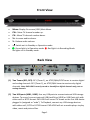
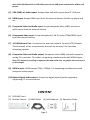
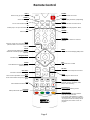
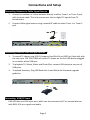
Front View Menu: Display On-screen (OSD) Main Menu. CH+: Move TV channel number up. CH-: Move TV channel number down. V+: Increase audio volume. V-: Reduce audio volume. : Switch unit in Standby or Operation mode. : Green light is in Operation mode. : Red light is in Recording Mode. No lights are in Standby mode. Back View (1) Two Tuners (RF1, RF2): RF1 (Tuner 1), an ATSC/QAM/NTSC tuner to receive digital and analog channels. RF2 (Tuner 2), an ATSC/QAM tuner to receive only digital channels. Note: PHD-VRX2 can only record or timeshift on digital channels only, not on analog channels. (2) Two USB ports (USB1, USB2): Use any USB ports to connect external USB storage devices. To record, connect external USB Hard Drive (HDD) or USB Flash stick with either ext2 or NTFS format. PHD-VRX2 will record TV shows on the first USB device plugged in (assigned as “usba”). To Playback, connect any USB storage devices with either ext2, NTFS or FAT32 format. PHD-VRX2 will act as media player to play video, music and picture files. Page 1