1
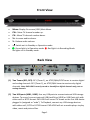
Note: PHD-VRX2 has built-in USB utility menu to test USB speed and partition USB to ext2
format.
(3) VGA (RGB) w/ Audio inputs: Accept video and audio inputs from PC VGA port.
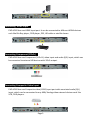
(4) HDMI input: Accept HDMI input from the external devices like Blu-ray player and
etc.
(5) Composite Video and Audio input: Accept composite video (480i) and stereo
audio inputs from the external devices.
(6) Component video input: Accept component (Y-Pb-Pr) video (720p/1080i) input
from the external devices.
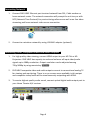
(7) 10/100 Ethernet Port: Connect to the external network. Connect NTP (Network
Time Protocol) server to synchronize the time for accuracy. On-line video
streaming capable.
(8) Composite Video and Audio output: Composite video (480i) and audio output to
analog TV or monitor. This video is outputting simultaneously with HDMI output.
Note: This output is providing composite video and audio only, no graphic on-screen menu
on this output.
(9) HDMI output: HDMI output (720p / 1080p). It is outputting simultaneously with
composite video output.
(10) Optical Digital Audio output: Connect to digital (optical) audio equipment.
Supporting 5.1 surround sound.
CONTENT
(1) PHD-VRX2 unit.
(2) Remote Control 3) HDMI Cable
(4) AAA Batteries (5) Operation Guide
Page 2