1
Verifying the IP settings
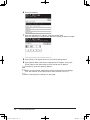
1 Print the network setting list to view the new configuration.
To print the network settings list: Press <Settings>, [List], [Network Settings], then [Yes].
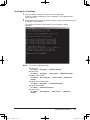
2 At the command prompt on a network computer, type “ping” followed by the
IP address of your machine.
If the machine is active on the network, you will receive a replay.
(Sample)
NOTE: To run the command prompt:
Windows 98:
Click Start → Programs → MS-DOS Prompt
Windows Me:
Click Start → Programs → Accessories → MS-DOS Prompt
Windows 2000 and XP:
Click Start → ALL Programs → Accessories → Command
Prompt
Windows NT 4.0 Workstation:
Click Start → Programs → Command Prompt
Windows Server 2003:
Click Start → Command Prompt
Windows Vista:
Click Start → All Programs → Accesarries → Command
Prompt
Installation Manual
Installation_Manual.indd
19
19
2007/04/27
12:11:41