1
Operation, cont’d
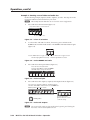
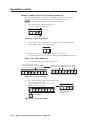
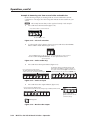
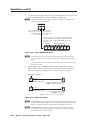
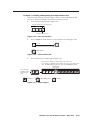
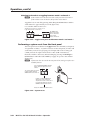
2.
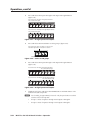
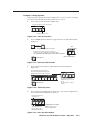
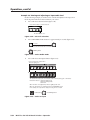
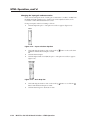
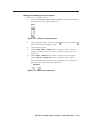
Release the Reset button and then immediately press and release the Reset
button again. Nothing happens if the second momentary press does not occur
within 1 second.
Performing a hard reset
The hard reset function restores the switcher to the base firmware that it was
shipped with. After a hard reset, events do not automatically start, but user settings
and files are restored. Perform a hard reset as follows:
N The hard reset restores the factory-installed firmware. The switcher reverts to
that factory firmware the next time power is cycled off and on unless a firmware
update is performed before the power cycle.
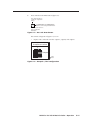
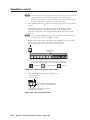
1.
If necessary, turn off power to the switcher.
2.
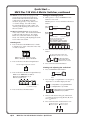
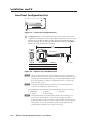
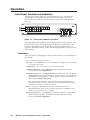
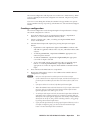
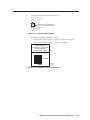
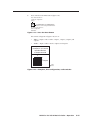
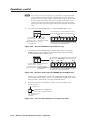
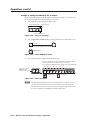
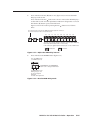
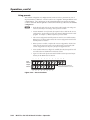
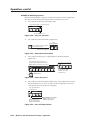
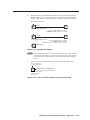
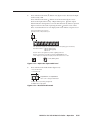
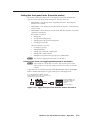
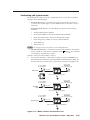
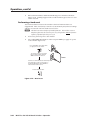
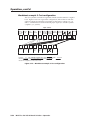
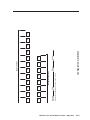
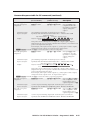
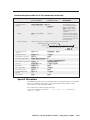
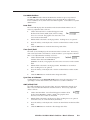
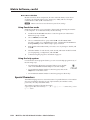
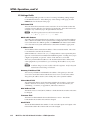
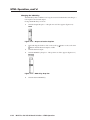
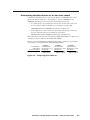
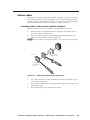
Press and hold the Reset button on the rear panel while you apply AC power
to the switcher (figure 3-72).
PRELIMINARY
RESET
Press and hold the Reset button while
you apply power to the switcher.
2
1
The switcher flashes the front panel
button indicators green, red, and
amber and then turns them off.
Power
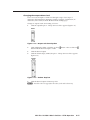
Continue to hold the Reset button until all input
and output buttons return to either unlit or to
background illumination and the RGBHV or
Video and Audio buttons turn on.
RESET
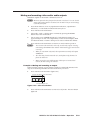
Release the Reset button.
Figure 3-72 — Hard reset
3-46
MVX Plus 128 VGA A Matrix Switcher • Operation