1
Introduction
About the IR 501
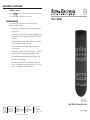
The Extron IR 501 Small Matrix Infrared (IR) Remote Control is an
optional remote control that works with Extron matrix switchers. The
remote control can duplicate most of the matrix switcher’s front panel
control functions and some of RS-232 control functions. The hand-held
remote operates at a carrier frequency of 38 kHz.
N
Refer to the appropriate matrix switcher manual for definitions of
ties, configurations, presets, and audio breakaway; and for more
detailed descriptions of the switcher’s front panel indications.
Battery Installation
Install two AAA batteries as shown (figure 1).
button — The Enter button
c Enter
saves changes when you create a
new tie or configuration.
{function}
buttons
and Output buttons —
d Input
The
button and
button
INPUT
OUTPUT
determine whether the I/O buttons
select an input or output(s) when
pushed.
and Audio buttons —
e Video
The Video and Audio buttons select
video or audio inputs and outputs
when creating or viewing a tie or
when muting an output.
N
The default selection is both video
and audio selection. If you want
to configure both video and audio,
you do not need to push the Video
or Audio button.
and Save buttons — When
f Preset
you push the Preset button before
Figure 1 — Battery installation
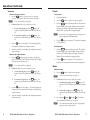
See “Sample Operations” for examples of using the IR 501 to perform
various functions.
I/O
INPUT/OUTPUT SELECTION
2
3
4
5
6
7
8
9
0
+10
ENTER
PRESET
SAVE
VIDEO
AUDIO
MUTE
UNMUTE
INPUT
OUTPUT
1
2
3
5
6
7
4
IR 501
SMALL MATRIX REMOTE
you press an I/O button, the I/O
button selects a preset to save or
recall when it is pushed.
IR 501 Buttons
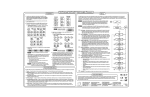
Aim the hand-held unit at the IR detector on the switcher and press the
desired buttons on the remote. The maximum operating range is 30
feet.
1
When you push the Save button Figure 2 — IR 501 buttons
before you push the Preset
button, the current configuration
is saved as a preset when you
push an I/O button.
buttons — The Mute button blanks the screen and/or
g Mute
silences the audio.
The Unmute button unmutes all video and audio outputs.
buttons
Selection buttons — The I/O buttons select inputs
a Input/Output
and outputs to tie. The switcher’s front panel Input LEDs indicate
the selected input or output.
These buttons also select among presets to save or recall.
button — The +10 button is used with the other I/O buttons
b +10
to select numbers higher than 9.
2
IR 501 Small Matrix Remote Control • Battery Installation
IR 501 Small Matrix Remote Control • Operations
3