1
Safety Guidelines
Troubleshooting
General Issues
Inspect All Parts
ight, check for damaged parts and verify all parts are operating
y if blades are damaged.
normally with all functions in order.
ect the
ight of the helicopter.
• Verify battery on board helicopter and your iPod touch, iPhone or iPad to
cient level of charge.
• Verify there is no introduction or exposure to water or moisture in any form.
During operation of helicopter
• Always be aware of your surroundings. DO NOT ALLOW Children to operate
the Smart iCopter without Adult Supervision.
• Maintain safe distances from aircraft and rotating main/tail rotor blades.
Recommended safe distance is 10 feet (3 meter).
• Always be conscious of your actions.
• Wear appropriate clothing that does not interfere with your iPod touch,
iPhone or iPad or Smart iCopter.
• Never leave your model unattended. Carefully follow all
directions and warnings.
• Maintain eye contact with your Smart iCopter during all aspects of operation.
20
y
my Smart iCopter.
• Press and hold Ignition button for 2-3 seconds and a sound will indicate
there is Ignition.
y my Smart iCopter.
• Please ensure that the power button is turned on at your Smart iCopter.
button.
• Please ensure that the Bluetooth icon is lighted up to indicate that your iPod
touch, iPhone or iPad is paired with your Smart iCopter.
but seems erratic and is having
.
at and hard surface as the sensors
may have trouble detecting height and will cause your Smart iCopter to
perform erratically.
Unable to connect Bluetooth.
• Please ensure that only ONE of your iPod touch, iPhone or iPad is connected
to your Smart iCopter.
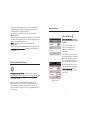
le on your iPod touch, iPhone or iPad Bluetooth
connection in Settings > General > Bluetooth > Tap blue arrow icon > tap
“Forget this Device” and re-pair.
The Smart iCopter seems to be drifting a lot or rotates without being
controlled.
• Please re-calibrate your Smart iCopter by using the Trim function on the App.
Dial the Trim button to the opposite side of the drift or rotation.
ying 2 or more Smart iCopter in the same airspace, please
pair one at a time.
21