1
8. LED Indicators
8. LED Indicators
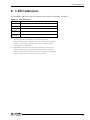
The POWER LED on the front face indicates each state of the display as follows:
Table 8.1. LED Indicators
LED status
Description
OFF
The power supply off or the equipment not started normally
Green(ON)
Normal operation
Green
Power save mode
(Flashing)
Orange (ON) Unsupported signal input *1
Orange
(Flashing)
*1
No signal input *2
The LED looks like this when the equipment cannot process the input
signal to provide normal display, for example, when the
horizontal/vertical sync signal frequency is exceeding the supported
frequency. See Chapter 9 "Display mode" for the display modes
supported by this equipment.
*2
The LED looks like this also when the horizontal or vertical sync
signal is turned off by the power management function of the host
computer. The equipment enters the power save mode automatically
when no signal has been input for about two seconds.
User’s Manual
41