1
How Does the IR-232 Work?
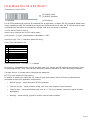
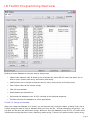
Translating IR into RS-232
=
IR Command
]3:093A32 (Push)
]3*093A32 (Release)
RS-232 String
The IR-232 translates the incoming IR command into an equivalent, or Native, RS-232 command. Rather than
simply repeating the RS-232 command as long as the remote sends the IR code, the IR-232 will send a single
command when the button is pushed and a release code when the button is released.
IR-232 Native Code Structure
Here’s how to interpret the IR-232 native codes:
Code format: ”]<Type><Push/Release><Hex pattern ><CR>”
Attention Byte: The “]” character starts the string
Code Type: Manufacturer ID
ID
1
2
3
4
5
7
8
9
Manufacturer
Samsung
NEC
Sony
Sharp, CR (4, 9)
Philips RC5
JVC
Mitsubishi, CR (5-8)
Tivo
Push/Release Byte: “:”= Push, “*” = Release
Hex Pattern: Expressed as two or three hex byte pairs. JVC, Philips, and CR codes will use two pairs, three
for Samsung and NEC, Sony uses both two and three (example code above is a Sony DVD play command).
Carriage Return: A carriage return completes the statement
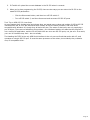
RS-232 Push/Release String Options
In addition to sending the native RS-232 codes for push and release, the IR-232 can provide alternate
commands to meet your application requirements.
•
Native Strings – sends the native RS-232 command
•
Custom Strings – sends a custom string, such as a video projector input command
•
Short Strings – sends a standard code, such as “!*” for every release, common for panel interface
applications
•
Nothing – sends nothing, typical for custom control button releases
Page 3