1
LAN User Manual
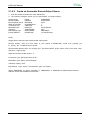
5.1.6.2 Create an Automatic RemoteOutput Queue
1. From the AS/400 command line, enter CRTOUTQ.
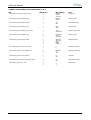
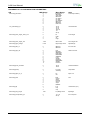
2. The following example shows only the parameters you need to specify:
Output Queue
Remote system
Remote printer queue
Writer to Autostart
Connection type
Destination type
Transform
Manufacturer type
Internet Address
OUTQ
RMTSYS
RMTPRTQ
AUTOSRTWTR
CNNTYPE
DESTTYP
TRANSFORM
MFRTYPMDL
INTNETADR
USERNAME
INTNETADR
d1prn
1
IP
XAUTOQXAIX
YES
IBM6400EP
127.000.000.000.
where,
Output queue: enter the name of the AS/400 output queue.
Remote System: enter the host name of your printer or INTNETADR, which then prompts you
to specify the IP address of your printer.
Remote Printer Queue: set to “pr1” through “pr4”. The remote printer queue name must be all lower case,
entered in single quotes.
Writer to Autostart: set the value to “1”.
Connection Type: specify this value as “IP”.
Destination Type: specify “XAUTOQXAIX”.
Transform: specify “YES”.
Manufacturer Type: select a manufacturer type and model.
Select “IBM6400EP” for Epson emulation or “IBM6400PR” or “IBM42023” for IBM Proprinter Internet
Address: specify the IP address of the printer.
MAN10244-01
34