1
SatService
Gesellschaft für Kommunikationssysteme mbH
Serial IO Hardware Setting (8-PORT / 1)
The first Moxa Smartio/Industrio 8-port board in a VLC is operated at at 0x180 / IRQ 10, which is the factory default setting for
these boards. So, usually the board can be used out of the box.
If you want to install a board which already has been configured to work as second or third board in a VLC, you have to reset the
IO/IRQ settings of this board. The following steps describe how to install the card into a running VLC.
1.
2.
3.
4.
Shut down the VLC, switch it off.
Open the housing.
Install the board in a free slot.
Install the jumper at the rounded corner of the board (it's the only jumper on this board).
5. Connect a VGA computer monitor and a keyboard to the VLC.
6. Switch on the unit.
7. Press 'F5' when the VLC asks to do so. The VLC only waits for 3 seconds at this point, so keep an eye on the messages
on the screen.
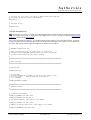
8. At the DOS prompt, enter MOXA
9. The configuration program first asks to select the card type (choose 'Smartio'), then it asks for the board address. Enter
'A700'.
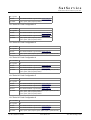
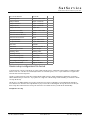
10. Set the port addresses and IRQs according to the table shown below:
IO Port 180
188
190
198
1A0
1A8
1B0
1B8
IRQ
10
10
10
10
10
10
10
10
Speed
Normal Normal Normal Normal Normal Normal Normal Normal
Int.Vec.
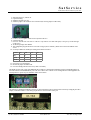
11. Press F10 to save the changes.
12. Remove the jumper from the board.
13. Close the housing and reboot the VLC (CTRL+ALT+DEL)
Serial IO Hardware Setting (8-PORT / 2)
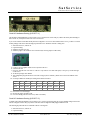
To install a Moxa Smartio/Industrio 8-port board in a VLC as the second serial board, the IO port and IRQ settings of the board
must be changed to 0x200 / IRQ 5 by means of the DOS based configuration utility shipped with the board.
The following steps describe how to install the card into a running VLC.
1. Shut down the VLC, switch it off.
2. Open the housing.
(C) 2013, SatService GmbH
www.satnms.com
VLC-IM-1307 Page 20/30