1
SatService
Gesellschaft für Kommunikationssysteme mbH
In contrast, the INSERT mode lets you enter text but no commands. You have to switch between these modes while you are
editing a text. Early versions of vi really didn't provide any commands while in INSERT mode. vim is much more flexible with this,
e.g. you may move around the text using the cursor keys, even if you are in INSERT mode.
The vi editor contains a extensive online help manual which you can view from within the editor. Type the
key, followed by :h
and
. The editor splits the window and shows the online help in the upper part. Type :q to remove the help again.
The following chapter lists the most frequently used commands for the vi editor as a reference.
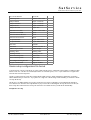
Common commands
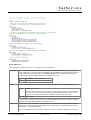
The table below lists some frequently used commands for the vi editor. Pleas note that all the commands except
must be typed
in COMMAND mode. This means if the editor is in another mode than the COMMAND mode, you have to press the
key
first.
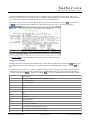
Commands starting with a colon are so called 'ex commands' which are entered in the command / status line at the bottom of the
terminal window. As soon as you press the colon character in COMMAND mode, the cursor jumps to the bottom line and lets
you edit the command. Press
to complete the command or
to return to COMMAND mode without changing anything.
Mode changes
Leave the INSERT mode, revert to COMMAND mode.
i
Go to INSERT mode
Cursor movements
k
Up
j
Down
h
Left
l
Right
0
Start of line
$
End of line
gg
First line of the text
G
Last line of the text
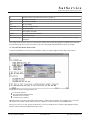
Block / range commands
v
Start visual mode, this marks the block start
y
Yank the marked block into the paste buffer.
x
Yank the marked block and delete it from the text.
(C) 2013, SatService GmbH
www.satnms.com
VLC-IM-1307 Page 29/30