1
Chapter 2
2.2.3
Hardware Installation
Expansion Module Installation
A series of optional Expansion Modules are available for Compex CGX3224
to upgrades its features. Please note that Compex CGX3224 is not shipped
with the Gigabit modules.
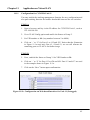
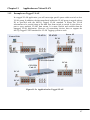
1. Power off the switch. Insert the Module carefully into the Expansion
Module Window and push it along the Module rail until it stops. Ensure
that there is a secure connection to the PCB Board of Compex CGX3224.
2. Tighten the screws on the module.
2.2.4
Removing the Expansion Module
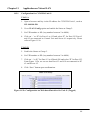
1. Disconnect any cable from the Module.
2. Unscrew and pull out the Module slowly from the Expansion Module Slot.
3. Slide the Module completely out of the chassis and cover the Window
with the cover plates, fasten back using the original screws.
11