1
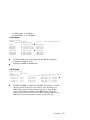
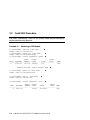
$ SHOW CPU
WFSI27, a Compaq AlphaServer GS160 6/1001
Multiprocessing is ENABLED. Streamlined synchronization image loaded.
Primary CPU = 000
CPU sets:
Active
Configure
Powered Down
Potential
Autostart
Failover
$
0-7
0-7
None
0-15
0-31
None
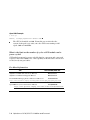
See Table 1-1 for the minimum versions of the operating system, firmware,
and WEBES needed to support online service. Also be sure to understand the
distinctions and restrictions in Chapter 1 relating to the CPU models and the system
boxes. Refer to Section 2.1 for instructions on removing CPU modules from the
system box.
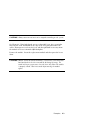
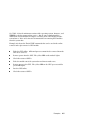
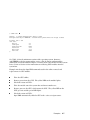
Example 2-2 shows the OpenVMS commands used in the online removal and
replacement of a CPU module.
Take the CPU offline.
Remove power from the CPU. The yellow LED on the module lights.
Check the status of CPU 3.
Take the module out of the system box and insert another one.
Restore power to the CPU, which starts the CPU. The yellow LED on the
CPU goes out and the green LED lights.
Check the status of CPU 3.
OpenVMS automatically adds the CPU to the active set of processors.
Examples
2-7