1
What do I need to know about the system clock, CPU variants,
and the system box QBBs?
Each CPU variant supports a different cache size. To use the larger cache size
the CPU needs the QBB that supports the larger cache size, even though the
faster CPUs can be installed in earlier QBBs.
Furthermore, the CPU derives its operating clock speed from the system clock,
so you need to know the setting of the system clock. Most of these components
can coexist in the same system. But for optimum performance the faster CPUs
should be in a system with the 9.0 ns clock setting.
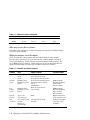
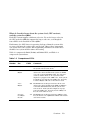
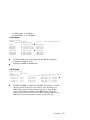
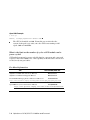
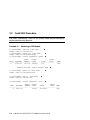
Table 1– 3 compares the B4125, B4166, and B4168 CPUs, and Table 1– 4
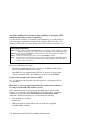
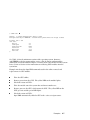
compares the system boxes.
Table 1– 3 Comparison of CPUs
CPU Part
Number
B-cache
Size
Speed
in MHz
B4125
4 Mbytes
B4166
4 or 8
Mbytes
1001
4 or 8
Mbytes
940
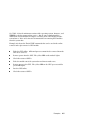
The B4166 runs at this speed and uses all its available B-cache when all CPUs in the QBB are B4166 or
it is mixed with B4168 CPUs, but the system clock
runs at 9.6 ns. If the system box duplicate tag supports only 4-MB cache, then only 4 of the 8 Mbytes of
B-cache on the CPU are used.
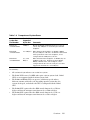
Uses 4 of
its 8 Mbyte
B-cache
731
The B4166 runs at this speed and uses 4 Mbytes of its
B-cache when it is in a QBB with a B4125 CPU and the
clock runs at 9.6 ns.
731
Comments
The B4125 must operate at this speed and requires
the system clock to run at 9.6 ns.
The B4166 runs at this speed and uses all its available B-cache when all CPUs in the system are B4166
or it is in a system with B4168 CPUs, the clock runs
at 9.0 ns, and the CPUs are in a system box with
duplicate tag support of the 8-MB cache. If the system
box duplicate tag supports only 4-MB cache, then only
4 of the 8 Mbytes of B-cache on the CPU are used.
Continued on next page
Overview
1-3