1
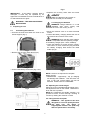
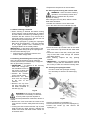
• When LED (1a) is illuminated (red LED) it
indicates that the battery charge is at minimum.
When the battery is discharged (red LED 1a), the
machine turns off or will not start and the red LED
“R” (Fig 5 page 8) of the battery charger flashes
for a few seconds. At this point the battery
requires recharging.
2 – Vacuum motor switch
Used to switch motor ON and OFF. Provides
suction at the squeegee. Button illuminated when
in the on position.
3 – Brush motor switch
Used to switch motor ON and OFF. Button
illuminated when in the on position.
To start the brush rotating press the lever on the
right hand side.
4 – Water dispensing button
When button 4 is pressed it illuminates and
enables the dispensing of water for scrubbing.
The water is controlled by pressing both switch 3
and by pressing lever 5.
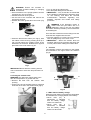
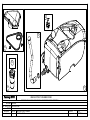
Fig 12
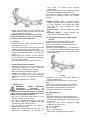
• Check that the connector on the squeegee is
not blocked and that the hose is connected
correctly (See detailed image 13).
5
6
Fig 13
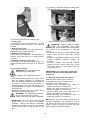
• Check the status of the battery charge by
pressing switch 3.
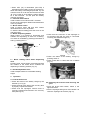
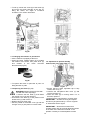
• Check water filter is clean and free of debris
(Fig 14).
Fig 11
5 – Brush rotating and/or water dispensing
lever
Pressing lever 5 and holding it pressed will start
the rotation of the brush and if enabled the
dispensing of cleaning solution (Fig 11).
6 - Handle adjustment lever
Used to adjust handle to comfortable working
height.
4
Operation
Fig 14
4.1 Checks before use
• Check the status of the battery charge by the
indicator (1 in Fig 9).
• Check the drain hose tube of the recovery tank
is properly coupled and sealed.
• Check that the squeegee vacuum hose is
correctly coupled and inserted in the recovery
tank (See Fig 12).
4.2 Preparing the machine and choosing the
cycle
• Press the brush motor button, switch 3, the
light illuminates.
• Pull the squeegee lifting lever and release it to
lower the squeegee to the floor (Fig 15).
9