1
Before Operation (Continued)
Sound
Others
Digital Audio Output
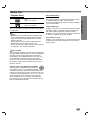
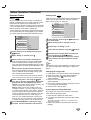
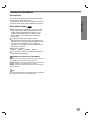
DRC, Vocal and Auto Play settings can be changed.
4 to select the desired option and press
Use 3/4
SELECT/ENTER. The setting of the selected option
can be changed between On and Off.
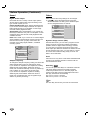
Each DVD disc has a variety of audio output options.
Set the player’s Digital Audio Output according to the
type of audio system you use.
DOLBY DIGITAL/PCM: Select “DOLBY DIGITAL/PCM”
if you connect the DVD Player’s DIGITAL OUT jack to a
Dolby Digital decoder (or an amplifier or other equipment with a Dolby Digital decoder).
Stream/PCM: Select “Stream/PCM” if you connect the
DVD Player’s DIGITAL OUT jack to an amplifier or other
equipment with a DTS decoder, Dolby Digital decoder
or MPEG decoder.
PCM: Select “PCM” if you connect to a 2-channel digital
stereo amplifier. The DVD player outputs sounds in the
PCM 2ch format; when you play a DVD video disc
recorded on the Dolby Digital, MPEG1, or MPEG2
recording system.
Disc Audio
DOLBY
DIGITAL
Disc Subtitle
Stream/PCM
Disc Menu
PCM
/PCM
Rating
Country Code
TV Aspect
Menu Language
Progressive Scan
Sample Freq.
48 KHz
96KHz
Digital Audio Output
5.1 Speaker Setup
Others
Sample Frequency
To change the Sample Frequency setting, first select the
desired Digital Audio Output as indicated as above.
If your receiver or amplifier is NOT capable of handling
96KHz signals, select 48KHz. When this choice is
made, this unit will automatically convert any 96KHz signals to 48KHz so your system can decode them.
If your receiver or amplifier is capable of handling
96KHz signals, select 96KHz. When this choice is
made, this unit will pass each type of signal through
without any further processing.
Disc Audio
DRC
On
Disc Subtitle
Vocal
On
Disc Menu
Auto Play
Off
Rating
Country Code
TV Aspect
Menu Language
Progressive Scan
Digital Audio Output
5.1 Speaker Setup
Others
Dynamic Range Control (DRC)
With the DVD format, you can hear a program’s soundtrack in the most accurate and realistic presentation
possible, thanks to digital audio technology. However,
you may wish to compress the dynamic range of the
audio output (the difference between the loudest sounds
and the quietest ones). Then, you may listen to a movie
at a lower volume without losing clarity of sound. Set
DRC to On for this effect.
Vocal
Set Vocal to On only when a multi-channel karaoke DVD
is playing. The karaoke channels on the disc will mix
into normal stereo sound.
Auto Play
DVD
You can set up the DVD Player so a DVD disc automatically starts playing whenever the DVD is inserted.
If Auto Play mode is set to On, this DVD player will
search for title that has the longest playback time and
then play back the title automatically.
On: Auto Play function is activated.
Off: Auto Play function is not activated.
ote
The Auto Play function may not work for some DVDs.
14