1
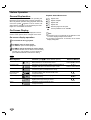
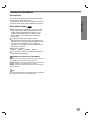
Front Panel and Display Window
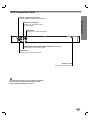
PAUSE ( X )
Pause playback temporarily/ press repeatedly
for frame-by-frame playback.
STOP ( x )
Stops playback.
POWER
Switches the player
ON and OFF.
Reverse Skip/Scan ( m / . )
Go to beginning of current chapter/track or to
PREVIOUS chapter/track.
Press and hold for two seconds for a fast reverse
search.
Power indicator
Lights green when the
DVD player is turned on.
Forward Skip/Scan ( > / M )
Go to NEXT chapter/track.
Press and hold for two seconds for
a fast forward search.
OPEN/CLOSE ( Z )
Opens or closes the disc tray.
Display window
Shows the current status of the player.
Remote Sensor
Disc Tray
Insert a disc here.
ANGLE active
TITLE Indicates current title number
CHP/TRK Indicates current chapter or track number
DVD
DVD inserted
Indicates total playing time/elapsed time
CD Audio CD inserted
MP3 MP3 or WMA disc
inserted
PROG. Programmed playback active
RANDOM RANDOM playback
active
Indicates current player
function:
Playback, Pause, etc.
MP3
Indicates repeat
mode
CD DVD
TITLE
CHP/TRK
PROG.
RANDOM ALL A
B
7
INTRODUCTION
PLAY ( N )
Starts playback.