1
Specifying Destinations
NOTE: To use this feature, the relay station must be set to use an SMTP server to
receive e-mail.
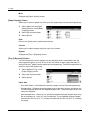
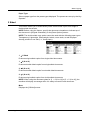
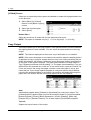
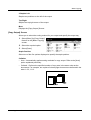
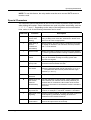
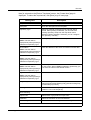
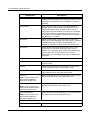
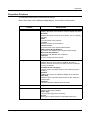
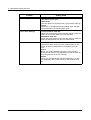
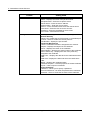
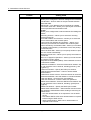
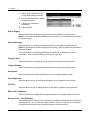
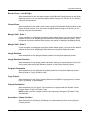
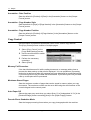
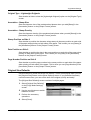
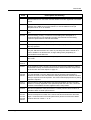
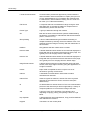
Special Characters
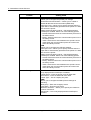
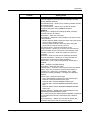
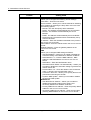
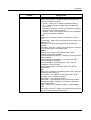
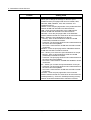
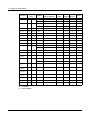
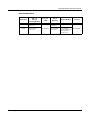
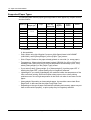
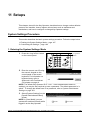
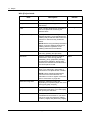
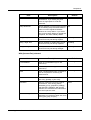
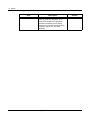
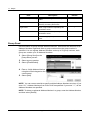
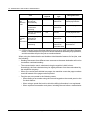
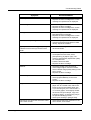
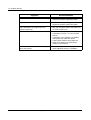
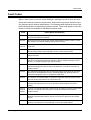
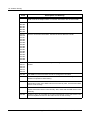
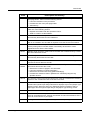
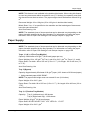
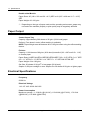
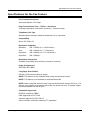
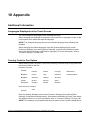
You can enter special characters as part of a fax number to perform many functions
when dialing the number. Some characters are used only when auto dialing, such as
“:”, “!”, “/”, “-”, and “=”. Depending on the setup of the telephone and communication
lines, some or all of the following characters can be used.
Character
Function
Description
-
Dial pause (to
pause while
dialing)
Inserts a pause in a fax number, for example when you are
using a calling card. Press the <Dial Pause> button more
than once to enter a longer pause.
/
Mask data (to
protect
confidential
information)
Select [/] before and after entering confidential information
to display as asterisks. This character must be preceded
with “!” to be effective.
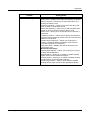
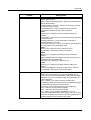
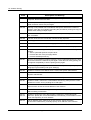
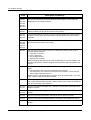
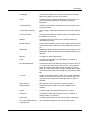
\
Screen mask
Masks the mailbox password on the screen with asterisks
(*). Select [\] before and after entering a mailbox password.
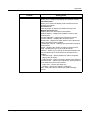
:
Pulse-to-tone
switch
Switches pulse dialing to tone dialing, for example when
using an automated message recording system that
requires tone signals.
’
Speed dial or
group code
Indicates a 3-digit speed dial or group code. Place this
character before and after the code.
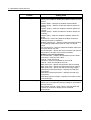
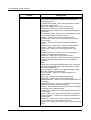
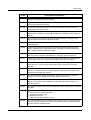
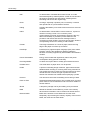
Communication
line switch
Switches communication lines that include parameter data,
where the parameter data include characters “0” to “9” or
“,”. The parameter data must be placed between angle
brackets (“<” and “>”).
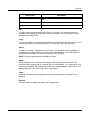
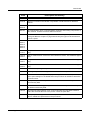
=
Dial tone
detection
Suspends dialing until a dial tone is detected.
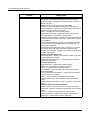
S
Password check
(for remote
machine
identification)
Use this character to verify that the correct number has
been entered. The machine checks if the password you
entered after “S” matches the fax number of the remote
machine. If the match is confirmed the machine sends the
document.
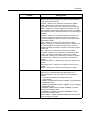
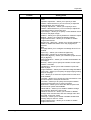
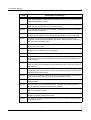
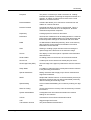
Readability
improvement
Improves readability by inserting spaces in a telephone
number, for example “1 234 5678” instead of “12345678”.
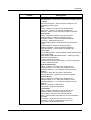
!
Start DTMF code
signaling
Pauses regular fax dialing, and starts the DTMF (dual tone
multi-frequency) method for sending documents to
mailboxes on the remote machines.
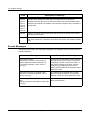
$
Wait for DTMF
confirmation
Wait for a DTMF confirmation signal from the remote
machine and proceed to the next step.
< >
space
Xerox CopyCentre/WorkCentre/WorkCentre Pro 123/128 User Guide
83