1
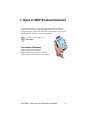
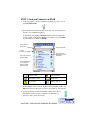
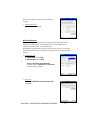
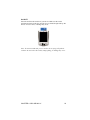
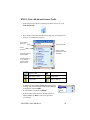
Main Screen of Wi-Fi Companion
The screen content varies depending on your connection status.
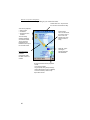
Socket status icon. Tap to access
this screen from outside the utility.
Your device properties.
• Device name
• IP address
• Packets sent and
received
The icon always
appears regardless
of connection status.
Tap to view more
IP addresses For
P300/P500, also tap to
turn the radio on/off.
Internet ready.
Tap to access email,
the Internet, ping or
trace route. Icon
appears only when
Internet access is
ready.
}
Data rate. Tap to
view signal
strength and data
rate distribution.
Encryption status.
Tap to access a
certificate
management utility
for WPA or 802.1x if
needed.
Access point/remote device properties.
• SSID
• Connection duration
• Signal quality rating and percentage
• MAC address (also known as BSSID)
• Channel number (in black circle)
Tap for Wi-Fi Finder.
30