1
ApollonII_general-copy_SEC.book
21 ページ 2004年9月6日 月曜日 午後4時57分
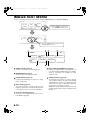
MISFEED REMOVAL
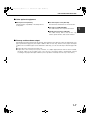
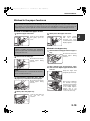
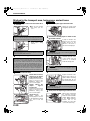
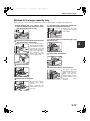
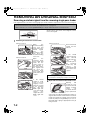
Misfeed in the stand/1 x 500 sheet paper drawer
NOTE
Paper misfed from a paper tray may be extending out of the tray into the right side cover area. In this case if the
tray is drawn out of the machine, the paper may become torn and difficult to remove. To prevent this from
happening, always open the right side cover first and remove the misfed paper if it is extending into that area.
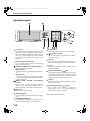
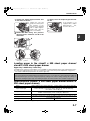
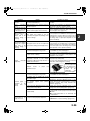
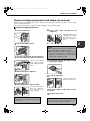
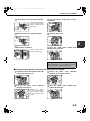
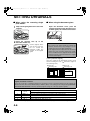
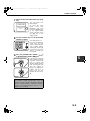
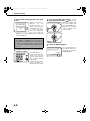
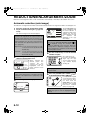
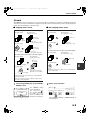
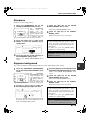
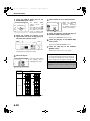
1 Open the upper and lower side covers.
Push the lever upward
and gently open the
cover.
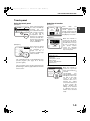
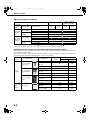
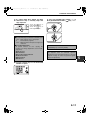
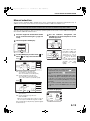
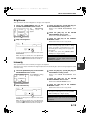
paper is not found in step 2, pull
3 Ifoutmisfed
paper tray 1 and remove the misfed
paper.
Be careful not to tear the
misfed paper during
removal.
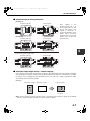
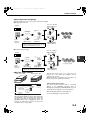
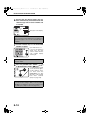
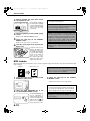
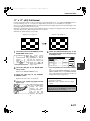
push
4 Gently
machine.
the paper tray into the
Push the tray firmly all the way into the machine.
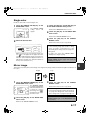
close
5 Gently
covers.
NOTE
If paper is loaded in the bypass tray, temporarily
remove the paper and close the bypass tray before
opening the side cover.
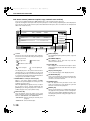
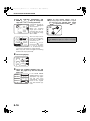
2 Remove the misfed paper.
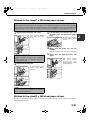
the upper and lower side
After closing, confirm
that
the
misfeed
message has been
cleared and the normal
display appears.
Be careful not to tear the
misfed paper during
removal.
NOTE
The misfeed may have occurred inside the machine.
Check carefully and remove it.
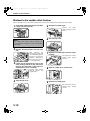
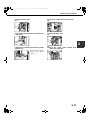
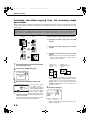
Misfeed in the stand/3 x 500 sheet paper drawer
To remove a misfeed in the upper, middle, or lower tray, follow steps 1 through 5 above of "Misfeed in the stand/1
x 500 sheet paper drawer".
2-21
2