1
PagePro 1100
User’s Manual
As an ENERGY STAR® Partner, we determined that this machine meets the ENERGY
STAR® Guidelines for energy efficiency.
What is an ENERGY STAR® product?
ENERGY STAR® product has a special feature that allows it to automatically switch to a “low-power mode” after a period of inactivity. An
ENERGY STAR® product uses energy more efficiently, saves you
money on utility bills and helps protect the environment.
Foreword
Safety Information
Laser Safety
This is a page printer which operates by means of a laser. There is no
possibility of danger from the laser, provided the printer is operated
according to the instructions in this manual.
Since radiation emitted by the laser is completely confined within protective housing, the laser beam cannot escape from the machine during
any phase of user operation.
Internal Laser Radiation
Maximum Radiation Power:
0.6 mW at laser aperture of the print head unit
Wavelength:
770 – 810 nm
This product employs Class IIIb Laser Diode that emits an invisible
laser beam.
Laser Diode and Scanning Polygon Mirror are incorporated in the print
head unit.
The print head unit is not a field service item.
Therefore, the print head unit should not be opened under any circumstance.
Laser Safety
This printer is certified as a Class I Laser product under the U.S.
Department of Health and Human Services (DHHS) Radiation Performance Standard according to the Radiation Control for Health and
Safety Act of 1968. This means that the printer does not produce hazardous laser radiation.
i
Foreword
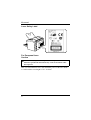
Laser Safety Label
For European Users
Caution
◆
Use of controls, adjustments or performance of procedures other
than those specified in this manual may result in hazardous radiation exposure.
This is a semiconductor laser. The maximum power of the laser diode
is 5 mW and the wavelength is 770 – 810 nm.
ii
Foreword
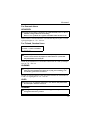
For Denmark Users
ADVARSEL
◆
Usynlig laserstråling ved åbning, når sikkerhedsafbrydere er ude af
funktion. Undgå udsættelse for stråling.
Klasse 1 laser produkt der opfylder IEC60825 sikkerheds kravene.
Dansk: Dette er en halvlederlaser. Laserdiodens højeste styrke er 5 mW
og bølgelængden er 770 – 810 nm.
For Finland, Sweden Users
LUOKAN 1 LASERLAITE
KLASS 1 LASER APPARAT
VAROITUS!
◆
Laitteen käyttäminen muulla kuin tässä käyttöohjeessa mainitulla
tavalla saattaa altistaa käyttäjän turvallisuusluokan 1 ylittävälle
näkymättömälle lasersäteilylle.
Tämä on puolijohdelaser. Laserdiodin suurin teho on 5 mW ja aallonpituus on 770 – 810 nm.
VARNING
◆
Om apparaten används på annat sätt än i denna bruksanvisning specificerats, kan användaren utsättas för osynlig laserstrålning, som
överskrider gränsen för laserklass 1.
Det här är en halvledarlaser. Den maximala effekten för laserdioden är
5 mW och våglängden är 770 – 810 nm.
VARO
◆
Avattaessa ja suojalukitus ohitettaessa olet alttiina näkymättömälle
lasersäteilylle. Älä katso säteeseen.
VARNING
◆
Osynlig laserstrålning när denna del är öppnad och spärren är
urkopplad. Betrakta ej strålen.
iii
Foreword
For Norway Users
ADVARSEL
◆
Dersom apparatet brukes på annen måte enn spesifisert i denne
bruksanvisning, kan brukeren utsettes for unsynlig laserstråling som
overskrider grensen for laser klass 1.
Dette en halvleder laser. Maksimal effekt till laserdiode er 5 mW og
bølgelengde er 770 – 810 nm.
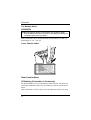
Laser Caution Label
User Instructions
CE Marking (Declaration of Conformity)
We declare under our sole responsibility that the printer and options to
which this declaration relates are in conformity with the specifications
below.
This declaration is valid for the area of the European Union (EU) only.
iv
Foreword
Product Type
Laser Beam Printer
Product Name
PagePro 1100
Options
Second Paper Cassette Unit (4148-601)
Face-Up Tray (4121-0633)
Network Interface Card (4625-131)
Expansion Memory (DIMM)
Standard
Safety: EN60 950/1992 with Amendments 1, 2, 3 and 4
Safety of information technology equipment, including electrical business
equipment
EN60825-1/1994 with Amendment A11
Radiation safety of laser products, equipment classification, requirements
and user’s guide
EMC: EN55 022 (Class B)/1998
Limits and method for measurement of radio disturbance characteristic of
information technology equipment (ITE)
EN55024/1998
Information technology equipment – immunity characteristics – Limits and
methods of measurement
EN61000–4–2/1995
Electromagnetic compatibility (EMC)
Part 4: Testing and measurement techniques
Section 2: Electrostatic discharge immunity test
EN61000–4–3/1996
Electromagnetic compatibility (EMC)
Part 4: Testing and measurement techniques
Section 3: Radiated, radio-frequency electromagnetic field immunity test
EN61000–4–4/1995
Electromagnetic compatibility (EMC)
Part 4: Testing and measurement techniques
Section 4: Electrical fast transient/burst immunity test
EN61000–4–5/1995
Electromagnetic compatibility (EMC)
Part 4: Testing and measurement techniques
Section 5: Surge immunity test
EN61000–4–6/1996
Electromagnetic compatibility (EMC)
Part 4: Testing and measurement techniques
Section 6: Conducted disturbances inducted by radio-frequency fields –
Immunity test
EN61000–4–8/1993
Electromagnetic compatibility (EMC)
Part 4: Testing and measurement techniques
Section 8: Power-frequency magnetic field immunity test
EN61000–4–11/1994
Electromagnetic compatibility (EMC)
Part 4: Testing and measurement techniques
Section 11: Voltage dips, short interruptions and voltage variations immunity test
EC Directive
Safety: 73/23/EEC
EMC: 89/336/EEC and 93/68/EEC
v
Foreword
This device must be used with shielded interface (Parallel) cable and
shielded network (10/100Base-T) cable.
The use of non-shielded cable is likely to result in interference with
radio communications and is prohibited under 89/336/EEC rules.
Ozone Release
During printer operation, a small quantity of ozone is released. This
amount is not large enough to harm anyone adversely. However, be
sure the room where the machine is being used has adequate ventilation, especially if you are printing a high volume of materials, or if the
machine is being used continuously over a long period.
vi
Foreword
Welcome
And thank you for selecting a Minolta/QMS PagePro 1100 Printer!
This User’s Manual explains the functions of the printer and how it
operates. It also provides you with troubleshooting tips as well as general precautions you should observe when operating the printer. To
ensure the top performance and effective use of your printer, read this
manual carefully from cover to cover, and keep it at hand for later reference.
No part of this document may be reproduced, transmitted, transcribed,
stored in a retrieval system, or translated into other languages without
the express written prior consent of Minolta Co., Ltd..
The contents of this manual are subject to change without notice.
Should there be any discrepancy between the printed materials and the
electronic-based resources provided with your printer, please refer to
the printed materials as your primary resource.
Trademark Acknowledgments
PCL is a registered trademark of Hewlett-Packard Company.
Centronics is a registered trademark of Centronics Inc.
MS-DOS, Microsoft, Windows, and Windows NT are registered trademarks of Microsoft Corporation.
IBM is a registered trademark of International Business Machines Corporation.
PagePro is a trademark of Minolta in Europe, Japan and Asia.
Fine-ART and Fine Micro Toning are trademarks of Minolta Co., Ltd.
QMS and the QMS logo are registered trademarks of QMS, Inc.
All other brand or product names are trademarks or registered trademarks of their respective companies or organizations.
vii
Contents
CONTENTS
Chapter 1: Introduction
Features............................................................ 1-1
Hardware...................................................... 1-1
Software ....................................................... 1-1
Operating System ........................................ 1-1
Printer Parts and Accessories ....................... 1-2
Printer........................................................... 1-2
Options......................................................... 1-4
Control Panel ................................................... 1-5
Indicators...................................................... 1-5
Panel Button................................................. 1-6
Chapter 2: Setting-Up
Installation Precautions .................................. 2-1
Selecting a Location for the Printer .............. 2-1
Space Requirements.................................... 2-2
Power Source............................................... 2-3
Grounding .................................................... 2-4
Operational Precautions ................................. 2-5
Operating Environment ................................ 2-5
Printer........................................................... 2-5
Printer Supplies............................................ 2-7
viii
Contents
Installing........................................................... 2-8
Setting-Up ...................................................... 2-11
Connecting the Power Cord ....................... 2-11
Loading Paper ............................................ 2-12
Turning on the Printer................................. 2-14
Testing the Printer ...................................... 2-15
Connecting to a Computer ......................... 2-17
Options ........................................................... 2-18
Second Paper Cassette Unit ...................... 2-18
Face-Up Tray .............................................. 2-21
Expansion Memory .................................... 2-23
Network Interface Card .............................. 2-27
Chapter 3: Using the Printer
Using the Panel Button ................................... 3-1
Counter Reset Mode .................................... 3-1
Job Cancel ................................................... 3-2
Print Configuration Page .............................. 3-2
Form Feed.................................................... 3-2
Printing Paper .................................................. 3-3
Type.............................................................. 3-3
Size .............................................................. 3-4
Printable Area .............................................. 3-6
Loading Paper.................................................. 3-7
Loading Paper onto Tray1 ............................ 3-8
ix
Contents
Manual Loading (Manual Feed Tray).......... 3-10
Loading Paper onto Tray2 (Option) ............ 3-13
Selecting Output Direction (Printed Side
Up or Down) ................................................... 3-17
Chapter 4: Printer Driver
Introduction...................................................... 4-1
System Requirements..................................... 4-2
Installing the PagePro 1100 Printer Driver
Under Windows 95/Windows 98/Windows
NT 4.0................................................................ 4-3
To Install the PagePro 1100 Printer Driver
Using the Installer (Auto Run) ...................... 4-4
To Install the PagePro 1100 Printer Driver
Using Plug-and-Play .................................... 4-8
To Install the PagePro 1100 Printer Driver
Using the Add Printer Wizard..................... 4-10
Installing the PagePro 1100 Printer Driver
Under Windows 3.1 ....................................... 4-12
To Install the PagePro 1100 Printer
Driver.......................................................... 4-12
Displaying the PagePro 1100 Printer Driver
Setup Dialog................................................... 4-16
To Display the Printer Driver Setup Dialog
Under Windows 95/Windows 98 ................ 4-16
To Display the Printer Driver Setup Dialog
Under Windows NT 4.0 .............................. 4-18
x
Contents
To Display the PagePro 1100 Printer Driver
Setup Dialog Under Window 3.1 ................ 4-21
Using the PagePro 1100 Printer Driver
Setup Dialog................................................... 4-23
Common Buttons ....................................... 4-23
Paper.......................................................... 4-24
Page Layout ............................................... 4-30
Quality ........................................................ 4-36
Device Option............................................. 4-38
Uninstalling the Printer Driver...................... 4-39
To Uninstall the PagePro 1100 Printer Driver
(Windows 95/Windows 98/Windows
NT 4.0) ....................................................... 4-39
To Uninstall the PagePro 1100 Printer Driver
(Windows 3.1) ............................................ 4-40
DOS Printing Utilities .................................... 4-41
Installing DOS Printing Utilities .................. 4-41
Loading and Unloading the Status
Monitor ....................................................... 4-42
Accessing the Printer Control Panel .......... 4-44
Using the Printer Control Panel.................. 4-45
Printer Control Panel Screens.................... 4-50
Using the Status Display ............................ 4-58
xi
Contents
Chapter 5: Printer Status Monitor and Control Panel
Using the Status Monitor ................................ 5-1
Starting Up the Status Monitor..................... 5-1
Using the Status Monitor.............................. 5-4
Using the Control Panel .................................. 5-6
Starting Up the Control Panel ...................... 5-6
Using the Control Panel ............................... 5-6
Chapter 6: Maintenance
Replacing the Toner Cartridge ....................... 6-1
To Replace the Toner Cartridge ................... 6-1
To Reset the Counter of the Toner
Cartridge ...................................................... 6-6
Replacing the Drum Cartridge ....................... 6-7
To Replace the Drum Cartridge ................... 6-7
To Reset the Counter of the Drum
Cartridge .................................................... 6-14
Cleaning the Printer ...................................... 6-15
Cleaning the Outside of the Printer ............ 6-15
Cleaning the Paper Feed Roller ................. 6-16
Chapter 7: Troubleshooting
Clearing a Paper Misfeed ................................ 7-1
Inside the Printer .......................................... 7-1
Face-Down Tray ........................................... 7-6
Face-Up Tray (option).................................. 7-7
xii
Contents
Tray1............................................................. 7-8
Manual Feed Tray......................................... 7-8
Second Paper Cassette Unit (option)........... 7-9
Print Quality Problems .................................. 7-10
No Output................................................... 7-15
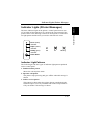
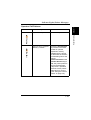
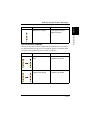
Indicator Lights (Printer Messages) ............ 7-17
Indicator Light Patterns .............................. 7-17
Chapter 8: Specifications
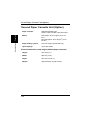
PagePro 1100 Printer....................................... 8-1
Second Paper Cassette Unit (Option)............ 8-4
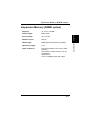
Expansion Memory (DIMM: option) ............... 8-5
Interface Connector and Cable ...................... 8-6
Appendix A: Glossary
Appendix B: Index
xiii
MEMO
Chapter 1
Introduction
1Chapter
Introduction
1
Introduction
Chapter 1
Hardware
•
•
•
•
•
•
•
•
Compact design
PCL 6 emulation
Real 600 dpi resolution
Prints up to 10 pages per minute (A4/Letter-size print)
Compact, easy to install toner and drum cartridges
Fine Micro Toning cartridges for clearer and sharper images
Fine-ART technology for resolution that actually exceeds 600 dpi
High speed performance
Software
• Easy to use networking
• Special features like watermark printing, image shift and N-up
printing
• Windows printer status monitor – Displays simultaneous printer status information as well as reports the progress of the current print
job
Operating System
•
•
•
•
•
Windows 95
Windows 98
Windows 3.1x
Windows NT 4.0
MS-DOS 5.0 or later (except version 7.0)
1-1
Introduction
Features
Chapter 1
Features
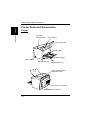
Printer Parts and Accessories
Printer
Top cover
release button
Introduction
Chapter 1
Printer Parts and Accessories
Control panel
Face-down tray
Paper guide
Paper support
Power switch
Manual feed tray
Tray1
(Multipurpose tray)
Face-up/Face-down
selection switch
Power cord socket
Parallel interface connector
1-2
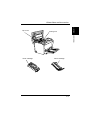
Fusing unit
Introduction
Top cover
Chapter 1
Printer Parts and Accessories
Toner cartridge
Drum cartridge
1-3
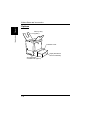
Options
Face-up tray
(option)
Introduction
Chapter 1
Printer Parts and Accessories
Cassette cover
Tray2 (500-sheet
second cassette)
Second paper
cassette unit (option)
1-4
Control Panel
Chapter 1
Control Panel
Introduction
The control panel has three indicators and one button.
Error (amber) indicator
Paper (amber) indicator
Ready (green) indicator
Panel button
Indicators
The three indicators turn on, off, or blink in combination to let you
know the current status of the printer.
Note
◆
◆
You can find out details of the printer’s status by checking the information that appears on your computer screen (see “Starting Up the Status
Monitor” on page 5-1).
See “Indicator Lights (Printer Messages)” on page 7-17 for information
about how the control panel indicators indicate the current status of the
printer.
ex.)
Printer is ready.
Paper misfeed
1-5
Introduction
Chapter 1
Control Panel
Panel Button
The panel button can be used to perform various operations according
to the status of the printer.
• Reset the counter
• Job cancel
• Print configuration page
• Form feed
For details, see “Using the Panel Button” on page 3-1.
1-6
Chapter 2
Setting-Up
2Chapter
Setting-Up
2
Setting-Up
Chapter 2
Installation Precautions
Installation Precautions
A proper location helps to ensure that your printer provides you with
the long service life for which it is designed. Double-check to make
sure that the location you select has the following characteristics.
• Choose a location that is well-ventilated.
• Make sure there is no chance of ammonia or other organic gasses
being generated in the area.
• The power outlet you plan to connect to for power should be nearby
and unobstructed.
• Make sure that the printer is not exposed to direct sunlight.
• Avoid areas in the direct airflow of air conditioners, heaters, or ventilators, and areas subjected to temperature and humidity extremes.
• Choose a sturdy, level surface where the printer will not be exposed
to strong vibration.
• Keep the printer away from any objects that might block its heat
vents.
• Do not locate the printer near curtains or other combustible objects.
• Choose an area where there is no possibility of the printer being
splashed with water or other liquids.
• Make sure that the surrounding area is clean, dry, and free of dust.
2-1
Setting-Up
Selecting a Location for the Printer
Chapter 2
Note the following important precautions when selecting a location for
the printer and when connecting it to a power source.
Installation Precautions
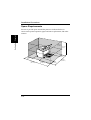
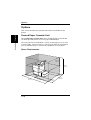
Space Requirements
Setting-Up
Chapter 2
Be sure to provide space around the printer as indicated below, to
ensure easier printer operation, paper and toner replacement, and maintenance.
250 mm
(9-3/4 in.)
507 mm
(20 in.)
100 mm
(4 in.)
150 mm
(6 in.)
680 mm
(26-3/4 in.)
672 mm
(26-1/2 in.)
2-2
300 mm
(11-3/4 in.)
200 mm
(7-3/4 in.)
Installation Precautions
Power Source
Note
◆
◆
◆
◆
◆
◆
◆
Use a power source with minimal voltage and frequency fluctuation.
Only use an outlet that is rated for the voltage capacity specified for this
printer.
Be sure to plug the power cord all the way into the outlet. The outlet
should be located near the printer and be easily accessible so you can
unplug the power cord immediately should any problem occur.
Make sure the outlet you use is visible, and not hidden behind the printer
or any other object.
If any other electrical equipment is plugged into the same outlet, make
sure that the capacity of the outlet is not exceeded.
If you use an extension cord, make sure its capacity is greater than the
power consumption of the printer. Using an extension cord with a lower
capacity creates the danger of fire.
Never use a multiple socket to connect other appliances or machines to
the same outlet being used to power the printer.
2-3
Setting-Up
Chapter 2
The following are the power source requirements for this printer.
Power supply:
220 – 240 V at 50 – 60 Hz
Voltage fluctuation:
220 – 240 V ±10%
Frequency fluctuation:
Within ±3 Hz
Installation Precautions
Always ground the printer to guard against the danger of electrical
shock. To ground the printer, connect the grounding wire to the ground
terminal of the electrical outlet you are plugging in to or to a grounding
contact that complies with local electrical standards in your area.
Note
◆
Never connect the grounding wire to a gas pipe, the grounding wire for a
telephone, or to a water pipe.
Setting-Up
Chapter 2
Grounding
2-4
Operational Precautions
Operational Precautions
Note the following important precautions whenever using the printer.
Printer
The following describes precautions for using the printer.
• Never turn the printer off or open any of its covers during a print
operation.
• Never place flammable gasses, liquids or objects that generate magnetic forces near the printer.
• When unplugging the power cord, always grasp the plug and never
pull on the cord. A damaged cord creates the danger of fire or electrical shock.
• Never touch the power cord when your hands are wet. Doing so creates the danger of electrical shock.
• Always unplug the power cord before moving the printer. Failure to
do so can damage the power cord, creating the danger of fire or
electrical shock.
• Always unplug the power cord if you do not plan to use the printer
for a long time.
• Never try to remove any secured panel or cover. The interior of the
printer contains high-voltage circuitry which creates the danger of
electrical shock when exposed.
2-5
Setting-Up
The following describes the operating environment required when
using the printer.
Temperature:
10°C to 35°C (50°F to 95°F) with fluctuation of 10°C (18°F) per
hour
Humidity:
15% to 85% with fluctuation of 20% per hour
Chapter 2
Operating Environment
Setting-Up
Chapter 2
Operational Precautions
• Never try to modify the printer. Doing so creates the danger of fire
or electrical shock.
• Never place any heavy objects on the power cord, pull on it or bend
it. Doing so creates the danger of fire or electrical shock.
• Always make sure the printer is not placed on the electrical cord or
the communications cables of any other electrical equipment. Also
make sure that cords and cables do not get into the printer’s mechanism. Any of these conditions create the danger of malfunction and
fire.
• Always take care so that paper clips, staples, or other small pieces
of metal do not get into the printer through its vents or other openings. Such objects create the danger of fire or electrical shock.
• Do not allow water or other liquids to spill on or near the printer.
Fire or electrical shock can occur should water or liquid come into
contact with the printer.
• Should liquid or any piece of metal accidently get inside the printer,
immediately turn it off, unplug the power cord, and contact your
dealer. Failure to take this immediate action creates the danger of
fire or electrical shock.
• Whenever the printer emits unusually high amounts of heat, smoke,
an unusual odor, or noise, immediately turn it off, unplug it, and
contact your dealer. Failure to take this immediate action creates the
danger of fire or electrical shock.
Caution
◆
Be sure to locate the printer in a well-ventilated location. A minimal
amount of ozone is generated during normal operation of this
printer. Because of this, an unpleasant odor may result when the
printer is used for extensive printing in a poorly ventilated area. For
comfortable, healthy, and safe operation, be sure to locate the printer
in a well-ventilated area.
2-6
Operational Precautions
Placer l’imprimante dans une pièce largement ventilée
Une quantité d’ozone négligable est dégagée pendant le fonctionnement de l’imprimante quand celle-ci est utilisée normalement.
Cependant, une odeur désagréable pent être ressentie dans les pièces
dont l’aération est insuffisante et lorsqu’une utilisation prolongée de
l’imprimante est effectuée. Pour avoir la certitude de travailler dans
des conditions de confort, santé et sécurité, il est préférable de bien
aérer la pièce où se trouve l’imprimante.
Printer Supplies
Note the following precautions when handling printer supplies such as
the toner cartridge, the drum cartridge, and paper.
• Avoid storing printer supplies in the following locations.
• Areas subjected to direct sunlight. Additionally, the drum cartridge must be protected from fluorescent light.
• Areas exposed to open flame.
• Areas subjected to high humidity.
• Areas subjected to large amounts of dust.
• Keep paper that has been removed from its wrapper, but not yet
loaded onto the printer tray, in a sealed plastic bag and store it in a
cool, dark location.
• Use only the toner cartridge that is expressly specified for this
printer.
• Keep supplies out of the reach of children.
• Should your hands become soiled with toner, immediately wash
them with soap and water.
Caution
◆
Whenever you remove the drum cartridge from the printer, immediately wrap it with a cloth to protect it against overexposure to light.
2-7
Setting-Up
◆
Chapter 2
Attention
Installing
Installing
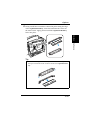
Take the items and accessories shown below out of the carton.
Chapter 2
1
Setting-Up
1. Printer
2. Accessories
User’s Guide
CD-ROM
Power cord
Warranty booklet
Registration card
Caution
◆
After unpacking, keep all packing materials out of the reach
of children.
Note
◆
2-8
Keep all the boxes and packing materials that the printer comes in
for later use when transporting the printer.
Installing
Remove the plastic bag and peel off the shipping tape from the
printer.
3
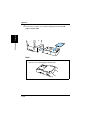
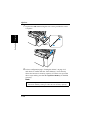
Pull Tray1 from the printer with both hands and lie it down flat.
4
Pull out the two cushions from the paper feed inlet.
2-9
Setting-Up
Chapter 2
2
Installing
Squeeze the right paper size guide and open the paper size
guides. Pull out the plastic-lead strip from the paper feed inlet.
Setting-Up
Chapter 2
5
For instructions on installing the optional item(s), see “Options” on
page 2-18.
2-10
Setting-Up
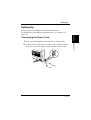
Connecting the Power Cord
1
2
Make sure that the power switch is in the ❍ (Off) position.
Connect one end of the power cord that comes with the printer to
the power cord socket. Plug the other end into a power outlet.
2
1
2-11
Setting-Up
Set-up the printer according to the following instructions.
For instructions on installing the optional item(s), see “Options” on
page 2-18.
Chapter 2
Setting-Up
Setting-Up
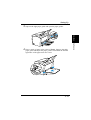
Loading Paper
Open the face-down tray.
2
Pull Tray1 from the printer with both hands and lie it down flat.
Setting-Up
Chapter 2
1
2-12
Setting-Up
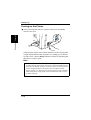
Squeeze the right paper guide and open the paper guides.
4
Place a stack of paper in the center of Tray1. Squeeze the right
paper guide and adjust the paper guides so that both the left and
right sides of the paper stack are secure.
2-13
Setting-Up
Chapter 2
3
Setting-Up
Turning on the Printer
After connecting the printer to a power outlet, press the power
switch to turn it on.
Setting-Up
Chapter 2
■
Turning on the printer causes all the indicators on the control panel
to light, which indicates that the printer is warming up. In about 23
seconds or less, only the Ready indicator remains lit, indicating that
the printer is ready to print.
Note
◆
2-14
The printer automatically enters a power saving mode after a set
period of time in which it does not receive a print command from the
computer. The default setting is 15 minutes, however, the time period
can be changed using the control panel (see “Using the Control
Panel” on page 5-6). Whenever the printer receives a print command
while in the power saving mode, it will automatically start to warm
up before printing.
Setting-Up
Testing the Printer
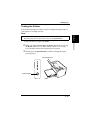
Perform the following procedure to print a configuration page and see
if the printer is working correctly.
See “No Output” on page 7-15 for information on what to do if the configuration page does not print when you press the panel button.
1
2
3
Place the A4 size paper onto Tray1.
Make sure that both the Paper and Error indicators are off, and
the Ready indicator is on. This indicates there is no existing
error condition and no data remaining to be printed.
Briefly press the panel button to start the configuration page
print operation.
Face-down tray
Panel button
Tray1
2-15
Setting-Up
◆
Chapter 2
Note
Setting-Up
Setting-Up
Chapter 2
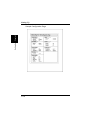
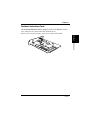
Sample Configuration Page
2-16
Setting-Up
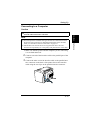
Connecting to a Computer
Always use a shielded interface cable. Use of an unshielded cable can
result in radio interference with data.
Note
◆
◆
You must purchase an IEEE 1284 type-B cable for connection between
the printer and a computer. For detailed specifications of the interface
cable, see “Interface Connector and Cable” on page 8-6.
Minolta does not warrant the use of any particular cable. The user
assumes all responsibility as to the quality and performance of the cable.
1
Make sure that the printer and the computer you are connecting
it to are both turned off.
2
Connect one end of the interface cable to the parallel port of the
computer.
3
Connect the other end of the interface cable to the parallel interface connector on the back of the printer. Secure the interface
cable using the two clips on the parallel interface connector.
2-17
Setting-Up
◆
Chapter 2
Caution
Options
Options
Setting-Up
Chapter 2
This section describes the optional items that are available for this
printer.
Second Paper Cassette Unit
The second paper cassette unit comes equipped with a cassette that
can hold up to 500 sheets of A4 size paper called Tray2.
The same unit can accommodate a variety of other paper trays as well
(Letter, JIS B5, Legal, Executive). Contact your dealer to find out how
you can add these trays to increase the capabilities of your printer.
Space Requirements
250 mm
(9-3/4 in.)
626 mm
(24-3/4 in.)
100 mm
(4 in.)
150 mm
(6 in.)
972 mm
(38-1/4 in.)
2-18
600 mm
(23-1/2 in.)
680 mm
(26-3/4 in.)
200 mm
(7-3/4 in.)
Options
Remove the second paper cassette unit and Tray2 from their
packaging, including the protective tape used to hold the various
components in place.
2
Place the printer on top of the base unit. Make sure to align the
coupling pins of the base unit with the holes located underneath
the printer.
3
Load paper onto Tray2. See “Loading Paper onto Tray2
(Option)” on page 3-13 for details.
Setting-Up
1
Chapter 2
Installing the Second Paper Cassette Unit
2-19
Options
Replace the cassette cover and insert Tray2 into the second
paper cassette unit.
Setting-Up
Chapter 2
4
Note
◆
2-20
Be sure to use both hands whenever Tray2 is removed from or
inserted into the second paper cassette unit.
Options
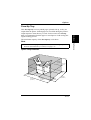
This face-up tray receives printed pages, printed side up, as they are
output from the printer. Printed pages are not rolled during the printer’s
output sequence when this tray is used. For this reason, the face-up
tray is recommended for thick paper or envelopes to avoid curling during the feeding process.
The maximum capacity of the face-up tray is 20 sheets.
◆
Setting-Up
Note
For details on changing the output direction, see “Selecting Output
Direction (Printed Side Up or Down)” on page 3-17.
Space Requirements
300 mm
(11-3/4 in.)
557 mm
(22 in.)
100 mm
(4 in.)
250 mm
(9-3/4 in.)
680 mm
(26-3/4 in.)
772 mm
(30-1/2 in.)
300 mm
(11-3/4 in.)
Chapter 2
Face-Up Tray
200 mm
(7-3/4 in.)
2-21
Options
Installing the Face-Up Tray
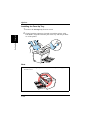
Remove the face-up tray from its carton.
Gently bend the output tray inwards, toward the printer, with
both hands. Align the insertion pins of the tray with the pin holders of the printer.
Setting-Up
Chapter 2
1
2
Note
◆
Never lay the face-up tray towards the front of the printer or apply
excessive to it.
2-22
Options
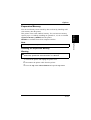
You can avoid many errors caused by data overload by installing sufficient memory into the printer.
This printer comes with 4 MB of memory. You can increase memory
capacity up to 132 MB by installing an optional 16, 32, 64 or 128 MB
expansion memory (DIMM) into the printer.
DIMMs are available from most computer retailers.
Chapter 2
Expansion Memory
◆
Setting-Up
Note
Use only PC/100 compliant DIMMs.
Installing the Expansion Memory
Warning
◆
Electric shock hazard! Do not remove any cover of the printer that is
not directly specified for removal in the User’s Manual.
1
2
3
Turn off the printer and unplug the power cord.
Disconnect the printer cable from the printer.
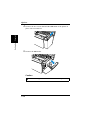
Press the top cover release button and open the top cover.
2-23
Options
Remove the two screws that hold the side cover of the printer in
place with a screwdriver.
5
Remove the side cover.
Setting-Up
Chapter 2
4
Caution
◆
2-24
Do not touch any part of the main circuit inside the printer.
Options
Chapter 2
Being careful not to touch the connection points along the edge
of the expansion memory, insert the board into the socket on
the main circuit. Apply pressure until the expansion memory
locks into place.
Setting-Up
6
Tip
◆
To remove the expansion memory from the main circuit, press
the taps on each side of the socket to release the expansion memory.
2-25
Options
Replace the side cover using the two screws provided to secure
it in place.
8
Print a configuration page “Testing the Printer” on page 2-15
and check to confirm that the “Total Memory” item correctly
shows the increase in memory capacity. If it does not, repeat the
above steps making sure that the expansion memory is installed
correctly.
Setting-Up
Chapter 2
7
Note
◆
2-26
Once the expansion memory has been installed, be sure to reset
the Printer Memory Setting to reflect the new memory capacity.
Options
Network Interface Card
Setting-Up
Chapter 2
The network interface card is equipped with a 10/100BASE-T interface connector for connection to the network server.
Refer to the Network Interface Card User’s Manual for detail.
2-27
Setting-Up
Chapter 2
MEMO
Chapter 3
Using the Printer
3
Using the Printer
3Chapter
Using the Printer
Chapter 3
Using the Panel Button
Using the Panel Button
Panel button
Counter Reset Mode
Use the following procedure whenever you want to reset the counter.
1
2
3
Turn off the printer.
4
After all the indicators blink, the printer enters the counter reset
mode. See “To Reset the Counter of the Toner Cartridge” on
page 6-6 and “To Reset the Counter of the Drum Cartridge” on
page 6-14 for details.
While holding down the panel button, turn on the printer.
Keep the panel button held down, and the Ready indicator will
start to blink. After the Ready indicator has blinked for about 5
seconds, release the panel button. This should cause all the
indicators to start to blink.
3-1
Using the Printer
Chapter 3
The panel button can be used to perform various operations according
to the status of the printer.
Using the Panel Button
Job Cancel
Use the following procedure whenever you want to cancel the current
job.
Using the Printer
Chapter 3
1
2
Hold down the panel button for more than 5 seconds.
After all the indicators are lit, release the panel button to cancel
the print job.
Print Configuration Page
Use the following procedure whenever you want to configuration for
printer.
■ Press the panel button while printer is idle without any errors and
job requests. See “Testing the Printer” on page 2-15 for details.
Form Feed
Use the following procedure to resume printing after an error occurs
dues to any one of the following causes.
• Print job is too complex.
• Memory overflow
• Almost out of paper
• Wrong size paper was fed into the printer.
■ Press the panel button to perform a form feed.
3-2
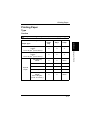
Printing Paper
Printing Paper
Type
Caution
Paper Source
Manual
Feed
Tray
Tray1
Tray2
Plain Paper
weight:
60 to 90 g/m2 (16 to 24 lbs.)
❍
❍
❍
Recycled Paper
weight:
60 to 90 g/m2 (16 to 24 lbs.)
❍
❍
❍
Transparency
Sheet
❍
❍
None
Labels
❍
❍
None
Letterhead
❍
❍
None
Envelopes
❍
❍
None
Thick Paper
weight:
90 to 163 g/m2
(24 to 43-1/4 lbs.)
❍
❍
None
Paper Type
Special
Paper
3-3
Chapter 3
This printer is designed to print on only the following types of paper.
Using the Printer
◆
Printing Paper
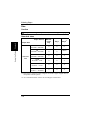
Size
Caution
◆
This printer is designed to print on only the following sizes of paper.
Standard sizes
Using the Printer
Chapter 3
Paper Source
Manual
Feed
Tray
Tray1
Tray2*1
A4
210 mm × 297 mm
❍
❍
❍*2
A5
148 mm × 210 mm
❍
❍
None
JIS B5
182 mm × 257 mm
❍
❍
❍
Legal
8-1/2 in.× 14 in.
❍
❍
❍
Letter
8-1/2 in. × 11 in.
❍
❍
❍
Executive
7-1/4 in. × 10-1/2 in.
❍
❍
❍
Paper Size
Standard
Size
*1. Each of the 5 cassettes of Tray2 support one of the 5 types of paper that are
compatible with this printer.
*2. A4 is standard cassette size for the second paper cassette unit.
3-4
Printing Paper
Manual
Feed
Tray
Tray1
Tray2
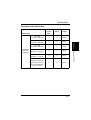
Env. DL
110 mm × 220 mm
❍
❍
None
Env. C5
162 mm × 229 mm
❍
❍
None
Env. B5
176 mm × 250 mm
❍
❍
None
Env. Com10
4-1/8 in. × 9-1/2 in.
❍
❍
None
Env. Monarch
3-7/8 in. × 7-1/2 in.
❍
❍
None
Custom Size
76 mm to 216 mm
(3 in. to 8-1/2 in.) ×
127 mm to 356 mm
(5 in. to 14 in.)
❍
❍
None
Paper Size
Envelope
and Custom Size
3-5
Using the Printer
Paper Source
Chapter 3
Envelope and Custom Size
Printing Paper
Printable Area
This printer is designed to print on paper with a 4 mm (0.16 in.) margin
on all sides.
4 mm
(0.16 in.)
4 mm
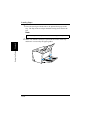
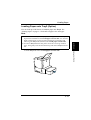
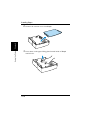
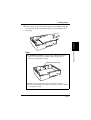
(0.16 in.)
Chapter 3
4 mm
(0.16 in.)
Using the Printer
Printable
area
4 mm
(0.16 in.)
3-6
Loading Paper
3-7
Using the Printer
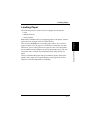
The following sources can be used to feed paper into the printer:
• Tray1
• Manual feed tray
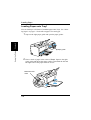
• Tray2 (option)
Tray1 is the standard source for supplying paper to the printer. Various
types and sizes of paper can be fed from this tray.
You can also add Tray2 as a secondary paper source. See “Second
Paper Cassette Unit” on page 2-18 for details on using this tray unit.
Whenever you are using special size paper, be sure to use the printer
driver installed on the computer to specify the printing area. You may
experience some variation in print quality when using special size
paper.
Always remember that paper storage conditions greatly affect print
quality. Store paper in its original package. Keep paper out of areas
subject to extreme temperatures or humidity.
Chapter 3
Loading Paper
Loading Paper
Loading Paper onto Tray1
You can load up to 150 sheets of standard paper onto Tray1. See “Printing Paper” on page 3-3 for details on paper sizes and types.
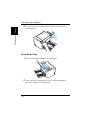
Squeeze the right paper guide and open the paper guides.
Chapter 3
1
Using the Printer
Paper guide
2
Place a stack of paper in the center of Tray1. Squeeze the right
paper guide and adjust the paper guides so that both the left and
the right sides of the paper stack are secure.
Maximum level
mark
3-8
Loading Paper
◆
◆
◆
A maximum level mark on the paper guide shows how high you
can stack paper on Tray1. Make sure that paper is stacked no
higher than this mark.
Do not load additional paper until the paper currently loaded onto
Tray1 is completely used.
Never load paper while the printer is performing a reset operation.
See “Counter Reset Mode” on page 3-1 for details.
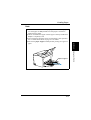
Pull out the paper support in Tray1 when printing on Legal size
paper.
Paper support
3-9
Using the Printer
◆
Chapter 3
Note
Loading Paper
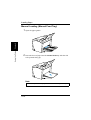
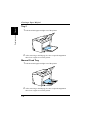
Manual Loading (Manual Feed Tray)
Open the paper guides.
2
Insert the sheet of paper into the manual feed tray with the side
to be printed facing up.
Using the Printer
Chapter 3
1
Note
◆
3-10
Insert only one sheet of paper at a time when feeding manually.
Loading Paper
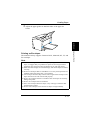
Adjust the paper guides so that both sides of the paper are
secure.
Printing on Envelopes
The manual feed tray supports Commercial 10, Monarch, DL, C5, and
B5 envelopes.
Note
◆
◆
◆
◆
◆
◆
◆
◆
Because there is great variation in the quality of paper used for envelopes, we suggest that you produce test prints of various types before
purchasing any envelope in large quantities for use with this printer.
Make sure that all edges are creased sharply and that all flaps are folded
correctly.
Do not use envelopes that are self-adhesive. Use only envelopes that have
standard sealing that sticks after it is moistened.
Use envelopes of which flaps run the entire length of the envelope. Envelopes that seal at one end will not feed properly.
Do not use envelopes that have a window. Such envelopes can seriously
damage the printer.
Do not use envelopes that are wrinkled.
Never use envelopes that have clasps or any other type of fastener that
can damage the printer.
Do not store envelopes in an area that is subject to high humidity.
3-11
Using the Printer
Chapter 3
3
Loading Paper
1
Place the envelope with the side to be printed facing up on the
tray. The flap of the envelope should be facing down and to the
left.
Note
◆
Using the Printer
Chapter 3
2
3-12
Insert only one envelope at a time when feeding manually.
Make sure that the envelope is placed in the center of the tray
and that it is secured by the paper guides.
Loading Paper
Loading Paper onto Tray2 (Option)
You can load up to 500 sheets of standard paper onto Tray2. See
“Printing Paper” on page 3-3 for details on paper sizes and types.
◆
Make sure that the Tray2 for the proper size of paper to be used for printing has been installed into the second paper cassette unit. See “Second
Paper Cassette Unit” on page 2-18 for instructions on inserting (and
removing) the Tray2 into (and from) the second paper cassette unit.
To remove Tray2 from the unit, pull it out as far as it will go without
force. Then gently raise the forward-end up, and remove Tray2 from the
unit.
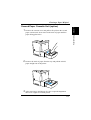
1
Slide Tray2 out of the second paper cassette unit.
Using the Printer
◆
Chapter 3
Note
3-13
Loading Paper
Remove the cassette cover from Tray2.
3
Press down on the paper lifting plate located inside of Tray2
until it locks.
Using the Printer
Chapter 3
2
3-14
Loading Paper
Chapter 3
Place a stack of up to 500 sheets of paper into Tray2 so that the
side that was facing up when the paper was unwrapped is still
facing up.
Note
◆
A maximum level mark inside the inlet of Tray2 shows how
high you can stack paper on Tray2. Make sure that paper is
stacked no higher than this mark.
Maximum level mark
◆
◆
Tray2 does not support landscape oriented paper feeding.
Do not load additional paper until all the paper currently on Tray2
is completely used up.
3-15
Using the Printer
4
Loading Paper
Using the Printer
Chapter 3
5
3-16
Replace the cassette cover and insert Tray2 into the second
paper cassette unit.
Selecting Output Direction (Printed Side Up or Down)
Selecting Output Direction (Printed Side
Up or Down)
Chapter 3
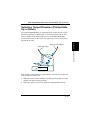
The optional face-up tray, as explained earlier in this section is a useful tool for printing on thick paper or envelopes printed side up. The
factory default for the output tray however, is the face-down tray
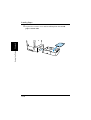
(printed side down). In this mode, the output tray receives the printed
documents in order.
Face-up tray (option)
Using the Printer
Face-down tray
This setting is controlled by a switch which is located on the right side
of the printer toward the rear.
a. When the switch is flush with the top of the printer, prints are output
printed side down (factory default).
b. When the switch is pressed in, prints are output printed side up.
3-17
Selecting Output Direction (Printed Side Up or Down)
Face-up tray
Face-down tray
Face-down tray
Using the Printer
Chapter 3
Face-up tray
Note
◆
◆
Do not use the switch to change the setting while the printer is operating.
Whenever the face-up tray is not installed on the printer, check to make
sure the set to switch for output to the face-down tray (see above illustration).
3-18
Printer Driver
Chapter 4
4
Printer Driver
4Chapter
Printer Driver
Chapter 4
Introduction
4-1
Printer Driver
The Minolta PagePro 1100 Printer Driver was specially developed to
provide true Windows-based and MS-DOS printing for users of the
Minolta/QMS PagePro 1100 printer. The PagePro 1100 Printer Driver
consists of two programs: Minolta PagePro Printer Driver and the
Printer Status Monitor, which also includes a Control Panel.
Printer Driver:
This program is built into the operating system. It controls printer
operations and enables proper printing.
Status Monitor:
This program displays information about the current status of the
computer’s local printer.
Control Panel:
This program displays the current settings of the computer’s local
printer. You can also use Control Panel to change settings and to
reset counters.
Chapter 4
Introduction
System Requirements
System Requirements
Printer Driver
Chapter 4
The following describes the minimum system requirements that are
necessary to correctly run the Minolta PagePro 1100 Printer Driver.
Operating System: Microsoft Windows 95, Windows 98, Windows 3.1,
Windows NT 4.0 or MS-DOS
Personal Computer: IBM-compatible PC with at least a 386DX
16MHz CPU (Pentium processor recommended)
CD-ROM drive
I/O Interface: IEEE 1284 parallel
Memory: At least 8MB of PC RAM
Free Disk Space: Approximately 10MB for files
4-2
Installing the PagePro 1100 Printer Driver Under Windows 95/
Windows 98/Windows NT 4.0
Installing the PagePro 1100 Printer Driver
Under Windows 95/Windows 98/
Windows NT 4.0
This section provides information on installing the PagePro 1100
Printer Driver under Windows 95, Windows 98 or Windows NT 4.0.
You can use the following methods to install the PagePro 1100 Printer
Driver.
Windows
NT 4.0
Using the auto-run
Installer on the CDROM
❍
❍
❍
Plug and Play Installation
❍
–
–
Using the Add Printer
Wizard
❍
❍
–
Chapter 4
Windows
98
Printer Driver
Windows
95
❍: Available
–: Not available
4-3
Installing the PagePro 1100 Printer Driver Under Windows 95/
Windows 98/Windows NT 4.0
To Install the PagePro 1100 Printer Driver
Using the Installer (Auto Run)
1
Turn on your computer and start up Windows 95, Windows 98 or
Windows NT 4.0.
Note
◆
Under Windows 95 or Windows 98 when the Update Device
Driver Wizard or Add New Hardware Wizard dialog appears on
the display, click Cancel.
Windows 98
Printer Driver
Chapter 4
Windows 95
2
Insert the CD-ROM labeled Minolta/QMS PagePro 1100
Printer Drivers into your computer’s CD-ROM drive.
3
The opening screen is automatically displayed. Click on the
Printer Driver menu to start the Installer.
Note
◆
4-4
The configuration of some computers may prevent the opening
screen from appearing automatically. If the screen does not
appear, double-click Setup from the CD-ROM.
Installing the PagePro 1100 Printer Driver Under Windows 95/
Windows 98/Windows NT 4.0
Follow the instructions that appear on your computer screen to
complete the installation.
5
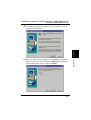
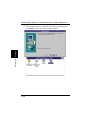
When the following dialog appears, select Local if the printer is
connected directly to your computer or Network if the printer is
connected through a network. Then click Next.
4-5
Printer Driver
Chapter 4
4
Installing the PagePro 1100 Printer Driver Under Windows 95/
Windows 98/Windows NT 4.0
Caution
◆
◆
6
If you intend to access the printer from a server running Windows 95, first install the printer’s driver from the server using
the Installer. The Installer can be accessed through either the
autorun program or the Setup file of the CD-ROM.
If you find that your printer is unable to print documents in a
network environment, set the data-spool format of the client
to RAW.
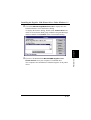
After the installation is completed, the following dialog appears.
Click Finish to close the setup program window.
Note
Printer Driver
Chapter 4
◆
4-6
During installation, it may take a moment before the Setup Complete dialog box appears if there was a check beside the Printer
Tools box in the Select Components and Destination Folder dialog box.
Installing the PagePro 1100 Printer Driver Under Windows 95/
Windows 98/Windows NT 4.0
It is recommended that you restart your computer after installation.
7
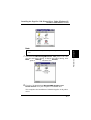
Check that the Minolta PageWorks/Pro 1100 printer icon is displayed in the Printers dialog. To display the Printers dialog, click
Start, point to Settings, and then click Printers.
8
Eject the CD-ROM labeled Minolta/QMS PagePro 1100
Printer Drivers from your computer’s CD-ROM drive.
This completes the installation of Minolta PagePro 1100 printer
driver.
4-7
Printer Driver
◆
Chapter 4
Note
Installing the PagePro 1100 Printer Driver Under Windows 95/
Windows 98/Windows NT 4.0
To Install the PagePro 1100 Printer Driver
Using Plug-and-Play
1
After connecting the printer to your computer, turn on the
printer.
• See “Connecting to a Computer” on page 2-17 for details on
connecting the printer to your computer.
2
3
Turn on your computer and start up Windows 95.
Printer Driver
Chapter 4
Continue with step 4 when the Update Device Driver Wizard
dialog shown below appears.
4
Insert the CD-ROM labeled Minolta/QMS PagePro 1100
Printer Drivers into your computer’s CD-ROM drive, and then
click Next.
• In this example, we assume that D: is the name of the CDROM drive.
5
Click the Other Locations button, type D:\driver\9598addp
and click OK.
4-8
Installing the PagePro 1100 Printer Driver Under Windows 95/
Windows 98/Windows NT 4.0
6
Follow the instructions that appear on your computer screen to
complete the installation.
Note
◆
◆
An opportunity to designate a name for the printer will be provided during the installation procedure.
It is recommended that you restart your computer after installation.
Check that the Minolta PageWorks/Pro 1100 printer icon is displayed in the Printers dialog. To display the Printers dialog, click
Start, point to Settings, and then click Printers.
8
Eject the CD-ROM labeled Minolta/QMS PagePro 1100
Printer Drivers from your computer’s CD-ROM drive.
This completes the installation of Minolta PagePro 1100 printer
driver.
Printer Driver
Chapter 4
7
4-9
Installing the PagePro 1100 Printer Driver Under Windows 95/
Windows 98/Windows NT 4.0
To Install the PagePro 1100 Printer Driver
Using the Add Printer Wizard
1
Turn on your computer and start up Windows 95 or Windows 98.
Note
◆
Under Windows 95 or Windows 98 when the Update Device
Driver Wizard or Add New Hardware Wizard dialog appears on
the display, click Cancel.
Windows 98
Printer Driver
Chapter 4
Windows 95
2
Insert the CD-ROM labeled Minolta/QMS PagePro 1100
Printer Drivers into your computer’s CD-ROM drive.
• When the initial screen appears, click Quit to close it.
3
Click Start, point to Settings, and then click Printers.
4-10
Double-click the Add Printer icon.
5
6
Click Next.
Select Local Printer if the printer is connected directly to your
computer’s parallel port or select Network Printer if the printer
is connected through a network.
7
If you selected Network Printer in step 5, specify the network
path and the network printer you want to use. If you selected
Local Printer, skip this step.
8
9
Click Have Disk.
10
11
Browse to the Minolta/QMS PagePro 1100 Printer Drivers CDROM and navigate to: driver\9598addp. Next, click OK.
Click OK and then click Next.
Follow the instructions that appear on your computer screen to
complete the installation.
4-11
Printer Driver
4
Chapter 4
Installing the PagePro 1100 Printer Driver Under Windows 95/
Windows 98/Windows NT 4.0
Installing the PagePro 1100 Printer Driver Under Windows 3.1
Installing the PagePro 1100 Printer Driver
Under Windows 3.1
This section provides information on installing the printer driver on a
computer running Windows 3.1.
Note
◆
The printer driver must be installed using the Installer of the printer
driver’s CD-ROM. Do not use the Add printer from the Printers dialog.
Printer Driver
Chapter 4
To Install the PagePro 1100 Printer Driver
1
2
3
4
5
4-12
Turn on your computer and start up Windows 3.1.
Insert the CD-ROM labeled Minolta/QMS PagePro 1100
Printer Drivers into your computer’s CD-ROM drive.
Use File Manager to display the contents of the CD-ROM.
On the CD-ROM window (drive D: in this example), open the
folder named Driver and then open the folder named Disk 1.
Double-click setup.exe to start the Installer.
Installing the PagePro 1100 Printer Driver Under Windows 3.1
Chapter 4
Follow the instructions that appear on your computer screen to
complete the installation.
Printer Driver
6
4-13
Installing the PagePro 1100 Printer Driver Under Windows 3.1
Printer Driver
Chapter 4
7
4-14
After the installation is completed, the following dialog appears.
Click Finish to close the setup program window.
Installing the PagePro 1100 Printer Driver Under Windows 3.1
Check that Minolta PageWorks/Pro 1100 is displayed in the
Installed Printers: list in the Printers dialog.
To display the Printers dialog, double-click Control Panel icon,
which is located in the Main group within the Program Manager,
and then double-click Printers in the Control Panel dialog.
9
Eject the CD-ROM labeled Minolta/QMS PagePro 1100
Printer Drivers from your computer’s CD-ROM drive.
This completes the installation of Minolta PagePro 1100 printer
driver.
4-15
Printer Driver
Chapter 4
8
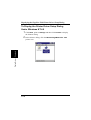
Displaying the PagePro 1100 Printer Driver Setup Dialog
Displaying the PagePro 1100 Printer
Driver Setup Dialog
To Display the Printer Driver Setup Dialog
Under Windows 95/Windows 98
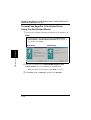
Click Start, point to Settings and then click Printers to display
the Printers dialog.
2
In the Printers dialog, click the Minolta PageWorks/Pro 1100
printer icon.
Printer Driver
Chapter 4
1
4-16
Displaying the PagePro 1100 Printer Driver Setup Dialog
Chapter 4
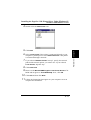
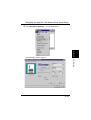
Select Properties from the File menu.
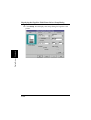
The following window appears.
Printer Driver
3
4-17
Displaying the PagePro 1100 Printer Driver Setup Dialog
To Display the Printer Driver Setup Dialog
Under Windows NT 4.0
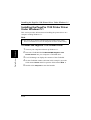
Click Start, point to Settings and then click Printers to display
the Printers dialog.
2
In the Printers dialog, click the Minolta PageWorks/Pro 1100
printer icon.
Printer Driver
Chapter 4
1
4-18
Displaying the PagePro 1100 Printer Driver Setup Dialog
Chapter 4
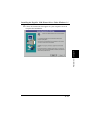
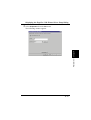
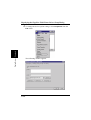
Select Document Defaults... from the File menu.
The following window appears.
Printer Driver
3
4-19
Displaying the PagePro 1100 Printer Driver Setup Dialog
To change the device option settings, select Properties from the
File menu.
Chapter 4
4
Printer Driver
The following window appears.
4-20
Displaying the PagePro 1100 Printer Driver Setup Dialog
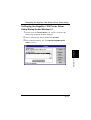
To Display the PagePro 1100 Printer Driver
Setup Dialog Under Window 3.1
1
Double-click the Control Panel icon, which is located in the
Main group within the Program Manager.
2
3
In the Control Panel dialog, double-click Printers.
Printer Driver
Chapter 4
In the Installed Printers: list, click Minolta PageWorks/Pro
1100 to select it.
4-21
Displaying the PagePro 1100 Printer Driver Setup Dialog
Printer Driver
Chapter 4
4
4-22
Click Setup, which displays the Setup dialog for PagePro 1100
printer.
Using the PagePro 1100 Printer Driver Setup Dialog
Using the PagePro 1100 Printer Driver
Setup Dialog
The printer driver provides you with control over a wide variety of
printer parameters from your computer. The following sections provide
an overview of the seven tabs of the printer driver’s Properties dialog
box. The settings you make with the Properties dialog box become the
default settings for the Minolta PagePro 1100 Printer Driver. To display
the dialog box, click Start, point to Settings, and then click Printers.
Next, right-click the Minolta PageWorks/Pro 1100 icon and then
select Properties from the context menu that appears.
The buttons described below appear at the bottom of each tab.
OK
Click to exit the Properties dialog box, saving any changes made.
Cancel
Click to exit the Properties dialog box without saving any changes
made.
Apply
Click to save all changes without exiting the Properties dialog box.
Help
Click to view online help.
4-23
Printer Driver
Chapter 4
Common Buttons
Using the PagePro 1100 Printer Driver Setup Dialog
Paper
Printer Driver
Chapter 4
The Paper tab contains functions that affect the format and output of
your printed documents.
Paper Size
Your printer supports the following paper and media sizes:
Paper
Letter
8-1/2 × 11 in.
Legal
8-1/2 × 14 in.
Executive
7-1/4 × 10-1/2 in.
A4
210 × 297 mm
A5
148 × 210 mm
JIS B5
182 × 257 mm
Custom Paper
76 to 216 mm × 127 to 356 mm, 3
to 8-1/2 in. × 5 to 14 in.
4-24
Using the PagePro 1100 Printer Driver Setup Dialog
Envelopes
Monarch
3-7/8 × 7-1/2 in.
Com-10
4-1/8 × 9-1/2 in.
DL
110 × 220 mm
C5
162 × 229 mm
B5
176 × 250 mm
Important!
Edit Custom...
Click this button to display the Custom Paper dialog box for defining
the dimensions of custom paper sizes you want to add to the Paper
Size list, and for editing existing custom paper sizes.
Note that you can define up to 50 different custom paper sizes.
4-25
Chapter 4
Only A4, Letter, JIS B5, Executive, or Legal can be selected as the paper
size when Tray2 is selected as the Paper Source.
Printer Driver
◆
Using the PagePro 1100 Printer Driver Setup Dialog
Add
Click this button to add a new custom paper size to the list.
After you add a custom paper size, you can change its name
and other default settings to create your own original custom
paper size.
Printer Driver
Chapter 4
Delete
Click this button to delete the custom paper size whose
name is currently highlighted in the list. Note that the delete
operation is performed as soon as you click the Delete button, and that the delete operation cannot be undone.
Because of this, you should make sure you really no longer
need the highlighted custom paper size before clicking this
button.
Name
Type in up to 20 characters for the name you want to assign
to the custom paper size whose current name is highlighted
in the list.
Width/Height
Type in the values you want to specify or use the arrow buttons to change the values. You can use the buttons to the
right of these boxes to select either inches or millimeters as
the unit of measurement.
To edit an existing custom paper, highlight its name in the list, and then
make the settings described above.
When everything is the way you want, click OK to add the new custom
paper to the Paper Size list.
4-26
Fit to Paper
Check this option when you want the print image to be scaled to fit the
paper size specified in the Output Paper Size box. Note that the Scaling setting on the Paper tab appears dimmed whenever the Fit to
Paper option is checked.
Important!
◆
Fit to Paper is disabled while the All Raster option is turned on. This
function also will not work with any bitmap fonts in the document being
printed.
Orientation
This setting lets you control how the image is positioned on the printed
page.
Portrait: Portrait documents are printed lengthwise on the page.
Landscape: Landscape documents are printed widthwise on the page.
4-27
Printer Driver
Chapter 4
Using the PagePro 1100 Printer Driver Setup Dialog
Using the PagePro 1100 Printer Driver Setup Dialog
Paper Source
Use this setting to specify the tray that should be used to feed the specified size of paper into the printer. Paper sources include:
Auto: This setting automatically loads the specified paper from any or
all of the available tray(s).
Tray1: This setting feeds paper from Tray1.
Tray2: This setting feeds paper from Tray2.
Important!
Printer Driver
Chapter 4
◆
Only A4, Letter, JIS B5, Executive, or Legal can be selected as the paper
size when Tray2 is selected as the Paper Source.
Manual: With manual feeding, you have to press the panel button on
the printer to start printing.
Media Type
Use this box to specify the type of media to which you want to print.
You can specify plain paper, transparencies, envelopes, or thick paper.
Scaling
Use this setting to control the size of the image on the printed page.
Type in the value you want to specify or use the arrow buttons to
change the value. You can specify a value within the range of 50% (half
the original size) to 200% (double the original size).
Important!
◆
Scaling is disabled while the All Raster option is turned on. This function also will not work with any bitmap fonts in the document being
printed.
Copies
Use this item to specify the number of copies of each page you want to
print. You can specify any value from 1 to 999.
4-28
Using the PagePro 1100 Printer Driver Setup Dialog
Important!
◆
◆
Expanding printer memory to 64 MB or more is recommended before
using Collate at Printer.
When using Collate at Printer, be sure to turn off the collation function
of the application.
4-29
Printer Driver
Use this setting to control whether collation of the multiple-copy printing should be performed by the printer (On) or by the application (Off).
When collation is turned on, multiple copy jobs are printed in copy
sets. When printing five copies of a document, for example, the entire
document is printed from the first page to the last five times. The second and subsequent copies of the document are printed at 10 pages per
minute, regardless of document size.
When collation is turned off, the printer prints the specified number of
pages one page at a time. When printing five copies of a document, for
example, five copies of page one are printed, followed by five copies of
page two, and so on.
The Collate at Printer settings appear dimmed when 1 is selected for
the Copies setting.
Chapter 4
Collate at Printer
Using the PagePro 1100 Printer Driver Setup Dialog
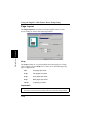
Page Layout
Printer Driver
Chapter 4
The Page Layout tab contains a real-time graphic mirror of most
driver settings as well as the following features.
N-up
The N-up settings let you print multiple document pages on a single
sheet of paper. Use the N-up box to select one of the following N-up
page configurations.
Off
One page per sheet
2-up
Two pages per sheet
4-up
Four pages per sheet
9-up
Nine pages per sheet
16-up
16 pages per sheet
Important!
◆
N-up is disabled while the All Raster option is turned on. This function
also will not work with any bitmap fonts in the document being printed.
4-30
Using the PagePro 1100 Printer Driver Setup Dialog
Chapter 4
Details of N-up
Click Details of N-up to display a dialog box for specifying the order
of document pages printed on each sheet of paper.
Printer Driver
Horz. Ascending
This setting prints the first document page in the upper left
corner of the sheet, the second page to the right of the first,
and so on. The first document page of each subsequent row
is located on the left side of the sheet, underneath the first
page of the preceding row.
Horz. Descending
This setting prints the first document page in the upper right
corner of the sheet, the second page to the left of the first,
and so on. The first document page of each subsequent row
is located on the right side of the sheet, underneath the first
page of the preceding row.
Vert. Ascending
This setting prints the first document page in the upper left
corner of the sheet, the second page underneath the first,
and so on. The first document page of each subsequent column is located at the top of the sheet, to the right of the first
page of the preceding column.
4-31
Using the PagePro 1100 Printer Driver Setup Dialog
Vert. Descending
This setting prints the first document page in the upper right
corner of the sheet, the second page underneath the first,
and so on. The first document page of each subsequent column is located at the top of the sheet, to the left of the first
page of the preceding column.
Borderline
Checking this box causes a borderline to be printed around each of the
document pages. No borderline is printed when this box is unchecked.
Printer Driver
Chapter 4
Watermark
Watermarks can be used to alert the reader to the nature of the content
of a document. Examples of often-used watermarks are: CONFIDENTIAL, DRAFT, URGENT, etc. Use the Watermark box to select the
watermark you want to use.
First Page Only
Checking this box causes the watermark to be printed on the first page
of the document only. The watermark is printed on all the pages of the
document when this box is unchecked. Note that this checkbox appears
dimmed when (none) is selected in the Watermark box.
4-32
Using the PagePro 1100 Printer Driver Setup Dialog
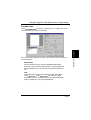
The following describes the settings you can make on the Edit Watermark dialog box.
Watermarks
This list shows all of the currently available watermarks.
Every time you create a new watermark, its name appears in
this list. Note that you can have up to 30 watermarks in the
list.
Add
Click this button to add a new watermark with the default
name Watermark to the Watermarks list. After you add a
watermark, you can change its name and other default settings to create your own original watermark.
4-33
Printer Driver
Chapter 4
Edit Watermark
Click Edit Watermark to display a dialog box for creating new watermarks and editing existing watermarks.
Using the PagePro 1100 Printer Driver Setup Dialog
Delete
Click this button to delete the watermark whose name is currently highlighted in the Watermarks list. Note that the delete
operation is performed as soon as you click the Delete button, and that the delete operation cannot be undone.
Because of this, you should make sure you really no longer
need the highlighted watermark before clicking this button.
Printer Driver
Chapter 4
Watermark Name
Type in up to 72 characters for the name you want to assign
to the watermark whose current name is highlighted in the
Watermarks list.
String
Type in up to 72 characters for the content of the watermark.
Note that inputting a string that is too long to fit on the page
causes the ends of the string to be cut off.
Shading
Use this setting to set the relative darkness of the watermark
as 10% (lightest), 25%, 50%, 75% or 100% (darkest).
Style
Check one or both of the boxes to specify Italic and/or Bold
for the watermark.
Font
Use these settings to specify the typeface and point size of
the watermark text.
Angle
Use these settings to specify the angle of the watermark on
the paper. Selecting User Set undims the angle setting box,
which you can use to specify an angle value.
Position
Use these settings to specify the vertical and horizontal
positioning of the watermark on the paper. Selecting User
Set undims the Horizontal and Vertical boxes, which you can
use to specify relative positions off of the vertical and horizontal center points.
4-34
Using the PagePro 1100 Printer Driver Setup Dialog
After creating a watermark, click OK to save it as a bitmap file and add
its name to the Watermark list on the Page Layout tab.
XY Image Shift
Printer Driver
Chapter 4
Use these boxes for fine adjustment of the printable area horizontally
(X) and vertically (Y) on the physical page. Type in the values you
want or use the arrow buttons to change the settings.
Use the setting when you want to align printed text with the spaces of a
preprinted form, etc.
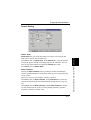
4-35
Using the PagePro 1100 Printer Driver Setup Dialog
Quality
Printer Driver
Chapter 4
The Quality tab allows you to make setting changes that enhance the
graphic quality of your printed documents.
Toner Save
Turn Toner Save off to improve. Turn it on to maximize toner cassette
life. Use Toner Save to reduce your printing costs by conserving toner
when printing rough drafts or sample documents.
Off: This setting uses normal amounts of toner during printing, improving the print quality of text and line art.
On: This setting maximizes toner cassette life, but can make images
and text to appear lighter.
Fine-Art
Changing the Fine-Art setting can improve the appearance of text and
graphics by smoothing jagged edges.
Off: This setting turns off the Fine-Art option, which can enhance the
print quality of images that include halftoning and screen patterns.
Light: Use this setting to make the edges of line art and text smoother
by using fewer dots.
4-36
Using the PagePro 1100 Printer Driver Setup Dialog
Medium: This is the default setting, which should be good enough for
most printing needs. Change to another setting only if text and graphics
appear to be too dark or too light when Medium is selected.
Dark: Use this setting to make the edges of line art and text smoother
by using more dots.
Toner Density
Use this box to make fine adjustments in the density of the toner during
printing. Use this setting to adjust toner density to the level you want.
Important!
◆
N-up, Fit to Paper, Scaling, and Use Printer True Type Font are disabled while the All Raster option is turned on.
Resolution
This setting specifies the number of dots per inch (dpi).
300 × 300 dpi: Use this setting for normal resolution printing.
600 × 600 dpi: Use this setting for high-resolution printing.
1200 × 600 dpi: Use this setting for 1200dpi horizontal resolution
printing.
Font
Checking Use Printer TrueType Font option substitutes printer-resident TrueType fonts for TrueType fonts in the print document, which is
faster than downloading fonts from the computer. Uncheck this option
if you want your printout to match exactly what is on the computer
screen.
4-37
Printer Driver
Use this setting to turn All Raster on and off. When turned on, all
objects (fonts, vector graphics, raster graphics) are sent to the printer as
raster (bitmapped) data. This can cause printing to take longer than
normal.
Chapter 4
All Raster
Using the PagePro 1100 Printer Driver Setup Dialog
Device Option
Printer Driver
Chapter 4
This tab shows auxiliary accessories that are available for installation
on the printer.
Input Option
Check Tray2 box when you have Tray2 installed on your printer. This
causes Tray2 to be added to the Paper Source box on the Paper tab. It
also changes the graphic on the left side of the Device Option tab so it
shows the second tray.
Memory Option
Use this box to specify the printer’s total memory capacity (preinstalled memory plus any additional memory). You can type in a value
or use the arrow buttons to change the setting.
4-38
Uninstalling the Printer Driver
Uninstalling the Printer Driver
This section describes how to uninstall the PagePro 1100 Printer Driver
when necessary.
To Uninstall the PagePro 1100 Printer Driver
(Windows 95/Windows 98/Windows NT 4.0)
Click the Start button, point to Programs, then to MLT PageWorksPro 1100, and then click Uninstall.
2
Click Yes to proceed with the uninstall operation or No to abort.
Note
◆
It is recommended that you restart your computer after uninstallation.
4-39
Printer Driver
Chapter 4
1
Uninstalling the Printer Driver
1
Double-click the Uninstaller icon of the MLT PageWorksPro
1100 dialog box.
2
In response to the warning dialog that appears, click Yes to proceed with the uninstall operation or No to abort.
Printer Driver
Chapter 4
To Uninstall the PagePro 1100 Printer Driver
(Windows 3.1)
4-40
DOS Printing Utilities
DOS Printing Utilities
Installing DOS Printing Utilities
Use the following procedure to install DOS printing utilities.
Connect the printer to the parallel port of your computer.
Turn on your computer and start up MS-DOS.
Turn on the printer and make sure it is online.
Insert the CD-ROM labeled Minolta/QMS PagePro 1100
Printer Drivers into your computer’s CD-ROM drive.
In this example, we assume that D: is the name of the CD-ROM
drive.
Change to the directory of the setup program is located.
Type: d:\↵
6
Change to the directory that the setup program is located.
Type: cd driver\msdos↵
7
Use the following command to start installation.
Type: setup↵
8
Follow the instructions that appear on your computer screen to
complete the installation.
Printer Driver
5
Chapter 4
1
2
3
4
4-41
Printer Driver
Chapter 4
DOS Printing Utilities
9
After the installation is completed, the following dialog appears.
Press the Enter key to close the setup program window.
10
Eject the CD-ROM labeled Minolta/QMS PagePro 1100
Printer Drivers from your computer’s CD-ROM drive.
This completes the installation of Minolta PageWorks/Pro 1100
DOS printing utilities.
Note
◆
Installing DOS printing utilities updates your AUTOEXEC.BAT, adding
a command to load the Status Monitor at the end of the file. This means
that the Status Monitor program will be loaded automatically whenever
you turn on your computer or execute AUTOEXEC.BAT.
Note that since the Status Monitor must be loaded after all disk caching
and disk compression, and after loading of LAN software (such as Netware).
Loading and Unloading the Status Monitor
If you choose to add REPORT to your Autoexec.bat file, the Status
Monitor is loaded and becomes resident in your computer’s memory
automatically whenever you start up your computer. The following
explains the procedure you should use to manually load the Status
Monitor, how to remove the Status Monitor from memory, and how to
change a variety of Status Monitor settings.
4-42
DOS Printing Utilities
To Load the Status Monitor from the DOS Prompt
Type the following at the DOS prompt to display the Status Monitor
screen:
Change to the directory you created under “Installing DOS
Printing Utilities” on page 4-41.
Type: cd c:\mltdos↵
• If you used the directory name we showed in our installation
example, type in the command exactly as shown above. If
you used a different directory name, change mltdos to the
name you used.
2
Type the following command at the DOS prompt.
Type: rep↵
To Remove the Status Monitor from Memory
■
Type the following at the DOS prompt:
Rep /d↵
Note
◆
You should use the above step to remove the Status Monitor from
memory if the Status Monitor is interfering with one of your other
software applications or if you need to free up the memory used by
the Status Monitor.
4-43
Printer Driver
Chapter 4
1
DOS Printing Utilities
Accessing the Printer Control Panel
This section explains how to access the Printer Control Panel.
1
Type the following at the DOS prompt to access the Printer Control Panel:
2
Change to the directory you created under “Installing DOS
Printing Utilities” on page 4-41.
Type: cd c:\mltdos↵
• If you used the directory name we showed in our installation
example, type in the command exactly as shown above. If
you used a different directory name, change mltdos to the
name you used.
3
Type the following command at the DOS prompt.
Type: spcpdos↵
After the Printer Control Panel finishes reading the printer profile, the Page Setup window appears.
Printer Driver
Chapter 4
To Access the Printer Control Panel
To Exit the Printer Control Panel
■
Select Exit from the File menu, or press [Alt]+[X].
4-44
DOS Printing Utilities
Using the Printer Control Panel
The Printer Control Panel lets you control the printer from your computer. This section tells you how to maneuver around the Printer Control Panel, change its settings, and save printer setups as profiles.
Note
Chapter 4
You can find further information on using the Printer Control Panel by
using its Help menu to access the online help files.
Printer Driver
◆
4-45
DOS Printing Utilities
Printer Driver
Chapter 4
Getting Around in the Printer Control Panel
Use the following key operations to get around the Printer Control
Panel and make the settings you want.
• Use the Esc key to move the selection cursor to the control buttons
on the left side of the Printer Control Panel Screen. Once the selection cursor is in place, use the up and down arrow keys to select the
button you want.
• To move the selection cursor between the menu bar at the top of the
window and the selections inside of the displayed screen, press Esc.
• To select a menu, use Esc to move the selection cursor to the menu
bar and then use the left and right arrow keys to move the cursor
left and right between menus.
• To pull down a menu, first select the menu and then press the down
arrow key.
• To execute an item inside of a menu, first pull down the menu and
then use the up and down arrow keys to highlight the item you
want. Next, press Enter to execute the item.
• To change a setting inside of a screen, first use Esc to move the
selection cursor to the screen and then use Tab to move the selection
cursor between items. When an item is selected, use the up and
down arrow keys to change its setting.
About profiles
You can save a printer setup to disk for later recall when you need it. A
printer setup is called a profile.
Important!
◆
Note that any changes you make in the Printer Control Panel do not
affect the settings of the printer until you export the settings to the printer.
4-46
DOS Printing Utilities
To save a profile
After making the Printer Control Panel settings you want, select
Save Profile from the File menu.
Note
◆
You can also save a profile under a new name by selecting Save
As... from the File menu.
2
Specify the drive, path, and file name where you want to save the
profile.
You can make these specifications using the lists that appear in
the dialog box, or you can type a path into the File Name box.
3
Select OK to save the profile.
4-47
Printer Driver
Chapter 4
1
DOS Printing Utilities
To open a profile
Important!
◆
This procedure replaces the current profile with the one you open. Make
sure you no longer need the current profile, or save it using the procedure
under “To save a profile” on page 4-47.
Select Open Profile from the File menu.
2
Specify the drive, path, and file name where the profile you want
to open is located.
You can make these specifications using the lists that appear in
the dialog box, or you can type a path into the File Name: box.
3
Select OK to open the profile.
The settings of the Printer Control Panel change in accordance
with the profile you opened.
Printer Driver
Chapter 4
1
4-48
DOS Printing Utilities
To print a test page or demo page
Select the test or demo page you want to print from the Option menu.
To change the printer port
Select Connect Port from the Option menu.
2
Select the port you want to change to and then select OK.
Printer Driver
Chapter 4
1
4-49
DOS Printing Utilities
Printer Control Panel Screens
This section describes the settings that are available in the Printer Control Panel Screens.
Common Buttons
OK
Select this button to export the current settings to the printer.
Reset to factory Default
Select this button to return all fields to their default settings.
Setup Screen
Printer Driver
Chapter 4
Cancel
Select this button to restore all fields to their previous settings without
updating the printer profile.
Paper Size
Use this list to specify either paper or envelopes for printing, and the
size of each.
4-50
DOS Printing Utilities
Paper Source
Indicate whether the printer automatically selects the paper tray for
feeding, whether paper should be fed from a designated tray or whether
paper will be fed manually.
Copies
Use this setting to specify in the range of 1 to 999 how many copies of
the document should be printed. The default setting is 1.
Orientation
Select the paper orientation setting you want to use. The default is Portrait.
4-51
Printer Driver
Line/Page
Use this setting to specify the number of lines that should be printed on
each page.
Chapter 4
Fast Print
Selecting Fast Print reduces the amount of time required for the first
print to start, because the printer keeps the fusing unit at high temperature while in the Ready mode. With the Normal setting, the printer
takes the normal amount of time to start the first print.
DOS Printing Utilities
Paper Time Out
During manual feeding of paper, the printer pauses during printing to
wait for you to feed the next sheet. The “paper time out” condition
exists when the printer is paused and nothing happens for about 10
minutes.
Printer Driver
Chapter 4
Setting
Paper Time Out Action
Proceed
Paper is automatically fed
from another paper tray.
Clear
The print job is cleared (cancelled).
None
The printer continues to wait
until you feed paper or manually cancel the print job.
Tray1 Setting
Specify whether Tray1 is a multi-purpose tray or a fixed-size tray.
When Multiple Purpose Tray is selected, a paper size error (Load XX)
does not occur regardless of the size of paper loaded in Tray1. When
Fixed Cassette is selected, you can specify the size you want in the
Tray1 Paper Size list.
4-52
DOS Printing Utilities
Typeface
Select the typeface you want to use from this list.
Pitch/Point
Specify the type size you want to use, either by scrolling the value in
the upper box or by selecting a value from the lower box. The values
indicate points for proportional fonts and inches for fixed pitch fonts.
Note
◆
When Typeface is set to Courier, the maximum pitch is 99.99.
Symbol Set
Select the symbol set for the typeface you are using.
4-53
Printer Driver
Chapter 4
Font Screen
DOS Printing Utilities
Printer Driver
Chapter 4
Output Quality Screen
Toner Save
Specify ON or OFF for the toner save setting. Turning toner save on
uses less toner for printing and helps toner cartridges to last longer. The
OFF setting produces normal output and toner usage, while ON uses
less toner but prints lighter.
Resolution
Use this setting to specify either 300 dpi or 600 dpi printing.
Fine-ART
Specify OFF, LIGHT, MEDIUM, or DARK for the Fine-ART setting.
Turning Fine-ART on smooths out jagged edges of text and graphics
for very high quality printing. The default setting for Fine-ART is OFF,
which is generally acceptable for most applications. Fine-ART controls
the size of dots along the edges of text, lines, and graphics so you
might want to change the setting if edges appear too light or dark.
Some graphics that include gray shading or a screen pattern are
improved by turning Fine-ART off.
4-54
DOS Printing Utilities
Toner Density
Use this box to make fine adjustments in the density of the toner during
printing. Note that a darker setting can cause toner to be used up relatively quickly.
Printer Driver
Chapter 4
Counter Screen
Total Counter
This value shows how many pages have been printed throughout the
life of the printer. This value cannot be reset.
Drum Counter
This value shows how many pages have been printed on the current
drum. This value can be reset to zero by clicking the Reset button.
Toner Counter
This value shows how many pages have been printed with the current
toner cartridge. This value can be reset to zero by clicking the Reset
button.
4-55
DOS Printing Utilities
Tray1 Counter
This value shows how many pages have been printed from Tray1. This
value can be reset to zero by clicking the Reset button.
Manual Counter
This value shows how many pages have been printed from the manual
feed tray. This value can be reset to zero by clicking the Reset button.
Tray2 Counter
This value shows how many pages have been printed from Tray2. This
value can be reset to zero by clicking the Reset button.
Printer Driver
Chapter 4
Configuration Screen
Printer Name
This box shows the name assigned to the connected printer.
Total Memory
This box shows how much memory is installed on the printer.
Additional Accessories
This box shows any additional accessories installed on the printer.
4-56
DOS Printing Utilities
Power Save
Specify ON or OFF for the Power Save setting. Turning on Power
Save causes the printer to enter a “sleep” mode whenever it is idle for
the period of time specified by the Power Save interval.
Power Save Interval
Specify the amount of time in minutes that the printer should wait
before entering its “sleep” mode.
Detect Size Error
A size error occurs when the actual paper size is different from the
paper size specified by the printer driver. Use this setting to turn the
size error detection on and off.
Auto-Continue
Auto-Continue lets the printer automatically recover from printer
overrun and memory overflow errors. Use this setting to turn AutoContinue on and off.
4-57
Printer Driver
Chapter 4
Other Screen
DOS Printing Utilities
Page Protection
Page Protection allows the printer to process the data for the entire
document before it is printed. When Auto is selected, the printer analyzes each page and turns on Page Protection automatically only
when it is required. Selecting On always keeps sufficient memory
reserved to ensure that a page can be fully composed.
I/O Timeout
The value you select in this box specifies the number of seconds the
printer waits for data. The printer automatically cancels the print job if
data does not arrive within the time you specify here.
Chapter 4
This section describes how to display the Status Display and make
changes in the operating environment of the Status Display.
Printer Driver
Using the Status Display
After the Status Display is loaded, perform the required hot key combination (a combination of keys you press at the same time to perform an
operation) to display the Status Display. The following is the default
hot key combination.
[ctl]+[alt]+[R]
You can change the hot key combination after the Status Display screen
appears.
To select an item on the Status Display, first highlight it and then press
Enter to advance to its setting screen. You can clear the Status Display
at any time by pressing Esc.
The following is a brief explanation of the items that are available on
the Status Display. Further information can be found in the Status Display’s online help.
To Display the Status Display
4-58
DOS Printing Utilities
Status Display Screen
In the dialog that appears when you execute this command, click the
checkbox next to the Enable Popup setting to toggle popup error messages on (checked) and off (unchecked). When this feature is turned
on, a dialog box will appear to alert you whenever an error condition
occurs.
• When a popup error message occurs, correct the problem and then
click OK.
• You can control which error conditions cause popup error messages
to appear by using the procedure under “Change Popup Message
Command” below.
Change Hot Key Command (Setup Menu)
The dialog that appears when you execute this command shows the
current hot key combination that launches the Status Display. While
the dialog is open, you can change the hot key combination by pressing
the key you want to change.
4-59
Printer Driver
Set Display Mode Command (Setup Menu)
Chapter 4
The following describes each of the buttons and the commands on the
Status Display Setup menu.
DOS Printing Utilities
Change Popup Message Command (Setup Menu)
The dialog that appears when you execute this command contains a list
of error conditions that cause popup error messages to appear. Error
conditions marked Active cause a popup error message to appear when
they occur, while no message appears for conditions marked Inactive.
To toggle an error condition between Active and Inactive, highlight it
and then press Enter.
Exit Command (Setup Menu)
Use this command to exit the Status Display.
Printer Driver
Chapter 4
Close (button)
Select this button to close the Status Display screen. Status Display
remains in memory when you return to the DOS prompt, and you can
remove it by typing the following:
REP /d
Help (button)
Select this button to display online help about the Status Display.
4-60
5Chapter
Printer Status Monitor and
Control Panel
Printer Status Monitor and Control Panel
Chapter 5
5
Printer Status Monitor and Control Panel
Chapter 5
Using the Status Monitor
Using the Status Monitor
The Status Monitor displays information about the current status of the
computer’s local printer.
Starting Up the Status Monitor
This section describes how to start up the Status Monitor, which keeps
you informed of the status of the printer at all times.
Important!
◆
Before staring up the Status Monitor, make sure that the printer is connected to your computer and turned on.
Note
Chapter 5
If you selected Yes when you were asked “Do you start Status Monitor
automatically?” in the installation procedure, the Status Monitor will
start up automatically each time you start up your computer.
Printer Status Monitor and Control Panel
◆
5-1
Using the Status Monitor
To Start Up the Status Monitor Under Windows 95,
Windows 98 or Windows NT 4.0
Click the Start button, point to Programs, then to MLT PageWorksPro 1100, and then click MLT PageWorksPro 1100 Printer Tools.
Printer Status Monitor and Control Panel
Chapter 5
■
5-2
Using the Status Monitor
To Start Up the Status Monitor Under Windows 3.1
From the File Manager, double-click the MLT PageWorksPro 1100
folder, and then double-click MLT PageWorksPro 1100 Printer
Tools.
To Hide the Status Monitor
■
Click the Close button to hide the Status Monitor. This causes the
Status Monitor icon to appear in the taskbar.
To Exit the Status Monitor
■
To exit the Status Monitor, use the Exit command from the View
menu.
5-3
Printer Status Monitor and Control Panel
Chapter 5
■
Using the Status Monitor
Using the Status Monitor
View Menu
Printer Status Monitor and Control Panel
Chapter 5
Expand/Reduce
Use these commands to select either the Status Monitor expanded view
or reduced view.
Exit
Select this command when you want to exit the Status Monitor.
5-4
Using the Status Monitor
Setup Menu
For details on how to use the Control Panel, see “Using the Control
Panel” on page 5-6.
Close button
Printer Status Monitor and Control Panel
Click this button when you want to hide the Status Monitor. This
causes the Status Monitor icon to appear in the taskbar.
Chapter 5
Printer Setting
Select this command to display the Control Panel dialog box for changing the printer setup.
5-5
Using the Control Panel
Using the Control Panel
This program displays the current settings of the computer’s local
printer. You can also use Control Panel to change settings and to reset
counters.
Starting Up the Control Panel
This section describes how to start up the Control Panel, which you can
check and change the current settings of the printer.
Start up the Status Monitor (see “Starting Up the Status Monitor” on page 5-1).
2
On the Setup menu, click Printer Setting....
The following window appears.
Printer Status Monitor and Control Panel
Chapter 5
1
Using the Control Panel
The Control Panel has 5 tabs, which you can use to control the following items.
See online help for full details about using these tabs to make settings.
5-6
Using the Control Panel
Tray1 Setting
Multipurpose Tray
Selecting this option defines Tray1 as a multipurpose tray, which
means that Tray1 supports any paper size.
5-7
Printer Status Monitor and Control Panel
Paper Time Out
The printer automatically goes into a “paper time out” standby state
after about 10 minutes of inactivity in the Manual Feed mode, or when
a Paper Size Error occurs. Use this setting to specify what the printer
should do after it enters the paper time out state.
Proceed: Selecting this option tells the printer to proceed with the job,
using paper from Tray1.
Clear: Selecting this option tells the printer to cancel the current print
job.
None: This option tells the printer to do nothing and stand by until
paper is fed manually or until it receives a command to cancel the current print job.
Chapter 5
Paper
Using the Control Panel
Fixed Cassette
This option defines a specific paper size for Tray1. Documents can be
printed only on the paper size specified for Tray1 in the Tray1 Paper
Size box.
Tray1 Paper Size
Any one of the following paper sizes can be selected for Tray1:
Chapter 5
Paper
Letter
8-1/2 × 11 in.
Legal
8-1/2 × 14 in.
Executive
7-1/4 × 10-1/2 in.
A4
210 × 297 mm
A5
148 × 210 mm
JIS B5
182 × 257 mm
Custom Paper
76 to 216 mm × 127 to 356 mm, 3
to 8-1/2 in. × 5 to 14 in.
Printer Status Monitor and Control Panel
Envelope
Monarch
3-7/8 × 7-1/2 in.
Com-10
4-1/8 × 9-1/2 in.
DL
110 × 220 mm
C5
162 × 229 mm
B5
176 × 250 mm
Note
◆
The settings of the software from which you are printing may override
the Tray1 Setting you specify here.
5-8
Using the Control Panel
Auto Continue
Turning on Auto Continue causes printing to restart automatically
when a specified amount of time passes after any one of the following
errors occurs:
paper size error, job too complex, memory overflow.
Click On to turn on Auto Continue. In the Time Out box, select the
amount of time the printer should wait until starting the recovery routine.
Click Off to turn off Auto Continue. When Auto Continue is turned
off, the printer must be reset to resume printing following a printer
overrun or memory overflow error.
5-9
Printer Status Monitor and Control Panel
Power Save
Power Save lets you set up the printer so it enters a low-power idle
state after a specific time of inactivity.
Click On to turn on Power Save. In the Interval box, type the amount
of time the printer should wait until going into the idle state. You can
also use the arrow buttons to change the Interval box value.
Click Off to turn off Power Save.
Chapter 5
Printer Setting
Using the Control Panel
Fast Print
Selecting Fast reduces the amount of time required for the first print to
start, because the printer keeps the fusing unit at high temperature
while in the Ready mode. With the Normal setting, the printer takes the
normal amount of time to start the first print.
I/O Timeout
The value you select in this box specifies the number of seconds the
printer waits for data. The printer automatically cancels the print job if
data does not arrive within the time you specify here.
Printer Status Monitor and Control Panel
Chapter 5
Detect Size Error
A size error occurs when the actual paper size is different from the
paper size specified by the printer driver. Selecting On enables the
printer to detect size errors, while Off turns off paper size error detection.
Page Protection
Page Protection reserves additional memory and waits until the page
is fully composed before starting the print operation. When Auto is
selected, the printer analyzes each page and turns on Page Protection
automatically only when it is required. Selecting On always keeps sufficient memory reserved to ensure that a page can be fully composed.
5-10
Using the Control Panel
Configuration Print
Click this button to print a page that describes the printer’s current settings.
Print the List of PCL Resident Fonts
Click this button to print a sample page of the resident fonts currently
installed in your computer.
LED indicator Print
Click this button to print a page that shows the indicator light patterns.
5-11
Printer Status Monitor and Control Panel
Demo Page Print
Click this button to print a page that demonstrates the features and
functions of the printer.
Chapter 5
Test Print
Using the Control Panel
Printer Status Monitor and Control Panel
Chapter 5
Counter
Total Counter
This box shows the number of pages that have been printed throughout
the entire lifetime of the printer. This counter cannot be reset by you.
Tray1 Counter
This counter indicates the number of pages that have been fed from
Tray1. Click the Reset button to reset this counter.
Tray2 Counter
This counter indicates the number of pages that have been fed from
Tray2. Click the Reset button to reset this counter.
Manual Counter
This counter indicates the number of pages that have been fed manually. Click the Reset button to reset this counter.
Drum Counter
This box shows the number of pages that have been printed using the
currently installed drum unit. Click the Reset button to reset this
counter whenever you replace the drum.
5-12
Using the Control Panel
Toner Counter
This box shows the number of pages that have been printed using the
currently installed toner cartridge. Click the Reset button to reset this
counter whenever you replace the toner cartridge.
Printer Status Monitor and Control Panel
Printer Name
This item shows the name of the printer connected to your computer.
Chapter 5
Configuration
Total Memory
This item shows the amount of memory currently installed in the
printer.
Additional Accessories
This box lists all optional accessories installed on the printer.
Set Default Button
Click this button to restore Control Panel settings to their initial
defaults.
5-13
Printer Status Monitor and Control Panel
Chapter 5
MEMO
6
Chapter 6
Maintenance
Maintenance
6Chapter
Maintenance
Chapter 6
Replacing the Toner Cartridge
Replacing the Toner Cartridge
Each toner cartridge contains enough toner to produce about 6,000
A4/Letter-size prints. The toner cartridge that comes with the printer
is capable of producing approximately 3,000 A4/Letter-size prints.
This is calculated based on an average image density equivalent to a
black-to-white ratio of 5% or less. The actual number of pages
obtained from a toner cartridge depends on the image density of the
pages you print.
If printed images start to get light, remove the toner cartridge from
the printer, rock it back and forth a few times, and then replace it in the
printer. If this does not solve the problem, you likely need to replace
the toner cartridge with a new one.
Turn off the printer and disconnect the power cord from the
printer.
2
Close the face-down tray.
Maintenance
1
Chapter 6
To Replace the Toner Cartridge
6-1
Replacing the Toner Cartridge
3
Press the top cover release button and open the top cover gently.
2
1
Chapter 6
ATTENTION
◆
The fusing unit inside the printer can become very hot during
operation. Do not touch the area to avoid injury.
Maintenance
Fusing unit
6-2
Replacing the Toner Cartridge
4
Remove the old toner cartridge.
Note
◆
Remove the toner cartridge from the box it comes packed in.
Holding it firmly with both hands, rock it left and right, forward
and back in the directions indicated by the arrows in the illustration.
Maintenance
5
The toner cartridge is made up of non-hazardous materials, and
can be disposed of freely. Check local regulations in your area
concerning disposal of such items.
The life span of the toner cartridge is dependent upon the mode
and application in which it is used.
Chapter 6
◆
6-3
Replacing the Toner Cartridge
6
Holding onto the toner cartridge’s handle, lower it into the
printer.
Make sure that the four pins (two on each side) fit into the
grooves inside the printer.
Note
Maintenance
Chapter 6
◆
6-4
Color coordinated “2” labels have been affixed to the toner cartridge and to the inside of the printer. Install the toner cartridge
by aligning these labels.
Replacing the Toner Cartridge
The cartridge will click into place when it is completely
installed.
1
Chapter 6
Close the top cover and press it down gently but firmly until it
locks into place.
Maintenance
7
2
6-5
Replacing the Toner Cartridge
To Reset the Counter of the Toner Cartridge
Perform the following procedure to reset the toner cartridge counter
after you replace the toner cartridge.
While holding down the panel button, turn on the printer.
3
After confirming that all the indicators are blinking, press and
hold down the panel button again for at least 5 seconds. During
this time, the Ready indicator only continues to blink and all the
other indicators turn off.
4
Release the panel button and only the Paper indicator starts to
blink.
5
After a few seconds, all the indicators start to blink again, indicating that the toner cartridge counter has been reset.
6
Turn off the printer. The printer will be ready to print the next
time you turn it on.
Maintenance
Chapter 6
1
2
6-6
Keep the panel button held down, and the Ready indicator will
start to blink. After the Ready indicator has blinked for about 5
seconds, release the panel button. This should cause all the
indicators to start to blink.
Replacing the Drum Cartridge
Replacing the Drum Cartridge
Each drum cartridge can produce about 20,000 A4/Letter-size prints.
The actual number of pages obtained from a drum cartridge depends
on the image density of the pages you print.
After about 20,000 A4/Letter-size prints, print images start to become
faint and blurred. If this happens, use the following procedure to
replace the drum cartridge with a new one.
Turn off the printer and disconnect the power cord from the
printer.
2
Close the face-down tray.
Maintenance
1
Chapter 6
To Replace the Drum Cartridge
6-7
Replacing the Drum Cartridge
3
Press the top cover release button and open the top cover gently.
2
1
Chapter 6
ATTENTION
◆
The fusing unit inside the printer can become very hot during operation. Do not touch the area to avoid injury.
Maintenance
Fusing unit
6-8
Replacing the Drum Cartridge
Remove the toner cartridge.
5
Remove the old drum cartridge.
Note
◆
The drum cartridge is made up of non-hazardous materials, and
can be disposed of freely. Check local regulations in your area
concerning disposal of such items.
6-9
Maintenance
Chapter 6
4
Replacing the Drum Cartridge
6
Remove the drum cartridge from the box it comes packed in.
Caution
◆
Maintenance
Chapter 6
7
6-10
If you do not plan to immediately install the drum cartridge
into the printer, cover it with a cloth to protect it against overexposure to light.
Install the drum cartridge into the printer, aligning the guides
of the cartridge with the grooves inside the printer.
Replacing the Drum Cartridge
Note
Color coordinated “1” labels have been affixed to the drum cartridge and to the inside of the printer. Install the drum cartridge
by aligning these labels.
◆
Make sure the drum cartridge is inserted inside the printer as far
as it will go.
Maintenance
Chapter 6
◆
6-11
Replacing the Drum Cartridge
8
Holding onto the toner cartridge’s handle, lower it into the
printer.
Make sure that the four pins (two on each side) fit into the
grooves inside the printer.
Note
Maintenance
Chapter 6
◆
6-12
Color coordinated “2” labels have been affixed to the toner cartridge and to the inside of the printer. Install the toner cartridge
by aligning these labels.
Replacing the Drum Cartridge
The cartridge will click into place when it is completely
installed.
1
Chapter 6
Close the top cover and press it down gently but firmly until it
locks into place.
Maintenance
9
2
6-13
Replacing the Drum Cartridge
To Reset the Counter of the Drum Cartridge
Perform the following procedure to reset the drum cartridge counter
after you replace the drum cartridge.
While holding down the panel button, turn on the printer.
3
After confirming that all the indicators are blinking, briefly press
the panel button. This causes the Error indicator to blink and
all the other indicators to turn off.
4
After a few seconds, all the indicators start to blink again, indicating that the drum cartridge counter has been reset.
5
Turn off the printer. The printer will be ready to print the next
time you turn it on.
Maintenance
Chapter 6
1
2
6-14
Keep the panel button held down, and the Ready indicator will
start to blink. After the Ready indicator has blinked for about 5
seconds, release the panel button. This should cause all the
indicators to start to blink.
Cleaning the Printer
Cleaning the Printer
Dust, dirt, and paper debris on the outer surfaces and inside the printer
can interfere with printer performance. Clean the printer regularly.
ATTENTION
◆
The fusing unit inside the printer can become very hot during operation. Do not touch the area to avoid injury.
◆
◆
Use a soft cloth to clean the printer. Never use abrasives or corrosive
detergents.
Wait for at least 10 minutes after the printer has been turned off and make
sure that the fusing unit has cooled before cleaning the interior of the
printer.
Cleaning the Outside of the Printer
■
Wipe the outside of the printer with a soft cloth moistened with a
neutral, household detergent.
6-15
Maintenance
Note
Chapter 6
Fusing unit
Cleaning the Printer
Cleaning the Paper Feed Roller
1
2
Turn off the printer and unplug the power cord.
3
Press the top cover release button and open the top cover gently.
Chapter 6
Close the face-down tray.
Maintenance
2
1
6-16
Cleaning the Printer
ATTENTION
◆
Remove the toner cartridge and the drum cartridge.
◆
Whenever you remove the drum cartridge from the printer,
immediately wrap it with a cloth to protect it against overexposure to light.
Chapter 6
Caution
Maintenance
4
The fusing unit inside the printer can become very hot during
operation. Do not touch the area to avoid injury.
6-17
Cleaning the Printer
5
Pull back on the cover that protects the paper feed roller
located at the bottom of the printer chamber.
Fusing unit
6
Use a soft cloth to wipe the paper feed roller.
Maintenance
Chapter 6
Fusing unit
6-18
Cleaning the Printer
Reinstall the drum cartridge and toner cartridge. See “To
Replace the Drum Cartridge” on page 6-7 and “To Replace the
Toner Cartridge” on page 6-1 for details.
8
Close the top cover and press it down gently but firmly until it
locks into place.
Maintenance
Chapter 6
7
6-19
Maintenance
Chapter 6
MEMO
Chapter 7
Troubleshooting
7Chapter
Troubleshooting
7
Troubleshooting
Chapter 7
Clearing a Paper Misfeed
Chapter 7
Clearing a Paper Misfeed
Use the following procedure to remove the misfed paper inside the
printer.
1
Troubleshooting
Inside the Printer
Close the face-down tray.
7-1
2
Press the top cover release button and open the top cover gently.
Troubleshooting
Chapter 7
Clearing a Paper Misfeed
2
1
ATTENTION
◆
The fusing unit inside the printer can become very hot during
operation. Do not touch the area to avoid injury.
Fusing unit
7-2
Clearing a Paper Misfeed
Chapter 7
Remove the toner cartridge and the drum cartridge.
Troubleshooting
3
Caution
◆
4
Whenever you remove the drum cartridge from the printer,
immediately wrap it with a cloth to protect it against overexposure to light.
Clear the paper misfeed using one of the following procedures
depending upon the location of the paper misfeed.
Caution
◆
Do not touch the image transfer roller.
7-3
Clearing a Paper Misfeed
Troubleshooting
Chapter 7
In the Vicinity of the Drum Cartridge
1. Pull the end of the paper that is visible straight out of the
printer.
At the Fusing Unit
1. Pull the end of the paper that is visible straight out of the
printer.
7-4
1
2
5
Reinstall the drum cartridge and toner cartridge. See “To
Replace the Drum Cartridge” on page 6-7 and “To Replace the
Toner Cartridge” on page 6-1 for details.
7-5
Troubleshooting
Between the Drum Cartridge and the Fusing Unit
1. If both the top and bottom edges of a misfed page are not visible, pull the bottom of the page up to pull the bottom edge
out from under the paper feed roller. Then, grab the bottom
edge of the page and pull the rest of the page out from behind
the fusing unit.
Chapter 7
Clearing a Paper Misfeed
6
Close the top cover and press it down gently but firmly until it
locks into place.
Troubleshooting
Chapter 7
Clearing a Paper Misfeed
Face-Down Tray
1
Pull the misfed paper straight out of the printer.
2
After removing a misfed page, be sure to open the top cover
then close it again to reset the printer.
7-6
Clearing a Paper Misfeed
Chapter 7
Face-Up Tray (option)
Pull the misfed paper straight out of the printer.
2
After removing a misfed page, be sure to open the top cover
then close it again to reset the printer.
Troubleshooting
1
7-7
Tray1
1
Pull the misfed paper straight out of the printer.
2
After removing a misfed page, be sure to open the top cover
then close it again to reset the printer.
Troubleshooting
Chapter 7
Clearing a Paper Misfeed
Manual Feed Tray
1
Pull the misfed paper straight out of the printer.
2
After removing a misfed page, be sure to open the top cover
then close it again to reset the printer.
7-8
Second Paper Cassette Unit (option)
Remove the cassette cover and pull out Tray2 from the second
paper cassette unit. Press down on the stack of paper until the
paper lifting plate locks.
2
Remove the stack of paper from the tray and pull the misfed
paper straight out of the printer.
3
After removing a misfed page, be sure to open the top cover
then close it again to reset the printer.
Troubleshooting
1
Chapter 7
Clearing a Paper Misfeed
7-9
Troubleshooting
Chapter 7
Print Quality Problems
Print Quality Problems
The following provides information on most print quality problems
you might encounter. If the advice provided here does not solve your
problem, contact your dealer.
Symptom
Cause
Remedy
Blank pages
The toner cartridge may be
running out of
toner.
Remove the toner cartridge
and rock it left and right a few
times to distribute remaining
toner.
If the problem persists,
replace the toner cartridge.
See “To Replace the Toner
Cartridge” on page 6-1 for
details.
The toner cartridge may be
defective.
Remove the toner cartridge
and check it for damage.
Replace the toner cartridge if
necessary. See “To Replace
the Toner Cartridge” on page
6-1 for details.
The toner cartridge may be
defective.
Remove the toner cartridge
and check it for damage.
Replace the toner cartridge if
necessary. See “To Replace
the Toner Cartridge” on page
6-1 for details.
Your printer may
require servicing.
Contact your dealer.
Black pages
7-10
Cause
Remedy
Printout too light
The Toner Density setting of
the printer driver
may be too light,
or the Toner
Save setting is
set to On.
Change the setting and try
printing again.
The toner cartridge may be
running out of
toner.
Remove the toner cartridge
and rock it left and right a few
times to distribute remaining
toner.
If the problem persists,
replace the toner cartridge.
See “To Replace the Toner
Cartridge” on page 6-1 for
details.
The toner cartridge may be
defective.
Remove the toner cartridge
and check it for damage.
Replace the toner cartridge if
necessary. See “To Replace
the Toner Cartridge” on page
6-1 for details.
The toner cartridge may be
defective.
Remove the toner cartridge
and check it for damage.
Replace the toner cartridge if
necessary. See “To Replace
the Toner Cartridge” on page
6-1 for details.
The Toner Density setting of
the printer driver
may be too
dark.
Change the setting and try
printing again.
Printout too
dark
7-11
Troubleshooting
Symptom
Chapter 7
Print Quality Problems
Symptom
Cause
Remedy
Blurred background
The toner cartridge may be
defective.
Remove the toner cartridge
and check it for damage.
Replace the toner cartridge if
necessary. See “To Replace
the Toner Cartridge” on page
6-1 for details.
Uneven print
density
The toner may
be unevenly distributed inside
the toner cartridge.
Remove the toner cartridge
and rock it left and right a few
times to distribute remaining
toner.
If the problem persists,
replace the toner cartridge.
See “To Replace the Toner
Cartridge” on page 6-1 for
details.
The drum cartridge may be
defective.
Remove the drum cartridge
and check it for damage.
Replace the drum cartridge if
necessary. See “To Replace
the Drum Cartridge” on page
6-7 for details.
Troubleshooting
Chapter 7
Print Quality Problems
7-12
Cause
Remedy
Illegularities
The paper may
have absorbed
some moisture
due to high
humidity or
because of
direct contact
with water.
Since toner will not adhere
well to wet paper, replace the
paper you are using with dry
paper and try printing again.
White or black
line
The toner cartridge or drum
cartridge may
be defective.
Remove the cartridges and
check them for damage.
Replace cartridges if necessary. See “To Replace the
Toner Cartridge” on page 6-1
or “To Replace the Drum
Cartridge” on page 6-7 for
details.
7-13
Troubleshooting
Symptom
Chapter 7
Print Quality Problems
Symptom
Cause
Remedy
Toner smudges
The toner may
be unevenly distributed inside
the toner cartridge.
Remove the toner cartridge
and rock it left and right a few
times to distribute remaining
toner.
If the problem persists,
replace the toner cartridge.
See “To Replace the Toner
Cartridge” on page 6-1 for
details.
The toner cartridge or drum
cartridge may
be defective.
Remove the cartridges and
check them for damage.
Replace the drum cartridge if
necessary. See “To Replace
the Toner Cartridge” on page
6-1 or “To Replace the Drum
Cartridge” on page 6-7 for
details.
The paper feed
roller is dirty.
Clean the paper feed roller.
See “Cleaning the Paper
Feed Roller” on page 6-16 for
details.
If problems persist, contact
your dealer.
Troubleshooting
Chapter 7
Print Quality Problems
7-14
Symptom
Cause
Remedy
Failure to produce output
There is a communications
problem
between the
printer and your
computer.
Check printer cable type
against the specifications in
“Interface Connector and
Cable” on page 8-6.
Note
◆
◆
◆
When checking the cable
type, make sure that the
printer and the computer
you are connecting it to
are both turned off.
When connecting your
computer to the parallel
connector on the printer,
we recommend using a
IEEE1284 Type B-compliant interface cable.
Be sure to exit Status
Monitor before connecting
the computer to the
printer using a parallel
cable.
If problems persist, contact
your dealer.
7-15
Troubleshooting
No Output
Chapter 7
Print Quality Problems
Symptom
Cause
Remedy
Check computer’s communication ports settings.
Refer to the documentation
that comes with your computer and check if its current
communications port settings
are correct.
If problems persist, contact
the manufacturer of your
computer or the retailer from
whom you purchased it to
verify correct communication
port settings.
Troubleshooting
Chapter 7
Print Quality Problems
7-16
The three indicator lights on the printer’s control panel turn on, turn
off, or blink in fixed patterns to let you know the current status of the
printer. Refer to the following sections for descriptions of each indicator light pattern and the action you need to take when it occurs.
Error (amber)
indicator
Paper (amber)
indicator
Ready (green)
indicator
Off
On
Blinking
Panel button
Indicator Light Patterns
The following are the three types of indicator light patterns produced
on the control panel.
1. Standard status pattern
Shows the current printer status.
2. Operator call pattern
The printer stops processing and goes offline when this message is
shown.
3. Call for service pattern
This pattern is shown when the printer detects a mechanical problem that requires service by an authorized technical representative.
Call your dealer if this message is shown.
7-17
Troubleshooting
Indicator Lights (Printer Messages)
Chapter 7
Indicator Lights (Printer Messages)
Troubleshooting
Chapter 7
Indicator Lights (Printer Messages)
Note
◆
You can find out details of the printer’s status by checking the information that appears on your computer screen (see “Starting Up the Status
Monitor” on page 5-1).
To print a list that explains the indicator light patterns, click the LED
indicator Print button on the Test Print tab of the Minolta PageWorks/
Pro 1100 Control Panel dialog.
Standard Status Patterns
Indicators
7-18
Description
Indicators
Description
Power is off.
Printer is ready.
Power on initial
setting.
Receiving data.
Processing
data.
Printing
Warming up
(Slow blinking)
Power save
Mode.
Counter reset
mode.
Canceling the
job.
Indicator Lights (Printer Messages)
Description
Action
Top cover is open.
Close the top cover.
Print job is too complex.
Memory overflow.
Press the panel button
to perform a form feed.
Install an optional
expansion memory
(DIMM) into the printer
or decrease the amount
of data being sent to the
printer.
If Auto-Continue on the
Control Panel dialog is
On, the printer performs
a form feed automatically when a specified
amount of time passes
after this error occurs
(see “Using the Control
Panel” on page 5-6).
Troubleshooting
Indicators
Chapter 7
Operator Call Patterns
7-19
Indicators
Description
Action
Paper of the wrong size
was fed into the printer.
Load paper of the
appropriate size onto
the paper feed tray and
continue printing.
If Auto-Continue on the
Control Panel dialog is
On, the printer resumes
printing automatically
when a specified
amount of time passes
after this error occurs
(see “Using the Control
Panel” on page 5-6).
Printer is standing by
waiting for manual paper
feed.
Load a sheet of paper
onto the manual feed
tray.
Printer is standing by
waiting for feeding from
paper feed tray.
Load paper of the
appropriate size onto
the specified tray (Tray1
or Tray2).
Paper misfeed.
Clear the misfeed and
continue printing.
Troubleshooting
Chapter 7
Indicator Lights (Printer Messages)
7-20
Indicator Lights (Printer Messages)
Almost out of paper.
Action
Chapter 7
Description
Load paper onto the
paper feed tray.
Troubleshooting
Indicators
Call for Service Patterns
Whenever any of the indicator light patterns shown below (two patterns
are shown alternately) appears, try turning the printer off and then back
on again. If the problem persists, contact your dealer.
Indicators
Description
Action
Engine communication
error.
Turn off the printer and
contact your dealer.
Controller error.
Engine error (laser).
Turn off the printer and
contact your dealer.
7-21
Indicators
Troubleshooting
Chapter 7
Indicator Lights (Printer Messages)
7-22
Description
Action
Engine error (fusing
unit).
Turn off the printer and
contact your dealer.
Engine error (polygon
scanner).
Turn off the printer and
contact your dealer.
Network communication error.
Turn off the printer and
contact your dealer.
Chapter 8
Specifications
8Chapter
Specifications
8
Specifications
Chapter 8
PagePro 1100 Printer
Desktop laser beam printer
Print system:
Electrostatic dry powder imaging system
Exposure system:
Laser diode + polygon mirror scanning
Resolution:
1200 × 600 dpi, 600 × 600 dpi, 300 ×
300 dpi
Rasterize method:
PCL 6 emulation
Print speed:
10 pages per minute (A4/Letter-size
print)
First print:
Within 19 seconds (A4/Letter-size
print)
Warm-up time:
23 seconds or less
Paper sizes:
Standard size: A4, A5, JIS B5, Letter,
Legal, Executive
Commercial 10, Monarch, DL, C5, and
B5 envelopes
Non standard size: Widths: 76 mm to
216 mm (3 in. to 8-1/2 in.), Lengths:
127 mm to 356 mm (5 in. to 14 in.)
Media:
Plain paper: 60 to 90 g/m2 (16 to 24
lbs.)
Recycled paper: 60 to 90 g/m2 (16 to
24 lbs.)
Thick paper: 90 to 163 g/m2 (24 to 431/4 lbs.)
Transparencies, Letterhead, Labels,
Envelopes
Paper feeding:
Multipurpose tray, Manual feed tray
Input capacity:
150 sheets
8-1
Specifications
Type:
Chapter 8
PagePro 1100 Printer
Specifications
Chapter 8
PagePro 1100 Printer
Output capacity:
Face-down tray: 100 sheets
Face-up tray: 20 sheets
Operating temperature:
10°C to 35°C (50°F to 95°F) with fluctuation of 10°C (18°F) per hour
Operating humidity:
15% to 85% with fluctuation of 20% per
hour
Toner cartridge life:
6,000 A4/Letter-size prints (black-towhite ratio of 5% or less)
The toner cartridge that comes with the
printer is capable of producing approximately 3,000 A4/Letter-size prints.
Drum cartridge life:
20,000 A4/Letter-size prints (black-towhite ratio of 5% or less)
Power supply:
220 – 240 V at 50 – 60 Hz
Power consumption:
700 W or less
Amperage:
3.0 A or less (220 V)
Interface:
Centronics Parallel (IEEE 1284/ECP)
CPU:
IBM Power PC 401
Standard memory:
4 MB (expandable up to 132 MB)
Options:
Second paper cassette unit, Face-up
tray, Network interface card, Expansion
memory (DIMM)
8-2
PagePro 1100 Printer
260 mm (10-1/4 in.)
Width:
380 mm (15 in.)
Depth:
222 mm (8-3/4 in.)
Weight:
Approximately 7 kg (15-1/2 lbs.)
Specifications
Height:
Chapter 8
External dimensions and weight (without second paper
cassette unit)
8-3
Second Paper Cassette Unit (Option)
Paper cassette:
Standard equipped: A4
Option: Letter, JIS B5, Legal, Executive
Chapter 8
Media:
Plain paper: 60 to 90 g/m2 (16 to 24
lbs.)
Recycled paper: 60 to 90 g/m2 (16 to
24 lbs.)
Specifications
Second Paper Cassette Unit (Option)
Paper feeding system:
One-way system (multi-feed tray)
Input capacity:
Up to 500 sheets
External dimensions and weight (without paper cassette):
Height:
125 mm (5 in.)
Width:
380 mm (15 in.)
Depth:
323 mm (12-3/4 in.)
Weight:
Approximately 4 kg (8-4/5 lbs.)
8-4
Expansion Memory (DIMM: option)
Expansion Memory (DIMM: option)
16, 32, 64, 128 MB
Function type:
Burst mode
Access speed:
70 ns or less
Number of pins:
168 pin
Module type:
DIMM (Dual In-line Memory Module)
Operating voltage:
3.3 V
Other conditions:
Non-ECC (However, ECC can be used
instead.)
CAS Latency 2 (CAS Latency 3 is not
compatible.)
Synchronous
LVTTL compatible input and output
8-5
Specifications
Chapter 8
Capacity:
Interface Connector and Cable
Interface Connector and Cable
Chapter 8
Connectors:
Parallel 36-pin connector (printer)
EIA 25-pin connector (computer)
Cable type:
Shielded. Each signal and ground pair
should be twisted.
Specifications
Be sure to use only a parallel interface cable that meets the specifications described below.
Pin assignments:
IEEE 1284 type-B connector
Note
◆
Minolta does not warrant the use of any particular cable. The user
assumes all responsibility as to the quality and performance of the cable.
8-6
Appendix
Glossary
Glossary
A
Appendix A
Glossary
Appendix A
Glossary
Glossary
The following definitions apply specifically to Minolta/QMS printers.
application
A software program that performs a particular function, such as
generating graphics or spreadsheets.
bitmap
A text character or graphic image that is defined by a pattern of dots.
click
To press and release a mouse button quickly. Often used to select an
object. SEE double-click.
control panel
A bank of indicators that show the current status of the printer. Panel
buttons that are located on the control panel make it possible to
perform a variety of different operations.
default
Settings that are preset in the absence of user-specified settings.
dialog box
A box that appears in order for the user to input information or
settings required for the printer to operate.
DIMM
Acronym for dual in-line memory module.
display
What appears upon the screen of the computer.
dpi
Acronym for dots per inch. Refers to the resolution that the printer
can produce through the measure of dots printed per inch.
A-1
Glossary
base weight
SEE paper basis weight.
Appendix A
ASCII
Acronym for American Standard Code for Information Interchange.
Glossary
double-click
Pressing a mouse button twice in quick succession while keeping the
mouse in place. Often used to open a dialog or enable a function.
SEE click.
Glossary
Appendix A
drum cartridge
A part of the printer that picks up toner particles after they have been
charged by the laser and then transfers the toner to the paper.
face-down tray
This tray receives the printed documents, face down, as they are
outputted from the printer. The tray can hold up to 100 sheets of
paper.
face-up tray
This tray receives the printed documents, face up, as they are
outputted from the printer. The tray can hold up to 20 sheets of
paper.
face-up/face-down selection switch
This switch is used to specify the facing (output) direction of
documents as they are output from the printer. When the optional
Face up tray is installed, the position of this switch determines
whether documents are output from the printer facing up (to Face-up
tray) or facing down (to Face-down tray).
500-Sheet Second Cassette
SEE Tray2.
fusing unit
A part of the printer that fixes the toner image onto the paper.
gray scale
A series of shades ranging from black to white used to add detail to
photo or scanned images, etc.
halftone
A printing technique using a pattern of dots to compose an image.
Also known as dithering.
A-2
Glossary
icon
A graphic image on the screen that represents an element.
laser printer
A high-resolution peripheral used to print text and graphics onto
paper or other media. A rotating mirror is used to reflect laser beams
onto a photosensitive drum; the image of the page is then transferred
via electrostatic charged toner. The final image is fused onto a piece
of charged paper using heat as it is rolled against the drum, setting
the toner onto the paper (or other media).
Glossary
manual feed tray
An external bay for loading paper into the printer manually.
Appendix A
image transfer roller
The part inside a page printer that transfers the image from the
photoconductive drum to the paper.
N-up printing
A series of printer settings that produces multiple, reduced
documents on one sheet of paper.
off line
A state in which the printer cannot receive data or perform any other
operation.
on line
A state in which the printer can receive data and operate.
operating system
A program or group of programs that control the functions of the
computer and its peripheral devices such as the printer.
paper basis weight
The standard for specifying paper weight. The metric standard,
applicable to all grades of paper is gm/m2. The U.S. system for basis
weight varies according to the grade of paper and is based upon a
500 sheet ream. The measurement of weight in the U.S. is pounds.
paper feed roller
A rolling mechanism that carries the paper through the various
functions of the printer during the printing process.
A-3
Glossary
paper guide(s)
Left and right sliding, adjustable holders that secure the paper onto
the paper tray.
paper support
A expansion tray for long-sized paper to be placed on the Tray 1.
Glossary
Appendix A
parallel interface
An output/input port utilizing multiple data circuitry.
parallel interface connector
A connector that enables the transfer of data between the printer and
the computer.
peripheral device
Any device that can be attached to the computer, such as a printer.
power cord socket
Connects the power cord and the printer.
power switch
Turns power to the printer on and off.
printer
A peripheral device that outputs data from a computer onto paper or
other media.
printer driver
A software file that manages commands to the printer.
Print Manager
An application that manages the print queue and the print file.
output tray
SEE face down tray and face up tray.
RAM
Acronym for random-access memory.
resolution
SEE dpi.
ROM
Acronym for read only memory.
A-4
Glossary
second paper cassette unit
A tray unit that feeds an additional 500 sheets of paper to the printer.
toner
Ink in the form of a plastic powder that is contained in a cartridge.
top cover release button
This button releases the hinge that locks the cover of the printer.
SEE top cover.
Tray1
A tray that can hold up to 150 sheets of paper for feeding into the
printer.
Tray2
Five types of Tray2 cassettes can be installed into the second paper
cassette unit (SEE second paper cassette unit). Each cassette can
hold up 500 sheets of one of the following paper sizes: A4, B5,
Legal, Letter and Executive.
watermark
A superimposed line of text or graphic upon a printed document.
A-5
Glossary
top cover
A cover attached to the printer that swings open by pressing a
release button. Opening the cover provides easy access to the
interior of the printer to perform basic maintenance procedures
including the installation and replacement of toner/drum cartridges
as well as clearing paper misfeeds.
Appendix A
toner cartridge
A tube shaped cartridge containing toner powder that is used during
the printing process.
Glossary
Appendix A
MEMO
Appendix
Index
Index Appendix B
B
Index Appendix B
C
Cassette cover 1-4
Cleaning the printer 6-15
outside of the printer 6-15
paper feed roller 6-16
Clearing a paper misfeed
face-down tray 7-6
face-up tray 7-7
inside the printer 7-1
manual feed tray 7-8
second paper cassette unit
7-9
Tray1 7-8
Computer
connecting to a computer
F
Face-down tray 1-2
Face-up/Face-down selection
switch 1-2
Face-up tray 2-21
Face-up tray (option) 1-4
Features 1-1
Form feed 3-2
Fusing unit 1-3
G
Grounding 2-4
I
Indicator lights 7-17
Indicators
Error (amber) indicator
1-5, 7-17
indicator lights patterns 7-17
Paper (amber) indicator
1-5, 7-17
Ready (green) indicator
1-5, 7-17
Interface cable 8-6
Interface connector 8-6
J
Job cancel 3-2
L
Loading paper
manual loading 3-10
onto Tray1 3-8
onto Tray2 3-13
Location for the printer 2-1
M
Maintenance Chapter 6
Manual feed tray 1-2
2-17
system requirements 4-2
Configuration page 3-2
Control panel 1-2, 1-5, 5-6
Counter reset mode 3-1
D
DIMM 2-23, 8-5
DOS printing utilities 4-41
Drum cartridge 1-3
replacing the drum cartridge
6-7
reset the counter 6-14
E
Expansion memory 2-23, 8-5
B-1
Index Appendix B
Index
Index
N
O
Index Appendix B
P
Printer parts and accessories
Network interface card 2-27
No output 7-15
Operating system 1-1
Options 2-18
Output directing (printed side
up or down) 3-17
1-2
Printer supplies 2-7
Print quality problems 7-10
S
Safety Information i
Second paper cassette unit
2-18, 8-4
Second paper cassette unit
(option) 1-4
Setting-up 2-11
Space requirements
printer 2-2
with face-up tray 2-21
with second paper cassette
unit 2-18
Specifications Chapter 8
Status Monitor 5-1
T
Testing the printer 2-15
Toner cartridge 1-3
replacing the toner cartridge
Panel button 1-6, 3-1
Paper
size 3-4
type 3-3
Paper guide 1-2
Paper support 1-2
Parallel interface connector
1-2
Power cord
connecting the power cord
2-11
power cord socket 1-2
Power source 2-3
Power switch 1-2
Precautions 2-1, 2-5
Printable area 3-6
Printer 8-1
Printer driver
displaying the setup dialog
4-16, 4-21
installing under Windows
3.1 4-12
installing under Windows
95/Windows 98/Windows
NT 4.0 4-3
uninstalling the printer driver
4-39
B-2
6-1
reset the counter 6-6
Top cover 1-3
Top cover release button 1-2
Tray1 (multipurpose tray) 1-2
Tray2 (500-sheet second
cassette) 1-4
Troubleshooting Chapter 7
U
Unpacking 2-8
© 1999 MINOLTA CO., LTD.
The information contained in this manual is
subject to change without notice to incorporate
improvements made on the product or products the
manual covers.
MIMOLTA CO., LTD.
Image Information Products Marketing Headquarters, 3-13, 2-chome, Azuchi-machi, Chuo-ku, Osaka. 541-8556, Japan
1999. 11
4121-7703-01