1
Cajun P333T QS.qxd
18/07/2000
12:09
Page 3
Rack mount (optional)
WARNING: Disconnect all cables from the unit before proceeding with the rack
installation.
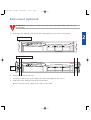
1. Snap open the hinged ends of the unit’s front panel to reveal the screw holes.
2
Closed hinged end
Cajun P333R
51 52 53 54
55 56 57 58
59 60 61 62
63 64 65 66
1
2
3
4
5
6
7
8
9
10 11 12
Lucent
EXPANSION
SLOT
13 14 15 16
LNK COL Tx
FIV
17 18 19 20
Rx FDX FC Hspd LAG
21 22 23 24
ROUT SYS OPR PWR
LAG
1
2
LAG
3
4
5
6
LAG
7
8
9
10
11
12
CONSOLE
13
14
15
16
17
18
19
20
21
22
23
24
Open hinged end
Cajun P333R
51 52 53 54
55 56 57 58
59 60 61 62
63 64 65 66
1
2
3
4
5
6
7
8
9
10 11 12
Lucent
EXPANSION
SLOT
Screw
holes
FIV
13 14 15 16
LNK COL Tx
17 18 19 20
Rx FDX FC Hspd LAG
21 22 23 24
ROUT SYS OPR PWR
LAG
1
2
LAG
3
4
5
6
LAG
7
8
9
10
11
12
CONSOLE
13
14
15
16
17
18
19
20
21
2. Position the unit in the rack.
3. Secure the unit to the rack, taking care not to overtighten the screws.
4. Snap closed the hinged ends of the front panel.
E You can now safely connect the cables to the unit.
22
23
24