1
Cajun P333T QS.qxd
18/07/2000
12:09
Page 8
Run the Web-Based Manager (optional)
E To configure the Cajun P330 you can use the P330 Web-based Manager in addition to
using the CLI.
System Requirements
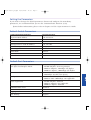
Minimum hardware and Operating System requirements are:
• Windows® 95 or NT® 4.0 or higher
• Pentium® 200 Mhz-based computer with 64 Mb of RAM (Pentium-II recommended)
• Minimum screen resolution of 1024 x 768 pixels
• Microsoft® Internet Explorer® 4 or
higher or
• Netscape Navigator® 4.x or higher
• Sun Microsystems Java™ plug-in version 1.2.2 (supplied)
Running the Embedded Manager
E Assign an IP address to the P330 before starting this procedure.
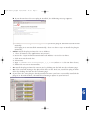
1. Open your browser.
2. Enter the URL of the switch in the form http://aaa.bbb.ccc.ddd
E aaa.bbb.ccc.ddd is the IP address of the switch.
K You are prompted to log into the switch.
E The user name is “root”.
The default password for read-write access is “root”.
E The Web management passwords are the same as those of the CLI. If you change the
passwords in the CLI then use those passwords for Web management as well.
K The welcome page is displayed:
6